


 Login
Login


Rippling earns its place on a lot of shortlists. It brings HR, payroll, IT, and spend management into one system, and its automations can handle a new hire’s payroll setup, app access, and laptop in a single workflow. For fast-growing teams that want everything connected, that’s a strong pitch.
But as companies grow, some start to question the fit. Module costs add up, setup and admin take more effort than expected, or the platform does more than the team actually uses.
In this guide, I compare 8 Rippling alternatives on pricing, payroll depth, implementation time, and built-in features. I’ll show which tool fits which company size, what switching off Rippling involves, and answers to the questions buyers ask most.
Here’s a Quick Overview of the tools
| Alternative | Best for | Price | G2 rating |
|---|---|---|---|
| Keka | Unified HR + payroll + PSA in one platform for companies of all sizes | Custom pricing. Free trial available. | 4.4/5 |
| Gusto | SMBs wanting simple setup, transparent pricing | Starts at $49/mo + $6/employee | 4.6/5 |
| ADP Workforce Now | Enterprise-grade compliance & scalability | Custom pricing | 4.2/5 |
| Paylocity | Mid-market firms prioritizing employee experience | Custom pricing | 4.4/5 |
| Paychex Flex | Companies wanting an optional PEO pathway | Starts at ~$44/mo + ~$1.44/employee | 4.1/5 |
| Paycom | Employee self-service payroll verification (Beti) | Custom pricing | 4.6/5 |
| UKG Ready | Workforce-intensive industries needing scheduling depth | Custom pricing | 4.4/5 |
| BambooHR | People-first SMBs wanting the best onboarding UX | Starts at $10/employee/month | 4.4/5 |
Why teams look for Rippling alternatives?
After researching a lot, I can says that the main reason is pricing, but it’s not the only reason companies switch. Here’s what actually shows up in user reviews, Reddit threads, and Capterra complaints about Rippling alternatives:
Pricing opacity and cost escalation
Rippling’s per-module pricing is a common complaint among small and mid-sized teams. Costs often climb well past the “simple, all-in-one” pricing they were sold on.
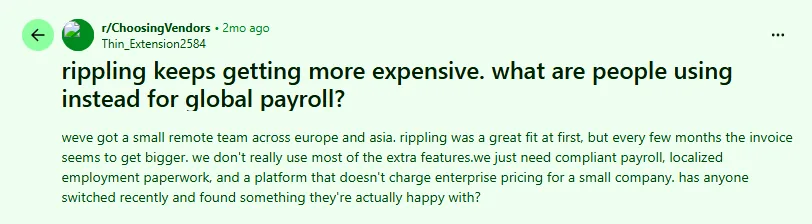
For example, a user on Reddit had the same problem. They run a small remote team across Europe and Asia, and said their Rippling invoice kept getting bigger every few months, even though they weren’t using most of the extra features. They called it “enterprise pricing for a small company.”
Customer support responsiveness
Once something goes wrong, several Rippling customers say getting real help back is hard.
For example, one Reddit user ran into the same issue. They said they were given three different account managers, and all of them ignored requests to escalate genuine P1 and P2 support incidents. They reached out to a few department heads directly on LinkedIn and got blocked instead of a reply. They also said 90% of support cases get routed to the US, so anyone in Europe waits days between responses.
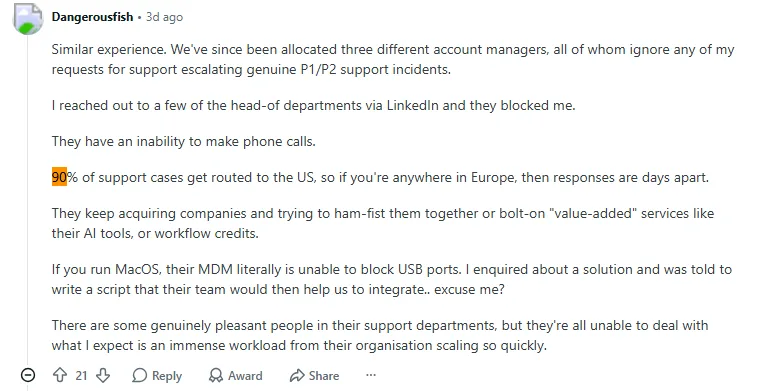
When they asked about a broken feature that was supposed to block USB ports on Mac devices, support’s answer was to write their own script, and that Rippling could not help with that either.
Implementation complexity for non-technical teams
For example, a user on Reddit summed up a pattern seen across several replies in the same thread: horror stories about Rippling, they said, usually come down to “rushed or under-supported implementations,” not the platform itself.

Another commenter in the same thread pointed to specifics, describing features marketed as available that were still “road mapped, not actually deployed,” along with high turnover among Rippling’s implementation staff that leads to dropped context and rework.
For a smaller HR team without a dedicated IT person to chase down gaps or push back on delays, that kind of inconsistency turns a rocky implementation into a much bigger time sink than expected.
How I evaluated
I compared all eight platforms against the same six criteria, based on what buyers moving off Rippling run into during evaluation and implementation. Here’s what each one covers, so you can judge which matters most for your own team.
| Criterion | What I checked |
|---|---|
| Multi-state US payroll depth | Coverage across all 50 states, including local tax jurisdictions and reciprocity handling between states, plus W-2/1099 support and year-end filing. This matters most if your team already spans multiple states or plans to hire remotely across the US. It’s also worth checking state leave law compliance, which varies widely from state to state. |
| Payroll engine & accuracy controls | How the platform handles off-cycle runs, retroactive pay corrections, garnishment processing, audit trails, and approval workflows. I looked for systems that help catch and fix payroll errors before they reach an employee’s pay check, not just after. |
| Breadth vs. point-tool sprawl | How many separate vendor contracts a buyer can consolidate into one platform, and how deep the native integrations go across HR, payroll, benefits, time tracking, and performance, rather than bolting on separate point solutions. |
| Implementation time & migration support | How long it realistically takes to go live, who owns data migration from your old system, and whether the vendor supports running payroll in parallel on both systems before cutover. |
| Pricing transparency & TCO | Whether pricing is published or requires a sales call, per-employee versus bundled pricing models, setup fees, and how much flexibility there is to change your contract as headcount changes. |
| Support responsiveness | Whether you get a named support rep or a ticket queue, whether SLAs are published, and what reviewers say specifically about support, separate from how they rate the product overall. |
Disclosure: Keka is our product. However, in order to make this an unbiased list, we have applied identical criteria to every platform. This includes genuine limitations for Keka based on real use-case fit, and sourced every price and rating independently rather than assuming any vendor’s own claims.
In-depth review: the 8 best Rippling alternatives in 2026
1. Keka (4.4/5 on G2)
Keka is a unified People Operations Platform built around three connected clouds: HR Cloud, Payroll Cloud, and PSA Cloud. It’s built for companies of all sizes that want to replace several separate tools with one system. This includes full HR from recruiting to offboarding, native multi-state US payroll across all 50 states, EOR support for hiring people abroad, and professional-services automation for project-based businesses. The interface is built for everyday use by employees and managers, not just HR administrators.
Key features
- Multi-state US payroll with automatic local tax calculation, W-2/1099 processing, and year-end filing across all 50 states
- Integrated PSA Cloud for services businesses: project costing, resource utilization, and billable-hours tracking
- Native ATS, onboarding, and performance management, with no separate vendor contracts
- Off-cycle payroll, retroactive calculations, and multi-level approval workflows
- EOR support for global hires, letting US teams expand internationally without a separate vendor contract
- Compliance monitoring for FLSA, ACA, and state-specific employment regulations
Pros and cons
| Pros | Cons |
| Designed to scale: Keka supports companies of different sizes and combines HR, payroll, and PSA capabilities within one platform. | Moving from multiple systems requires some transition: Organizations replacing several existing HR or operational tools may need to plan data migration and workflow changes as part of implementation. |
| Intuitive user experience: Keka is designed to make HR and workforce processes easy to navigate for HR teams, managers, and employees. | Implementation may require some process alignment: Organizations moving to a unified HR platform may need to align existing processes, workflows, and approval structures with the way they want to operate in Keka. |
| Covers the entire employee lifecycle: Keka supports hiring, onboarding, core HR, attendance, performance, payroll, employee experience, and other workforce processes. |
Best for: Companies of all sizes that want to combine HR, payroll, and project-based work tracking in one platform, especially professional services firms like consulting shops, IT services companies, or agencies where project costing and billable-hours tracking matter.
Pricing
Custom pricing. Free trial available.
Thinking about switching HR software?
Most teams go live on Keka in weeks, not months, with no hidden fees along the way.
2. Gusto (4.6/5 on G2)
Gusto is a cloud-based payroll and HR platform built for small and mid-sized businesses, known for an easy interface and simple pricing. Gusto was founded in 2011, originally as ZenPayroll, and built its reputation on making payroll straightforward without cutting corners on compliance. You get full-service payroll, benefits administration, and basic HR tools, all through an interface that needs almost no training. If your Rippling payroll bill keeps climbing every quarter, and that’s what sent you looking for alternatives, Gusto’s flat, published pricing is the most direct answer here. Check out our Gusto vs Rippling head-to-head for a closer look.
Key features
- Full-service payroll across all 50 states with automatic tax filing and payments
- Integrated health insurance, 401(k), and workers’-comp brokerage
- Automated new-hire reporting and state tax registration
- Employee self-service portal for paystubs, tax documents, and benefits enrollment
- Built-in time tracking at higher tiers
- Contractor payments with 1099 filing
Pros and cons
| Pros | Cons |
|---|---|
| Publicly listed pricing with no hidden fees | Performance management and advanced HR are limited or absent |
| Fastest onboarding among the alternatives evaluated | Less robust for complex multi-entity or multi-EIN structures |
| Strong small-business benefits brokerage | Per-person pricing gets expensive at scale (200+ employees) |
| Unlimited payroll runs on every plan, no long-term contract. | Support is primarily ticket-based at the Simple tier |
Pricing
Gusto publishes three pricing tiers. The Simple plan starts at $49 per month plus $6 per employee and covers single-state full-service payroll with employee self-service. The Plus plan starts at $80 per month plus $12 per employee, and adds multi-state payroll, time tracking, and next-day direct deposit. The Premium plan starts at $180 per month plus $22 per employee, and adds a dedicated advisor, an HR resource centre, and same-day ACH transfers.
Best for: SMBs with 10 to 150 employees that want simple payroll, easy access to benefits, and predictable costs, more than advanced HR features.
Not for: Companies that need strong performance management, complex multi-entity structures, or integrated IT device management.
3. ADP Workforce Now (4.2/5 on G2)
ADP Workforce Now is ADP’s mid-market and enterprise HCM platform, built for companies with 50 or more employees. ADP is the largest payroll provider in the world and processes paychecks for roughly 1 in 6 US workers, backed by more than 70 years in the payroll and compliance business. Workforce Now brings payroll, HR, time and attendance, talent management, and benefits administration together in one platform, and ADP has recently added AI-based tools like anomaly detection during payroll runs and continuous, always-current payroll calculations. If what’s driving your search for Rippling alternatives is a need for deeper compliance coverage and a tax-filing guarantee, backed by decades of enterprise deployments, rather than a faster or more modern setup experience, ADP Workforce Now is the safe, proven choice. See our detailed Rippling vs ADP comparison for a full side-by-side breakdown.
Key features
- Multi-state payroll with ADP’s tax-filing guarantee and penalty protection
- Integrated talent management: recruiting, onboarding, performance
- ADP Data Cloud analytics and benchmarking against anonymized peer data
- Comprehensive benefits administration with carrier connections
- Time and attendance with geofencing and biometric options
- Robust compliance library with proactive regulatory updates
Pros and cons
| Pros | Cons |
|---|---|
| Industry-deepest compliance infrastructure and tax expertise | Pricing requires a sales conversation; reviewers note TCO often runs higher than competitors |
| Penalty-protection guarantee on tax-filing errors | Implementation timelines frequently run long per review sentiment |
| Massive integration marketplace and payroll data portability | Interface feels dated next to newer platforms |
| Proven at scale across decades of enterprise deployments | Support quality varies by assigned representative, per reviews |
Best for: Mid-market to enterprise companies with 200 to 2,000 employees, where compliance certainty and tax filing guarantees matter more than implementation speed or a modern interface.
Not for: Fast-moving companies that need a quick implementation, or those prioritizing a modern interface and IT integration.
Pricing
ADP doesn’t publish per-employee pricing. Select, Plus, and Premium tiers all route to a sales quote.
4. Paylocity (4.4/5 on G2)
For companies whose Rippling frustration is more about employee engagement than compliance, Paylocity is worth a look. It’s a cloud-based HCM platform built for mid-market organizations, with a clear focus on employee experience. Beyond core payroll and HR, Paylocity stands out for its Community feature (social collaboration), video-based learning, and employee engagement surveys. It serves over 36,000 clients, and has invested heavily in mobile-first tools that get employees actually using the platform day to day, not just logging in to check a pay stub. Paylocity is best for HR teams that treat culture and internal communication as strategic priorities alongside payroll.
Key features
- Full-service multi-state payroll with on-demand pay options
- Community social-collaboration platform for internal communications
- Native video-creation tools for training and announcements
- Comprehensive benefits administration with decision support
- Advanced scheduling and time tracking with labor-cost analytics
- Employee surveys and engagement pulse tools
Pros and cons
| Pros | Cons |
|---|---|
| Best-in-class employee experience and engagement features | Pricing isn’t publicly available; requires a sales process |
| Modern mobile app with high employee adoption | Reporting customization has a learning curve |
| Strong learning management with video capabilities | PSA and project-based features are limited |
| Effective implementation support with dedicated specialists | Some advanced features require additional module purchases |
Best for: Mid-market companies with 150 to 1,500 employees, where employee engagement, internal communications, and culture-building are strategic HR priorities alongside payroll.
Not for: Companies that need IT management integration, or those prioritizing automation over engagement features.
Pricing
Paylocity doesn’t publish per-employee pricing; Core, Enhanced, and Premium tiers all require a sales conversation.
5. Paychex Flex (4.1/5 on G2)
Paychex Flex is the software platform from Paychex, one of the largest HR service providers in the US. What makes it different from the other tools here is that you’re not locked into just software. You can start with Paychex Flex on its own and later add full PEO services if you decide you’d rather outsource more of your HR and payroll work, or run a mix of both. That makes it a good option if payroll accuracy isn’t your main concern, but you’re still not sure whether you want to handle HR in-house or hand more of it off to someone else. Read our Rippling vs Paychex comparison for more detail.
Key features
- Scalable payroll from small business to enterprise, with all-50-state coverage
- A pathway to PEO services without a platform migration
- Integrated retirement services (401(k)), since Paychex is a major provider
- HR advisory services available at premium tiers
- Robust time and attendance with physical clock integrations
- Dedicated payroll specialist at higher service tiers
Pros and cons
| Pros | Cons |
|---|---|
| Flexibility to scale from software to PEO without switching systems | Interface is less modern than Rippling or newer entrants |
| Strong 401(k) and retirement-services integration | Pricing tiers and add-ons create complexity |
| Dedicated payroll-specialist relationships available | Mobile experience lags competitors, per reviews |
| Physical time-clock hardware options for frontline workforces | Feature depth varies significantly by selected tier |
Best for: Companies with 50 to 500 employees that are still deciding whether to build internal HR capability or outsource to a PEO, particularly those that value 401(k) integration and access to HR advisory support.
Not for: Tech-forward companies that want a modern interface, or those who are certain they don’t want PEO services.
Pricing
Custom pricing
6. Paycom (4.6/5 on G2)
Paycom’s employee-verified payroll model is worth a look for companies where payroll accuracy, rather than engagement or PEO flexibility, is the main driver. It’s a single-database HCM platform built around employee self-service, best known for Beti (Better Employee Transaction Interface), which lets employees check and approve their own pay checks before payroll runs. It’s built for mid-market companies that want one true database behind everything, instead of separate modules that need to be connected. See our Rippling vs Paycom analysis for a deeper look.
Key features
- Beti employee-driven payroll verification, reducing HR corrections
- True single-database architecture, so there’s no need to integrate separate modules
- Direct Data Exchange, letting employees enter their own data
- Comprehensive talent management from recruiting to performance
- Advanced document management and e-signatures
- Manager self-service for approvals and team management
Pros and cons
| Pros | Cons |
|---|---|
| Beti significantly reduces payroll errors through employee verification | Pricing isn’t transparent, and reviews say it runs higher than some alternatives |
| A true single database eliminates module-integration issues | Implementation typically takes 8 to 12 weeks, based on reviews |
| Strong automation reduces administrative HR burden | Contract terms often require multi-year commitments |
| Comprehensive talent suite without separate modules | Less flexible than modular approaches for selective adoption |
Best for: Mid-market companies with 150 to 2,000 employees and high transaction volumes, where employee self-service payroll verification (Beti) would meaningfully cut down HR’s administrative workload.
Not for: Companies that prefer to adopt HR modules one at a time, or those that need IT management integration.
Pricing
Paycom doesn’t publish per-employee pricing. It’s sold as a unified HCM suite through a sales quote rather than named, priced tiers.
7. UKG Ready (4.4/5 on G2)
For workforce-intensive industries where scheduling complexity is the real driver, UKG Ready is built specifically for that. Formerly Kronos Workforce Ready, it’s the mid-market HCM solution from UKG, and its heritage in workforce management makes it particularly strong for healthcare, manufacturing, retail, and hospitality, combining HR and payroll with genuine scheduling depth. It’s the choice when shift optimization matters more than IT device management.
Key features
- Advanced scheduling with demand forecasting and optimization
- Industry-specific configurations for healthcare, retail, manufacturing
- Comprehensive time and attendance with multiple collection methods
- Full payroll with labor-cost allocation and job costing
- Performance and succession-planning tools
- Compliance tracking for industry-specific regulations
Pros and cons
| Pros | Cons |
|---|---|
| Best-in-class workforce scheduling and labor management | Interface complexity reflects its feature depth |
| Deep industry-specific configurations | Implementation typically runs 12 or more weeks for full deployment, based on reviews |
| Strong compliance support for shift-based workforces | Pricing complexity across multiple modules |
| Extensive time-clock and collection hardware options | Less suited to knowledge-worker companies without scheduling needs |
Best for: Companies with 200 to 2,500 employees in workforce-intensive industries, where complex scheduling, labor cost management, and shift optimization are primary needs alongside payroll.
Not for: Knowledge-worker companies without complex scheduling needs, or those who’d rather have a simple interface than deep workforce management features.
Pricing
UKG Ready shows as “Contact vendor” on its Capterra listing. There’s no published per-employee rate. Pricing is modular, based on which capabilities you select.
8. BambooHR (4.4/5 on G2)
Last, if what’s actually driving your switch is Rippling’s clunky day-to-day UX rather than payroll depth, BambooHR is usually the fastest upgrade. It has the best onboarding experience in this comparison and one of the highest employee-satisfaction ratings among HR platforms. One caveat: payroll is a native BambooHR Payroll module, not bundled by default, so most companies pair it with a payroll-first tool or add the module separately.
Key features
- Industry-leading onboarding: task checklists, e-signatures, pre-boarding portals, automated equipment provisioning before day one
- Core HR with centralized employee profiles, document storage, org charts, workflow approvals
- Performance management with 360-degree feedback, goal tracking, peer reviews
- 100+ integrations via the BambooHR Marketplace, including Gusto, QuickBooks, Paylocity, ZipRecruiter, and Okta
- BambooHR Payroll (add-on): automated pay runs, tax filings, and direct deposit across all 50 states
- Built-in employee community and satisfaction/eNPS surveys
Pros and cons
| Pros | Cons |
|---|---|
| Best onboarding experience in this comparison, consistently top-rated | Payroll is an add-on, not native, so it’s a second system to manage if you want HRIS and payroll fully bundled |
| Strong employee adoption without heavy training | Not the strongest fit for 500+ employees or complex multi-state payroll |
| Tiered per-employee pricing published openly | Reporting and analytics are thinner than Paycom or UKG Ready |
| 100+ marketplace integrations covering payroll, ATS, and SSO | No IT device management or app provisioning, which is a core Rippling differentiator |
Best for: SMBs and lower mid-market companies with roughly 20 to 500 employees that want the best onboarding and day-to-day employee experience and are comfortable adding a separate payroll tool or module rather than needing one fully bundled system.
Not for: Companies with more than 500 employees or complex multi-state payroll needs, or those that want IT device management and app provisioning built into the same platform.
Pricing
BambooHR publishes three per-employee pricing tiers. The Core plan starts at $10 per employee per month, and covers employee records, custom reports, time-off management, and basic compliance training. The Pro plan starts at $17 per employee per month, adding performance management, employee community, and recognition and rewards on top of Core. The Elite plan starts at $25 per employee per month, adding compensation management, advanced analytics, HR benchmarks, and premium support on top of Pro.
How to choose the right Rippling alternative?
With eight solid alternatives on this list, the right pick usually comes down to two things: how big your company is, and what’s pushing you away from Rippling. Here’s a quick way to narrow it down before you start booking demos. If you want to weigh options beyond this list, our best payroll software guide covers the wider market.
| Headcount | Pick | Why |
|---|---|---|
| 10–20 employees | Gusto or BambooHR | Transparent pricing, fastest setup, and (for BambooHR) the strongest onboarding experience for lean HR teams without dedicated administrators |
| 20–200 employees | Keka, Gusto Plus, or BambooHR Pro | Growing companies need more HR depth; Keka for performance management and PSA, Gusto Plus or BambooHR Pro for teams prioritizing simplicity and engagement |
| 200–1,000 employees | Keka, Paylocity, or Paycom | Mid-market sweet spot where unified platforms provide value, choose based on PSA and platform depth needs (Keka), engagement focus (Paylocity), or self-service payroll (Paycom) |
| 1,000–5000+ employees | Keka, ADP Workforce Now, Paycom, or UKG Ready | Enterprise compliance needs increase, ADP for the tax-filing guarantee, Paycom for employee self-service, UKG Ready for workforce-intensive scheduling |
Above 2,500 employees, if you’re weighing Rippling vs Workday for enterprises or Ceridian Dayforce for continuous payroll calculation at that scale, that’s a separate enterprise-tier comparison outside the 8 platforms benchmarked here.
How to Migrate off Rippling?
Switching off Rippling usually takes about 8 to 12 weeks from start to finish. Here’s what that timeline looks like broken down by phase, along with who owns what Each phase should also be checked against your US compliance requirements, especially around tax filings and benefits continuity.
| Phase | Timeline | You own | Vendor owns |
|---|---|---|---|
| Pre-migration audit | Weeks 1–2 | Complete employee census, gather historical data requirements, document current integrations | Provide data-import templates, assign implementation manager, establish project timeline |
| Data extraction from Rippling | Weeks 2–4 | Export employee master data, YTD earnings, tax elections, benefits enrolments from Rippling | Validate data-format requirements, provide a secure data-transfer mechanism |
| System configuration | Weeks 4–6 | Review and approve configurations, validate pay policies and approval workflows | Configure company settings, pay groups, tax jurisdictions, benefits plans, approval hierarchies |
| Parallel payroll testing | Weeks 6–8 | Compare outputs, document discrepancies, approve go-live readiness | Process parallel runs, reconcile differences, tune calculations |
| Go-live and hyper care | Weeks 8–12 | Communicate to employees, monitor the first live payroll, escalate issues | First payroll support, issue resolution, post-go-live optimization |
Common failure points
Watch out for these three things. They’re the most common reasons a Rippling migration goes sideways.
YTD wage and tax accuracy: Rippling’s export format may not match what your new vendor needs to import. Someone will need to manually check all employee’s year-to-date earnings and withholdings to make sure nothing gets missed.
Benefits enrolment continuity: Make sure your carrier relationships carry over correctly, and that employees aren’t forced into re-enrolling during an open enrolment window they weren’t expecting.
Integration reconnection: Any third-party tool connected to Rippling, like 401(k) providers, expense systems, or other HRIS integrations, needs a new connection set up before you go live.
Okay, So What’s Next?
Rippling is not a bad platform. But in 2026, it is no longer the only option at this price point, and for most mid-market companies, it is not the best one.
The worst outcome, however, is staying on a platform by default because evaluating alternatives feels time-consuming. Most of the platforms in this guide will let you see a real number within 48 hours, and whatever gap exists between what you’re paying now and what you could be paying only gets bigger the longer you wait.
For companies of all sizes that want to move quickly, Keka HR offers a free trial, published pricing, and an implementation timeline measured in weeks rather than months. Start there.
See how Keka can simplify HR and payroll for your growing workforce.


