Login


The best workforce management software in India for 2026 includes Keka, Darwinbox, greytHR, and Zoho People for attendance, shifts, and HR management; UKG, Workday, Deputy, When I Work, and Quinyx for workforce scheduling and forecasting; Verint for contact centres; Blue Yonder for retail and warehouse labour planning; and Unolo for field workforce tracking. The right choice depends on your workforce size, industry, and operational needs.
A retail chain needs enough staff during peak hours without paying for unnecessary shifts. A manufacturing unit needs to manage rotating schedules and overtime.
Meanwhile, a company with field employees needs to verify attendance across multiple locations.
Each of these needs a different kind of workforce management software, yet many businesses still juggle spreadsheets and separate attendance and payroll systems. Some tools focus on attendance and Indian payroll, while others specialize in AI scheduling, contact centre staffing, or field tracking.
We compared 12 of them on scheduling, attendance, forecasting, payroll integration, India fit, pricing, and reviews.
Best Workforce Management Software in India at a Glance
| Tool | Best for | Pricing details | G2 rating | Free trial |
|---|---|---|---|---|
| Keka | Attendance, shifts, leave, and payroll in one platform for teams of all sizes | Custom pricing | 4.4/5 | Free trial available |
| Darwinbox | Large enterprises with complex shifts and many locations | Custom pricing | 4.4/5 | No free trial |
| Zoho People | SMBs and Zoho users |
Free plan: Free forever for up to 5 users Paid plans starts at ₹60/user/month |
4.5/5 | 30- days free trial available |
| greytHR | Indian SMBs needing attendance, overtime, and statutory payroll | Starts at ₹2,495/month for up to 50 employees | 4.4/5 | 7- days free trial available |
| UKG | Large hourly workforces needing AI-driven scheduling and labour forecasting | Custom pricing | 4.3/5 | No free trial available |
| Workday | Enterprises already using Workday HCM | Custom pricing | 4.2/5 | No free trial available |
| Deputy | Retail and hospitality businesses managing hourly shifts | Starts at $5.50/user/month | 4.6/5 | Free trial available |
| When I Work | Small hourly teams needing easy scheduling and shift swaps | Starts at $2.50/user/month | 4.4/5 | 14-days free trial available |
| Quinyx | Large frontline teams needing AI-powered scheduling and demand forecasting | Custom pricing | 4.3/5 | No free trial available |
| Verint | BPOs and contact centres managing agent schedules and adherence | Custom pricing | 4.2/5 | No free trial available |
| Blue Yonder | Large retailers and warehouses planning labour around operational demand | Custom pricing | 3.9/5 | No free trial available |
| Unolo | Field sales and service teams needing GPS attendance | Custom quote | 4.3/5 | 14-days free trial available |
How We Came Up with This List of Best Workforce Management Software in India in 2026
While researching these 12 tools, we found that comparing them feature by feature wouldn’t tell the whole story. A platform built for contact centre staffing solves a different problem from one designed for Indian payroll or field employee tracking.
So, we focused on what each tool actually helps businesses do, what it costs, and where its limitations might affect your decision.
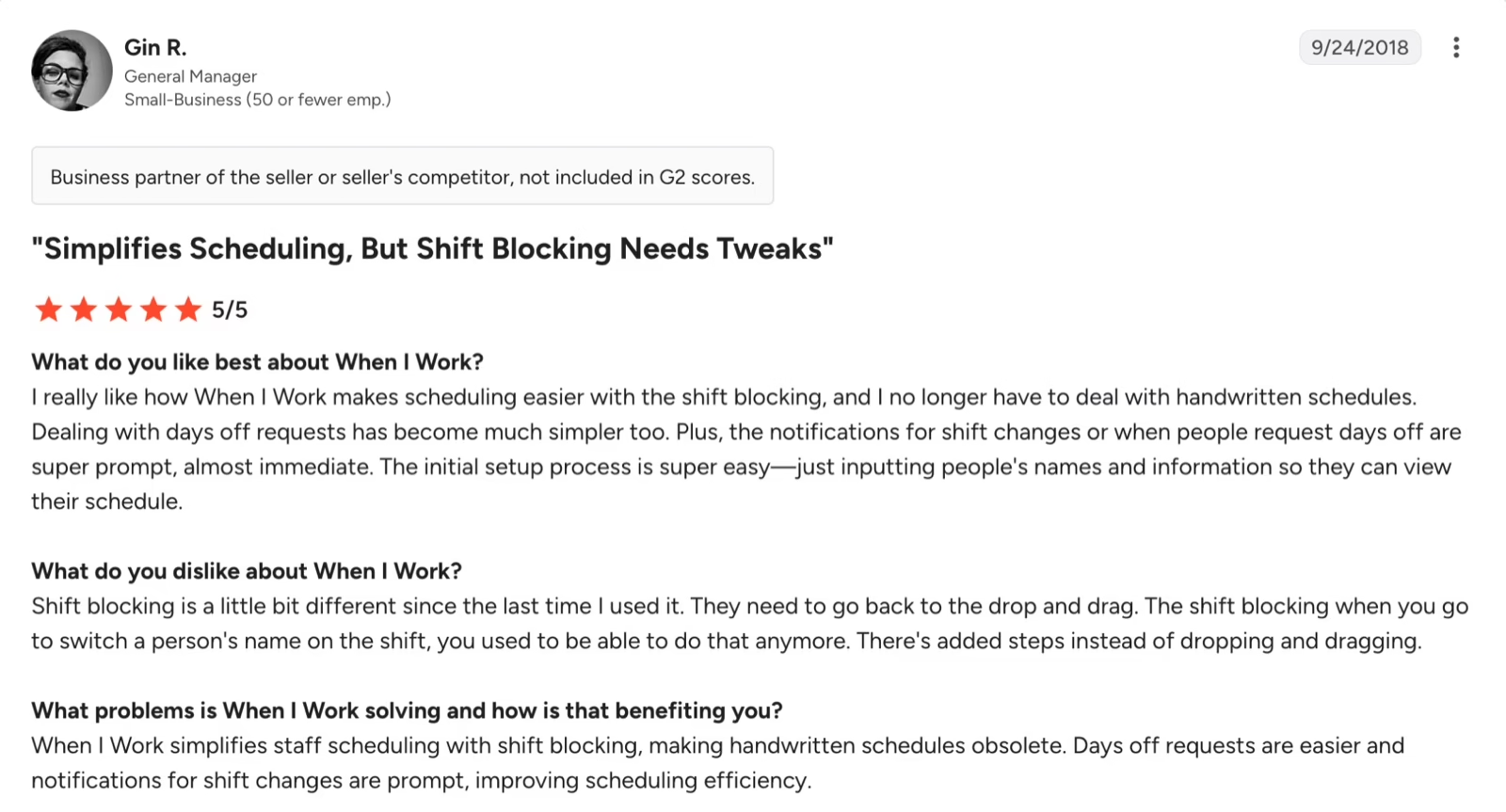
Here’s what we looked at:
-
Shift scheduling and rostering: we checked how each platform handles rotating shifts, shift swaps, multiple locations, and changes in staffing requirements. For specialist tools, we also examined automated scheduling and employee skill matching.
-
Attendance and time tracking: we looked at mobile, biometric, and geofenced attendance, along with overtime calculations, missed punches, leave approvals, and field employee tracking.
-
Forecasting and labour costs: we distinguished platforms that forecast staffing demand using sales, workloads, or customer interactions from tools that primarily provide scheduling and attendance reports.
-
HR, payroll, and Indian compliance: we checked whether attendance data connects to payroll, whether statutory Indian payroll is native or requires a separate system, and what information vendors provide about working-hour and overtime rules.
-
Pricing, usability, and support: we compared published plans, free trials, add-ons, and common complaints in G2 and Capterra reviews.
To verify our findings, we cross-checked vendor documentation, help centres, published customer case studies, and independent user reviews. Where pricing, features, or India-specific capabilities couldn’t be confirmed, we’ve highlighted those gaps rather than making assumptions.
A note on transparency: Keka is our product, but we’ve evaluated it using the same criteria as the other 11 platforms in this comparison.
Top 12 Workforce Management Software in India in 2026: Ultimate Breakdown
Keka HR (4.4/5)
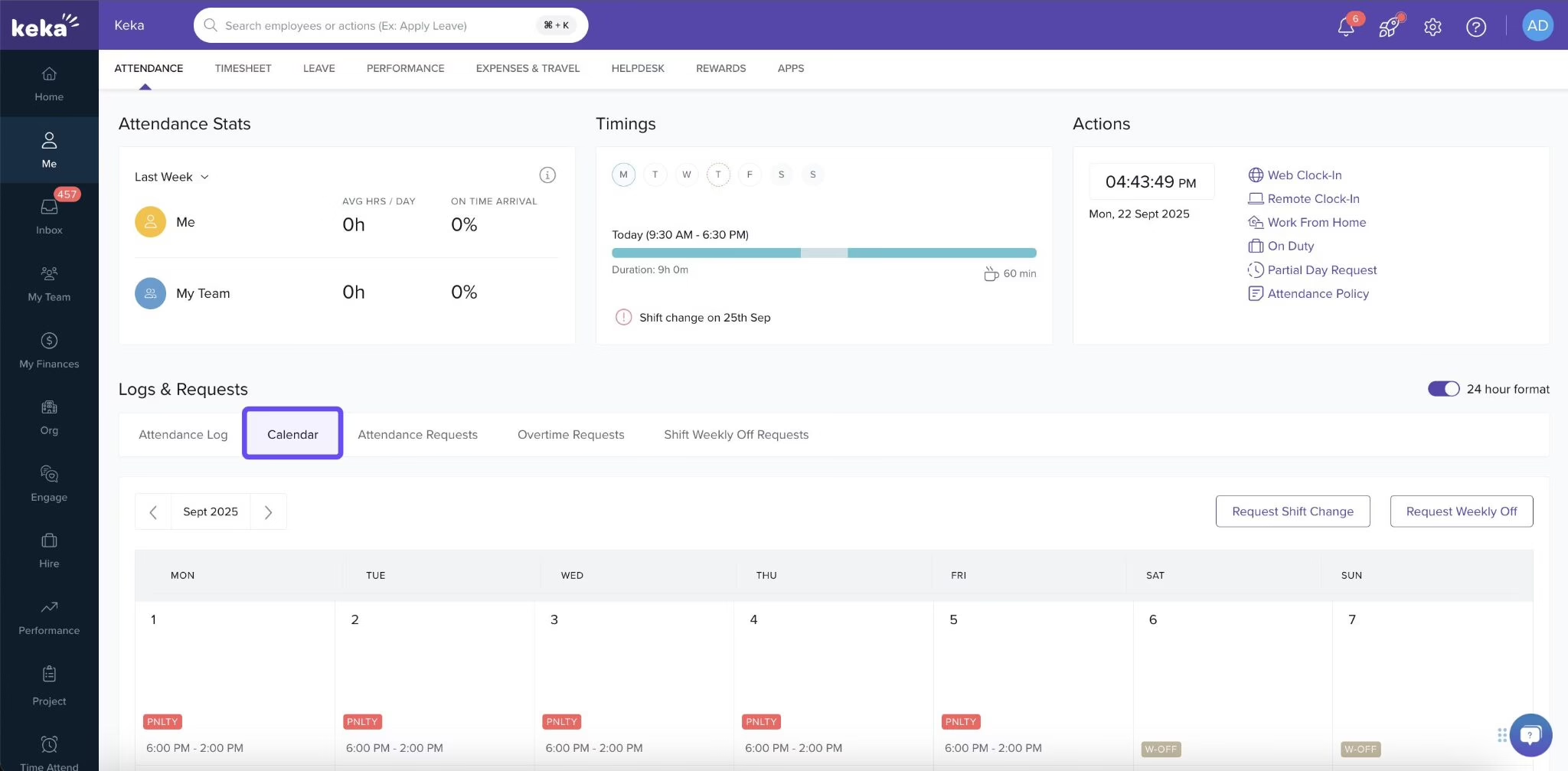
Keka is an all-in-one HR platform that helps businesses manage attendance, shifts, leave, employee records, and payroll in one place. It’s particularly useful for Indian companies where HR teams spend considerable time reconciling attendance data before processing salaries.
What stands out to us is how these processes connect. When an employee misses a punch, works overtime, or takes leave, HR can review the relevant records and approvals within the same system used for payroll. This reduces the need to move data between separate attendance and salary-processing tools.
Keka also handles office, remote, and field employees, with configurable shifts, rotations, and leave and overtime rules. That makes it a good fit for businesses that want workforce management alongside the rest of the employee lifecycle.
Key features
-
Flexible attendance tracking: Capture attendance through mobile, web, and supported biometric devices, with GPS and geofencing options.
-
Shift scheduling: Create reusable shift patterns, assign rotations, and manage rosters through the Scheduler.
-
Leave and overtime management: Configure leave policies, comp-offs, overtime calculations, and approval workflows.
-
Payroll integration: Use approved attendance, leave, and overtime information for Indian payroll processing.
-
Workforce reporting: Monitor working hours, attendance exceptions, leave balances, and team-level trends.
Pros and Cons
| Pros | Cons |
|---|---|
| Attendance, shifts, leave, and Indian payroll work within one HR platform. | Advanced shift-board scheduling may require a separate add-on. |
| Supports office, remote, and location-based attendance requirements. | AI-powered operational demand forecasting isn’t a verified core capability. |
Pricing
Custom pricing across Foundation, Strength, and Growth packages.
Best for:
Indian startups, mid-sized businesses, and enterprises wanting attendance, shifts, leave, and statutory payroll connected to broader HR processes.
Darwinbox (4.4/5)
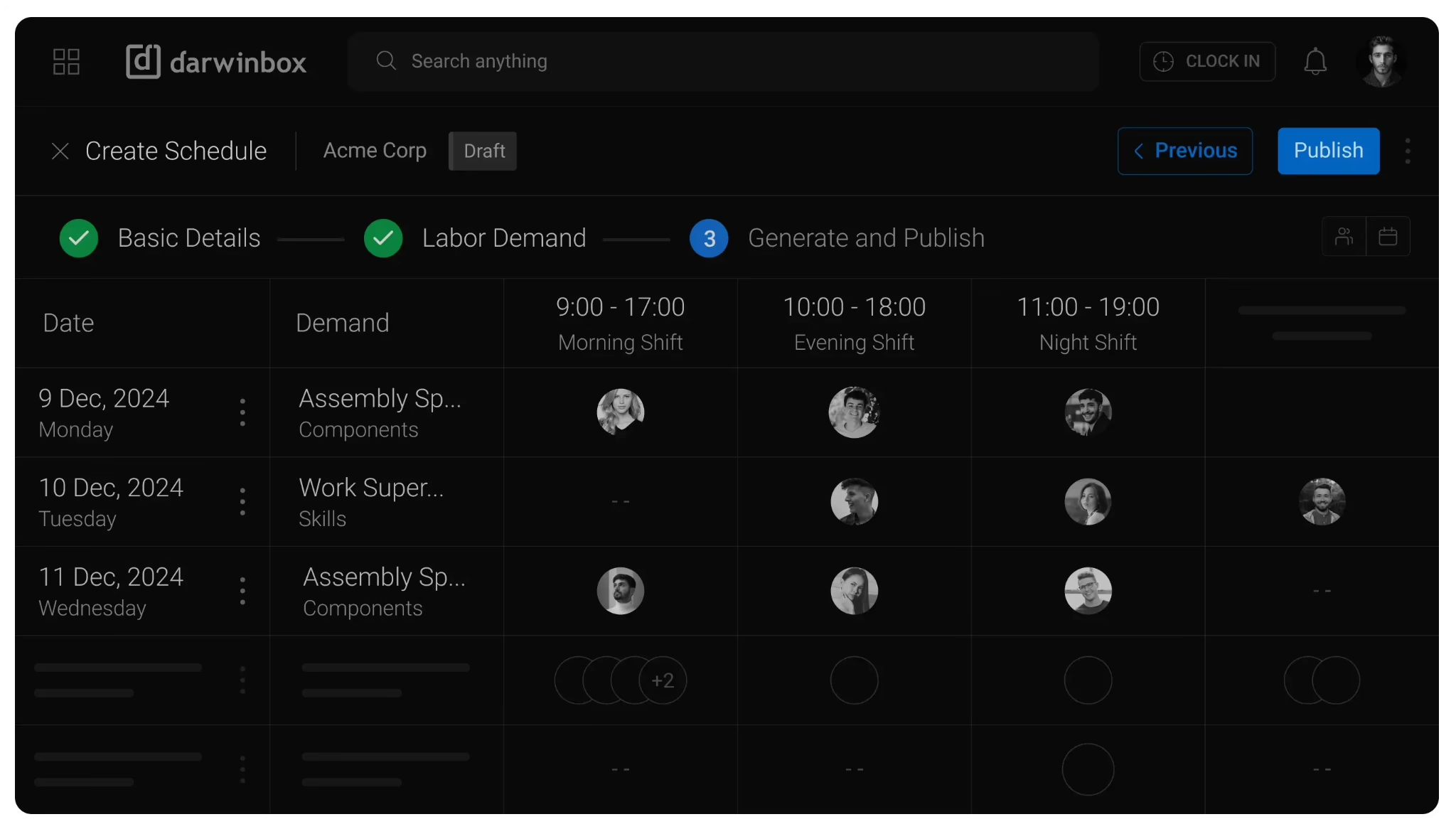
Darwinbox is an enterprise HCM platform designed for businesses managing complex shifts and workforce policies across multiple locations, departments, and legal entities.
It supports rotating shifts, mobile GPS and biometric attendance, geofencing, leave, and overtime management. Managers can also handle attendance exceptions through approval workflows, with workforce records connected to broader HR and payroll processes.
Key features
-
Configurable shift rosters, rotations, and working-time policies.
-
Mobile attendance, geofencing, and biometric integrations.
-
Leave, overtime, and manager approval workflows.
-
Workforce dashboards and Indian payroll capabilities.
Pros and Cons
Pricing
Custom pricing.
Best for:
Large Indian organizations managing multiple entities, locations, and complex workforce policies.
Zoho People (4.5/5)
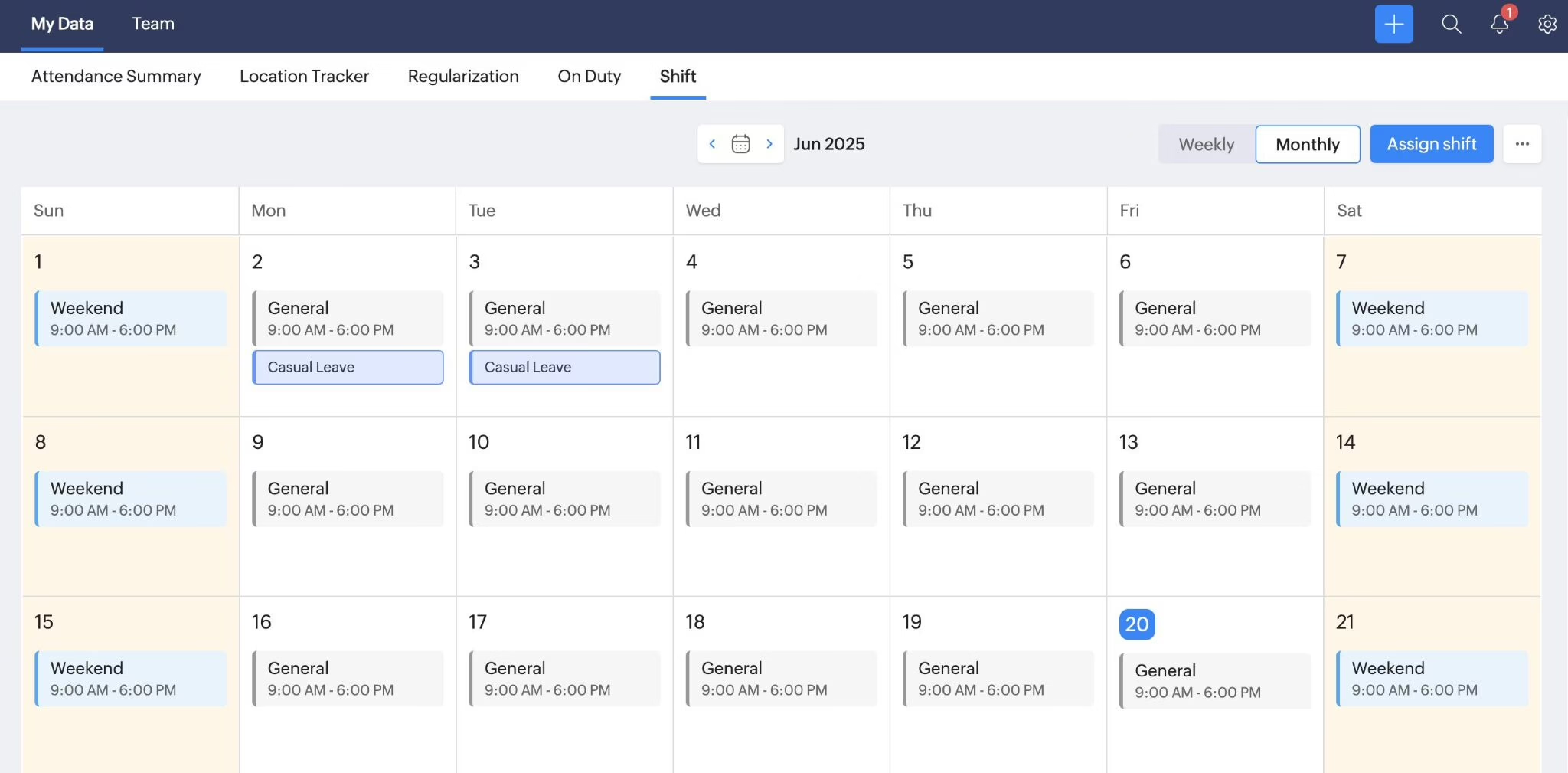
Zoho People is a flexible HR system for businesses that want attendance, leave, shifts, and timesheets without paying for an enterprise workforce planning tool.
It’s a natural fit for companies already using Zoho apps. Employees mark attendance, request leave, and check their shifts, while managers handle approvals and time records.
One thing to know: Zoho People doesn’t run Indian payroll on its own. You’ll need to connect it to Zoho Payroll, which is a separate product.
Key features
-
Shift rotations, rosters, and shift allowances.
-
Mobile attendance with GPS, geofencing, and biometric integrations.
-
Leave, overtime, and timesheet approvals.
-
Integration with other Zoho applications.
Pros and Cons
| Pros | Cons |
|---|---|
| Supports flexible shift rosters, weekly offs, and employee-specific schedules. | Occasional slowdowns during employee check-ins and check-outs. |
| GPS and geofencing help track attendance across locations. | Customizing reports and advanced workflows can be complicated. |
Pricing
Zoho People offers multiple pricing options:
-
Free plan: Free forever for up to 5 users
-
Essential HR: ₹60/user/month
-
Professional: ₹120/user/month
-
Premium:₹180/user/month
-
Enterprise:₹240/user/month
-
Zoho People Plus: from ₹240/user/month
A 30-days free trial is available.
Best for:
Small and growing businesses already using Zoho or seeking configurable HR and attendance management.
greytHR (4.4/5)
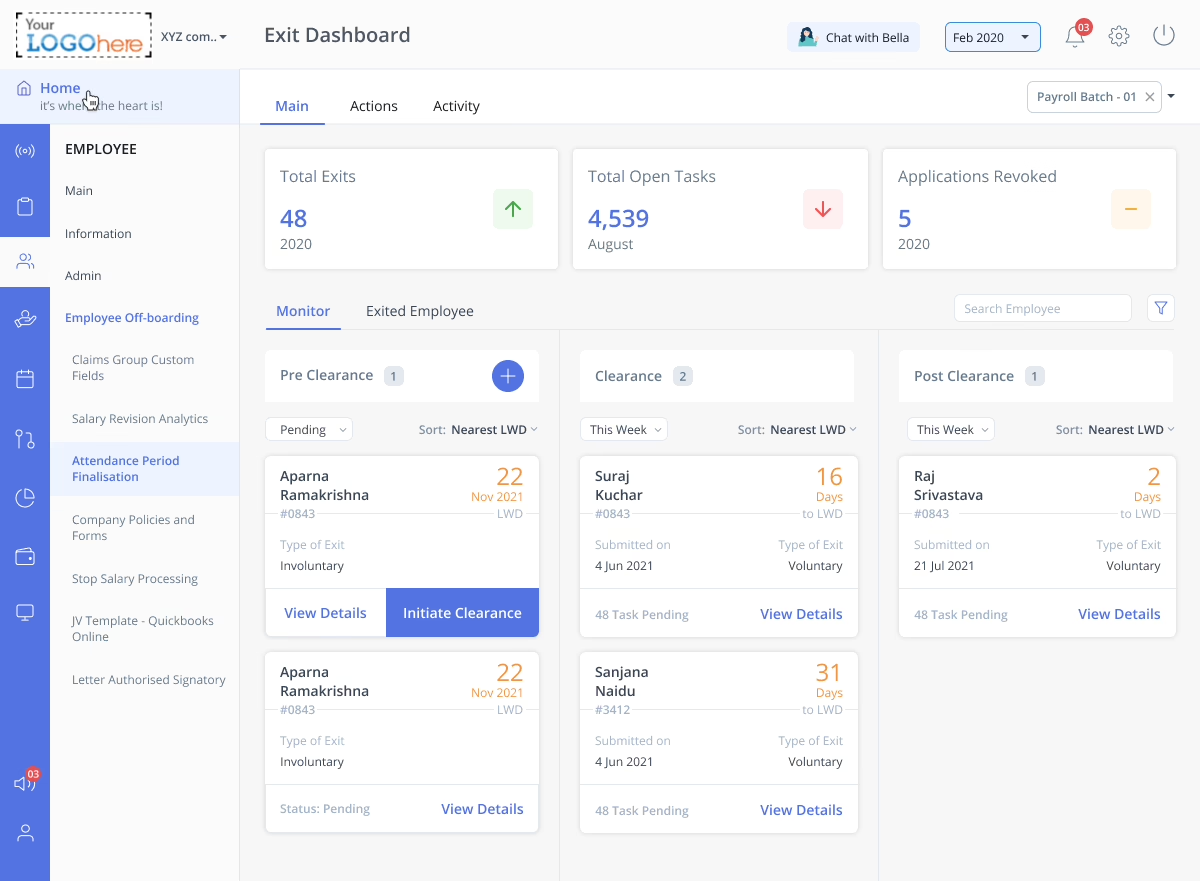
greytHR is an India-focused HRMS covering attendance, leave, statutory payroll, and employee self-service.
Its shift management capabilities make it relevant to businesses with rotating schedules and overnight shifts. Managers can organize rosters, review attendance exceptions, and apply overtime or comp-off rules.
Unlike specialist scheduling platforms, greytHR focuses more on accurate attendance administration and payroll processing than predicting future staffing demand.
Key features
-
Shift rotations, roster uploads, and attendance regularization.
-
Mobile, biometric, and location-based attendance.
-
Overtime, comp-off, and leave management.
-
Indian statutory payroll and employee self-service.
Pros and Cons
| Pros | Cons |
|---|---|
| Simplifies attendance, leave, and payroll management. | Some users report attendance syncing issues with biometric devices. |
| User-friendly interface reduces everyday HR administration. | Support-ticket resolution can be slow. |
Pricing
Here are the different pricing plans offered by greytHR:
-
Essential: ₹2,495/month for up to 50 employees; ₹45/additional employee/month
-
Growth: ₹4,495/month for up to 50 employees; ₹85/additional employee/month
-
Premium: Custom pricing
Best for:
Indian SMBs prioritizing attendance accuracy, shift administration, leave, and statutory payroll.
UKG (4.3/5)
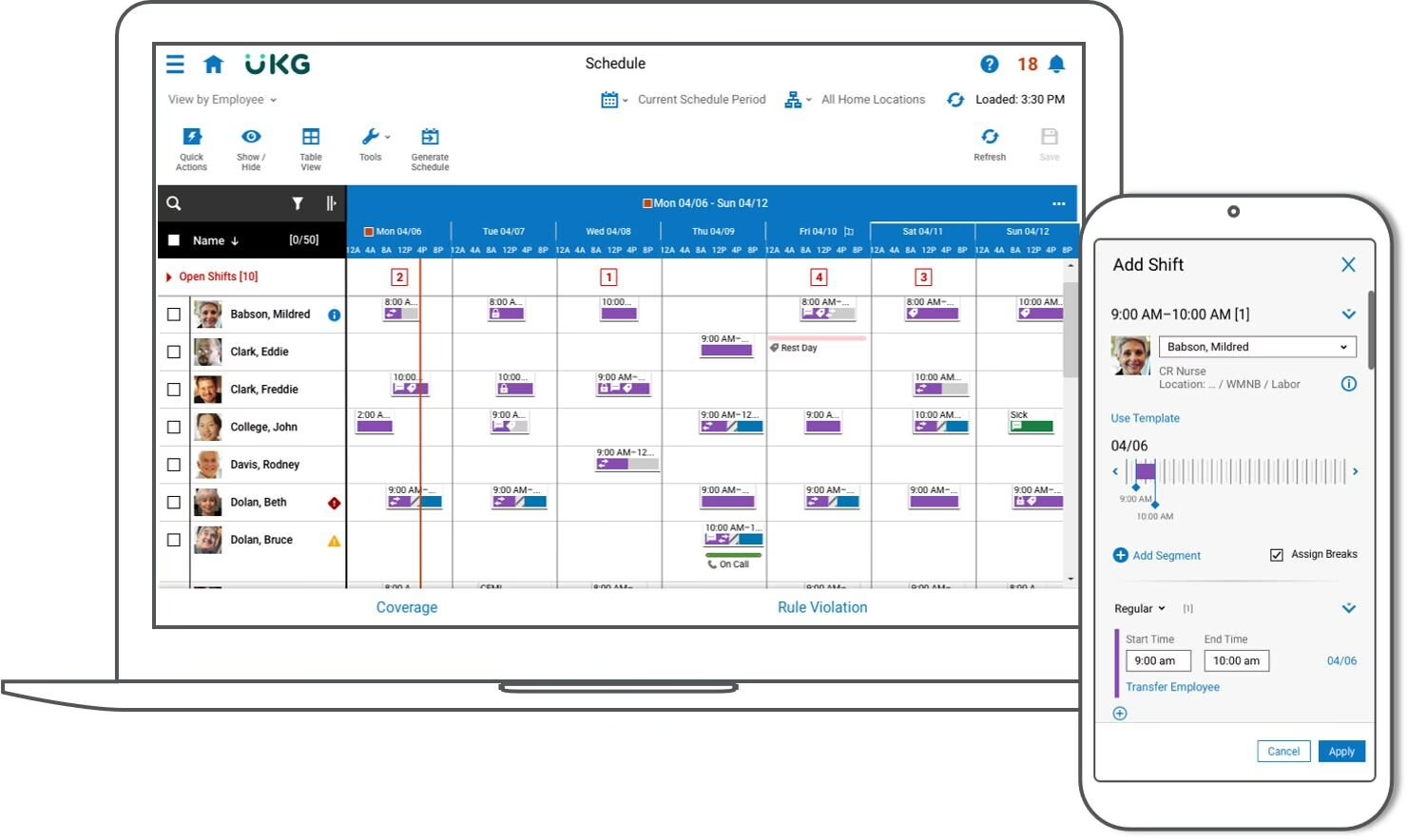
UKG Pro Workforce Management is designed for enterprises with large hourly workforces across multiple locations.
Its biggest strength is demand-based scheduling. Instead of relying only on fixed shift patterns, UKG forecasts how many staff you’ll need and suggests schedules based on employee availability, skills, and working rules. That makes it a good fit for retailers, hospitals, manufacturers, and other employers whose staffing needs change through the day.
Key features
-
AI-powered labour forecasting and automated scheduling.
-
Skills-based assignments and employee shift preferences.
-
Timekeeping, attendance exceptions, and overtime monitoring.
-
Real-time labour analytics and compliance alerts.
Pros and Cons
| Pros | Cons |
|---|---|
| Simplifies attendance, time tracking, and shift management. | Workforce Management module can be difficult to navigate. |
| Supports workforce administration across multiple entities. | Custom reports can be difficult to build. |
| Employee self-service makes schedules and time-off information accessible. | Some users report slow loading and mobile app issues. |
Pricing
Best for:
Large enterprises that require sophisticated scheduling, labour forecasting, and multi-location workforce management.
Workday (4.2/5)
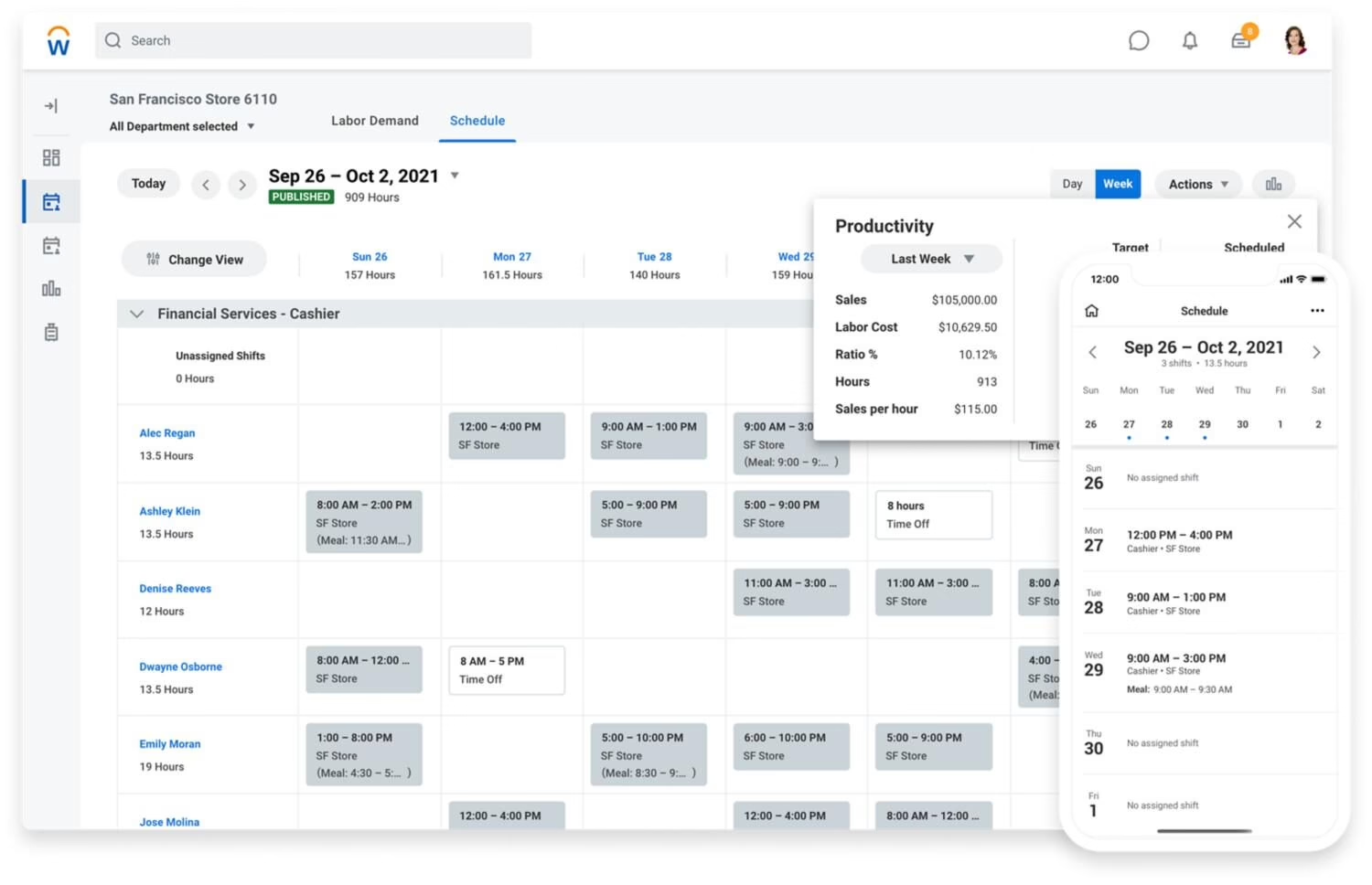
Workday combines scheduling, time tracking, and absence management with its broader enterprise HCM platform. What makes it appealing is the connection between workforce decisions and employee information. Managers can review staffing requirements, available workers, time records, and labour costs without relying entirely on disconnected systems.
However, Workday makes more sense for businesses that already use its HCM ecosystem or are prepared for a larger enterprise implementation.
Key features
-
AI-assisted scheduling and labour optimization.
-
Time tracking, absence management, and employee self-service.
-
Shift swaps, open shifts, and mobile access.
-
Workforce cost reporting and operational insights.
Pros and Cons
Pricing
Best for:
Large businesses already using Workday HCM or planning an integrated enterprise HR environment.
Deputy (4.6/5)
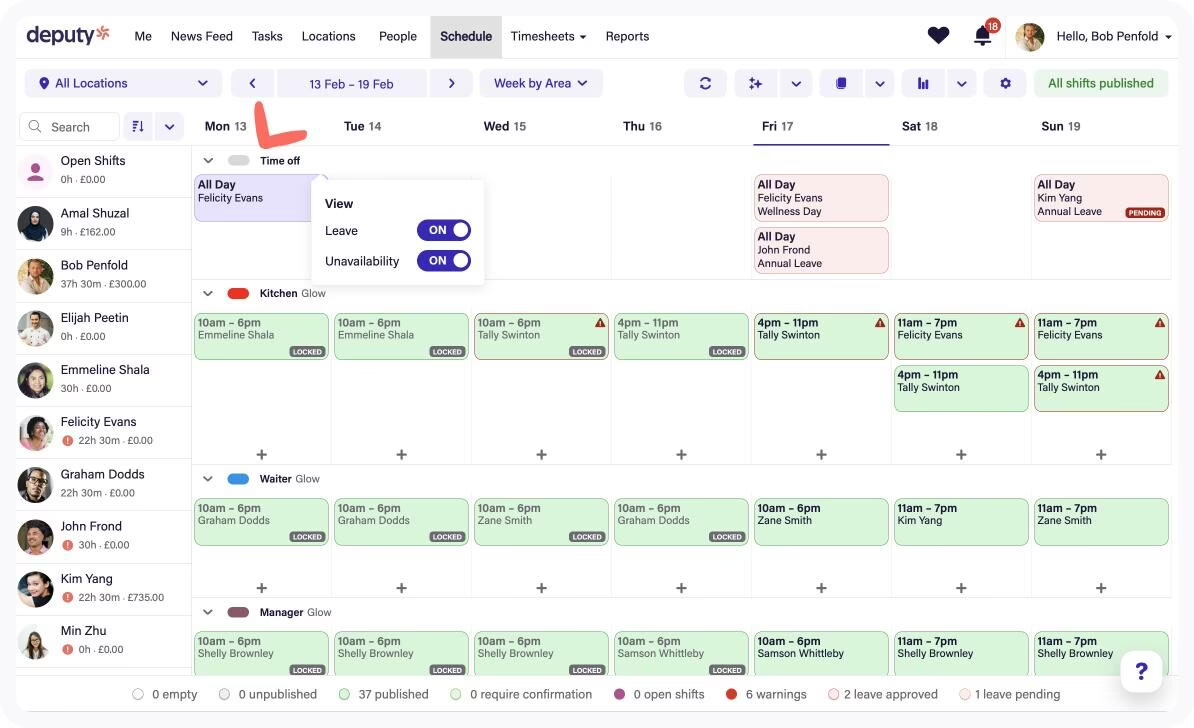
Deputy is designed for businesses employing hourly workers, particularly restaurants, retailers, and hospitality operators.
We found its scheduling capabilities especially relevant for managers handling frequent shift changes. Employees can exchange shifts or claim open shifts, while managers review staffing coverage and expected labour costs.
Deputy also offers demand forecasting and auto-scheduling, making it more specialized than a basic shift calendar.
Key features
-
Automated schedules based on staffing demand.
-
Open shifts, swaps, and employee availability.
-
Mobile time clocks, geofencing, and timesheets.
-
Labour budgets, overtime alerts, and sales integrations.
Pros and Cons
| Pros | Cons |
|---|---|
| Easy-to-use interface requires minimal training. | Some users report failed or delayed clock-ins and clock-outs. |
| Makes shift scheduling and employee communication easier. | Some payroll integrations can be difficult to manage. |
Pricing
Pricing details of Deputy are as follows:
- Lite: $5.50/user/month
- Core: $7.25/user/month
- Pro: $10/user/month
Free trial is also available
Best for:
Retail, restaurant, and hospitality businesses with changing hourly staffing needs.
When I Work (4.4/5)
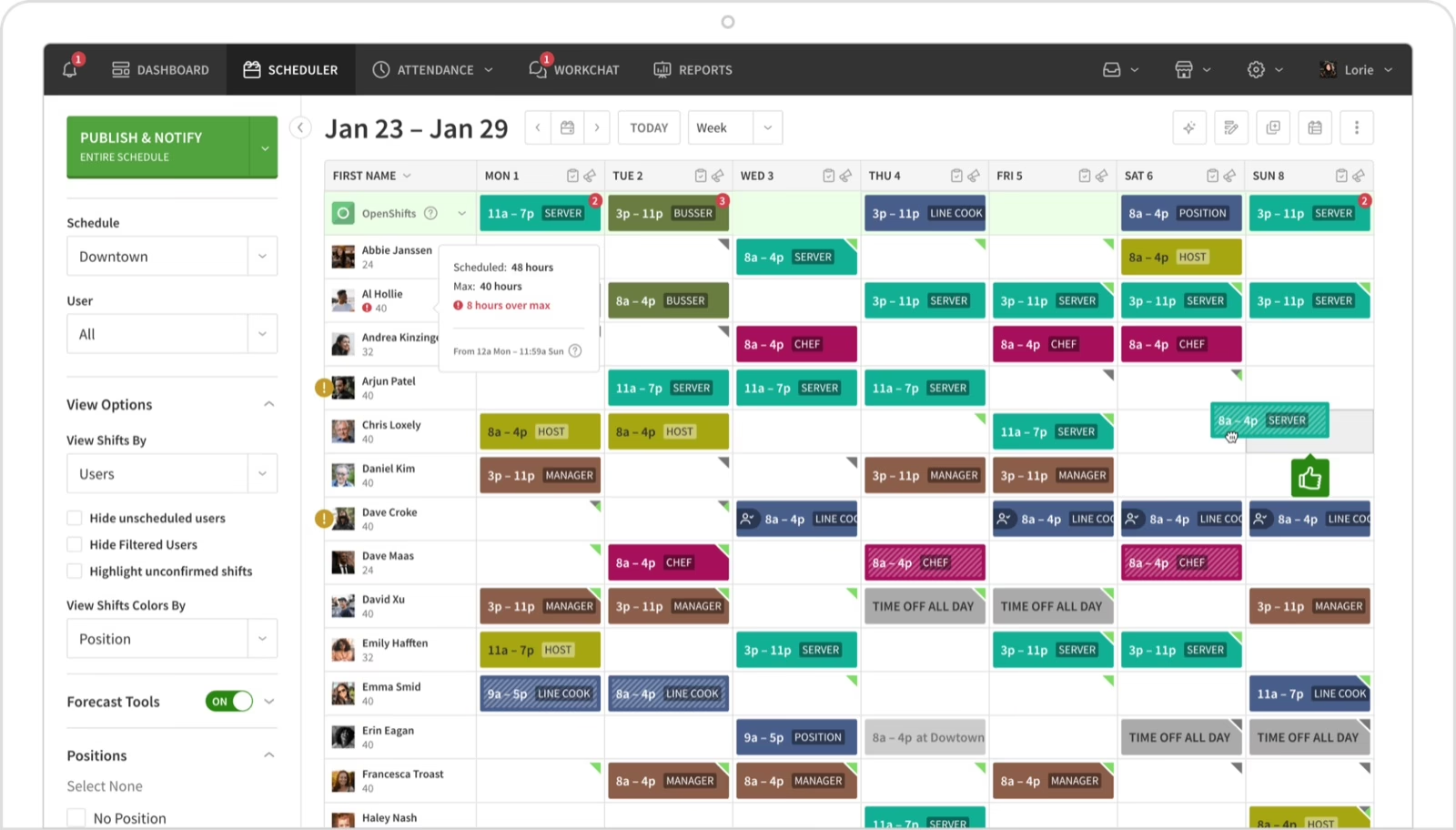
When I Work focuses on making employee scheduling less time-consuming for smaller hourly teams. Managers can create reusable schedules, publish shifts, and handle last-minute replacements. Employees can view upcoming shifts, request swaps, and communicate through the mobile application.
Its straightforward approach is useful when a business wants better scheduling without the complexity of enterprise workforce optimization software.
Key features
-
One-click auto-scheduling and reusable templates.
-
OpenShifts, shift swaps, and team messaging.
-
Multi-location and multi-week scheduling.
-
Labour forecasting tools and optional time tracking.
Pros and Cons
Pricing
Here are the two pricing options provided by When I Work:
-
Single location or schedule: $2.50/user/month
-
Multiple locations or schedules: $5/user/month
14-days free trial available.
Best for:
Small hourly teams seeking simpler schedules, shift swaps, and employee communication.
Quinyx (4.3/5)
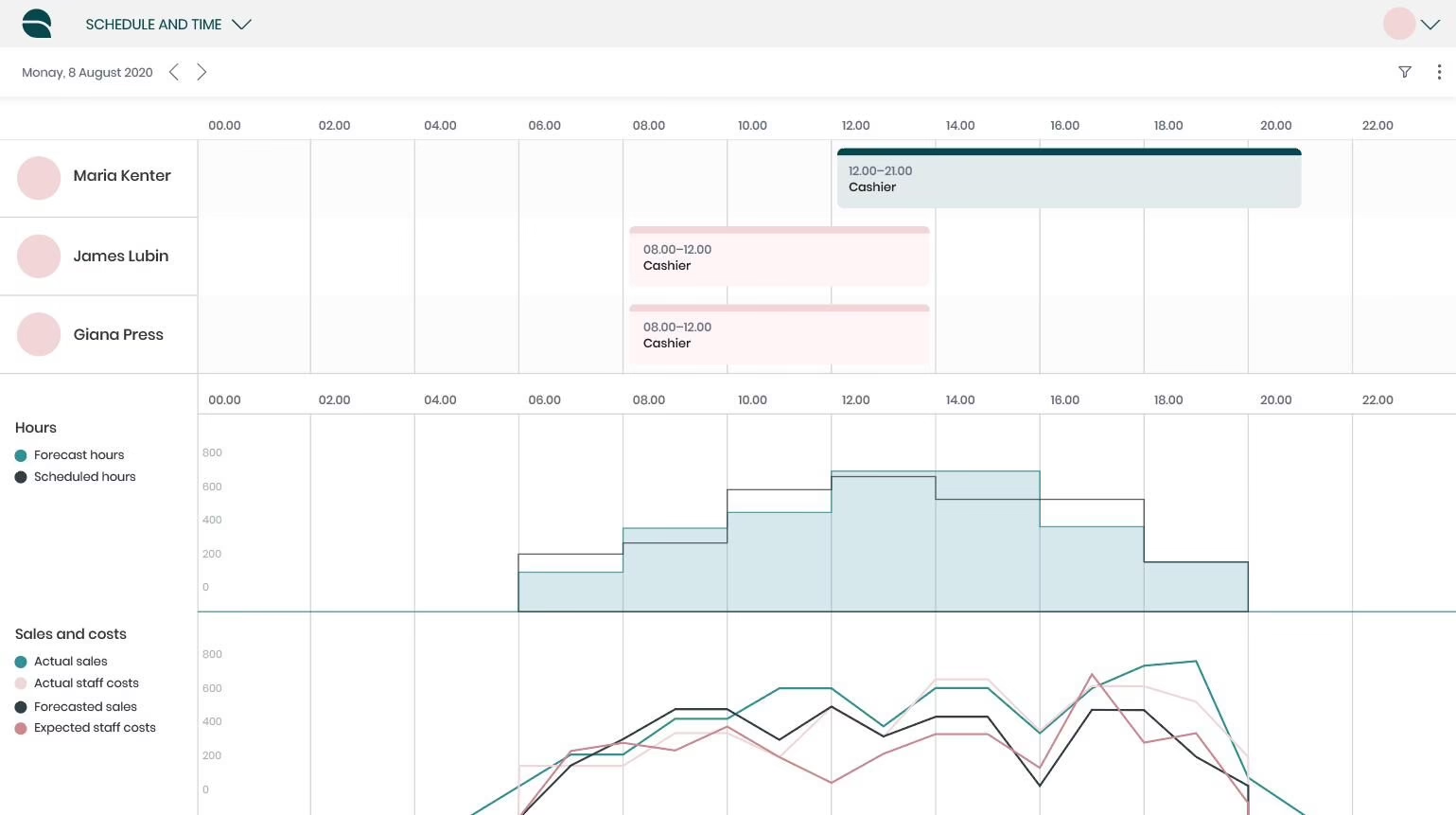
Quinyx is an AI-powered workforce management platform for businesses with large frontline teams.
Its biggest differentiator is the connection between demand forecasting and automated scheduling. It can use sales, footfall, seasonality, and other demand signals to estimate staffing needs before generating employee schedules.
For organizations running numerous stores or locations, this can be more useful than repeating historical shift patterns.
Key features
-
AI-based staffing demand forecasts.
-
Auto-Schedule and Auto-Assign using skills and availability.
-
Employee shift swaps and scheduling preferences.
-
Mobile attendance, geofencing, and labour-cost analytics.
Pros and Cons
Pricing
Best for:
Large frontline organizations needing demand-based scheduling and labour optimization.
Verint (4.2/5)
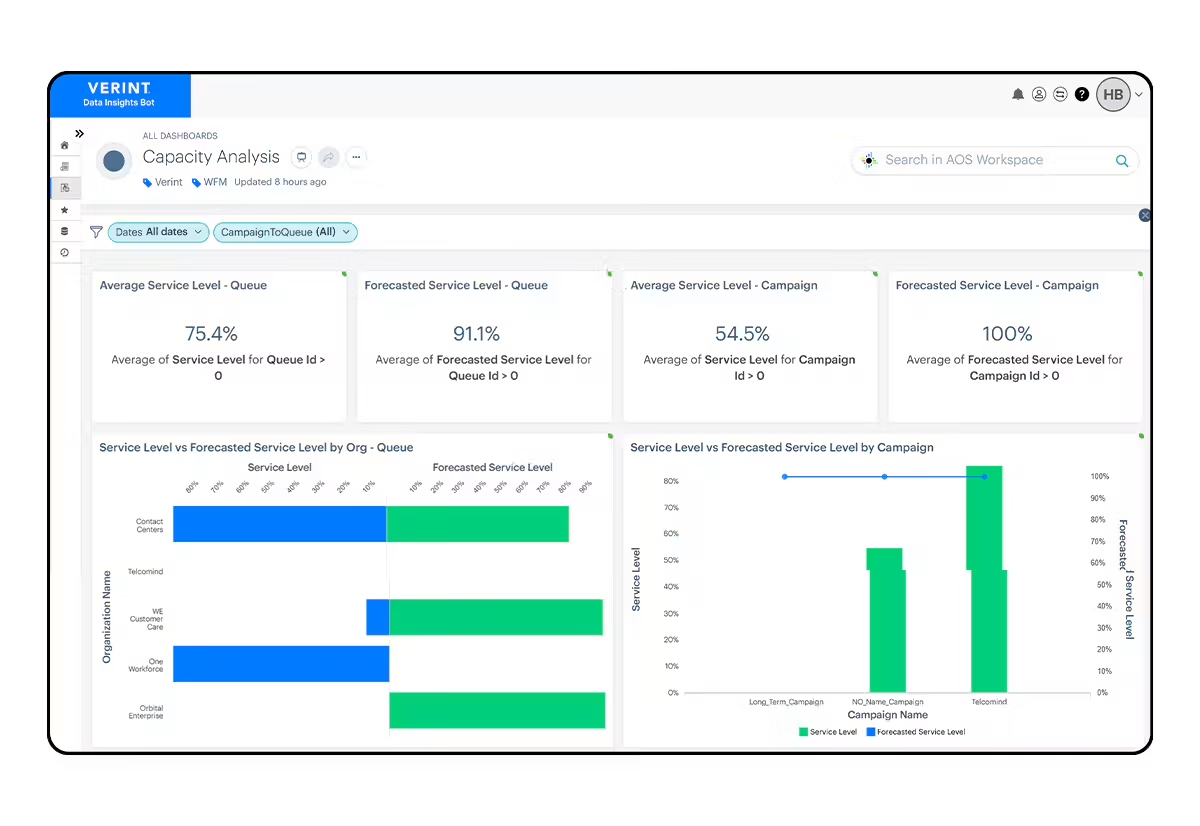
Verint is quite different from most platforms on this list. It focuses on managing contact centre agents rather than general office attendance.
The platform forecasts incoming calls, chats, emails, and other workloads, then helps managers schedule agents according to skills and service-level requirements.
Its real-time adherence tools are particularly valuable. Supervisors can compare scheduled activities with actual agent status and adjust staffing when customer demand changes.
Key features
-
Multichannel interaction-volume forecasting.
-
Agent scheduling by skills, queues, and service levels.
-
Real-time schedule adherence and intraday adjustments.
-
Time-off management and employee scheduling flexibility.
Pros and Cons
| Pros | Cons |
|---|---|
| Automates forecasting, reducing manual spreadsheet work. | Difficulties aligning workforce management and quality-management organizational hierarchies. |
| Helps managers track agent adherence and schedule discrepancies. | Reports problems with data consistency between exports and standard reports. |
Pricing
Best for:
Indian BPOs, customer support centres, and organizations managing large agent teams.
Blue Yonder (3.9/5)
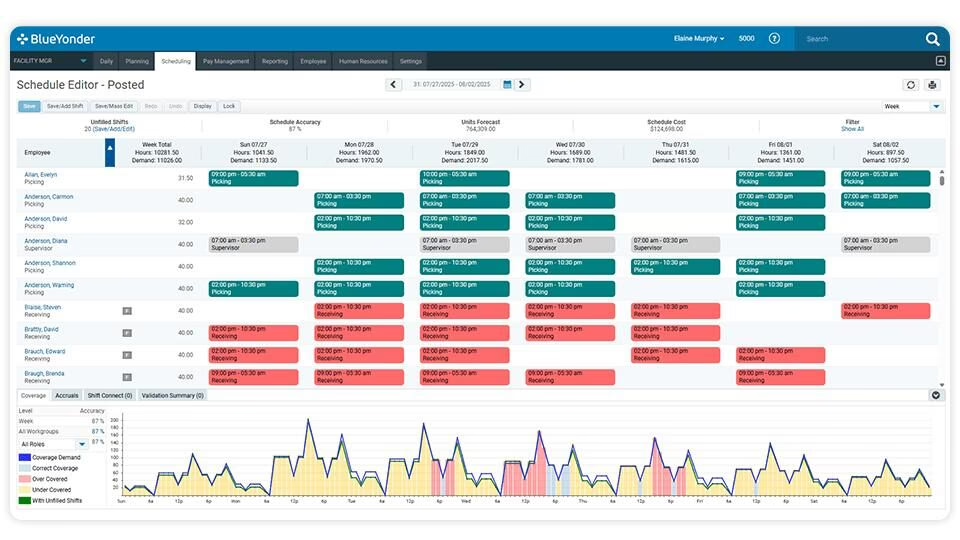
Blue Yonder offers workforce and labour management solutions for retailers, warehouses, and supply-chain businesses.
Its retail Workforce Management software uses demand information to help forecast staffing requirements and create schedules. Employees can view shifts, request swaps, and access time-related information.
For warehouses, Blue Yonder offers a separate Labor Management solution focused on productivity, workload balancing, and engineered labour standards. These aren’t necessarily included in the retail WFM product.
Key features
-
Retail demand forecasting and automated scheduling.
-
Skills-based assignments and cross-location coverage.
-
Mobile employee scheduling and time tracking.
-
Warehouse productivity and labour standards through a separate solution.
Pros and Cons
Pricing
Best for:
Large retailers, warehouse operators, and logistics businesses optimizing labour against operational demand.
Unolo (4.3/5)
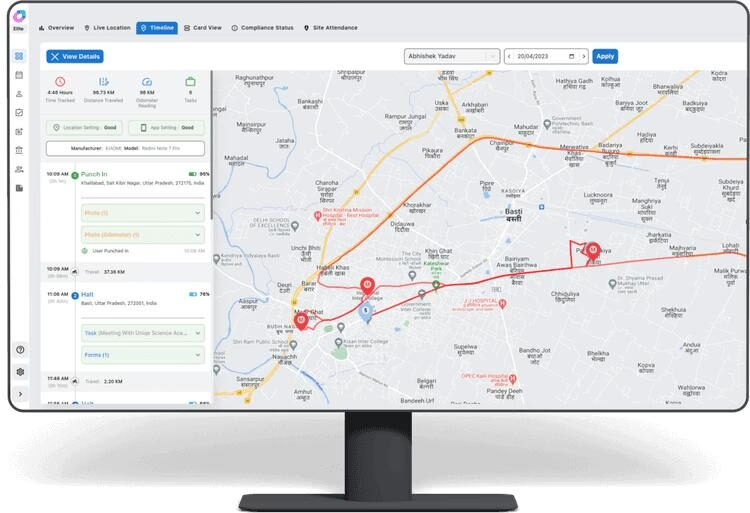
Unolo is an Indian field workforce management platform for employees working across sales territories, customer sites, and service locations.
Unlike tools that only record where employees clock in, Unolo can track on-duty movement and connect location information with client visits, assigned tasks, and travel claims.
We found its expense validation particularly useful for field teams, where managers need to verify both work completed and conveyance reimbursements.
Key features
-
GPS-based attendance and live on-duty location tracking.
-
Geofenced client visits and automatic site attendance.
-
Beat planning, task assignments, and field activity reports.
-
Travel-distance calculation and conveyance claim approvals.
Pros and Cons
Pricing
Custom quote; Starter, Basic, and Standard plans. A 14-day free trial is also available.
Best for:
Indian field sales, distribution, and service teams needing visibility into employee locations, visits, tasks, and travel expenses.
How to Choose the Best Workforce Management Software for Your Business
The right workforce management software should solve your team’s everyday challenges without adding complexity. Here’s what we’d recommend checking before making a decision.
1. Start With Your Workforce Type and Primary Needs
Think about where your employees work and what you need to manage. For example, an Indian IT company may prioritize attendance, leave, and payroll integration. A retail chain might need demand-based shift scheduling, while a BPO may require call-volume forecasting and real-time agent adherence.
Pro Tip: List your three biggest workforce challenges before comparing products. This will help you distinguish between integrated HRMS platforms like Keka and greytHR and specialist solutions like Verint or Unolo.
2. Consider Your Company Size and Locations
A 100-person company in one office would require something very different from a retailer with 2,000 employees across several states. If you manage several locations, check whether the software supports location-specific shifts, holiday calendars, approval workflows, centralized reporting, and support for multiple departments or legal entities as your business grows.
Pro Tip: Ask the vendor to show how you’d manage two locations with different shifts and holiday policies from one dashboard. This will tell you more about scalability than simply checking employee limits.
3. Check the Features You’ll Actually Use
Focus on features your team will actually use:
-
Scheduling: Shift rotations, swaps, and roster changes.
-
Attendance: Biometric, mobile, GPS, and geofenced punches.
-
Time management: Overtime, leave, comp-offs, and corrections.
-
Workforce planning: Demand forecasting and labour-cost reports.
-
Self-service: Mobile access to schedules and approvals.
Pro Tip: Ask vendors to demonstrate these features using your actual workflows.
4. Does it connect to payroll?
This matters most for Indian businesses. If an employee works overtime or takes unpaid leave, does that flow into payroll automatically, or does HR have to export spreadsheets and fix things by hand? Check that the tool connects with your HR system, payroll, biometric devices, and any ERP or POS systems you use.
Also check whether Indian payroll is built in, or handled through a third-party integration. A tool that exports data for international payroll won’t necessarily handle PF, ESI, TDS, or professional tax.
Pro Tip: Ask the vendor to demonstrate how approved overtime and unpaid leave appear in an employee’s payslip. If manual exports or adjustments are needed, factor that effort into your decision.
5. Compare the Total Cost and Support Available in India
The advertised subscription price rarely tells the whole story. A lower-priced plan might exclude advanced rostering, GPS tracking, forecasting, or payroll integrations. Implementation, employee minimums, training, and add-ons can also affect your final cost.
Before making a decision, we’d ask vendors three questions:
-
What’s the total annual cost for our employee count, including required modules and implementation?
-
Which features and integrations are included in the quoted plan?
-
Is implementation and customer support available in India, and what response times are guaranteed?
Pro Tip: Request an itemized quote for your current team size and projected headcount after one year. This helps uncover add-on charges and shows how much your costs may increase as you grow.
Workforce Management Gaps Most Tools Overlook
Even software with strong scheduling and attendance features may fall short on Indian labour compliance, field tracking, or contractor management. Here are four areas worth checking.
1. Labour Code Readiness for Shifts and Overtime
India’s four Labour Codes took effect on 21 November 2025, so it’s worth checking how your system handles working hours, overtime, rest periods, and statutory records. Rules can differ by establishment, central or state rules, and employee type.
What to check: Can the software configure location-specific working hours, overtime calculations, weekly rest, night shifts, and holiday policies? Does it maintain reliable attendance and overtime records? Software can support compliance, but you still need to confirm the legal requirements yourself.
2. Field and Frontline Attendance
A GPS punch doesn’t prove that a field employee actually visited the customer. For field sales and service teams, look for geofencing, selfie checks, offline punches, location history, and client-visit tracking.
What to check: Does the software support the attendance method your employees actually need? Also verify mobile connectivity requirements, location accuracy, employee privacy controls, and offline synchronization.
3. Contract and Multi-Entity Workforce Management
Managing 500 employees across several branches is different from managing 500 permanent and contract workers across multiple vendors and project sites. HR teams may need to reconcile attendance, approved overtime, shift allocations, and contractor records separately.
What to check: Check that the software can separate permanent and contract workers, assign them to sites or entities, and report by location and vendor. Also check that it supports contractor compliance documents, since a shared roster doesn’t mean it handles contractor rules.
4. Workforce Management vs. Resource Management
These terms sound similar, but they solve different problems.
| Workforce management | Resource management |
|---|---|
| Manages shifts, attendance, leave, and overtime. | Allocates employees to projects based on skills and availability. |
| Focuses on staffing coverage and labour costs. | Focuses on project capacity and utilization. |
| Common in retail, manufacturing, and field operations. | Common in IT services and consulting. |
What to check: If you need to plan who works when, and for how long, choose workforce management software. If you need to decide who works on which project, choose resource management software.
Choosing the Right Workforce Management Software for Your Business
There’s no single best workforce management software for every business. Start by finding where your process breaks down, whether that’s rotating shifts, attendance corrections, overtime costs, or getting approved hours into payroll. Once you know the problem, the right tool is easier to pick.
For Indian businesses that want attendance, shifts, leave, and payroll in one place, Keka connects them on a single HR platform, so HR doesn’t have to match data across tools. Book a free Keka demo to see how it works.