Login


Quick overview
The top applicant tracking systems in 2026 include Keka (all-in-one HR, payroll and recruitment), Greenhouse (structured hiring), Lever (ATS with CRM), Ashby (recruiting analytics), Workable (AI-powered sourcing), BambooHR (HRIS-led hiring), JazzHR (affordable SMBs), Zoho Recruit (for Zoho users), iCIMS (high-volume enterprise hiring), Manatal (AI-powered matching).
Most applicant tracking systems can post jobs, parse resumes, and move candidates through a pipeline. The real differences show up later: how well the ATS works with your HRIS and payroll, whether it produces the EEOC and OFCCP reports your compliance team needs, and whether its AI screening filters out good candidates.
I compared 10 platforms on exactly those points, covering who each one fits, what it costs, and what to plan for.
10 Best Applicant Tracking Systems at a Glance
| Tool | Best For | Pricing Details | G2 Review | Free Trial |
|---|---|---|---|---|
| Keka | Unified HR, payroll and hiring for businesses of all sizes | Custom quote | 4.4/5 | Demo on request |
| Greenhouse | Structured hiring at mid-market and enterprise scale | Custom quote | 4.4/5 | No, demo only |
| Lever | Combined ATS and recruiting CRM | Custom quote | 4.3/5 | No, demo only |
| Ashby | Recruiting analytics for high-growth companies | From $270/mo billed annually (up to 100 employees) | 4.7/5 | No |
| Workable | AI sourcing with published pricing | From $299/mo | 4.4/5 | Yes |
| BambooHR | Small teams that want HRIS plus basic hiring | $10 to $25 per employee/mo | 4.4/5 | Yes |
| JazzHR | Budget hiring with unlimited users | $1,000 to $5,508/yr billed annually | 4.4/5 | 14 days |
| Zoho Recruit | Budget teams already using Zoho | Free plan; paid from $25/user/mo | 4.4/5 | Free plan |
| iCIMS | Enterprise and high-volume hiring | Custom quote | 4.2/5 | No, demo only |
| Manatal | AI candidate matching at a low per-user price | $15 to $55/user/mo billed annually | 4.8/5 | 14 days |
How I Came Up With This List of the Best ATS in 2026
I’ve worked in HR and run hiring, onboarding, and talent management myself, so I’ve used several of these tools day to day. I judged every platform on four questions that decide whether an ATS works for a US employer:
-
Company size and hiring volume: Does it fit a team hiring 20 people a year, 2,000, or both?
-
Integrations: Does it connect to your HRIS, payroll, calendar, background verification and assessment tools, or does it need workarounds?
-
Compliance: Can it support EEOC (Equal Employment Opportunity Commission) and OFCCP (Office of Federal Contract Compliance Programs) reporting, and handle candidate data under GDPR for global hiring?
-
Budget and pricing clarity: Is pricing published, and what will the real cost look like after implementation?
For each tool, I went through demos, read G2 and Capterra reviews, and checked Reddit threads in HR communities, where people are more candid about what works after the first year.
Disclaimer: Keka is our product. I evaluated it using the same criteria as every other platform on this list.
Top 10 ATS Tools in 2026: Ultimate Breakdown
Here’s an in-depth look at the top 10 ATS tools:
1. Keka (4.4/5 on G2)
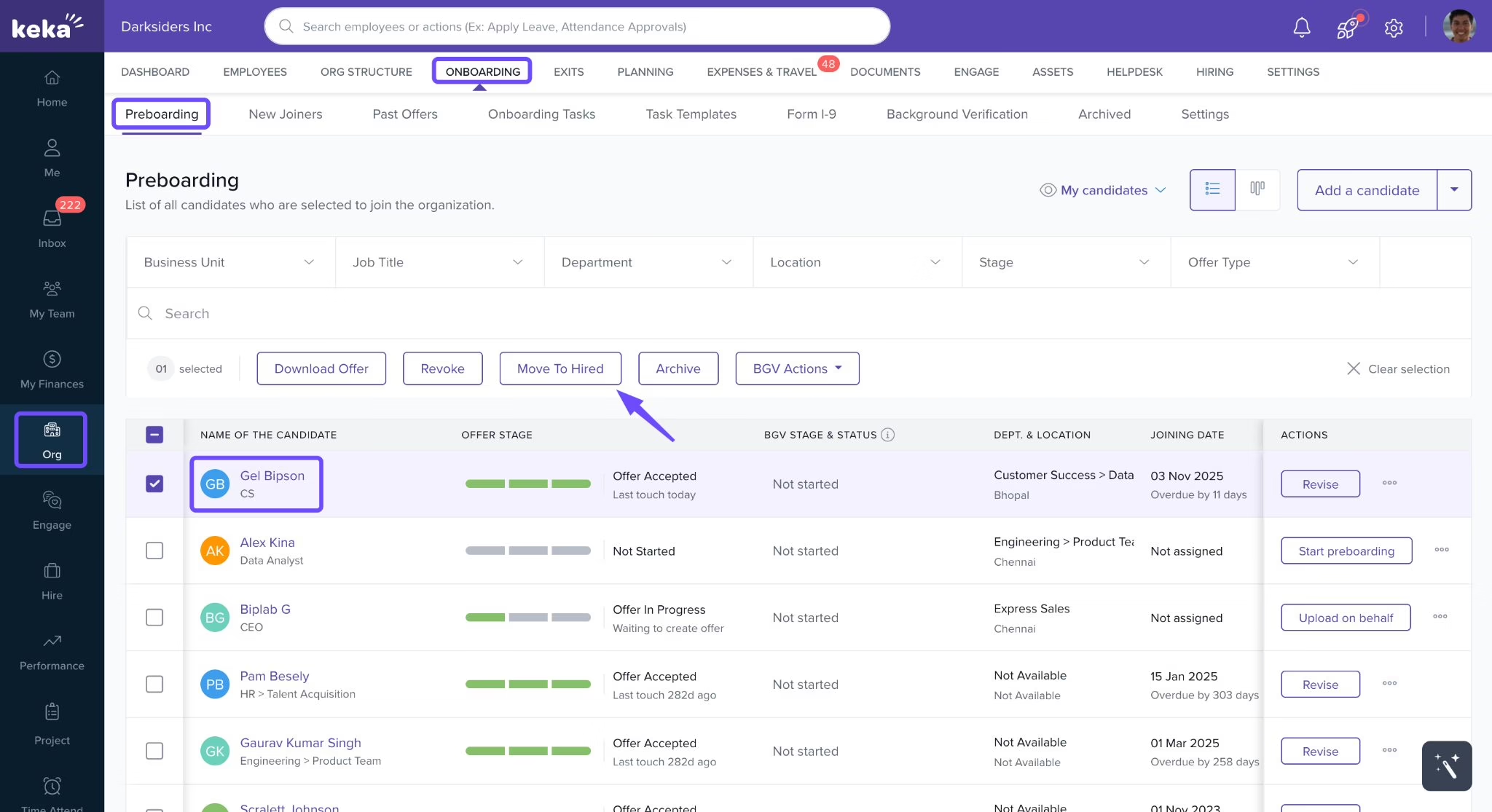
Keka runs recruiting on the same platform as core HR, payroll, time and attendance, and performance. Candidates move from application to interview, offer, and onboarding in one system, and their profile becomes their employee record once hired.
For US teams, Keka Payroll covers W-2 and 1099 workers in all 50 states. Keka connects with 100+ tools, is GDPR compliant, is hosted on SOC 2 Type II and ISO 27001 certified infrastructure, and is used by 12,500+ companies worldwide.
Quick note
When in HR, we had a recruiting tool for the TA team to keep jobs and candidates organized, an onboarding tool, and a whole other HR tool. Even though all of them were integrated, I’d still have to go in and enter data manually every single time we onboarded someone. Having it all in the same place, instead of a best-of-breed approach, is honestly a massive time saver.
What are the key features of Keka HR?
-
Weighted profile scoring: Customize how Keka scores applicants across five criteria for each role.
-
AI for job descriptions and interviews: Keka AI writes role-based job descriptions in seconds, generates skill-based interview questions for each candidate, and summarizes interview feedback.
-
Structured scorecards: Interviewers rate candidates on specific skills and questions, and Keka averages the ratings for each section, interviewer, and round.
-
Agency portal with candidate lock-in: The first external recruiter to submit a candidate gets exclusive ownership for a set period, which prevents duplicate claims.
-
One-click posting and resume parsing: One post goes live across job boards, your careers site, and referrals, and the parser turns resumes into searchable, rankable profiles
-
Self-scheduling synced to interviewer calendars: Candidates book from open slots pulled from interviewers’ Google or Outlook calendars, and the interview is confirmed with calendar invites sent automatically.
-
Assessments and DEI reporting: Pre-employment tests plus Mercer Mettl and HackerEarth integrations
| Pros | Cons |
|---|---|
| New hires move from offer to onboarding, core HR, and US payroll on one employee record. | Keka Hire can run on its own, but teams that also run onboarding and payroll on Keka get more from the connected data. |
| Keka AI drafts job descriptions, scores candidate profiles, and summarizes interview feedback. | Teams replacing an existing ATS may need to plan how candidate records and workflows move across. |
| Job boards, the careers page, and referrals feed a single candidate database that stays searchable for future roles. | Teams may need to map interview stages, scorecards, and approval chains before setup. Doing so up front lets automation move candidates forward without manual follow-up. |
Pricing: Custom quote.
Best for: CHROs, People Ops directors, and finance leaders at US businesses of all sizes who are currently stitching together multiple point solutions for hiring, HR, and payroll.
2. Greenhouse
4.4/5 G2 rating
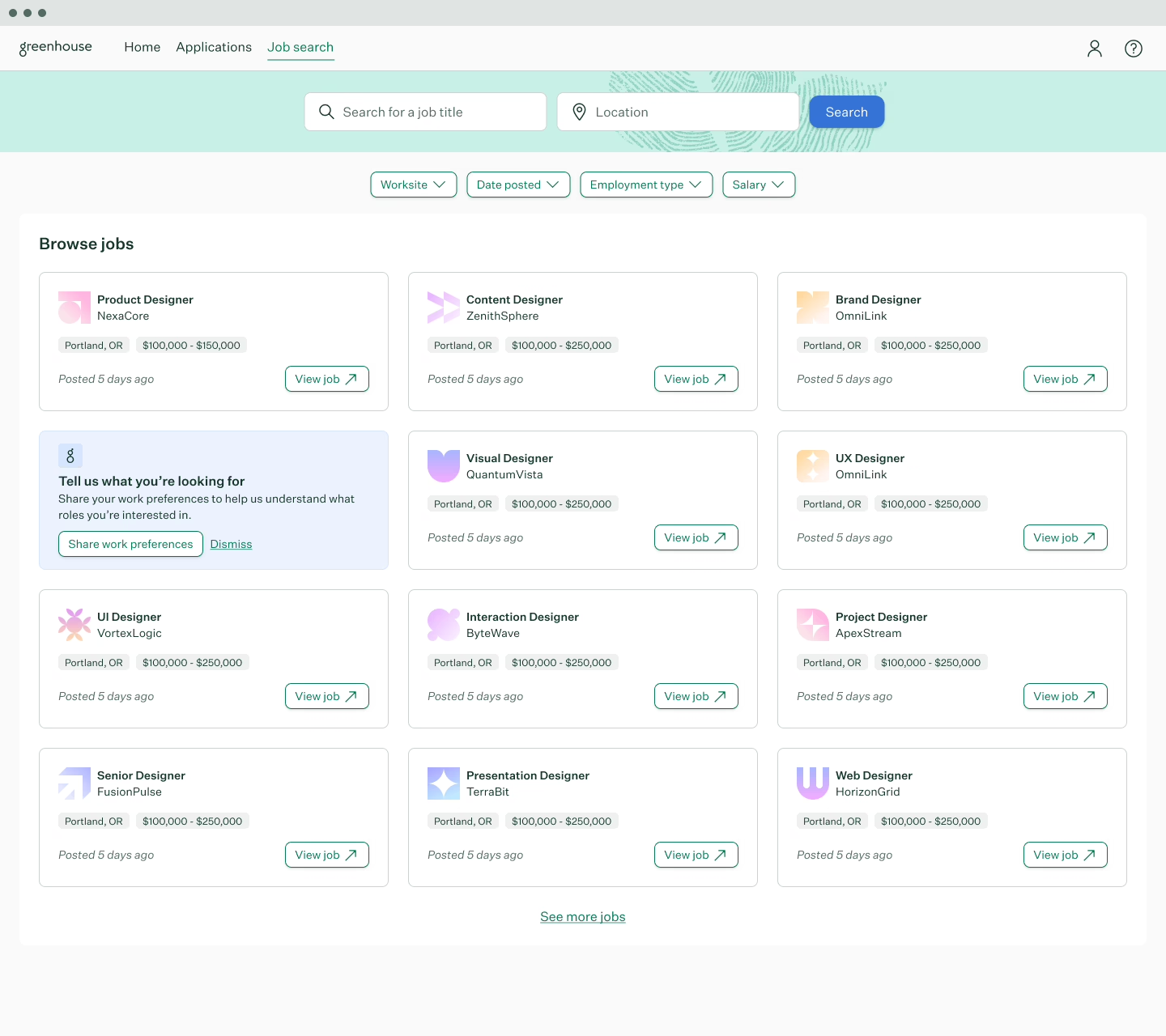
Greenhouse helps from even before hiring starts, right from when an opening is identified. Teams can add skills they need in the new hire, and every interviewer gets an interview kit and scorecard attached to the particular combination of skills. This makes assessment impartial, and decisions easier to compare and defend.
More than 7,500 companies use Greenhouse, and it ranks as a G2 leader for mid-market and enterprise ATS. Its Real Talent add-on brings in CLEAR identity verification and fraud screening, which matters more each year as application volumes climb.
What are the key features of Greenhouse ATS?
-
Interview kits and scorecards: Interviewers get prep notes, role-specific questions, and a four-point scorecard from “Definitely Not” to “Strong Yes.”
-
Real Talent add-on: Checks candidate identity with CLEAR, flags fraud and spam, and matches talent with AI.
-
Anonymized resumes: Hides candidate details during review and breaks down hiring data by demographic.
-
Voice AI: Runs early two-way voice interviews and syncs advance or reject decisions to Greenhouse.
-
500+ integrations: Connects to tools like Checkr and HireRight for background checks, HackerRank and Codility for assessments, Spark Hire for video interviews, and DocuSign for e-signatures.
| Pros | Cons |
|---|---|
| Almost every part of the process can be customized around how the team hires | Standard reports cover the basics, but a tailored pipeline view needs manual effort. Bulk actions are also limited for high-volume hiring. |
| The identity-verification tool is super useful now that fraudulent applicants have surged, and saves a lot of time | New or occasional hiring managers can find the interface overwhelming. |
Pricing: Custom quotes across all plans
Best for: Mid-market and enterprise teams that want consistent, defensible hiring decisions and have large recruiting teams to handle the manual work Greenhouse leaves behind.
Not for: Small teams that need tools up and running in a week.
3. Lever (4.3/5 G2)
Lever, now part of Employ, is built for recruiting teams that build relationships with candidates long before they apply.
Its data model is candidate-centric: each person has one profile holding every role they’ve been considered for, so a past runner-up resurfaces with their full history when a new role opens.
What are the key features of Lever?
-
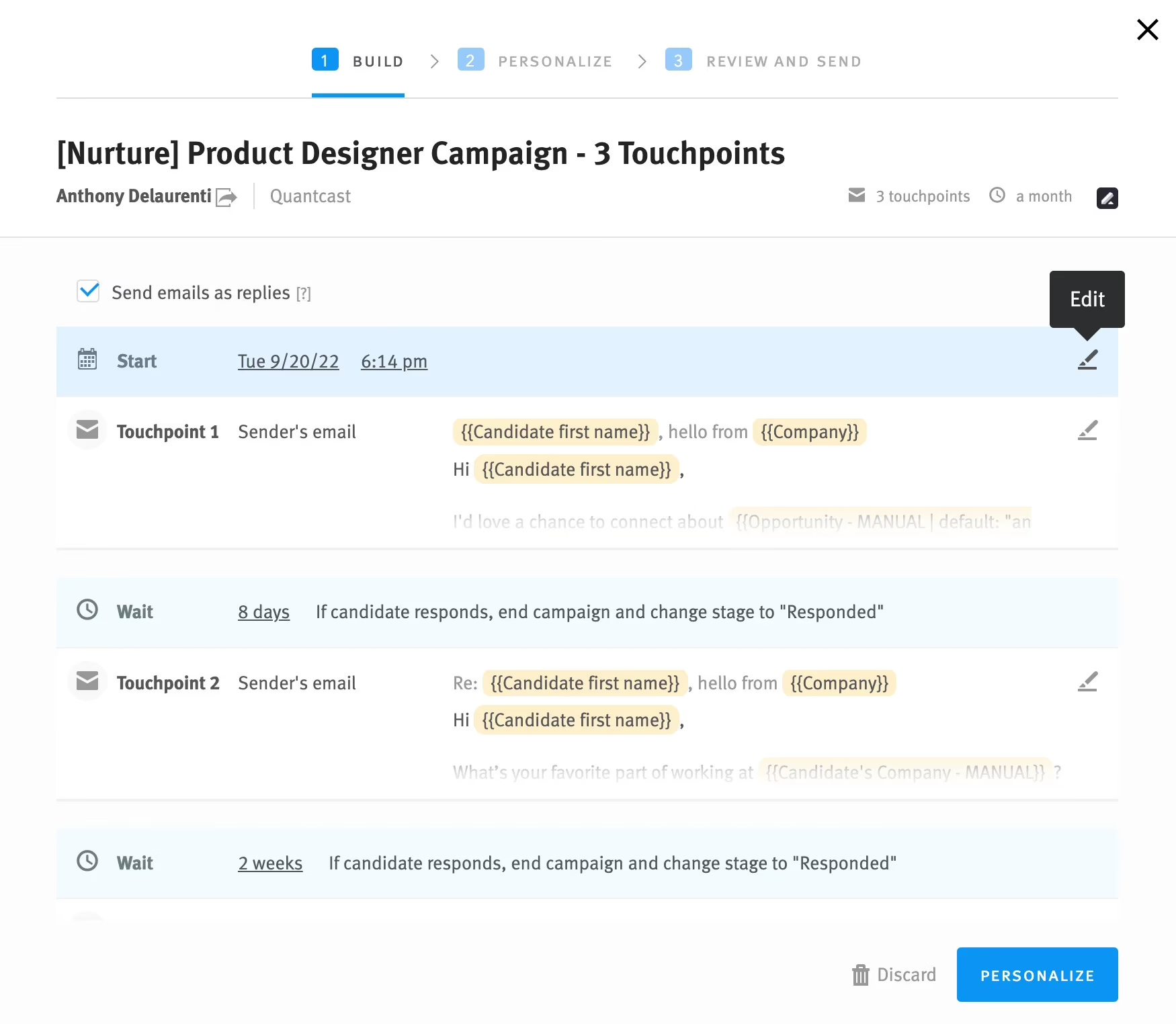
Nurture campaigns: Sends multi-step emails to passive candidates and tracks opens, replies, interviews, and hires.
-
AI matching and risk alerts: Matches candidates to roles and flags those at risk of dropping out, with tips to re-engage them.
-
Fraud checks: Verifies identity, documents, and location.
-
Wider EEO surveys: Sends diversity surveys to sourced, referred, and agency candidates, not just applicants.
-
300+ integrations and add-ons: Includes VONQ for screening, Pillar for interview insights, and Candidate Insights for assessments and reference checks.
| Pros | Cons |
|---|---|
| The tool is intuitive and easy to use, with emails, scheduling, contacts, and notes all in one place | All jobs share a single set of pipeline stages, which confuses managers whose roles don’t use every stage |
| The pipeline view makes it easy to spot bottlenecks and keep candidates moving. | Support has gotten worse over time, especially with AI replacing human agents in important conversations |
Pricing: Custom quote only, no free trial
Best for: Mid-market recruiting teams that source passive candidates as much as they process applicants
Not for: Teams who only process inbound applicants
4. Ashby (4.7/5 G2)
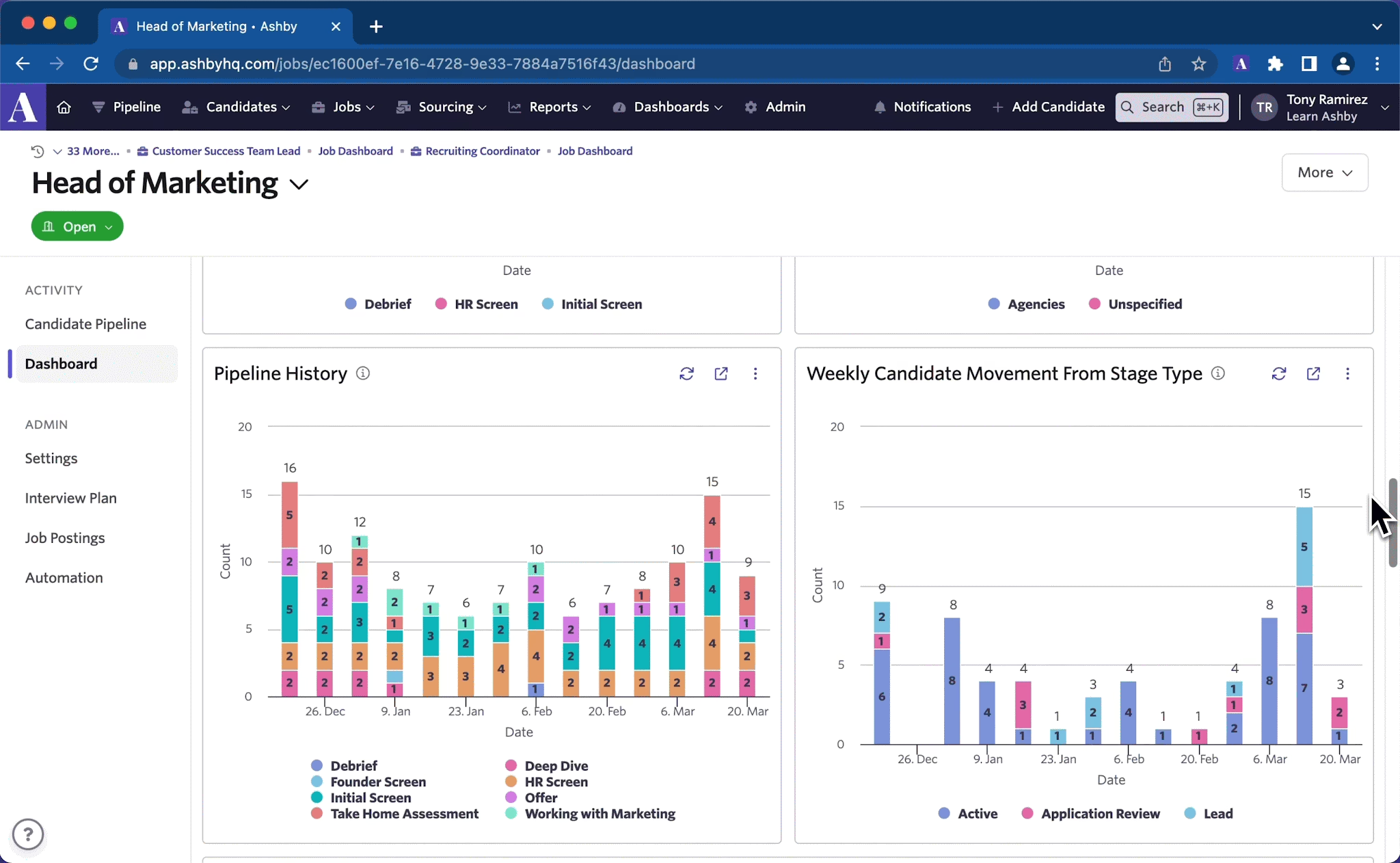
Ashby combines ATS, CRM, scheduling, and analytics into one product rather than having separate tools bolted on later. Recruiting leaders can build custom reports on pipeline speed and source quality without exporting data to a BI tool.
Ashby is popular with venture-backed, high-growth teams that hire quickly and want data at every stage.
What are the key features of Ashby?
-
AI application review: Rates each candidate against your job criteria, with citations, and flags vague or risky wording in those criteria.
-
Feedback blinding: Admins decide if interviewers can see each other’s feedback before, after, or never.
-
Interviewer training: Trains and certifies interviewers, so HR doesn’t track readiness by hand.
-
Smart scheduling: Replaces interviewers who decline and suggests times once a candidate shares availability.
-
Surveys, offers, and e-signatures: Runs quality-of-hire and candidate surveys, with offer approvals and built-in e-signatures.
| Pros | Cons |
|---|---|
| Very good support, super responsive | Setup and onboarding are very demanding because the platform is technical |
| Fast interview scheduling; can see the whole interview panel’s calendars next to the candidate’s availability and book an interview instantly | Wider access means paying for more seats |
Pricing:
-
Foundations starts at $300/month
-
$270/month billed annually, for up to 100 employees
-
Plus and Enterprise are custom quotes
Best for: High-growth teams hiring fast
Not for: Conservative teams that want to trial the tool before buying
5. Workable 4.4/5 G2
Workable is used by more than 35,000 teams and has grown from a recruiting tool into a broader HR platform. Employee records, onboarding, time tracking, and performance management now sit alongside hiring, so lean HR teams can run most people processes in one place.
What are the key features of Workable?
-
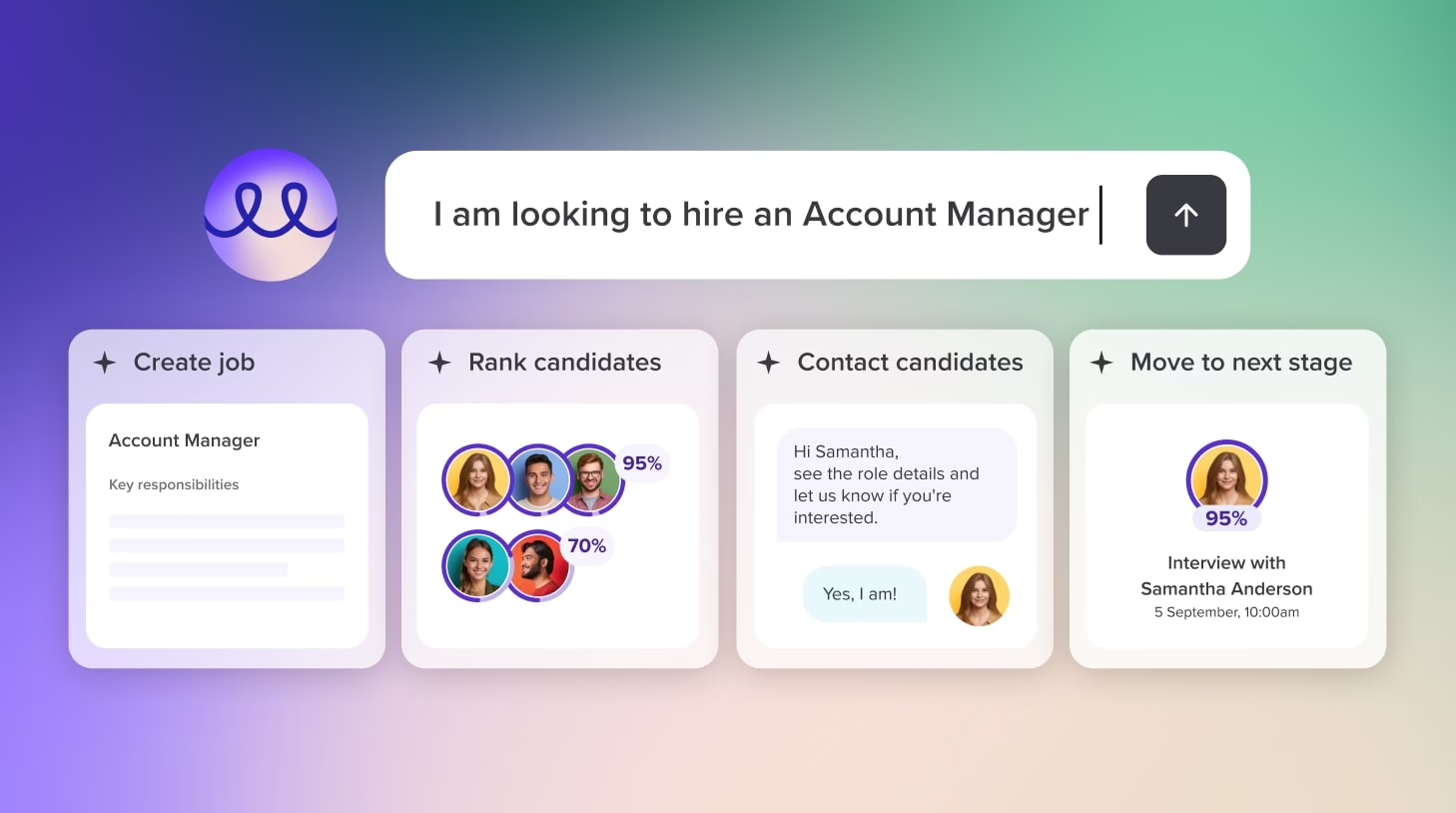
Workable agent: Screens applicants against your ideal candidate profile, sources passive candidates toward about 10 interested people per job, and chats with them.
-
Anonymized screening: Hides names, photos, social profiles, and contact details until the candidate moves past the applied stage
-
Knock-out questions: Yes or no application questions that auto-disqualify, logged as a system action and reversible
-
People search: AI-matched search across 400M+ passive candidate profiles
-
One-way video interviews, assessments and job posts in nine languages
| Pros | Cons |
|---|---|
| AI candidate matching from 400M profiles | Candidates cannot be emailed or notified unless they are attached to an active job |
| AI Copilot compares resumes to JDs and drafts interview questions, WhatsApp messages in the candidate timeline, and the auto-scheduler books panel rounds | Duplicate candidates aren’t reliably caught across jobs, which creates a lot of manual work. |
Pricing: For companies with 1 to 20 employees, Standard is $299/month, and Premier is $599/month. Prices step up by company size.
Best for: Growing companies of 50 to 500 employees that want AI sourcing and transparent pricing.
Not for: Large enterprises with complex, multi-region compliance workflows.
6. BambooHR (4.4/5 G2)
BambooHR is an HRIS first, with an applicant tracking system included in every plan. Hiring covers job postings, candidate records, offer letter templates with e-signatures, and new hire packets that go into onboarding.
The main difference between plans is how many job openings you can run at once: 5 on Core, 25 on Pro, and 50 on Elite. For a small company that hires a handful of people a year and wants hiring and HR in one simple tool, that’s often enough.
What are the key features of BambooHR?
-
Background checks inside BambooHR: Candidates are screened in the same system.
-
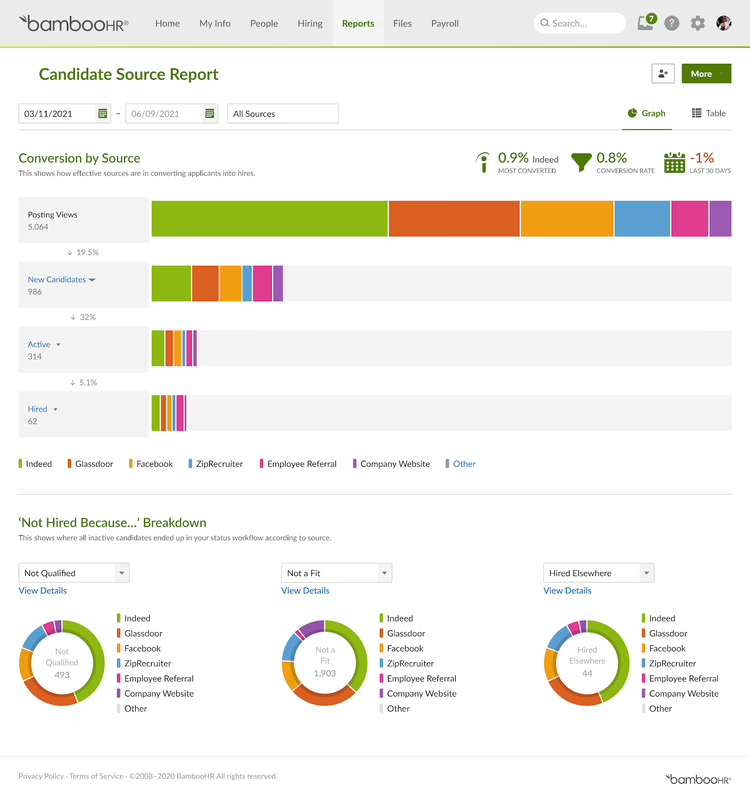
Candidate Sources and Funnel reports: Show which channels bring applicants and which stage is the bottleneck.
-
Self-scheduling from preset slots: Candidates choose from times you define, and confirmations go out automatically.
-
Offer to employee record: Offer letters auto-fill candidate details. Once accepted by e-signature, the data moves into the employee record and new-hire packet.
-
Job posting to Indeed, ZipRecruiter, and LinkedIn, plus 150 integrations
| Pros | Cons |
|---|---|
| Simpler than enterprise tools for day-to-day hiring | Complex reports often need to be finished outside BambooHR. Workflows can also be rigid for unusual business needs. |
| Support is quick and responsive, and they keep everything organized | Weak screening and duplicate detection, screening questions only allow yes, or no answers, and comments can’t be formatted |
Pricing: About $10, $17 or $25 per employee per month for Core, Pro and Elite. Companies with 25 or fewer employees pay a flat $250, $425 or $650/month.
Best for: Small companies that want basic hiring inside an HRIS
Not for: Recruiting teams running more than 50 open roles or doing active sourcing.
7. JazzHR 4.4/5 G2
JazzHR is part of Employ, the group behind Lever and Jobvite, which serves 18,000 customers globally.
Within that group, it’s the option built for small businesses that hire steadily but don’t have a dedicated recruiting team.
What are the key features of JazzHR?
-
EEO and OFCCP data collection and reporting built in, which is uncommon at this price point
-
Pay-per-applicant Linkedin distribution: VONQ CPA + charges only when someone applied, and each applicant arrives already AI-screened and scored
-
Real time new-hire push to ADP: Hires write one way into ADP Workforce Now or TotalSource with contact details, location, hire date and salary, plus EEO gender and race if collected
-
15+ free job boards plus premium boards and a careers page that embeds with one line of code, and a tracked referral portal
| Pros | Cons |
|---|---|
| Workflows are easy to set up during onboarding, and new hires flow straight into ADP | The system seems to go down almost every week, and there are many pesky bugs. |
| Enables you to shape your workflows to suit your unique hiring needs, even with a high volume of applicants every single day | Jobs pushed to boards like Indeed, and ZipRecruiter sometimes show wrong details, with onsite roles flagged as remote. |
Pricing: Hero $1,000/year, Plus $3,480/year and Pro $5,508/year, billed annually. Monthly billing is $110, $350 and $549 for each plan respectively.
Best for: Small businesses under 50 employees that hire regularly on a tight budget.
Not for: Organizations that need advanced analytics or global compliance.
8. Zoho Recruit 4.4/5 G2
Zoho Recruit comes in separate editions for corporate HR teams and staffing agencies, each with its own workflows. As part of the wider Zoho suite, it slots into stacks already running Zoho One, Zoho People or Zoho CRM with very little integration work.
G2 reviewers highlight its customizable workflows, automation and resume parsing. It’s one of the most budget-friendly ways to get a full-featured ATS.
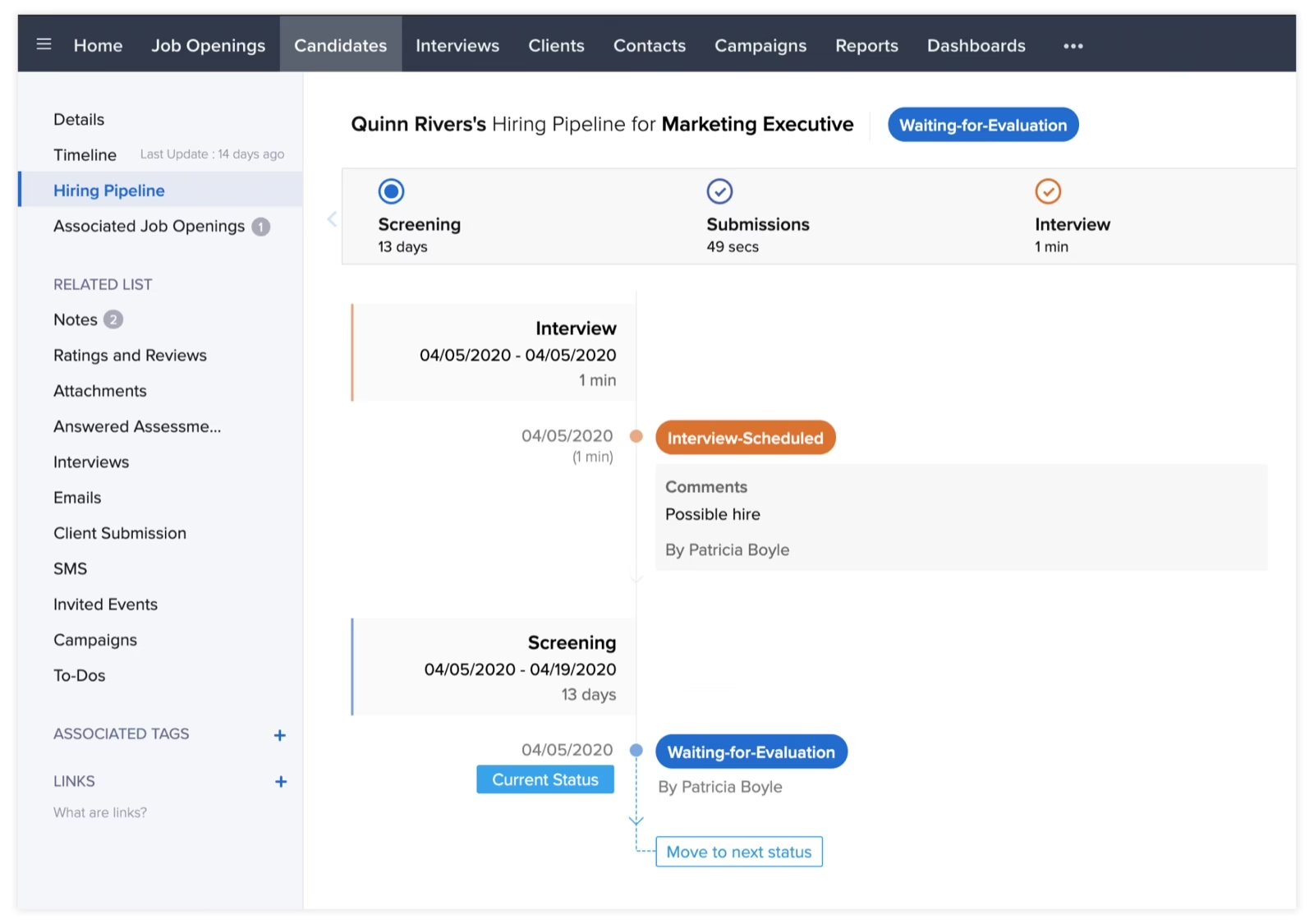
What are the key features of Zoho Recruit?
-
Zia job matching: Scores candidate-to-job fit from 0 to 100. Jobs can mark primary skills as must haves, but in the corporate HR version of the tool, it’s only available in the Enterprise plan.
-
OFCCP search and applicant flow logs: Logs the search terms that led to each job application and each candidate’s path through every stage with 1- or 2-year retention
-
Zoho PhoneBridge: Call and text candidates from inside Zoho Recruit itself
-
Skill depth and recency in matching: Zia weighs whether someone is a beginner or an expert, how recently they used each skill, and for how long
| Pros | Cons |
|---|---|
| Once you set up the Blueprint (Zoho’s process automation feature), the whole hiring process runs on its own | The interface feels busy when managing several roles at once |
| Zoho’s built-in AI gives detailed candidate analysis without separate AI tools. It also automated emails, schedules meetings and records calls. | Pipeline view could be more visual, and lower-priced plans limit language features for teams working across regions |
Pricing: Free plan with one active job per recruiter. Corporate HR Standard is $25/user/month and Enterprise is $50/user/month.
Best for: Budget-conscious teams, especially those already using Zoho.
Not for: In-house teams running more than 20 open roles at once.
9. iCIMS 4.2/5 G2
iCIMS is a full talent acquisition platform rather than a standalone ATS, built for hiring at enterprise scale. It’s designed to be heavily configured, so large employers can run very different hiring campaigns side by side. In May 2026, Gartner named it a Leader in the Magic Quadrant for Talent Acquisition (Recruiting) Suites.
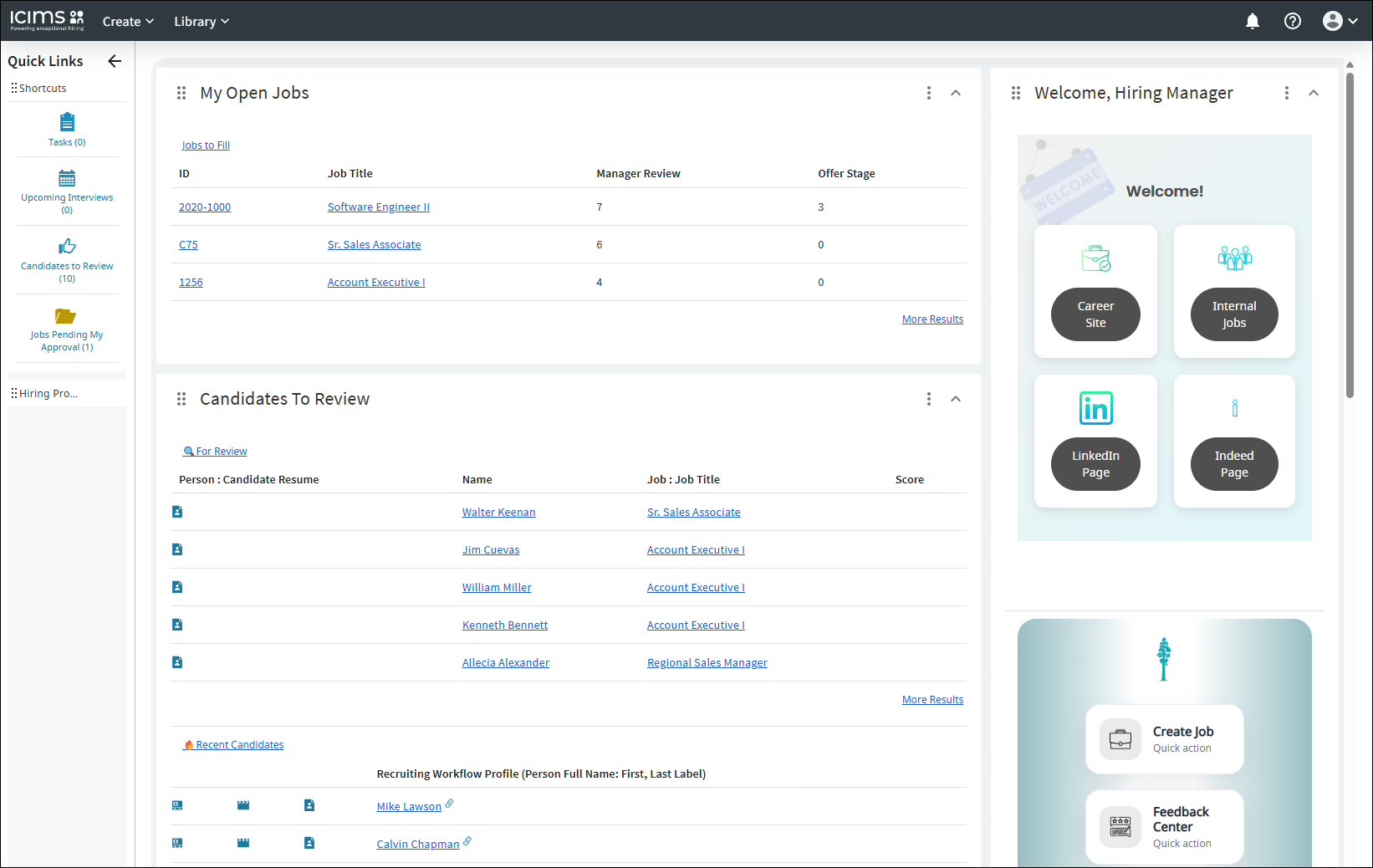
What are the key features of iCIMS?
-
Digital assistant: An AI chatbot on the career site that answers FAQs, screens applicants and lets qualified candidates book their own video interviews. It works in 20 languages over SMS, web chat, WhatsApp, and Facebook Messenger.
-
Campaign templates for rediscovery: Prebuilt CRM campaigns for silver medalists and talent pool re-engagement, with self-service campaign reporting.
-
Internal mobility signals: Employees can flag interest in lateral moves, leadership role or new departments
-
Status entrance criteria: Admins can set conditions a candidate must meet before entering a status. For example, a candidate can’t reach Phone Screen without a complete application, a resume or a prescreen form.
| Pros | Cons |
|---|---|
| Adapts to regional workflows at global companies | Setting up the third-party assessment tools from iCIMS’s marketplace is a complex project. When one breaks, it’s not clear which tool is at fault. |
| Reporting is laid out the way you’d expect to find information on user profiles | Duplicate entries aren’t checked and reports can only export 50,000 records at a time, which is a problem for companies with large data volumes. |
Pricing: Custom quote.
Best for: Large enterprises (5,000+ employees) with high-volume or multi-region hiring.
Not for: Small and mid-sized teams that need a quick setup
10. Manatal 4.8/5 G2
Manatal is an AI-native ATS and recruitment CRM for agencies and in-house teams. Ai candidate matching and resume parsing are central to the product, and it now includes an AI interviewer for automated video interviews.
It also connects with AI tools like ChatGPT through MCP, so recruiters can query their candidate data with prompts. It’s one of the lowest priced, paid options here.
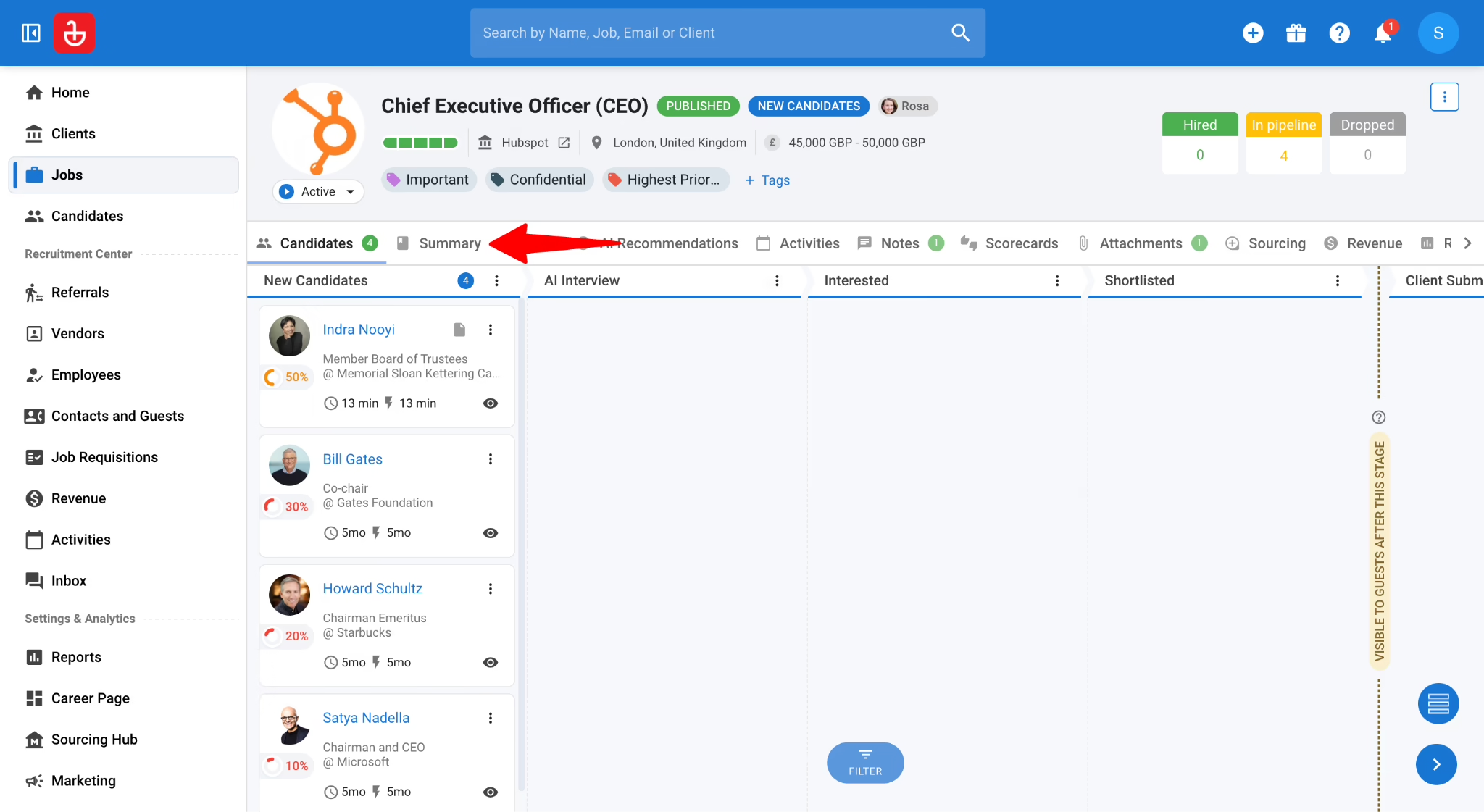
What are the key features of Manatal?
-
AI interviewer (add-on): Asynchronous video interviews of up to 10 questions, each graded against criteria you write, in 11 languages
-
People-match Chrome extension: Sources candidates from LinkedIn and GitHub straight into Manatal
-
MCP server and AI copilot: Search candidates, create jobs and manage pipelines from Claude or ChatGPT, or ask questions inside Manatal
-
Profile enrichment from 20+ platforms: Adds public social and professional data to new candidate profiles automatically
| Pros | Cons |
|---|---|
| The AI-generated summaries are a standout feature and the candidate bank helps keep a talent pool organized | There’s no reporting on recruiter performance, no proper Microsoft integration. It’s too basic for staffing operations |
| Client access is free, and they can view candidates directly with all their feedback in one place | Can’t filter applications by custom criteria from the CV or application data, making it hard to search the candidate bank by specific skills |
Pricing: Professional $15, Enterprise $35 and Enterprise Plus $55 per user per month, billed annually
Best for: Agencies and SMBs that want AI candidate matching on a budget
Not for: Enterprises needing deep HRIS and compliance integrations
How to Choose the Best Applicant Tracking System for Your Business
The right ATS is one that fits your hiring volume, your stack and your compliance obligations. Here’s how I’d work through the decision:
1. How many people will you hire this year?
Start with your yearly hiring and applicant volume, and how many roles you run at once. Plan limits matter here: some tools cap active jobs at 3, 5, or 20 on lower tiers, so a team with 30 open roles in its busiest quarter will need a higher plan from day one.
| Business size | What to look for | Best tools |
|---|---|---|
| Small businesses (under 50) | Quick setup and low entry pricing | Keka, JazzHR, or Zoho Recruit |
| Mid-market (50-1,000) | Structured hiring, reporting and HRIS integration | Keka, Greenhouse, Workable |
| Enterprise (1,000+) | SSO, audit trails, multi-region support, custom workflows | Keka, iCIMS, or Greenhouse |
2. What should it handle without extra cost?
If a customer support role gets 200 applications a week and your ATS can’t screen them automatically, a recruiter spends days reading resumes that miss basic requirements like work authorization or shift availability.
Quick note
When I was filling an urgent role, I wanted department heads to review candidates in the ATS, but every extra seat added cost. We ended up sharing updates by hand, which defeated the purpose.
Before any demo, check that the platform covers these basics:
-
Resume reading that pulls details from PDF and Word files correctly
-
Hiring workflows you can customize for each role
-
Interview scheduling that syncs with Google or Outlook calendars
-
AI screening that shows why a candidate scored the way they did
-
A mobile app hiring managers can use to review candidates and leave feedback
-
Offer letters with e-signatures
3. Will it help you meet US hiring rules?
US employers with 100 or more employees file an annual EEO-1 report, and federal contractors can be audited by the OFCCP. In an audit, you’d need to show who applied for each role, how they were screened, and why they were rejected.
Look for a system that collects voluntary demographic data separately from hiring decisions and can produce applicant records on request. If you hire in the EU or UK, also check for GDPR tools that handle consent and data deletion.
4. Will it connect to the tools you already use?
Check that your ATS connects to:
-
Your HR and payroll system, so new hires aren’t typed in twice
-
Background check and assessment providers
-
Job boards like LinkedIn, Indeed, and Glassdoor
-
Calendar, email, and video interview tools
Keka skips the HR and payroll handoff entirely, since hiring, HR, and payroll share one employee record.
5. How hard is it to switch, and how long until it’s live?
Moving from spreadsheets is very different from moving off another ATS with 40,000 candidate records and three years of hiring reports. In the second case, you need to know before you sign which data will come across and which reports you’ll lose.
Set-up time varies widely. G2 reviewers report:
| About two months | For tools like Greenhouse, Lever |
|---|---|
| About three months | For tools like iCIMS |
Before you sign, ask:
-
What format will my candidate data export in, and what will import cleanly?
-
Will my past hiring reports carry over?
-
Who sets up the integrations and trains recruiters and hiring managers?
-
Is setup included in the price or billed separately?
Choosing the Best ATS in 2026
There’s no single best ATS. What works for you depends on how you hire, how many people you’re hiring, what tools you already use, and what compliance requirements you need to meet. A staffing agency, a 40-person startup, and a 5,000-person enterprise are going to have very different needs.
If your hiring, HR, and payroll already sit in different tools, check whether bringing them together would save more time than adding another standalone system. Keka keeps hiring, onboarding, HR, and US payroll on one employee record, so you don’t re-enter the same information every time someone joins. Book a demo to see how it works.