Login
Login

W2 Tax Form: Due Dates, Box-by-Box Tax Filing Instructions



PRODUCTS
 Payroll Suite
 HR Suite
 Talent Suite
 Project Services Suite
Meet the platform tailored to your business
Core system of record
One platform for the entire employee journey

BY INDUSTRY
BY COMPANY SIZE
LEARN
EXPLORE KEKA
Form W-2 shows an employees wages and the taxes that have been taken from their paycheck. Because Form W-2 has than a dozen boxes it is easy for an employer to make an error when filling it out and it is easy for an employee to make an error when reading it. This problem is worse because the payroll records are tied to an employees tax return and the last chance to fix payroll records is in January. We explain why Form W-2 is needed, when Form W-2 must be filed we walk through Form W-2 box by box and we show how Form W-2 is different, from a 1099.
Preparing for tax returns is a hassle in itself and then comes the W2 Form; sometimes multiple ones if you work more than one job or change jobs. With more than 10 boxes in the form, you have to make sure you’re filling out all the information correctly.
If you’re overwhelmed by the whole process, you’ve landed in the right place. This article will walk you through the basics of the W2 form, including its purpose and who it is applicable for, while breaking down all its components.
Form W-2 is a tax form by the Internal Revenue Service (IRS) in the United States. It contains information about total wages paid to employees with taxes withheld. It is also known as the “Wage and Tax Statement” and is given to employees by the employer by January 31st every year.
The W2 contains income and tax information from the previous year including social security tax, medicare tax, tips, other taxes, and compensation. It helps employees file federal and state tax returns along with the employer.
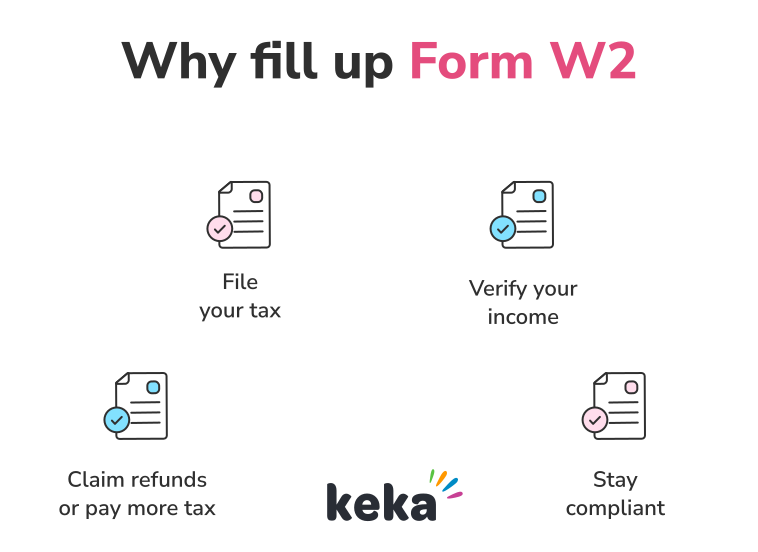
Form W2 is crucial for submitting your income and tax information to the federal government. It facilitates deciding whether you’ll get tax returns or owe the IRS.
Here are some more reasons why W2 is so important:
Employers are required to submit Form W-2 for each employee who meet these specific criteria:
Note: In rare cases, a W-2 might not be required if no taxes were withheld and the payment was less than $600, such as for certain election workers or foreign agricultural workers
Employers must provide W-2 forms to their employees on or before January 31 of each year. This gives employees enough time to file their income tax returns accurately and on time (typically by mid-April).
W-2s can be issued either:
If you haven’t received your W2 form by January 31st, ask your employer when it was sent. You can request a reprint if you don’t get it by mid-February (some employers may charge a small fee).
If your employer fails to issue the W2, you have to contact the IRS. Call 800-829-1040 and have some basic details ready including your employer’s name, address, and phone number. They may also ask for your employer’s identification number (EIN), your estimated wages, withheld taxes, and employment dates (from pay stubs).
If you can’t get your W-2, the IRS may ask you to submit Form 4852 as a substitute when filing your tax return.
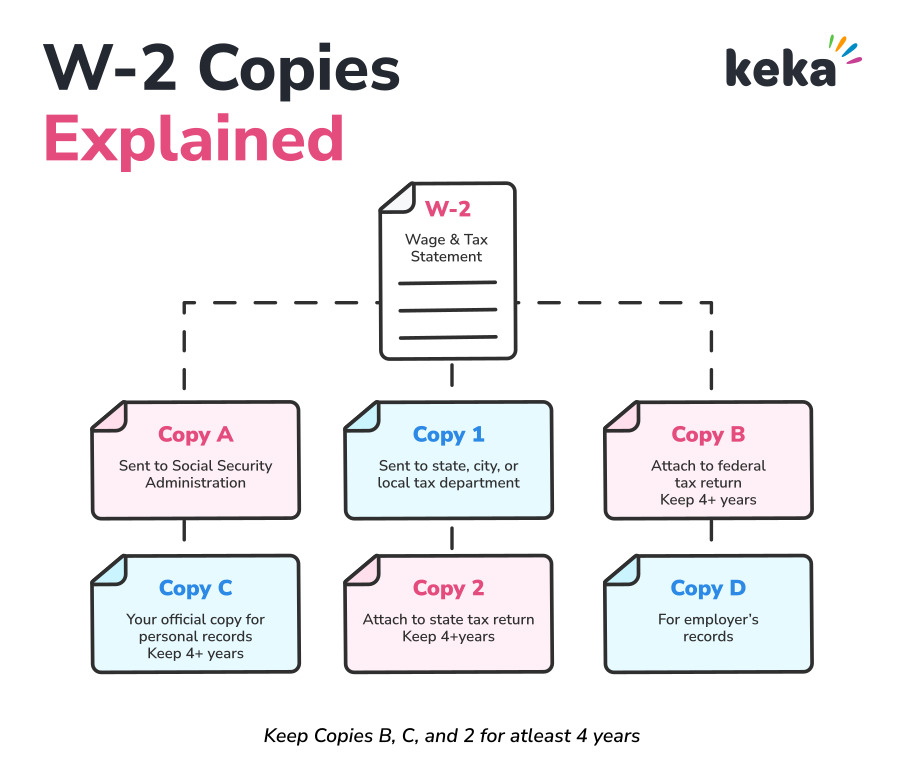
W2 may have upto five copies: A, 1, B, C, 2, and D. Here’s what they represent:
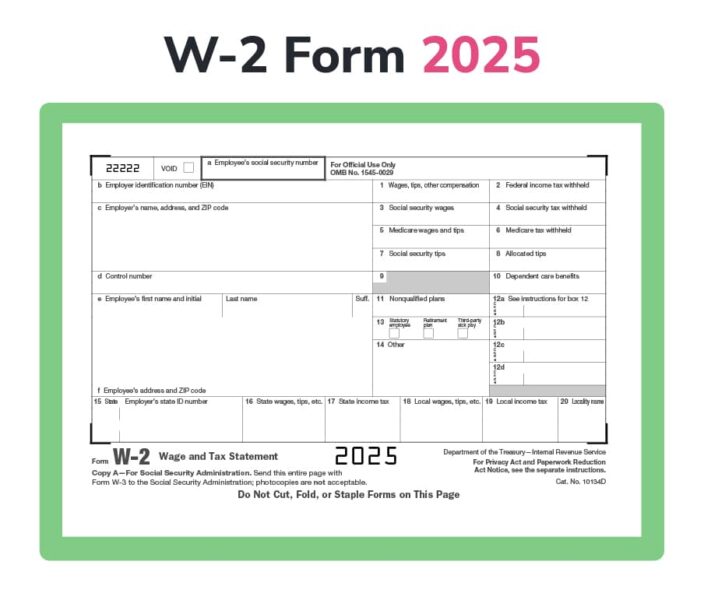
There are a total of 20 main boxes in the W2 form. Box 12 is further divided into four sub-boxes (12a, 12b, 12c, and 12d), each with its own code and amount. Here’s what each box represents and what information you should be filling in on each:
Box 12 uses codes to identify specific types of deferred compensation and other items. Here are some of the common codes:
How do you file tax using form W2?
Filing your W-2 is pretty straightforward. Most of the details you need, like your wages and taxes withheld, are already on your payroll and employee records. You’ll just need a bit of extra information about your employer, such as their Employer Identification Number (EIN) and, in most cases, their State ID Number.
To make this process easier for you, here are the detailed steps for filing your tax with the W2 form:
The main document obviously includes the W2. If you work in multiple jobs, you’ll have to fill out multiple W2 forms.
If you have income from sources other than employment (e.g., self-employment, investments, rental property), you’ll need those documents as well (e.g., 1099 forms).
Furthermore, gather any records that will help you claim deductions, such as receipts for charitable donations, student loan interest statements, medical expense records, etc.
There are many tax filing software available such as Keka, TurboTax, H&R Block, etc. These programs guide you through the filing process and often offer features like error checking and deduction finders.
Alternatively, you can hire a tax professional or a certified public accountant (CPA). This can be especially helpful if you have a complex tax situation.
The least convenient method for filing taxes is doing it manually. You have to download the necessary tax forms from the IRS website (irs.gov), fill them out, and mail them in.
Whether you use tax software, a tax professional, or paper forms, you will need to transfer the information from your W-2 to the appropriate places on your tax return. The easiest way to do this is just following the instructions provided by your tax software, tax professional, or the IRS forms.
Make sure you’re reporting all sources of income. Claim all eligible deductions and credits and double-check all entries for accuracy.
Once you’ve filled out your tax return, it’s time to file it. The fastest and most secure way is to e-file using tax software, but you can also mail a paper return to the IRS using the address listed on the form’s instructions.
After filing, either pay any taxes you owe by the deadline (usually April 15), or wait for your refund if you’re due one. You can make payments online, by mail, or through electronic funds withdrawal. Refunds typically arrive by direct deposit or check.
The primary differences between Form W-2 and Form 1099 are that a W-2 is used for employees, reporting wages and taxes withheld, while a 1099 is used for independent contractors, reporting income without tax withholding, and the recipient is responsible for their own tax payments.
Here are the differences in a table:
| Feature | Form W-2 | Form 1099-MISC |
| Used For | Employees | Independent contractors or freelancers |
| Taxes Withheld | Employer withholds federal, state, and payroll taxes | No taxes withheld; contractors pay their own taxes |
| Tax Responsibility | Employer submits taxes on behalf of the employee | Contractor handles their own tax payments |
| FICA Contributions | Employer and employee both pay Social Security and Medicare taxes | Contractors are responsible for their own FICA taxes |
| Benefits Eligibility | Typically eligible for employee benefits like health insurance, paid time off, etc. | Not eligible for employee benefits |
| Filing Deadline | Sent by January 31 to employees and the Social Security Administration | Sent by January 31 to contractors and the IRS |
| Purpose | Reports wages, tips, and taxes withheld | Reports payments of $600 or more to non-employees |
| Employer’s Responsibility | Employer handles tax withholdings and reports earnings | Payer only reports the total amount paid; no withholdings |
There are minor differences in the form W2 every year. The IRS makes periodic updates to the form which can include changes to box labels, tax rate updates, filing requirements or deadlines, etc.
Here are the major differences between the W2 forms for 2023 and 2024:
| Category | 2023 | 2024 |
| Box 12 – Code II | No code for Medicaid Waiver Payments | New code II for Medicaid Waiver Payments |
| Social Security Wage Base | $160,200 | $168,600 |
| Penalties | Lower penalty rates | Increased penalties, adjusted for inflation |
More than 130 million people in the United States of America use the W2 form. Hence, knowing how to read and use this form helps you file your taxes accurately and claim any refunds you’re owed.
As already mentioned, if you spot issues with your W-2, start by contacting your employer. They can often correct mistakes quickly. If the problem isn’t resolved, you may need to file a complaint with the IRS.
Lastly, keep in mind that codes like AA (for designated Roth contributions under a 401(k) plan) and other Box 12 entries provide important details about your earnings and withholdings.
You need to review all information in your W2 correctly because the repercussions would be costly. Filing with accurate information ensures you stay compliant with tax laws, reduces the risk of audits, and prevents delays in receiving any refunds you’re owed.
If you notice an error on your W-2 form, such as incorrect wages, tax withholdings, or a misspelled name, contact your employer immediately. They are responsible for correcting the mistake by filing a Form W-2c (Corrected Wage and Tax Statement) with the Social Security Administration (SSA). If your employer is uncooperative or refuses to make the correction, you can contact the IRS at 800-829-1040 for assistance.
If you lose your W-2, start by asking your employer for a replacement copy. Many companies also offer online access to W-2s through payroll software providers like Keka, ADP or Paychex, which allows you to download and print a copy. If you cannot get a replacement from your employer, you can contact the IRS.
Yes, many employers provide online access to W-2 forms through their payroll systems. You can log into your employer’s HR or payroll portal (e.g., ADP, Paychex, or Workday) to download a digital copy. If your employer uses a third-party service, they should provide you with instructions on how to access your W-2 online.
Yes, you can still file your taxes without a W-2, but you’ll need to provide accurate information. If you don’t receive your W-2 by mid-February, contact your employer or the IRS. The IRS may instruct you to file using Form 4852 (Substitute for Form W-2), which requires you to estimate your earnings and taxes withheld based on your pay stubs or other records.
To get a copy of your W-2 online, check if your employer provides digital access through their payroll provider. Platforms like ADP, Paychex, or Gusto often allow employees to log in and download W-2 forms. If you cannot access it through your employer, you can request a wage and income transcript from the IRS through their Get Transcript tool.
Subscribe to keep up with the latest strategic finance content.
Request a demo