


 Login
Login


isolved is a capable HCM, especially when payroll and tax administration are high on your priority list. One G2 user said it cut what used to be a five-hour manual payroll process to just 30 minutes.
Not only that, compared with the alternatives I looked at, it has one of the strongest payroll-specific AI workflows. Its Guardian AI can spot unusual payroll entries, rank issues by severity, and even prepare corrections for an admin to review before anything changes.
But that doesn’t mean it works equally well for every HR and payroll team. The right HCM still depends on your team’s priorities, workflows, and the level of flexibility you need beyond payroll.
For this guide, I compared eight isolved alternatives across the things that matter most when you’re actually running HR and payroll. Let’s get started!
An overview of the 8 best isolved alternatives
I narrowed the list to eight platforms that cover much of the same payroll and HCM ground that isolved offers:
| Alternative | Best for | Pricing | G2 rating (as of September 2026) |
|---|---|---|---|
| Keka HR | Ease of use and connected people operations | Custom pricing. | 4.4/5 |
| UKG Ready | Complex time, scheduling, and payroll rules | Custom pricing. | 4.4/5 |
| Paylocity | Combining payroll with employee communication and engagement | Custom pricing.. | 4.4/5 |
| Rippling | Automating HR, payroll, and IT workflows | Custom pricing. | 4.8/5 |
| Paycom | Employee-driven payroll and HR self-service | Custom pricing. added based on requirements. | 4.6/5 |
| Dayforce | Complex payroll and workforce management | Custom pricing. | 4.2/5 |
| Paycor | Payroll teams managing frequent adjustments and variable pay | Custom quote | 4.0/5 |
| Paychex Flex | Payroll and benefits backed by specialist assistance | Custom pricing. | 4.1/5 |
Why do businesses look for isolved alternatives?
If you’re already comparing isolved alternatives, you probably don’t need us to convince you that something isn’t working. Still, checking recent user feedback shows that many HR and payroll teams run into similar friction points while using isolved.
- The interface can feel less intuitive as you get into more features. One reviewer said, “The interface can be a bit confusing for me,”. Another said the sheer number of features and options can make the system feel kind of complex unless you take time to fully learn it. In fact, multiple users suggest that isolved’s functionality can add some navigation and learning friction.
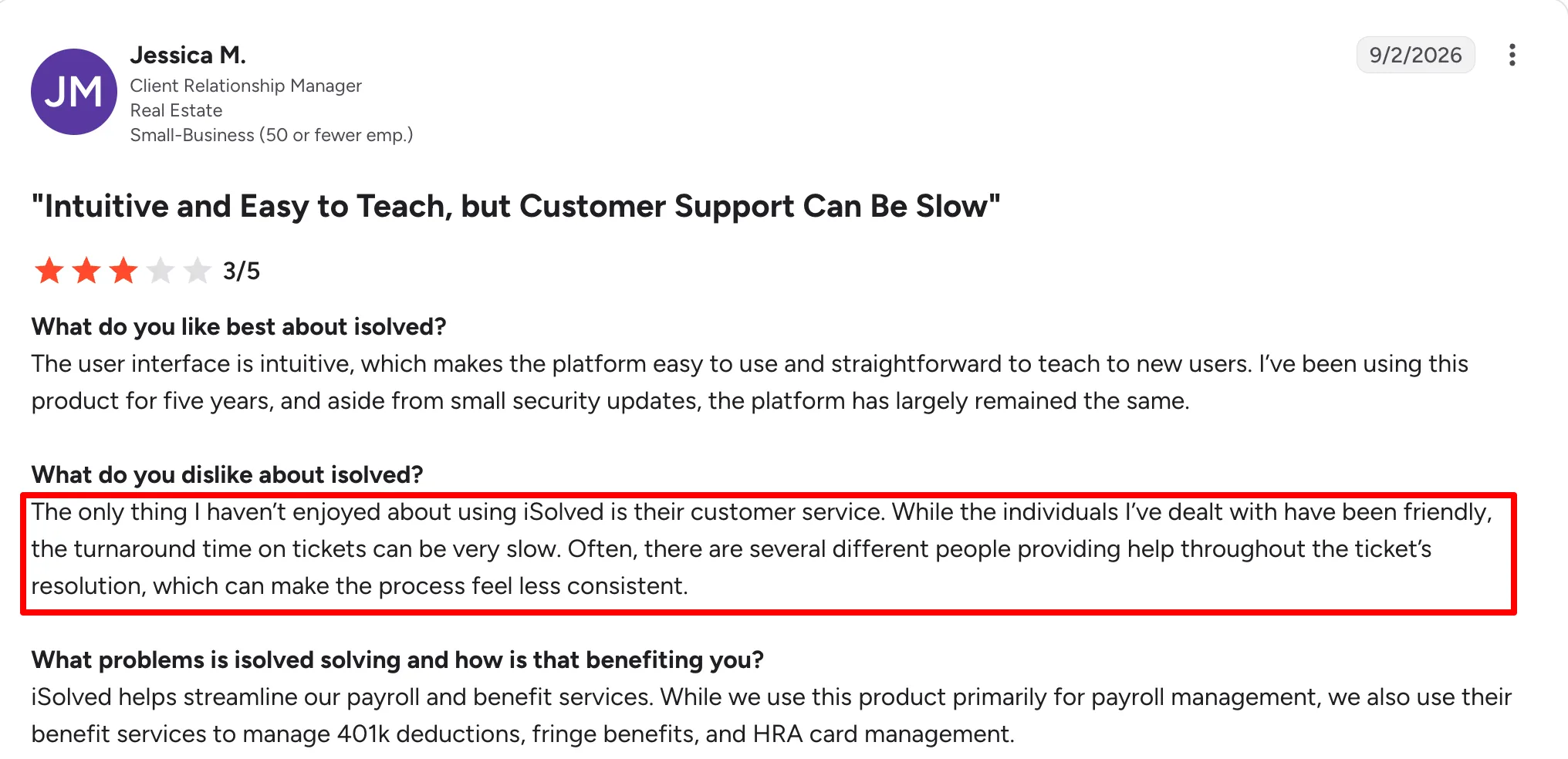
- Customer support can be slow when you need it most. Users often describe the support team as friendly, but response times are a recurring concern. One reviewer said, “The turnaround time on tickets can be very slow,” and noted that different people within their organisation faced the same issue.
- Reporting gives you plenty of data, but getting the right answer can take work. One user said, “There are a ton of reporting options available, maybe too many,” and sometimes had to manually combine information from several reports.
- Your cost can grow as you add functionality. Add-ons and integrations came up repeatedly in the research. As one reviewer put it, “They try to sell more and everything has a subscription.”
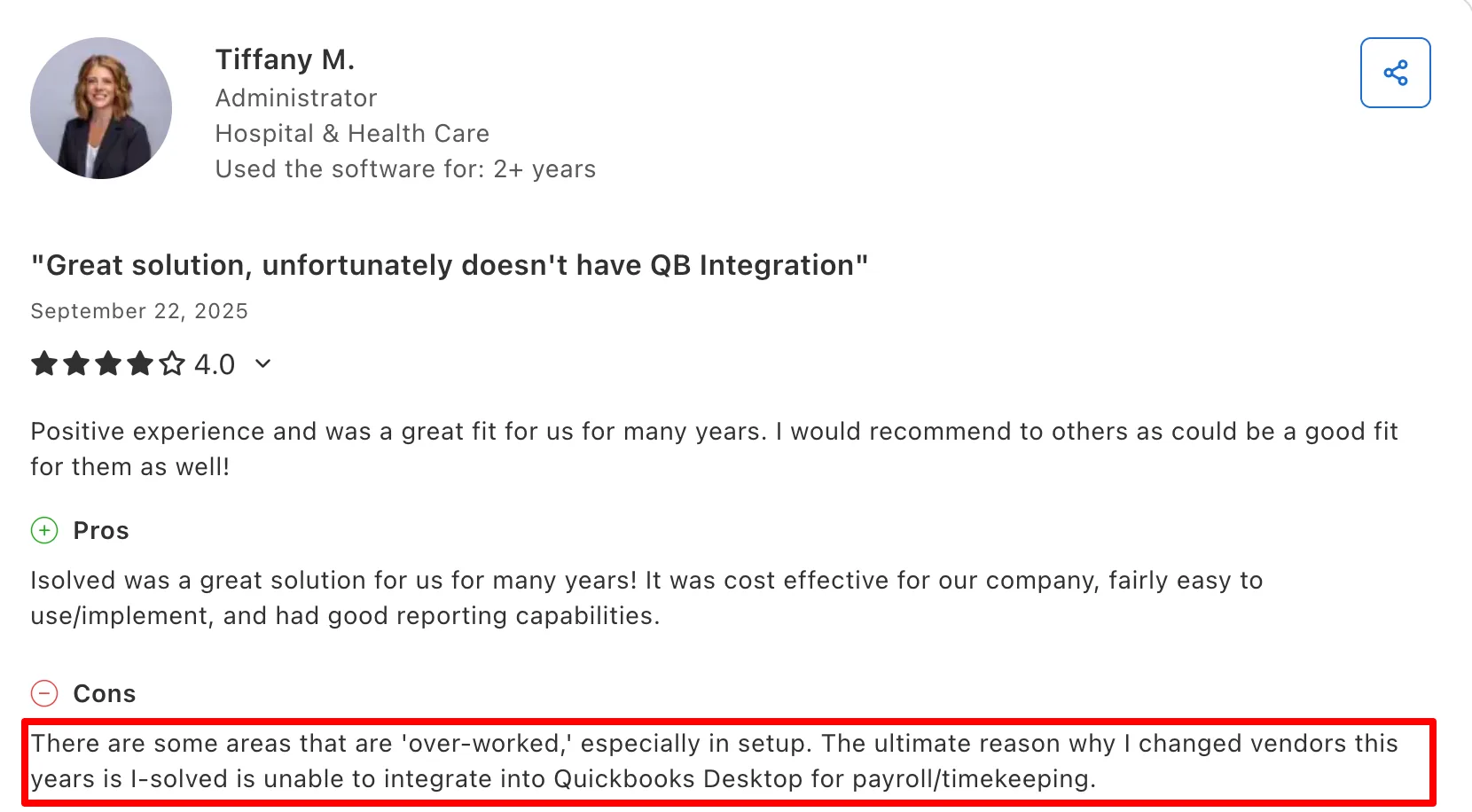
- Integration gaps can become deal-breakers. One customer said they ultimately switched from isolved because they couldn’t integrate with QuickBooks Desktop for payroll/timekeeping.
- Some everyday workflows still feel too manual. A reviewer described certain processes as “very manual and click heavy” and said tasks that should take one or two workflows can take longer.
- Configuration changes can sometimes create unexpected problems elsewhere. One customer said adding or changing a service “always results in something else breaking.” That shows why configuration stability matters when switching HCMs.
How I selected this list of 8 best isolved alternatives?
I couldn’t test every feature of every platform end to end, and I don’t want to pretend we did. So, we built the list from several types of evidence and cross-checked them wherever possible.
- I spent time with real user feedback and switch stories. I reviewed G2, Capterra, Reddit, and available accounts from companies that moved away from iSolved to see which strengths and frustrations kept coming up.
- I checked vendor claims against real-world experience: I used official product pages, help docs, pricing, implementation, and support material, then compared those claims with what users actually reported.
- I checked the products in action: I used demos, walkthroughs, and trials where available to understand how important workflows actually work.
- I evaluated what actually matters in a switch: multi-state US payroll depth, payroll accuracy controls, HCM breadth, implementation and migration, pricing transparency, support responsiveness, and the practical usefulness of AI.
A quick transparency note: Keka is our product, so I’ve placed it at rank 1 based on our evaluation criteria, but I’ve kept an unbiased approach so you can find your best fit. I encourage you to demo multiple platforms before deciding.
8 Best isolved Alternatives in 2026
For every alternative, I’ll show you its key features, pros, cons, pricing, who is it best for and who it is not for.
Keka (4.4/5 on G2)
Keka is a unified HR, payroll, and PSA software that brings people and project management together. More than 12,500 organizations across 120+ countries use Keka to manage their workforce and operations. Its platform includes HR, payroll, hiring, performance management, employee experience, time tracking, resource management, project management, timesheets, billing, and analytics. Keka is also known for its intuitive interface and focus on ease of use.
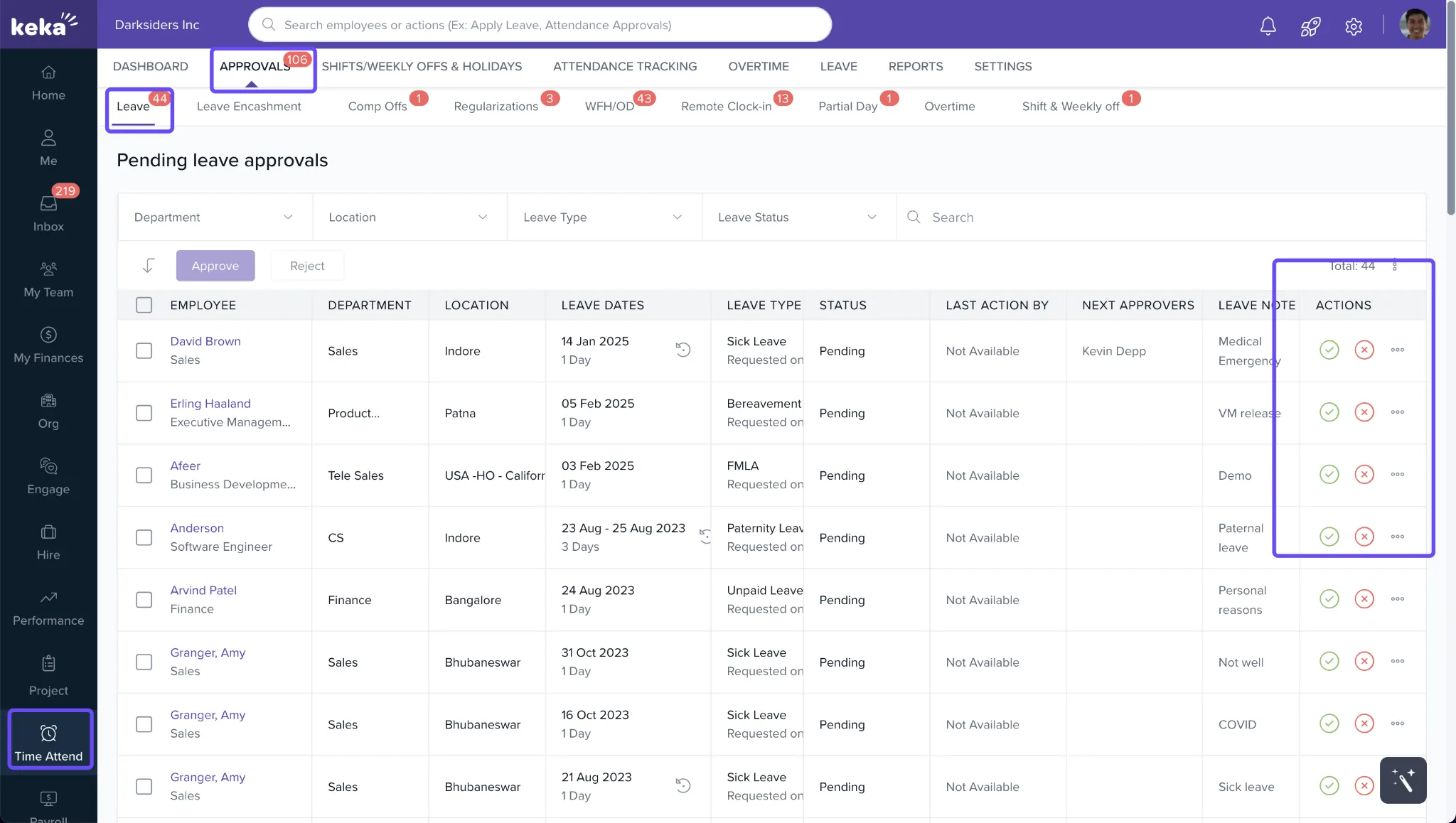
Keka HR’s ease of use is highlighted time and again by users. In fact, one HR manager said payroll can be completed in just six steps, while another said the platform is easy to use and requires less employee training.
Keka has an intuitive web and mobile app that helps employees check payslips, request leave, review attendance and access tax information without asking HR every time.
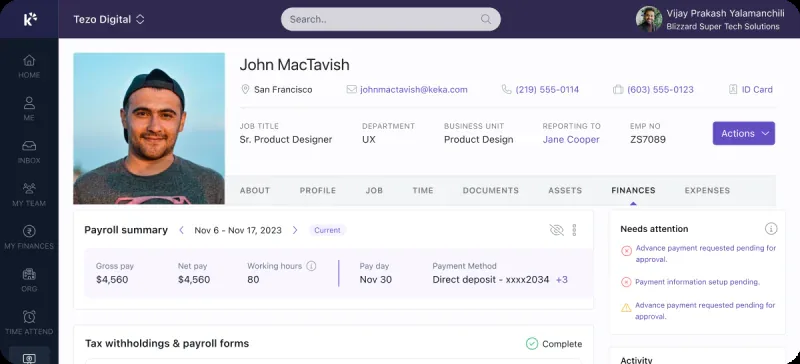
For managers, even processes like shift allowance requests can move out of email and spreadsheets into one approval workflow where you can see who requested what, for which shift, and whether anything looks off.
Keka is adding AI into these everyday workflows as well. Keka AI can answer people-related questions, help with leave, screen candidates, analyze workforce data, and take approved actions. One reviewer also liked having its AI bot available 24/7 for routine queries.
Key features
- Run payroll in all 50 states with taxes, garnishments, W-2s, and 1099s.
- Sync HR and payroll data across time, pay, overtime, and deductions.
- Manage multiple entities and worker types from one view.
- Sync benefits with payroll to update deductions automatically.
- Manage service operations with timesheets, utilization, billing, and invoicing.
Keka pros and cons
| Pros | Cons |
|---|---|
| Keka is designed to make HR and workforce processes easy to navigate for HR teams, managers, and employees. | Keka can work as a single point solution, but organizations that adopt the broader ecosystem can benefit more from the connected workflows and data across the platform. |
| Strong employee self-service for leave, attendance, payslips, shift scheduling, tax details and more | Organizations may need to clearly define their existing approval structures and workflows before configuring them for automation to get best results. |
| Centralized HR operations across attendance, leave, and payroll. | As organizations expand their use of the platform, administrators may need to decide which features, workflows, permissions, and reports are most relevant to their teams. |
| Keka PSA covers resource management, project management, timesheets, opportunity management, billing, invoicing, and analytics |
Keka pricing
Keka does not publish a fixed US price, so you’ll need a custom quote.
Best for:
Growing SMBs and mid-market companies with lean HR teams that want easy-to-run HR and payroll. Especially suitable for technology, IT services, consulting, and agencies.
Not for:
Companies that need deeply customized workflows or want the longest possible track record around highly complex US payroll, tax and benefits administration.
Thinking about switching HR software?
Most teams go live on Keka in weeks, not months, with no hidden fees along the way.
2. UKG Ready (4.4/5 on G2)
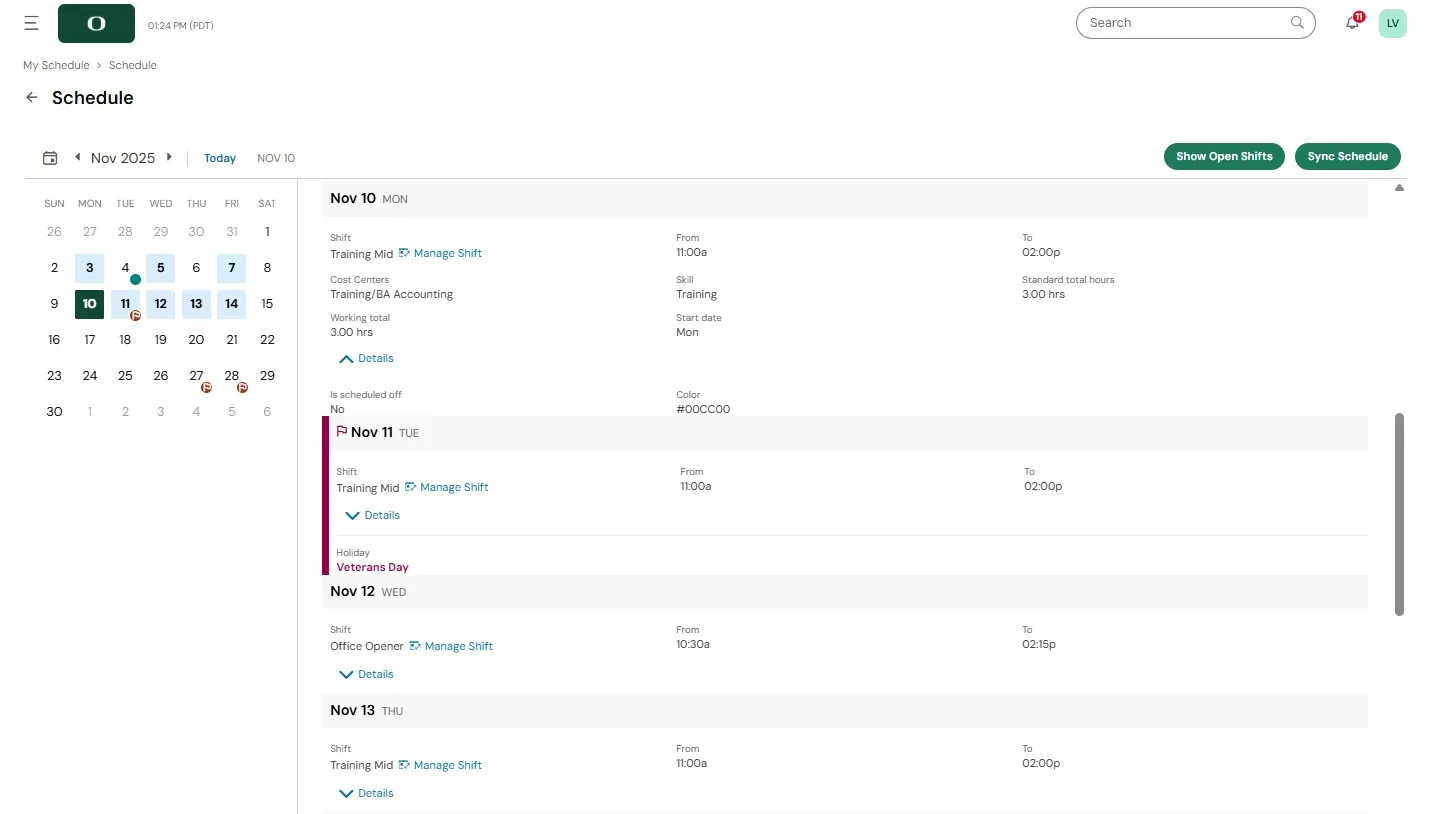
UKG Ready is especially useful when your payroll depends on getting time, shifts, overtime, PTO, and approvals right first rather than fixing everything at payroll time.
For example, if someone works across two departments on the same day and earns a shift premium, UKG Ready can track the hours for you, apply the right rules, route the timecard for approval, and pass the approved data into payroll.
Key features
- Manage complex pay rules across shifts, overtime, jobs, and accruals.
- Customize workflows for approvals, PTO, forms, and permissions.
- Sync HR, time, and payroll automatically.
- Build workforce reports from HR and payroll data.
- Use Bryte AI for payroll questions and guidance.
- Enable mobile self-service for punches, schedules, and approvals.
UKG Ready pros and cons
| Pros | Cons |
|---|---|
| Customize approvals, security, forms, time rules, and policies. | The login process gets criticized by some users. One reviewer said it could be easier to use, especially because two-factor authentication through text or call can feel cumbersome. |
| Useful UKG community for peer advice, ideas, and troubleshooting. | Support can be inconsistent. Response quality and speed vary. |
| Flexible reporting. One HR director explained that almost every screen can be treated like a report and filtered or adjusted as needed. | Mobile app might have bugs and feature gaps. |
UKG Ready pricing
UKG Ready uses custom pricing.
Best for:
Growing SMBs and mid-market companies with hourly, shift-based, or multi-location workforces that need payroll, time, scheduling, and workforce rules connected. Especially relevant for healthcare, manufacturing, construction, retail, and hospitality.
Not for:
Very lean HR teams with straightforward payroll needs that want a low-maintenance system and don’t need extensive workforce-management configurability.
3. Paylocity (4.4/5 on G2)
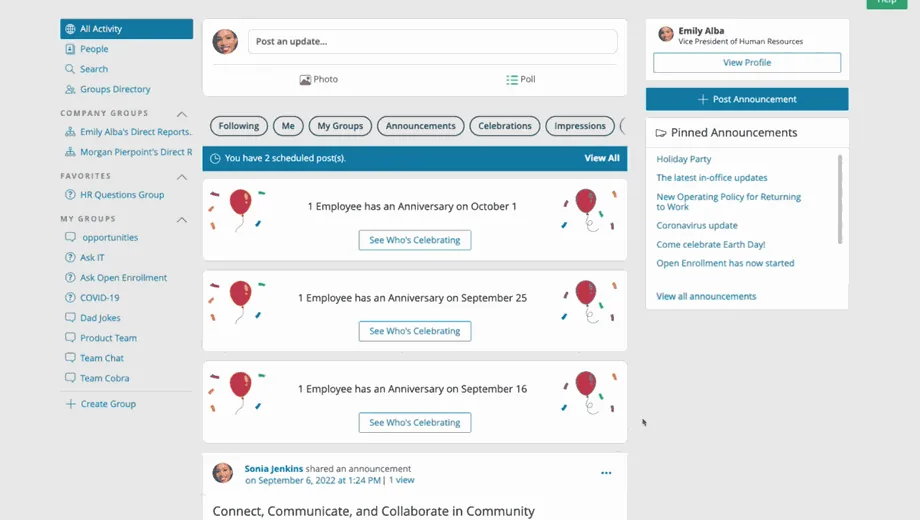
With Paylocity, employees have more reasons to open the HCM than just checking a paycheck. Alongside payroll, PTO, benefits, and timecards, Community gives you a place to share company updates, create groups, run surveys, recognize coworkers, and communicate with distributed teams.
That makes Paylocity particularly useful if you have employees who are rarely sitting at a desk. One HR director said they chose Paylocity because they wanted an app with more and better features for their employees, especially for people working on the go.
Key features
- Catch payroll errors early with 40+ automated pre-submission audits.
- Feed approved time, retro, and prorated pay into payroll.
- Sync payroll, HR, and time to reduce manual work.
- Engage employees with Community, surveys, recognition, and rewards.
- Build custom reports across HR and payroll data.
- Use Ignite AI for workforce questions, recruiting, and workflows.
- Connect third-party tools through integrations, APIs, EDI, and SFTP.
Paylocity pros and cons
| Pros | Cons |
|---|---|
| Useful AI based self-service for employees to handle policy related queries. | Some users say they pay for features they don’t need |
| Users especially appreciate being able to access Paylocity when they’re away from a desk. | e. Users mention limitations when customizing applicant forms and collecting specific candidate information. |
| Some users praise implementation specialists for staying involved through the first few payroll runs. | Some modules offer less workflow and field control. |
Paylocity pricing
Paylocity uses custom pricing based on workforce size and selected products.
Best for:
Growing SMBs and mid-market companies that want strong US payroll plus better employee engagement, especially distributed, hybrid, or deskless teams.
Not for:
Teams that want a simple payroll-first system or prioritize highly specialized benefits, tax support, and hands-on service over broader employee-experience features.
4. Rippling (4.8/5 on G2)
Rippling is especially useful when one HR change creates work across several teams. For example, a new hire may need payroll and benefits setup, app access, a laptop, spending limits, and manager onboarding tasks. Rippling can trigger many of those steps from the same employee record, which is where it goes beyond a traditional HRMS.
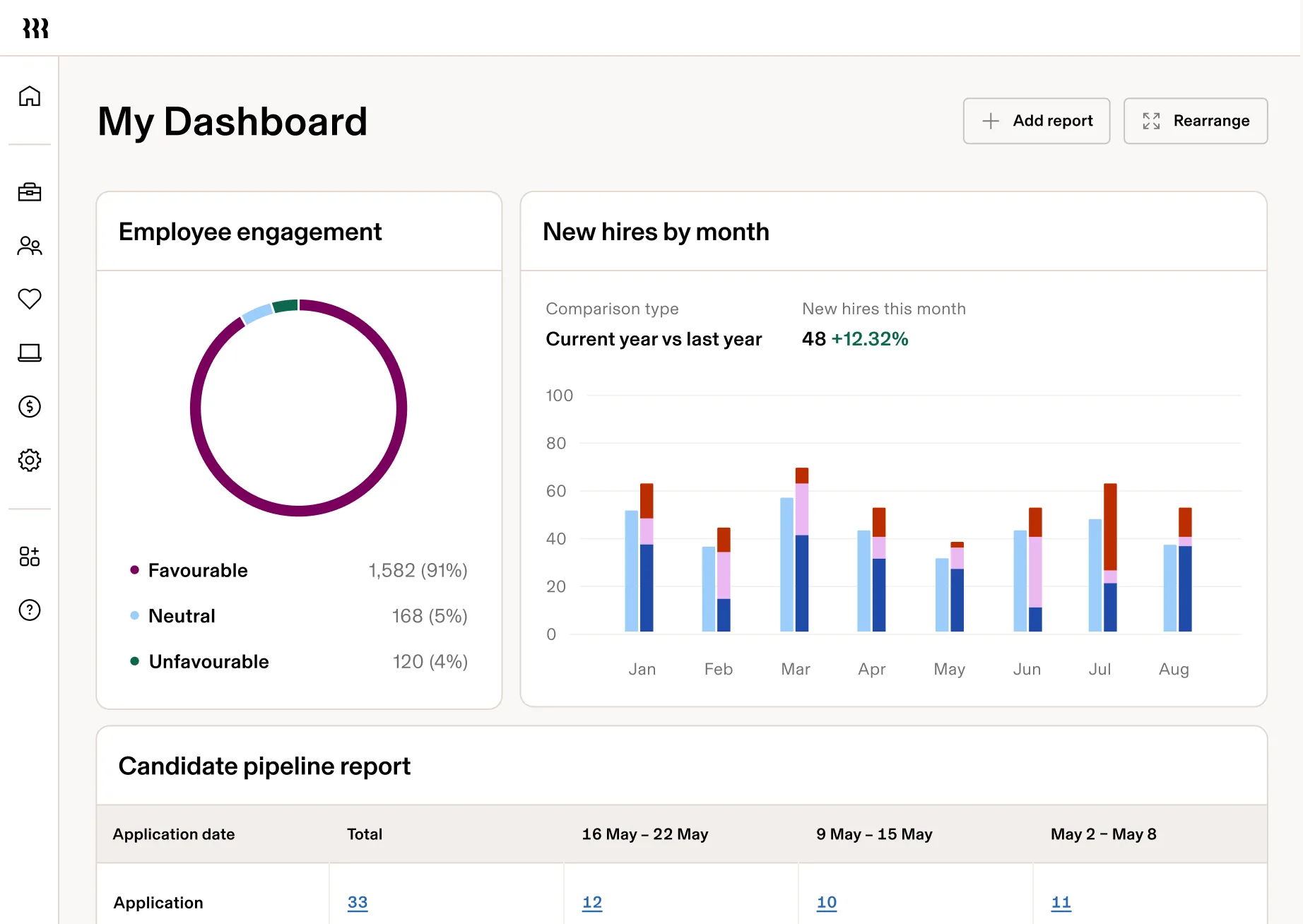
Payroll stays connected too. New hires, salary changes, time, and benefit deductions can flow in automatically, and teams can compare pay runs before approving them.
Key features
- Automate the employee lifecycle from onboarding to offboarding.
- Sync employee changes with payroll automatically.
- Manage IT access and devices from the same employee record.
- Use Rippling AI for questions, reports, bonuses, and workflows.
- Report across HR, payroll, IT, and Finance in one place.
- Connect 650+ apps across your tech stack.
Rippling pros and cons
| Pros | Cons |
|---|---|
| Users frequently praise its clean, organized navigation. | Some international users report country-specific issues. |
| Implementation can be very smooth when the setup is well managed. | One reviewer said unclear or outdated instructions made troubleshooting a device-management issue |
| Connects HR, IT, finance, security, and productivity tools. | Advanced setup takes time due to complex workflows and permissions. |
Rippling pricing
Pricing starts at $8/user/month + $40 base fee for small businesses, but broader HCM setups require a custom quote.
Best for
Growing SMBs and mid-market companies with lean HR/ops teams that want to automate HR, payroll, IT, and Finance. Especially strong for technology, SaaS, remote, distributed, and fast-growing businesses with large app stacks.
Not for
Companies that need simple payroll and basic HR, prefer hands-on specialist support, or have highly complex multi-location payroll requirements.
5. Paycom (4.6/5 on G2)
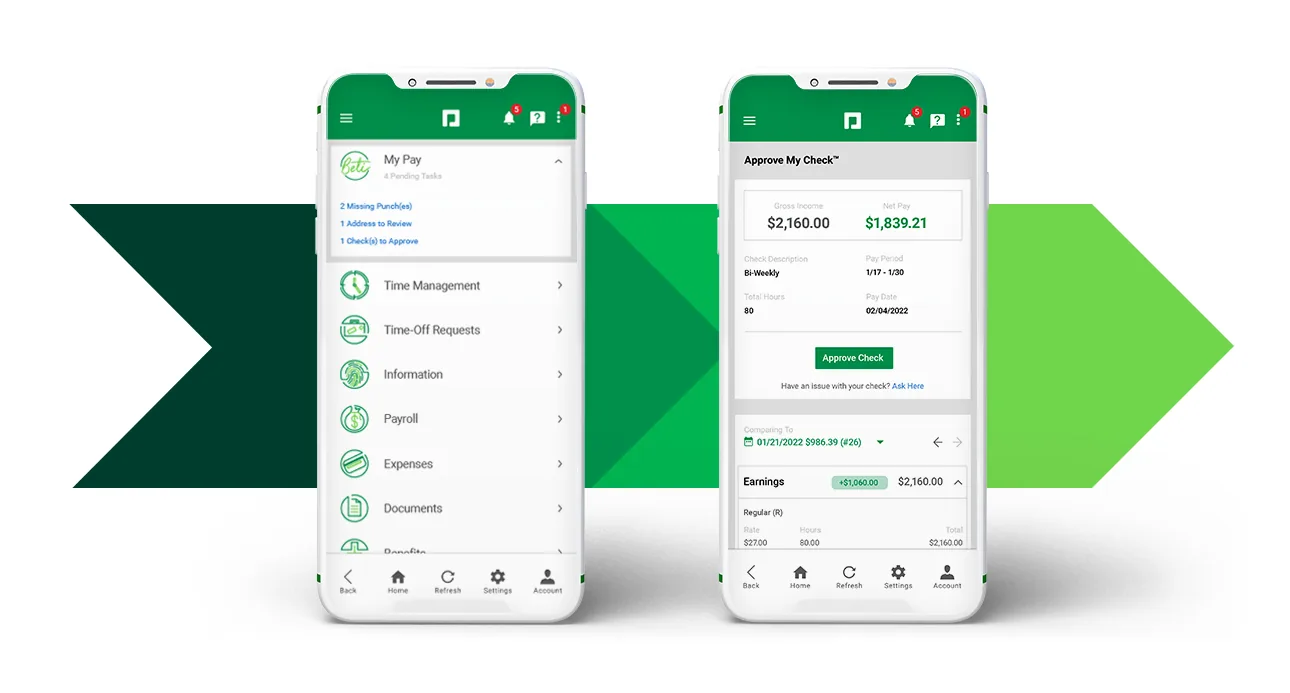
Paycom takes a slightly different approach by giving employees a role in checking payroll before payday. Its Beti system builds payroll from live data like timecards, PTO, expenses, benefits, taxes, and compensation changes. Then employees can use the ‘Approve My Check’ feature to review hours, deductions, gross pay, and net pay before payroll closes. This helps catch issues like missing overtime before the paycheck is finalized, not after.
Key features
- Build payroll continuously with live time, PTO, expenses, and benefits data.
- Enable employee self-service for pay, benefits, PTO, expenses, and personal details.
- Automate time-off decisions with GONE.
- Use IWant AI to find HR data and actions faster.
- Keep HR and payroll in one database to reduce duplicate entry.
Paycom pros and cons
| Pros | Cons |
|---|---|
| Straightforward for everyday payroll and employee tasks. | Setup quality can affect the long-term experience. |
| Employees can manage pay, PTO, and HR tasks on the go. | Some users struggle to combine information across modules or build the exact custom report they need. |
| Good self-service for employees to handle routine tasks | Some customers say the total cost becomes harder to justify when they don’t use every capability they are paying for. |
Paycom pricing
Best for
Growing SMBs and mid-market companies that want employee-driven payroll and HR self-service, with lean teams focused on exceptions rather than routine admin.
Not for
Companies that want payroll fully controlled by HR or rely on highly customized reporting, complex integrations, and specialized third-party systems.
6. Dayforce (4.2 /5 on G2)
Dayforce starts to make sense when your payroll gets complicated because of different shifts, overtime, job changes, or multiple locations. Instead of waiting until payroll closes, you can keep pay calculations updated as workforce data changes during the pay period.
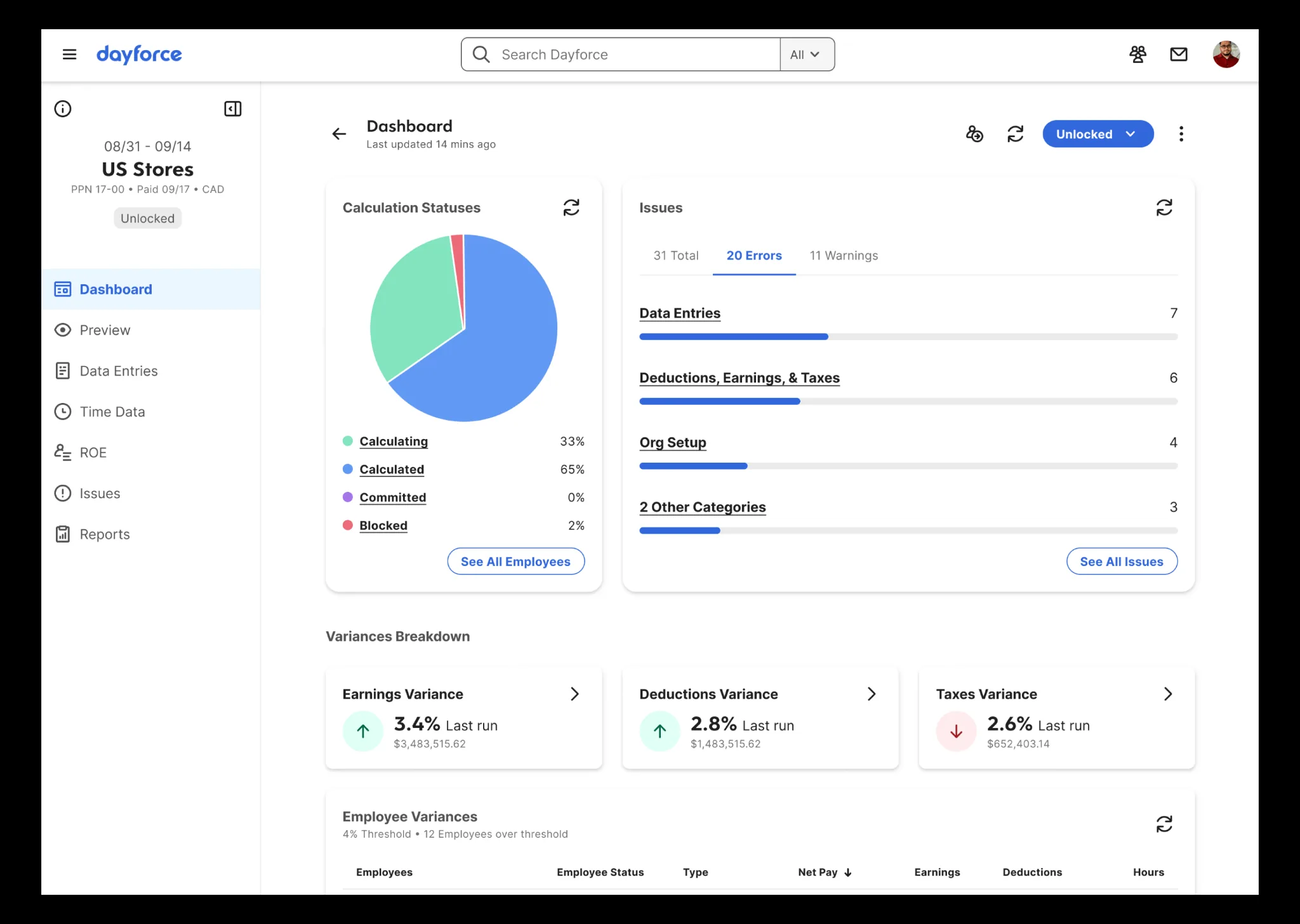
You can also connect that payroll process much more closely with operations. Dayforce can take you from labor forecasting → scheduling → actual time worked → pay rules → payroll, which is especially useful if you run a large hourly or shift-based workforce.
One mid-market G2 reviewer summed it up simply: “Dayforce is my one-stop shop for scheduling and payroll needs.”
Key features
- Calculate payroll continuously as time and pay data change.
- Sync scheduling, time, and payroll automatically.
- Handle complex workforce rules across shifts, overtime, jobs, and locations.
- Optimize labor planning with demand, hours, overtime, and cost data.
- Support global payroll across 200+ countries and territories.
- Use Dayforce AI for pay, time-off, forecasting, talent, and analytics.
Dayforce pros and cons
| Pros | Cons |
|---|---|
| Payroll, time, benefits, and employee data stay connected. | Implementation can become a major project. G2 data derived that the actual implementation might take seven months. |
| One Capterra reviewer specifically praised real-time payroll for helping reduce processing errors. | Advanced custom reports can be complex. |
| Well suited to hourly and shift-based workforces. | Support experiences are mixed and inconsistent. |
Dayforce pricing
Best for
Growing mid-market companies with hourly, shift-based, or multi-location workforces that need payroll, time, scheduling, talent, and analytics together. Especially strong for 200–500 employee organizations.
Not for
Smaller companies with straightforward salaried payroll and very lean HR teams that don’t need sophisticated scheduling, workforce planning, or global scalability.
7. Paycor (4.0/5 on G2)
If you regularly deal with bonuses, gross-ups, retro pay, one-off checks, corrections, or void-and-reissue situations, you get much more flexibility around those exceptions with Paycor than you’d expect from a standard payroll workflow.
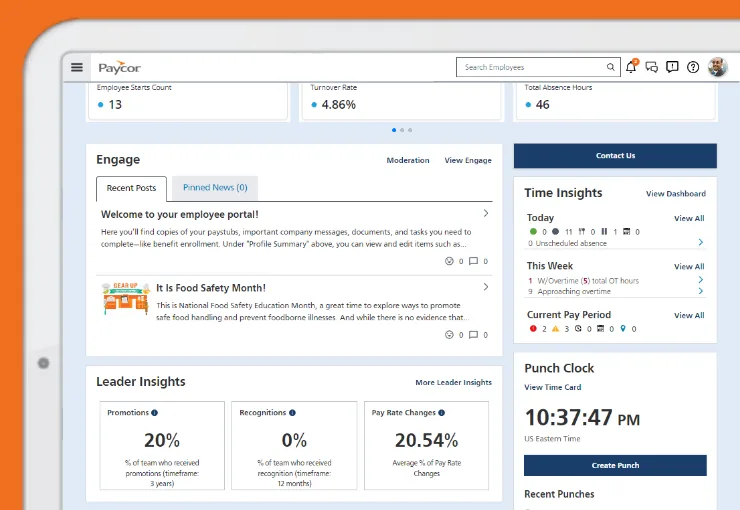
You can still use it as a broader HCM too. Payroll, HR, time, benefits, recruiting, onboarding, performance, and analytics can all sit in the same system, so you are not choosing a payroll-only tool just to get that flexibility.
Key features
- Handle complex payroll with bonuses, gross-ups, retro pay, corrections, and reissues.
- Run multistate payroll with federal, state, and local tax support.
- Enable employee self-service for pay, tax forms, PTO, and personal details.
- Manage benefits with payroll and carrier connections.
- Analyze workforce trends across pay, turnover, headcount, and equity.
- Use Paycor AI for HR questions and workforce insights.
Paycor pros and cons
| Pros | Cons |
|---|---|
| Strong self-service for employees to access pay, tax forms, PTO, and HR information easily. | The UI can feel cluttered. |
| Fits well into broader HR and payroll stacks. | Users say building custom reports can be frustrating and less intuitive than expected. |
| Offers AI-supported sourcing and recruiting tools. | Users mention slow loading and occasional login frustrations, especially during busier periods. |
| It fits the mid-market well. Paycor is especially relevant for employers in the 50–1,000 employee range, with a sweet spot around growing SMBs and mid-market teams. | Subpar AI features and clearly not a major differentiator. |
Paycor pricing
Best for:
SMBs and mid-market companies with lean payroll teams that regularly handle bonuses, commissions, gross-ups, retro pay, and corrections, while still needing broader HR, benefits, time, talent, and analytics.
Not for:
Organizations that prioritize hands-on payroll-tax or benefits administration, or need highly specialized reporting, integrations, and white-glove support.
8.Paychex Flex (4.1/5 on G2)
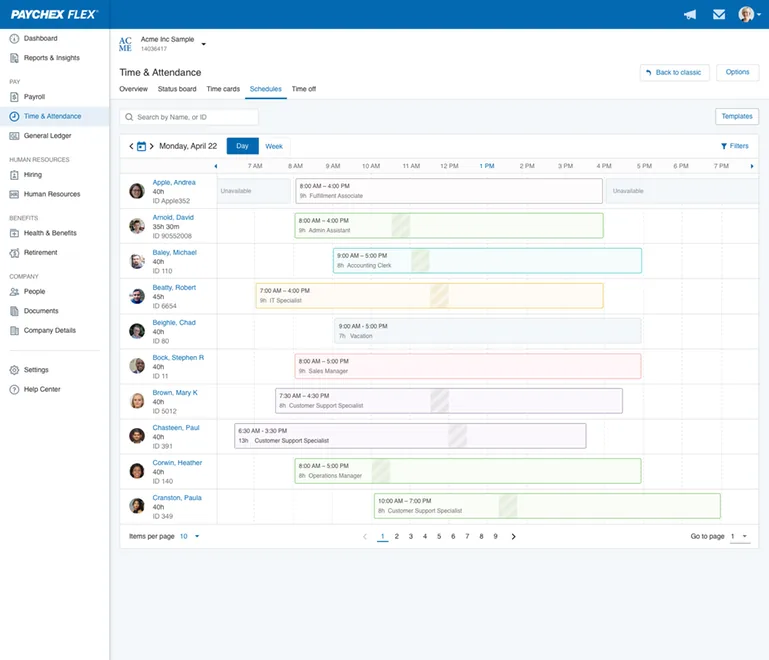
Paychex Flex is a good fit if you want payroll software but also value having people behind it to help.
You can enter hours, salaries, bonuses, and time off, while Paychex handles tax calculations, payments, and filings. Depending on your plan, you can also get help from payroll and HR specialists instead of managing everything internally.
That support becomes especially useful for lean HR teams. You can also add benefits administration, 401(k) services, HR guidance, and PEO support as your needs grow.
Key features
- Automate routine payroll with deductions, deposits, and tax calculations.
- Get specialist support for payroll and HR.
- Handle multi-state taxes with filings and tax administration.
- Add benefits and retirement including health, 401(k), FSA, and HSA.
- Enable employee self-service for pay, PTO, benefits, and tax forms.
- Expand into broader HR with time, hiring, performance, and PEO services.
Paychex Flex pros and cons
| Pros | Cons |
|---|---|
| Strong specialist support with Payroll, HR, benefits, and PEO experts available. | Payroll audit checks could be stronger. |
| Onboarding can be very hands-on with detailed implementation support from specialists. . Users praise detailed implementation support from specialists across different Paychex teams. | Users mention difficulty finding, refining, and customizing the reports they need. |
| Connects with multiple HR tools and services. | Pricing can feel expensive, especially as services and add-ons are added. |
Paychex Flex pricing
Best for:
Small and growing US employers with lean HR/payroll teams that want straightforward payroll with human specialist support, plus benefits, retirement, or HR administration.
Not for:
Mid-sized organizations with complex payroll or HR workflows, workforce structures, or reporting and integration needs that require greater HCM flexibility.
Which isolved alternative is right for you?
Eight options can feel like a lot. The easiest way to narrow them down is to start with what you actually want to improve after isolved:
- Want intuitive HR platform that covers the depth and complexity of an enterprise software? Start with Keka.
- Need stronger time, scheduling, or complex payroll rules? Look at UKG Ready or Dayforce.
- Want better employee communication and engagement? Choose Paylocity.
- Want HR, payroll, IT, and Finance automation? Rippling stands out.
- Want employees more involved in payroll? Consider Paycom.
- Handle lots of bonuses, retro pay, or corrections? Paycor is worth a look.
- Want more specialist help with payroll and benefits? Paychex Flex makes sense.
No option beats isolved at everything. The right one is the platform that fixes the problem making you consider switching in the first place.
If ease of use, employee self-service, and keeping everyday HR operations connected are high on that list, take a closer look at Keka and see whether it fits the way your team actually works.
See how Keka can simplify HR and payroll for your growing workforce.


