Login
Login


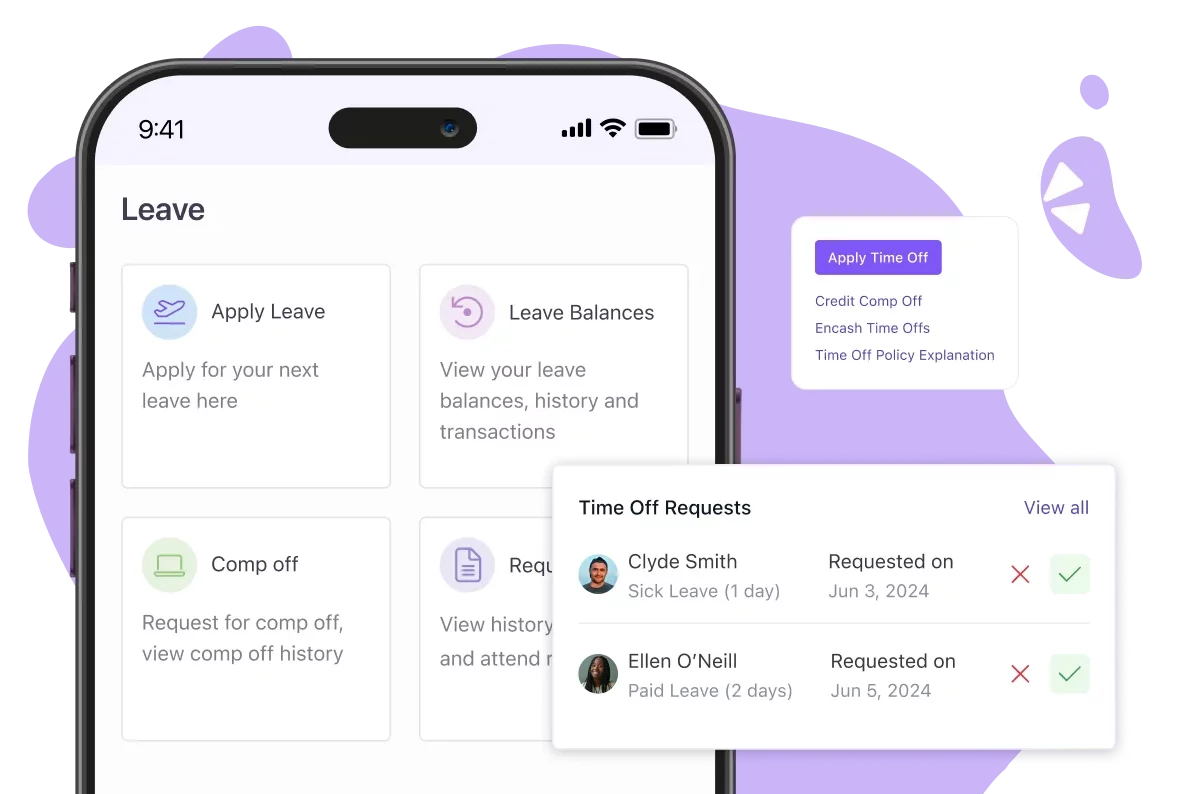
Quick Summary:
The best leave management software in India in 2026 are Keka (leave, attendance and payroll on one platform, any company size), greytHR (India statutory compliance), Zoho People (Zoho users), Darwinbox (large enterprises), HROne, factoHR, Zimyo, Pocket HRMS, Qandle, Spine HR and sumHR, compared on state-wise leave rules, approvals, payroll sync, mobile apps and INR pricing.
Managing employee leave through spreadsheets and emails might work for a small team, but it becomes hard as the organisation grows. Leave balances can get out of sync, approvals can be delayed, and approved absences can be missed during payroll processing.
Leave management software helps employees apply for leave, managers approve requests, and HR teams track balances, accruals and leave policies in one place. When connected to payroll, it can also help account for loss of pay (LOP) and leave encashment.
Choosing a system in India requires additional consideration. Companies may need different leave policies across states, location-specific holiday calendars and accurate payroll calculations. I’ve compared 11 leave management software options to help Indian businesses find a system that fits their workforce, policies and budget.
Best Leave Management Software in India at a Glance
| Tool | Best For | Pricing Details | G2 Review | Free Trial |
|---|---|---|---|---|
| Keka | Leave, attendance and payroll on one platform, any company size | Custom | 4.4/5 | Free trial available |
| greytHR | India statutory leave and payroll compliance |
Starts from ₹2,495 /month ₹45/employee above 50 |
4.4/5 | 7-day free trial |
| Zoho People | Companies already on Zoho | Starts from Rs. 48 per user per month. | 4.5/5 | 30-day trial advertised |
| Darwinbox | Large enterprises with many entities | Custom quote | 4.4/5 | Confirm with vendor |
| HROne | Mid-size firms wanting configurable workflows | ₹4,950/month for 50 users; ₹99/month per additional user. | 4.8/5 | Free trial available |
| factoHR | Shift-heavy and field teams | ₹4,999/month for 50 employees + ₹99 per additional employee. | 4.6/5 | Free trial available |
| Zimyo | SMEs wanting HR and payroll in one app | Starts from ₹80/user/month | 4.5/5 | 14 days free trial |
| Pocket HRMS | Chatbot and WhatsApp leave requests | ₹2,995/month, billed annually, for 50 employees, with ₹60 per additional employee. | 4.6/5 | Free trial available |
| Qandle | Mid-size firms wanting a modular HRMS | ₹2,450/month, billed annually, for up to 50 employees + ₹49/month per additional employee. | 4.2/5 | Free trial available |
| Spine HR | Large Indian firms with complex leave rules | Custom quote | 4.4/5 | Confirm with vendor |
| sumHR | Small teams on a tight budget | Starts from ₹49 per user/month | 4.6/5 | Demo on request |
What to look for in Leave Management Software in India in 2026
I compared these tools against six criteria that matter when choosing employee leave management software.
1. Leave policy configuration
A useful leave management system should let HR configure the leave types the company uses, such as earned leave (EL), casual leave (CL), sick leave (SL), compensatory off and optional holidays. Check whether policies can vary by location, employee group or grade, and whether the system supports accrual, carry-forward, lapse and sandwich-leave rules where applicable.
2. Approvals and team visibility
Look for configurable approval chains, delegation when a manager is unavailable, notifications and a shared team leave calendar. Managers should be able to see overlapping absences before approving requests, while employees should be able to check their balances and request status without repeatedly contacting HR.
3. Payroll and attendance connection
A leave system is more useful when approved leave connects with attendance and payroll.Review how the platform handles unpaid leave, LOP calculations, attendance regularisation and any leave encashment process your organisation uses. Confirm whether the integration is native, requires a separate module or relies on file exports.
4. Indian policy and compliance needs
Indian employers should check whether policies can be configured by state and location, including relevant holidays and statutory leave. Software can help apply configured rules consistently, but the employer still needs to confirm that the rules match the applicable legislation and the organisation’s circumstances.
5. Employee experience
Look for the web and mobile experience for both employees and managers. Depending on the vendor and plan, features may include mobile leave applications, in-app approvals, calendar views, chat integrations or notifications. Verify the exact integration available rather than if every platform supports Slack, Microsoft Teams or Google Calendar.
6. Pricing and value
Compare the annual cost for your actual employee count, not just the advertised starting price. Look at minimum billing, per-employee charges, module restrictions, implementation fees, GST, integrations and support. A low entry price may not include the attendance or payroll features you need.
Evaluation note: I reviewed each platform’s official website, analysed user reviews on G2 and Capterra to understand their features, usability, and limitations.
I also explored relevant Reddit discussions to understand real-world user experiences and cross-checked my findings against available product information. Where relevant, I’ve included review screenshots and source links so you can explore the evidence behind my recommendations.
Disclaimer: Keka is our product, and I’ve evaluated it using the same criteria and standards as every other platform on this list.
Top 11 Leave Management Software in India in 2026
1. Keka: Best for leave, attendance and payroll on one platform
Overview
Keka is an all-in-one HR and payroll platform for businesses of every size. It is a relevant option for businesses that want to manage employee leave alongside attendance and payroll rather than handle these processes separately.
Administrators can configure leave policies and approval workflows, while employees can manage leave requests through the platform. Approved leave is reflected in attendance and working hours, helping keep payroll records aligned with employee absences.
Keka also provides employee self-service features, including access to leave balances and company policies through its AI helpdesk. By connecting leave management with core HR and payroll, Keka helps businesses manage related workforce processes within a single platform.
Explore Keka’s leave management system and payroll software.
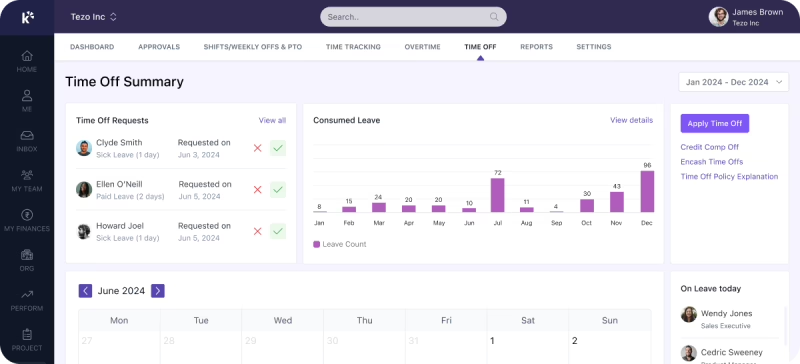
Key Features of Keka:
-
Customizable leave policies: Configure different leave policies for employee groups and define leave types, including paid and unpaid leave.
-
Paid and unpaid leave types linked to payroll: Set up leave types such as paid and unpaid leave, and connect them to payroll so approved absences are reflected in salary calculations.
-
Mobile leave applications: Employees can apply for leave and track their balances and requests in the Keka mobile app, and managers can act on requests from their phones.
-
Approvals from the Keka inbox: Managers can act on leave requests from the Keka inbox, and approve or reject several requests at once.
-
Multi-stage approval workflows: Configure approval sequences with replacement approvers and automated skips for delayed actions.
-
Shared team leave calendar: View team leave schedules to help managers plan work around employee absences.
-
Slack, Microsoft Teams and Google Calendar integration: Keka integrates with Slack and Microsoft Teams and automatically updates Google Calendar with employees’ out-of-office days.
Pros and Cons of Keka:
| Pros | Cons |
|---|---|
| Leave and payroll work together: When leave is approved, Keka includes it in payroll automatically. HR doesn’t have to match leave records with salary by hand. | Leave policies need upfront configuration: Organizations may need to define leave rules for different employee groups, locations, and entities before implementation. Planning these policies upfront helps ensure the configured workflows reflect internal requirements. |
| Flexible leave administration: Keka offers the ability to configure leave policies and approval workflows around organizational structures. This can help HR teams manage leave requests consistently across departments and employee groups. | Approval workflows require planning: Businesses with multiple approval levels may need to map their reporting structures and identify replacement approvers before setting up workflows. Doing so helps leave requests reach the appropriate approvers. |
Pricing: Contact Keka for a custom quote.
Best For: HR managers and HR ops leads at Indian companies of every size who want leave tied to attendance and payroll.
2. greytHR: Best for Indian leave and payroll processes
greytHR is an HRMS that combines leave management, payroll, and core HR in one platform. It supports configurable leave policies, multiple leave types, customisable holiday lists, and employee self-service through its web portal and mobile app. Its payroll integration helps HR teams simplify leave-related calculations and administration.
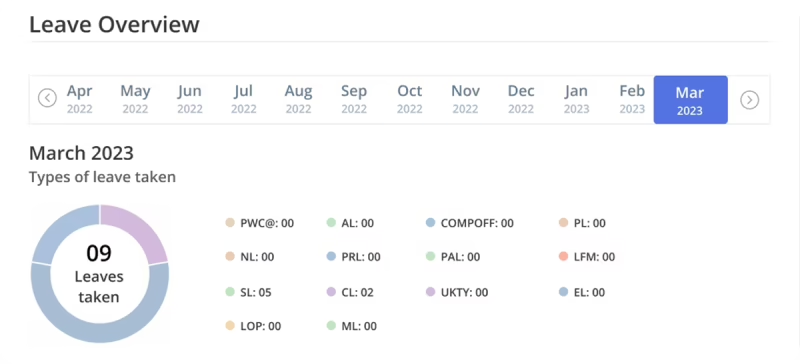
Key Features of greytHR Leave Management Software:
- Indian statutory compliance: Automates state-specific and national labor laws, including maternity, medical, and earned leave.
- Festival and holiday management: Tracks regional holidays and optional leave days with employee choice options.
- Biometric integration: Syncs attendance data directly into leave calculations for accurate tracking.
- Employee self-service: Supports multiple Indian languages with mobile access for both urban and rural teams.
| Pros | Cons |
|---|---|
| The user-friendly interface makes it easy to manage attendance, leave, payroll, onboarding, employee records, and statutory compliance with minimal effort. | Leave calendar doesn’t flag overlapping shift/approval dependencies, and there’s no automatic backup approver, requests can sit unapproved for days |
| The portal is intuitive, allowing employees to access payslips, apply for leave, regularize attendance, and update their information independently. | The response time for resolving queries could be faster, particularly for issues that impact leave management. |
Pricing: Essential plan starts at ₹2,495/month for up to 50 employees, with ₹45 per additional employee, greytHR Pricing.
Best for: Businesses looking to manage employee leave, payroll calculations and statutory requirements through an HRMS.
3. Zoho People: Best for companies already using Zoho
Zoho People offers leave management within its broader HR platform, allowing businesses to configure leave policies by location, department, and employee group. HR teams can create custom leave types, set accrual rules, and manage approval workflows. For Indian businesses, Zoho People can integrate with Zoho Payroll to sync employee information and loss-of-pay data for payroll processing.
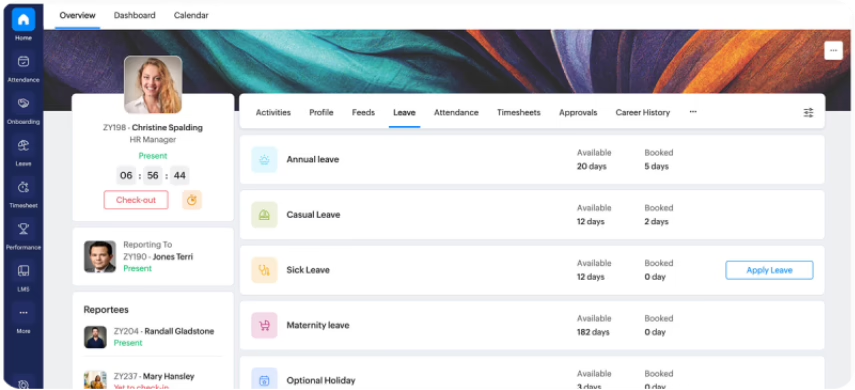
Key Features of Zoho People Leave Management Software:
- Policy management: Apply different leave rules across locations, departments, and employee categories.
- Custom leave types: Configure vacation, sick leave, parental leave, and sabbaticals with unique accrual rules.
- Approval workflows: Build multi-level processes with conditional routing and automated escalation.
- Global compliance support: Use built-in templates to meet international statutory leave requirements.
Pros and Cons of Zoho People Leave Management Software:
| Pros | Cons |
|---|---|
| Leave tracking is easy to use and cuts manual admin work, alongside attendance and employee-info management | Some leave-related workflows aren’t very intuitive and feel repetitive, needing too many similar steps. |
| Centralized dashboard makes it easy to track attendance and manage leave requests in one place. | Some settings take time to find, and customization feels limited for specific workflows |
Pricing: Essential HR plan with basic leave management feature starts at Rs. 48 per user per month.
Best for: Organisations already using Zoho applications or looking for configurable HR software within the Zoho ecosystem.
4. Darwinbox: Best for large enterprises with multiple entities
Darwinbox is an enterprise HCM platform that integrates leave management with time and attendance, employee self-service, and workforce analytics. It supports configurable leave and attendance policies, mobile leave applications and approvals, and location-based attendance controls such as geofencing. Its configurable workflows and reporting capabilities make it suitable for large organisations managing complex workforce requirements across locations.
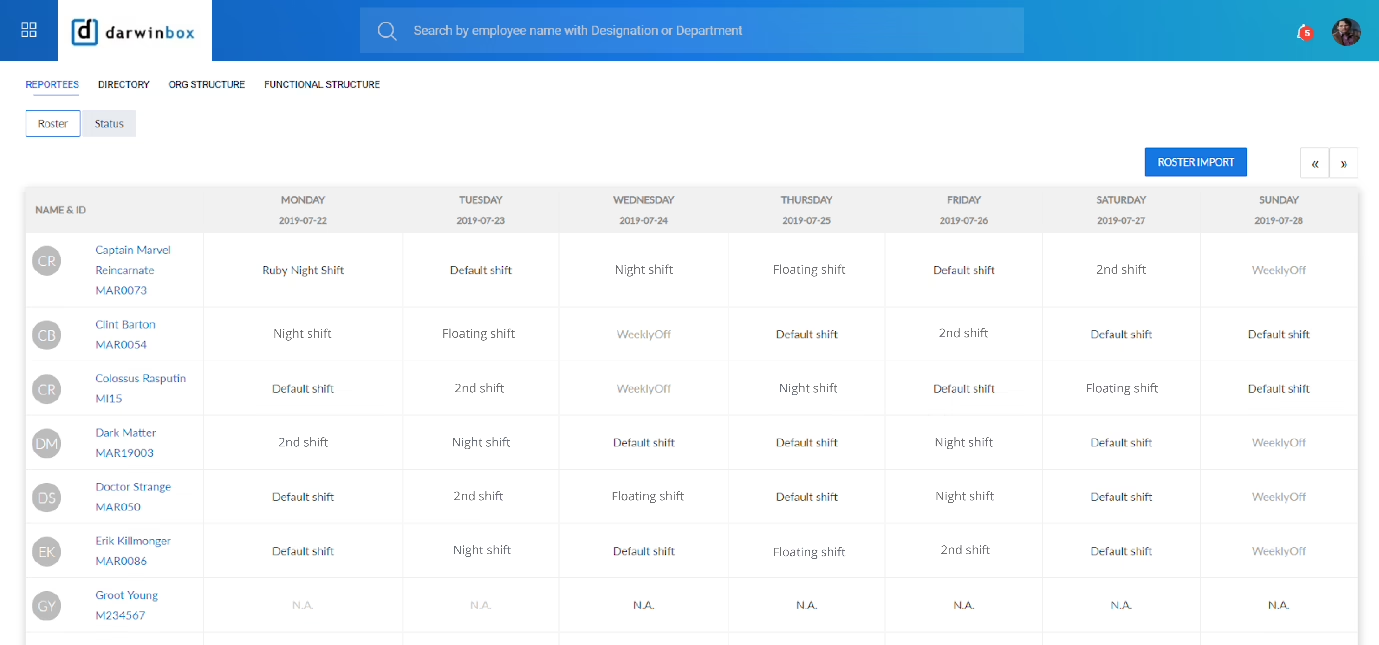
Key features of Darwinbox:
-
Integrated leave management: Manages leave and time-related workflows within a broader HCM platform.
-
Configurable leave policies: Supports policy configuration for different locations and employee groups.
-
Mobile access and approvals: Enables employees to access HR services and managers to review and approve requests through mobile devices.
-
Attendance management: Supports attendance tracking and related workforce management workflows.
-
Enterprise reporting and integrations: Supports workforce analytics, reporting, and integration requirements across enterprise HR systems.
Pros and Cons of Darwinbox
| Pros | Cons |
|---|---|
| Convenient to submit and track leave requests alongside payslips and HR documents in one interface. | The home screen sometimes doesn’t reflect punch-in status correctly, requiring a manual check elsewhere. |
| Easy to view whether a manager has approved leave, simpler to use than Workday, Oracle, or SAP for this. | The mobile app UI lags and slow to load, making attendance actions feel like a long process. |
Pricing: Request a customized quote.
Best for: Large Indian enterprises with multiple entities, locations and complex HR workflows.
5. HROne: Best for mid-size firms wanting configurable workflows
HROne is an India-focused HRMS that combines leave management, attendance, payroll, and workflow automation in one platform. It supports configurable leave policies, automated leave credits, approval workflows, and employee self-service through its mobile app.
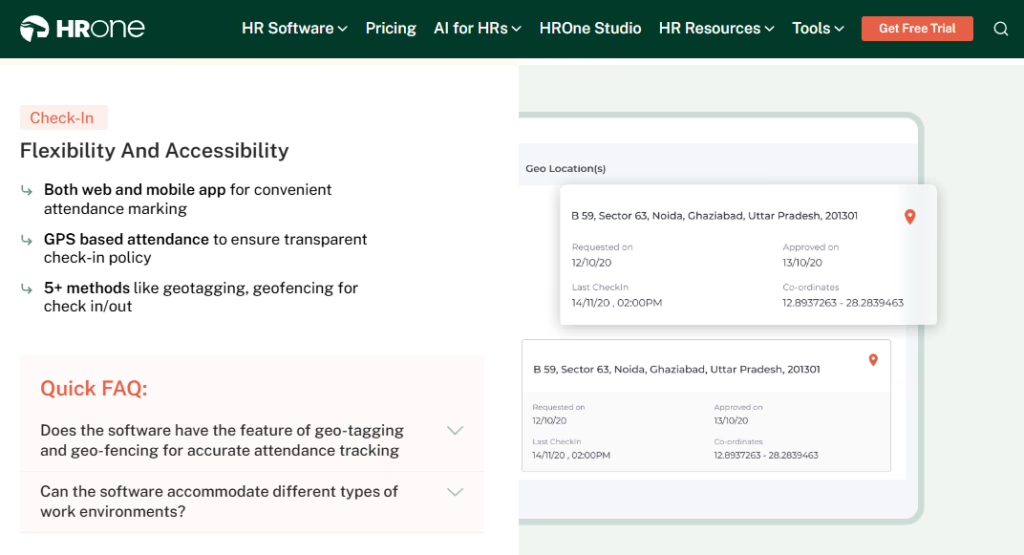
Key features of HROne:
-
Configurable leave policies: Create leave policies based on organisational requirements.
-
Automated leave credits: Schedule leave credits and update employee leave balances automatically.
-
Approval workflows: Automate leave requests and approvals.
-
Attendance integration: Manage leave alongside attendance, shifts, and holiday calendars.
-
Employee mobile app: Let employees check leave balances, apply for leave, and plan time off through the app.
-
Payroll integration: Connect leave and attendance records with payroll processing.
Pros and Cons of HROne
| Pros | Cons |
|---|---|
| Centralizes leave applications, leave balances, holiday calendars and HR policies so employees self-serve instead of contacting HR. | Organisations with complex leave policies should confirm the available workflow configurations during a demo. |
| Real-time leave and attendance tracking with reports, easing what was earlier hectic to manage. |
Pricing: The Basic plan starts at ₹4,950/month for 50 users, with each additional user costing ₹99/month.
Best for: Indian businesses looking to manage leave, attendance, and payroll together
6. factoHR: Best for shift-heavy and field teams
factoHR combines leave management with attendance, shift planning, and payroll in one HRMS. Its configurable leave policies support different leave types, accrual rules, and approval workflows, while a team leave calendar helps managers track employee availability. Employees can apply for leave through the mobile app, and attendance features include selfie-based punching, location tracking, and geofencing, depending on the plan and configuration.
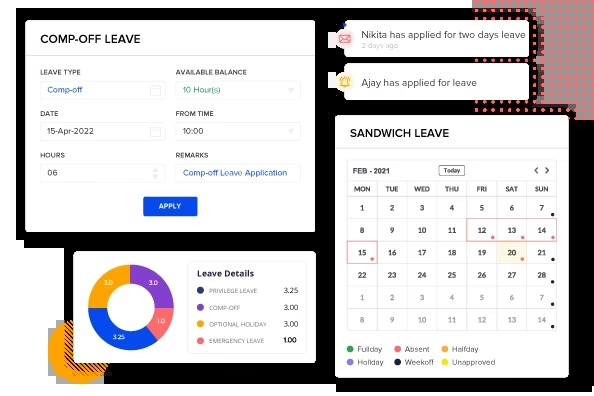
Key Features of FactoHR:
-
AI-powered attendance integration: Uses facial recognition and geo-tagging to sync attendance with leave balances.
-
Team leave calendar: Shows absences across teams to prevent conflicts and improve planning.
-
Mobile-first design: Native app with geo-fencing and touchless attendance tied to leave requests.
-
Automated policy engine: Configures earned, casual, sick, and statutory leave rules with automatic accruals.
Pros and Cons of FactoHR:
| Pros | Cons |
|---|---|
| Simple and easy for anyone to use, and runs smoothly without glitches. | The app can’t save clock-in/out data or draft leave requests for offline submission. |
| Comprehensive automation covering payroll, leave and attendance together, plus performance management. | Leave carry-forward and lapse rules cannot be customized for complex policies. |
Pricing: Core plan costs ₹4,999/month for 50 employees, plus ₹99/month per additional employee.
Best for: Indian businesses with hybrid workforces that want biometric and AI-driven leave tracking with compliance automation.
7. Zimyo: Best for SMEs wanting HR and payroll in one app
Zimyo combines leave management, attendance, shift scheduling, and payroll in one HR platform. It offers configurable leave policies, accruals, and approval workflows, with mobile self-service for leave requests. Geofenced attendance and payroll integration help businesses manage employee absences, work schedules, and salary processing across locations.
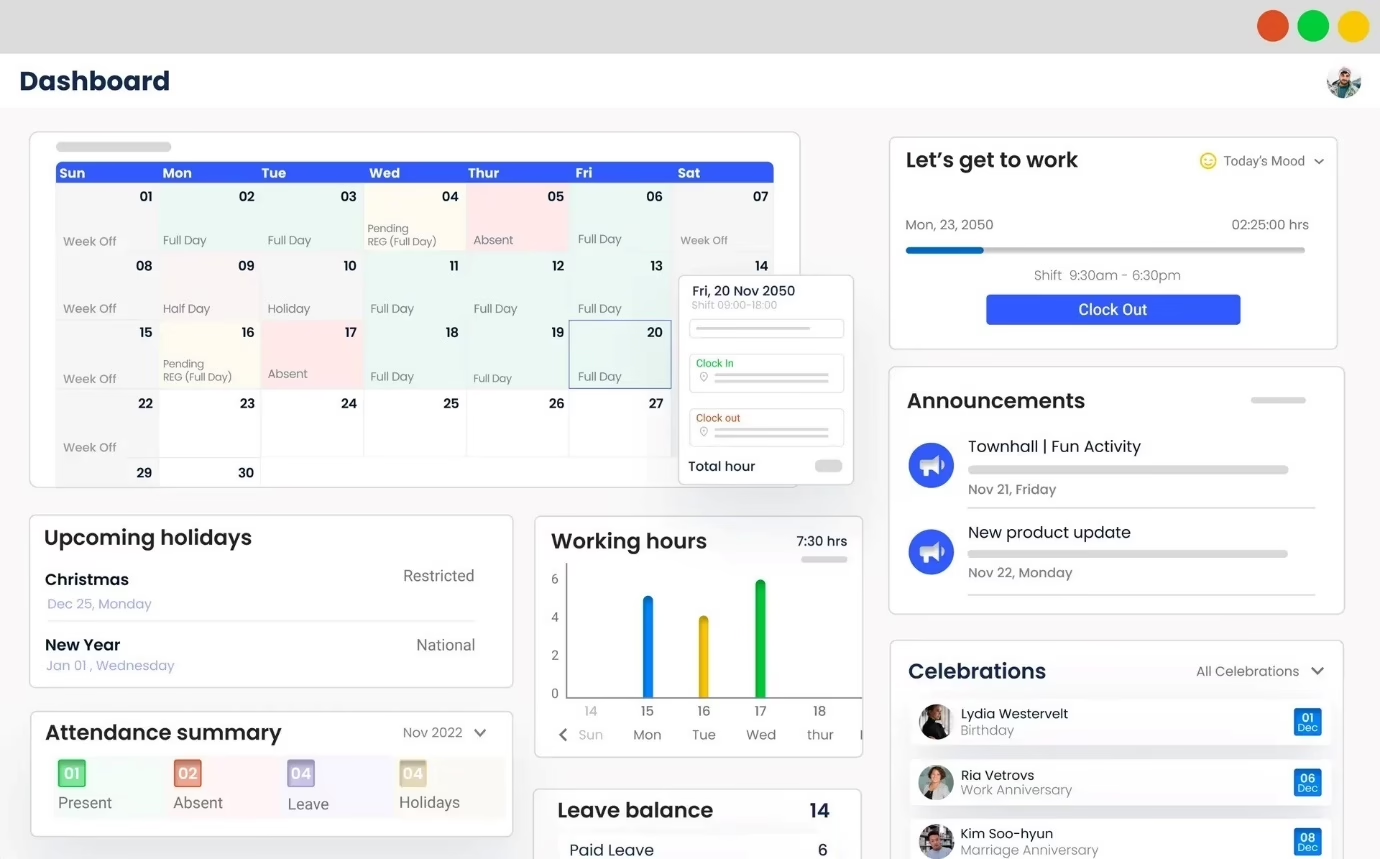
Key Features of Zimyo:
-
Customisable leave policies: Creates multiple leave types and configure leave rules according to organisational requirements.
-
Geofenced attendance: Defines location-based attendance boundaries to help verify employee check-ins.
-
Shift and roster management: Configures fixed and rotational shifts, time zones, and shift-based leave policies.
-
Employee self-service: Give employees access to leave balances, holidays, attendance records, and requests through a central portal.
-
Attendance reports: Generate reports to review attendance trends, leave utilisation, and workforce activity.
Pros and Cons of Zimyo:
| Pros | Cons |
|---|---|
| Using Zimyo mainly for attendance and leave tracking makes that part of the job noticeably easier. | Takes time initially to learn where features live; the interface can feel slow moving between sections. |
| Offers mobile self-service for leave applications and approvals. | Occasionally encounter errors with leave and payroll processing. |
Best For
Growing businesses looking to connect leave policies, employee attendance, shift scheduling, and payroll without managing separate systems.
Pricing
The Basic plan costs ₹80 per user per month, with a minimum billing requirement of 50 users.
8. Pocket HRMS: Best for chat-oriented employee self-service
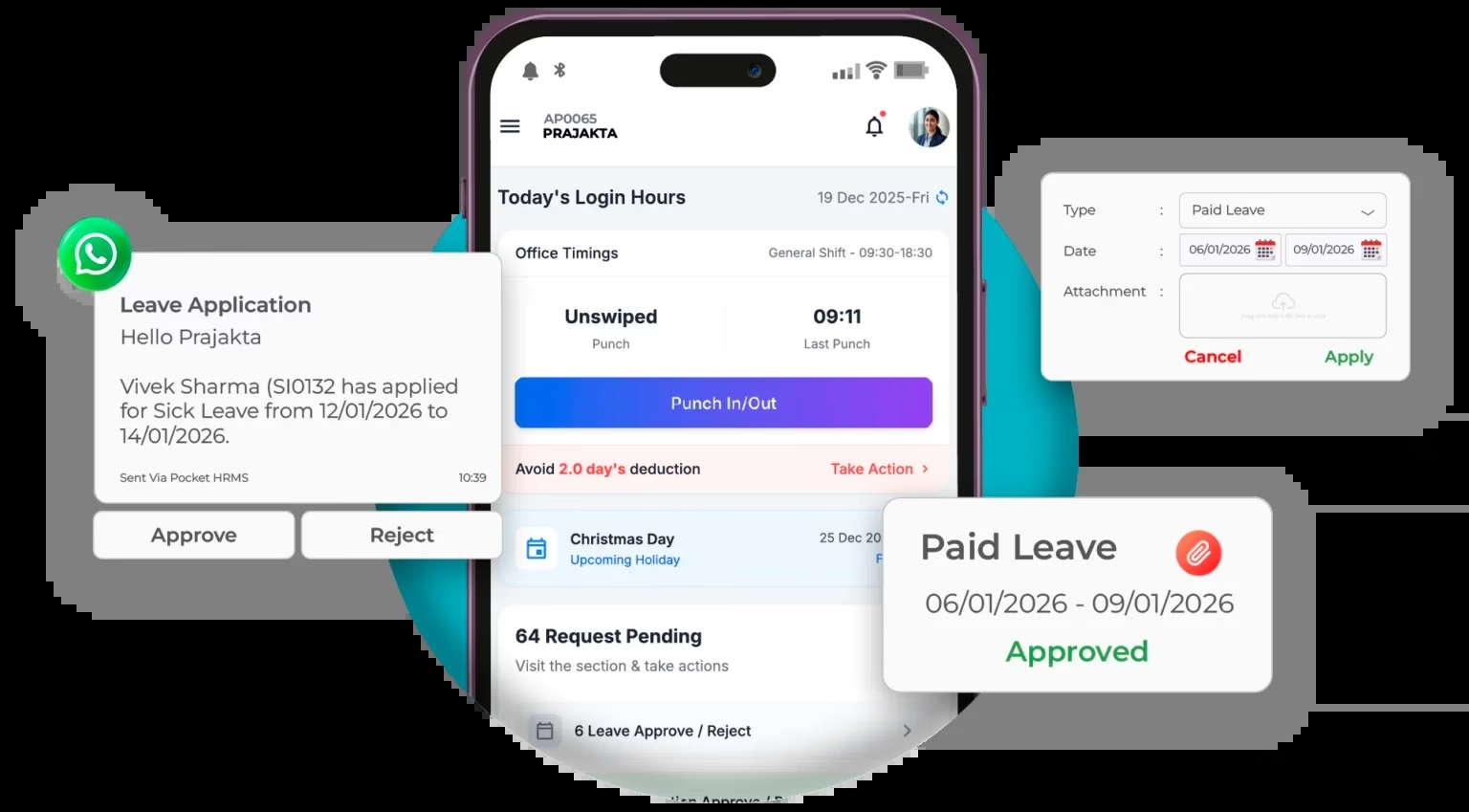
Pocket HRMS combines leave management, attendance, and payroll with smHRty, its AI-powered HR chatbot. Employees can use the chatbot to get answers to HR queries and check information such as leave balances. Its mobile app also supports leave applications and attendance regularisation, while the platform connects leave and attendance management with payroll processing.
Key Features of pocket HRMS
-
Configurable leave policies: Creates different leave types and assign policies based on business units, designations, and organisational requirements.
-
Leave credits and balances: Configures leave credit processes and track employee leave balances.
-
AI-powered smHRty chatbot: Help employees find answers to HR-related questions through a conversational chatbot.
-
WhatsApp notifications and approvals: Send leave approval notifications and payslips through WhatsApp. Managers can also approve leave applications and attendance regularisation requests through the integration.
-
Mobile leave applications: Allow employees to apply for leave, check balances, and track requests through the mobile app.
-
Attendance regularisation: Enable employees to submit requests to correct attendance records and track relevant requests through the HRMS app.
Pros and Cons of Pocket HRMS:
| Pros | Cons |
|---|---|
| Leave management runs smoothly alongside payroll, biometric attendance and the ESS portal, cutting manual HR work. | Occasional minor bug with punch-in/punch-out. |
| An easy, simple HRMS that has all the features one should expect | Some reports lack customization, and attendance sync can lag depending on the biometric device or network. |
Pricing: Pocket HRMS lists Standard at ₹2,995/month, billed annually, for 50 employees, with ₹60 per additional employee.
Best for: Businesses that want to simplify leave management through mobile self-service, AI-assisted employee support, and WhatsApp-based approvals.
9. Qandle: Best for mid-size firms considering a modular HRMS
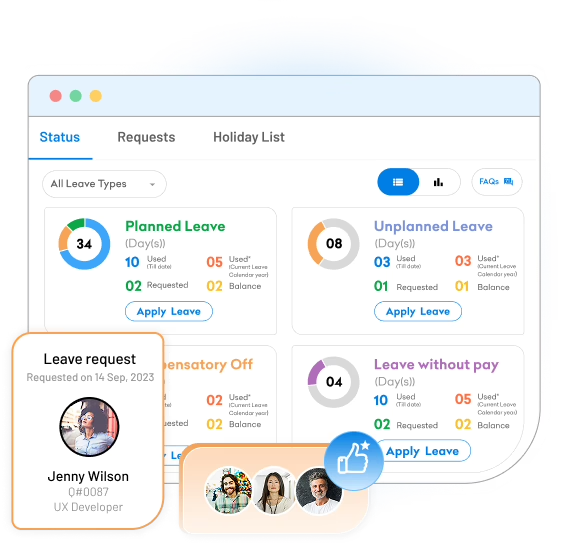
Qandle is a modular HRMS that offers customisable leave policies, automated approval workflows, and integration with attendance and payroll. Its mobile app enables employees to apply for leave and managers to approve requests on the go.
Key features of Qandle
-
Customisable leave policies: Configure leave policies for different employee roles, levels, and locations.
-
Mobile leave applications and approvals: Allow employees to apply for leave and check balances through mobile devices, while managers can approve or reject requests on the go.
-
Attendance integration: Connect leave and attendance records through integrated HR workflows.
-
Payroll integration: Automate leave-without-pay calculations and process leave encashments through payroll.
-
Leave reports and analytics: Track absence patterns, monitor leave trends, and generate reports to support workforce planning.
-
Modular HRMS: Select the HR modules required by the organisation and request a custom quote based on the chosen modules.
Pros and Cons of Qandle:
| Pros | Cons |
|---|---|
| Attendance tracking integrates with payroll, avoiding duplicate data entry. | Initial setup takes time due to the modular design. |
| Mobile access lets employees handle HR tasks, including leave, from anywhere via a simple interface | Reporting for complex data could be improved. |
Pricing: Foundation: ₹2,450/month, billed annually, for up to 50 employees + ₹49/month per additional employee.
Best for: Mid-size Indian businesses that want to evaluate a modular HRMS.
10. Spine HR: Best for large Indian firms with complex leave rules
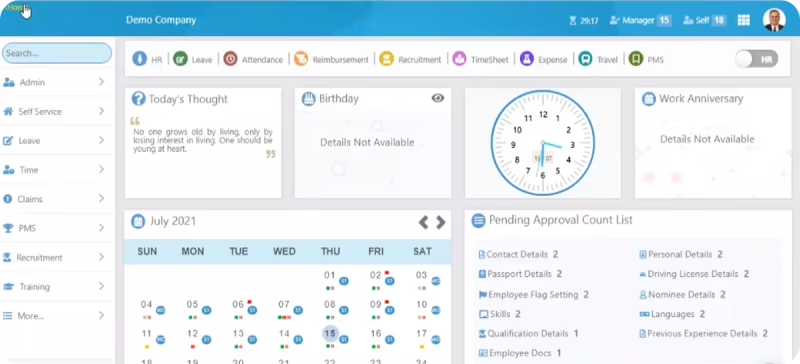
Spine HR combines leave management, attendance, and payroll in one HRMS platform. It supports configurable leave policies, accruals, carry-forward rules, and multi-level approval workflows to help businesses manage employee absences across different teams. Integration with attendance and payroll helps streamline leave-related salary calculations and reduce manual work
Key features of Spine HR:
-
Configurable leave policies: Creates multiple leave types and configure leave accruals, carryovers, and policy rules according to organisational requirements.
-
Multi-level approval workflows: Route leave requests through multiple approval levels, with options for mobile and email approvals and substitute approvers.
-
Leave tracking and reporting: Monitors real-time leave balances, maintain historical leave records, and analyse leave utilisation to support workforce planning.
-
Payroll and system integration: Connects leave management with attendance and payroll processes. Spine HR also supports integration with existing finance systems and third-party HR tools.
Pros and Cons of Spine HR:
| Pros | Cons |
|---|---|
| Easily integrates payroll processing, attendance management, and employee self-service. | Limited customization. |
| Makes it easy to track all attendance related activities. | Mobile app can be better. |
Pricing: Spine HR offers custom pricing based on the number of users, modules, and features required. Businesses need to contact the vendor for a tailored quote.
Best for: Large Indian organisations with complex leave rules and formal approval hierarchies.
11. sumHR: Best for small teams looking for a budget-conscious HRMS
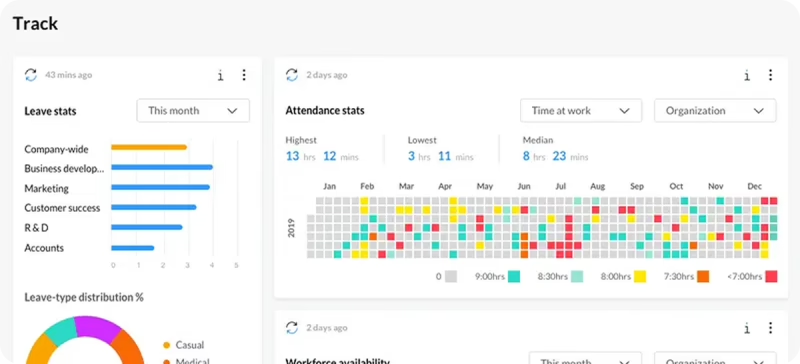
sumHR is a budget-friendly HRMS for small Indian businesses, combining leave management, attendance tracking, and payroll in one platform. Its leave management system supports configurable leave policies, accrual, pro-rata calculations, and carry-forward rules. Employees can access leave balances, submit requests, and manage attendance through web and mobile self-service. The platform also supports biometric attendance integration and GPS-based clock-ins through a paid add-on.
Key features of sumHR:
-
Leave accrual and carry-forward: Configure accrual, pro-rata calculations, carry-forward rules, usage limits, and leave-cycle transitions.
-
Web and mobile self-service: Allow employees to apply for leave, check balances, and access attendance information through web and mobile interfaces.
-
Biometric attendance integration: Connect supported biometric devices to centralise attendance records and sync data with the system. Confirm any applicable integration fee with sumHR.
-
GPS attendance and geo-fencing: Capture location-based mobile attendance and restrict check-ins to approved locations. This feature is available as a paid add-on.
-
Shift planning: Schedule shifts, assign them in bulk, make retrospective changes, and manage weekly-off credits.
-
Attendance policy management: Configure rules for work-from-home requests, out-duty, breaks, work hours, late arrivals, and overtime.
Pros and Cons of Sum HR:
| Pros | Cons |
|---|---|
|
Leave and attendance automation is smooth, cutting out spreadsheets and back-and-forth emails, saving hours weekly. The self-service portal lets employees handle attendance independently. |
Can get standard reports for leave, attendance, and headcount, but we can’t customize dashboards. |
Pricing: Startup at ₹49, Basic at ₹69, Advanced at ₹119 per user/month
Best for: Small teams looking for a budget-conscious first step away from spreadsheet-based leave tracking.
How to Choose the Right Leave Management Software in India
Before investing in leave management software, evaluate its implementation process, customer support, pricing and ability to scale. Here are five things to consider.
1. Request a product demo
Ask vendors to demonstrate common workflows, such as leave applications, manager approvals and payroll updates. If a free trial is available, test these features with a few employees and managers.
2. Evaluate customer support
Review available support channels, response times, escalation processes and support hours. Read G2 and Capterra reviews to understand existing customers’ experiences with issue resolution.
3. Understand the onboarding process
Ask about employee data migration, existing leave balance transfers, implementation timelines and administrator training. Understand what assistance the vendor provides after go-live.
4. Identify hidden costs
Look beyond subscription fees. Account for implementation, migration, training, integrations, premium support, additional modules and GST. Request a consolidated quote to understand the total cost.
5. Assess scalability
Consider whether the software can accommodate workforce growth, multiple locations, additional entities and changing HR requirements without requiring a platform change.
Indian Leave Laws Your Software Must Handle
Leave entitlements in India depend on the applicable legislation, establishment type, and state. Leave management software should account for these differences to help HR teams administer leave policies accurately.
Shops and Establishments Acts: Each state has its own Shops and Establishments legislation, which governs aspects such as working hours, weekly holidays, and leave entitlements. For example, the Maharashtra Shops and Establishments Act, 2017 and the Karnataka Shops and Commercial Establishments Act, 1961 contain state-specific provisions. HR teams can also refer to Keka’s guides to Maharashtra leave policies and Karnataka leave policies.
Factories Act, 1948 — Section 79: Section 79 covered annual leave with wages for eligible factory workers. The Occupational Safety, Health and Working Conditions Code, 2020 includes provisions for annual leave, with a 180-day eligibility threshold under Section 32. Refer to the Factories Act, 1948 for the earlier framework. The applicable requirements should be checked against the rules and transitional provisions relevant to the establishment.
Maternity Benefit Act, 1961: The 2017 amendment increased paid maternity leave to 26 weeks for eligible women with fewer than two surviving children. Maternity benefits are also addressed under the Code on Social Security, 2020. For more details, see Keka’s Maternity Benefit Act guide.
Labour Codes: India’s four Labour Codes took effect on 21 November 2025. During implementation, transitional provisions may affect which existing rules continue to apply. Employers should refer to the Ministry of Labour and Employment’s announcement and Keka’s Labour Codes compliance guide to understand the changes.
What HR teams need: Leave management software should support state-specific policies, establishment types, and employee categories, while making it easier to update leave rules as applicable laws and regulations change.
Conclusion: Which Leave Management Software Should You Choose?
| Your main requirement | Tools to evaluate |
|---|---|
| Leave, attendance and payroll on one platform | Keka |
| India-focused HR and payroll processes | greytHR |
| Existing Zoho ecosystem | Zoho People |
| Large, multi-entity enterprise HCM | Darwinbox |
| Shift-heavy and field teams | factoHR |
| Published INR pricing with a broader HR feature set | Zimyo or Pocket HRMS |
| Configurable workflows in a broader HRMS | HROne or Qandle |
| Complex enterprise approval structures | Spine HR |
| Budget-conscious first step away from spreadsheets | sumHR |
The best leave management software in India depends on how your organisation handles leave policies, approvals, attendance and payroll.
If you want to manage leave, attendance and payroll on one platform, Keka is worth considering. greytHR is another option for businesses prioritising Indian payroll and leave administration, while Zoho People may be suitable for organisations already using Zoho. Larger enterprises should also evaluate Darwinbox and other platforms against their multi-entity requirements.
Before making a decision, compare the exact plan inclusions, test your leave rules and confirm how approved leave affects payroll. A demonstration using your own policies will tell you more than a feature list alone.
Still tracking leave in Excel and email? See how Keka manages leave policies, approvals and payroll in one place. Book a Keka demo.