


 Login
Login


The best Namely alternatives in 2026 are Keka, Rippling, Paylocity, Paycor, BambooHR, Gusto, Paycom, and Justworks. Each offers distinct strengths in multi-state payroll, HR automation, or benefits administration for US mid-market companies.
Namely can be a good fit if you want HR, payroll, and benefits in one place. Its approachable interface and core capabilities work well for companies with straightforward HR processes. However, it has its limitations. One HR Director on Reddit noted that its workflows couldn’t handle dual reporting lines, while support often turned simple questions into days of back-and-forth.
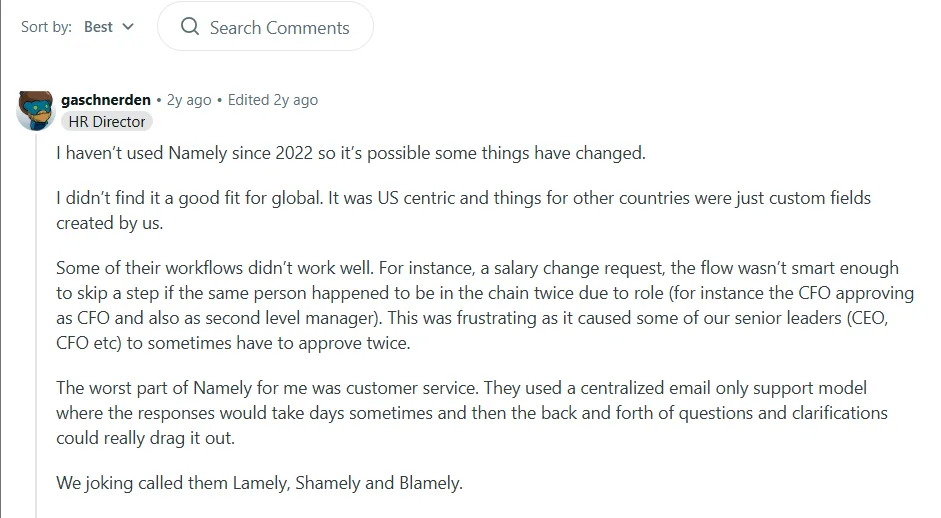
Source: Reddit
This doesn’t make Namely a bad platform. The interface is easy enough to pick up, and it handles the basics of HR and payroll fine for plenty of US mid-market teams. The trouble starts when the workforce grows past what those basics were built for.
That is why I looked at Namely alternatives for HR, People Operations, payroll, and finance teams evaluating a replacement.
I focused my comparison on the factors that matter most when choosing an HR platform. These include payroll, HR automation, reporting, integrations, employee experience, support, pricing, and the amount of administrative work each platform leaves your team with.
I’ve included a comparison table below for a quick overview. In the main article, I break down each platform to show where it fits and the trade-offs I found.
How Did I Evaluate These Namely Alternatives?
This comparison looks at each platform through the same set of buying criteria:
- Core HR and payroll coverage
- Automation
- Employee self-service
- reporting and analytics
- Integrations
- Pricing
- Suitability by company size
User experience observations are based on the current public G2 feedback. Where a vendor does not publish pricing, the article says so rather than estimating a number.
I have also kept a clear distinction between what the vendor says the product does and what users report experiencing. That matters with HR software because a feature existing on a product page doesn’t necessarily tell you how much work it takes to use.
What are the Best Namely Alternatives at a Glance?
| Platform | Best for | Starting price | Free trial | Core HR & payroll | Automation |
|---|---|---|---|---|---|
| Keka | Businesses of all sizes that want HR, payroll, and PSA together | Contact vendor | Yes | Yes | Advanced |
| Rippling | HR + IT + payroll consolidation | From $8/employee/month + base fee | No | Yes | Advanced |
| Paylocity | Mid-market workforce management | Contact vendor | No | Yes | Advanced |
| Paycor | Payroll and compliance-focused mid-market | Contact vendor | No | Yes | Advanced |
| BambooHR | HR-first teams that value ease of use | From $10/employee/month | Yes | Yes | Good |
| Gusto | Smaller businesses that want simple payroll | $49/month + $6/person | No | Yes | Good |
| Paycom | Larger organizations that want one HR/payroll database | Contact vendor | No | Yes | Advanced |
| Justworks | Small businesses that want a PEO model | From $79/employee a month for PEO basic | Available on payroll | Yes | Good |
Disclosure: Keka is our product, so we’ve been transparent about that by including real cons for Keka, citing third-party review sources for all claims, and applying the same evaluation criteria to every platform including our own.
Why are HR Teams Looking for Namely Alternatives?
Namely still gets several things right. Its interface is relatively approachable. It brings HR, payroll, and benefits into one environment, and users often like the overall employee experience. However, a handful of recurring pain points push them to look elsewhere as they grow.
- HRIS-to-payroll sync: When changes don’t move cleanly between the two, HR teams end up checking records, correcting information, or reconciling data manually.
- Customization limits: A workflow that works well for one organization may need more intervention when another company has different approval rules, employee groups, or processes.
- Support quality: As payroll gets more complicated, a small issue involving HR, payroll, benefits, or integrations can turn into a much bigger problem if the person handling the ticket doesn’t have full context.
- Benefits administration reliability: Multi-state teams (particularly in states like California and Washington) report mismatched ACA enrollment data during open enrollment, which adds manual cleanup work for HR.
- Product direction since acquisition: Namely was acquired by PrismHR’s parent Vensure Employer Solutions, and reviewers describe innovation slowing down and experienced staff leaving as the platform changed ownership, with some noting the tech has “taken a backseat” since.
In fact, one HR and Payroll Specialist gave it a 3.0/5 on Capterra, citing sluggish performance, limited integrations, and disappointing support.
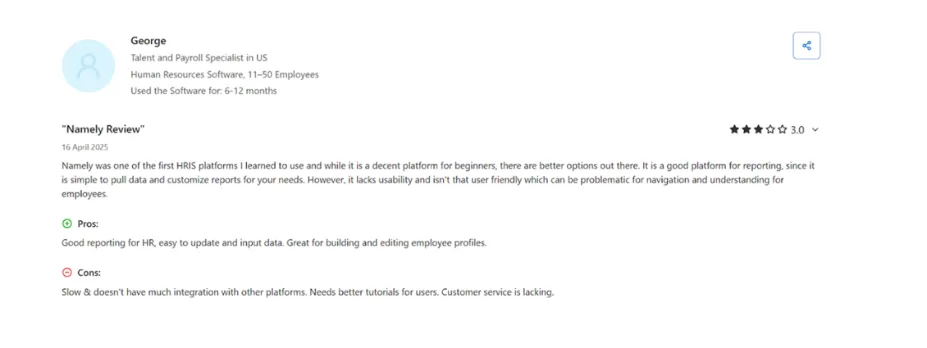
Source: Capetrra
Namely can still be a solid choice for many organizations. But if its limitations are starting to affect your workflows, it’s worth seeing how other HR platforms compare. The eight alternatives below offer different approaches to HR, payroll, and workforce management, so you can find one that better fits your organization’s needs today.
Top 8 Alternatives to Namely in 2026
Here are the eight best HR platforms giving Namely serious competition in 2026, with their pros and cons along with real-world views.
1. Keka: The practical all-in-one HRMS for businesses of all sizes
Keka is built to support businesses of all sizes with complex HR and payroll needs. It’s SOC 2, ISO 27001, and GDPR compliant, with payroll that stays current on federal, state, and local rules, so multi-entity teams don’t have to track tax changes themselves.
It runs payroll, hiring, performance, and time and attendance from one system, with Keka AI layered across all of it. The AI reads live payroll, attendance, and hiring data. It can answer a manager’s direct question, draft a routine workflow, or flag a payroll anomaly or attrition risk before it becomes a problem.
Keka also includes Professional Services Automation, covering project timesheets, billing, and resource management. It connects with 100+ tools already in most companies’ stacks, including Salesforce, Jira, Xero, and Stripe. More than 12,500 companies use Keka today.
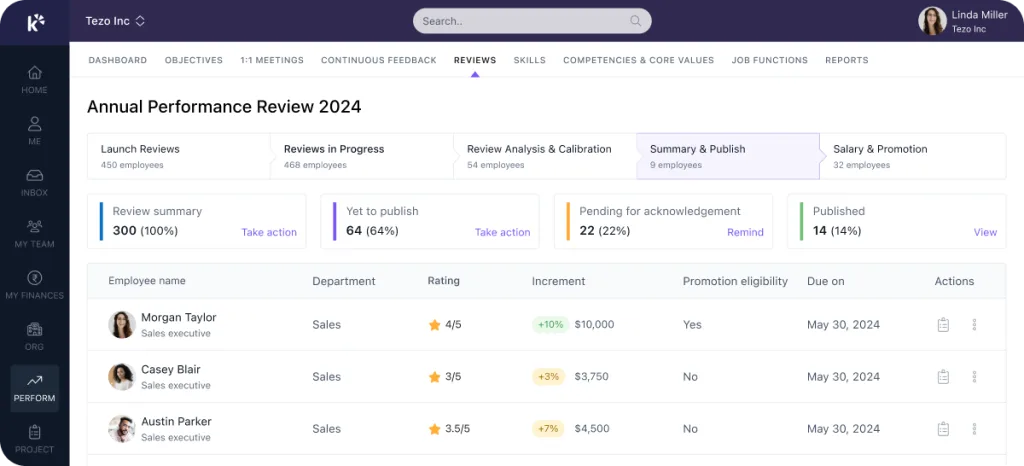
Key features:
- Unified HR and payroll: Manage employee records, onboarding, attendance, payroll, performance, and other HR processes from one platform.
- Payroll automation: Keka supports payroll workflows, salary calculations, employee self-service, and payroll reporting.
- Attendance and time tracking: Attendance, leave, shifts, and related workflows connect with the broader employee record.
- Performance management: Goals, reviews, feedback, competencies, and performance insights sit within the same HR environment.
- Recruitment and ATS: Hiring teams can manage requisitions, candidate stages, assessments, interviews, and offers.
- Employee experience: Recognition, polls, announcements, and employee self-service are built into the platform.
- PSA and project operations: Project creation, resource allocation, utilization, timesheets, and billing workflows make Keka particularly relevant to service businesses.
| Pros | Cons |
|---|---|
| Broad HR and PSA coverage: Keka brings HR, payroll, talent, employee experience, project management, resource management, timesheets, and billing into one platform. | Moving from multiple systems requires some transition: organizations replacing several existing HR or operational tools may need to plan data migration and workflow changes as part of implementation. |
| Comprehensive US payroll: Keka supports payroll, benefits, deductions, direct deposit, ACH, W2s, 1099s, and automated tax filings across all 50 states. | Best suited to organizations looking to consolidate HR processes: Keka can work as a single point solution, but organizations that adopt the broader ecosystem can benefit more from the connected workflows and data across the platform. |
| Global workforce capabilities: Keka is used by organizations across 120+ countries, supporting companies with geographically distributed teams. | The PSA capabilities may require some process alignment: Companies introducing project and resource management alongside HR may need to map their existing project workflows into the platform. |
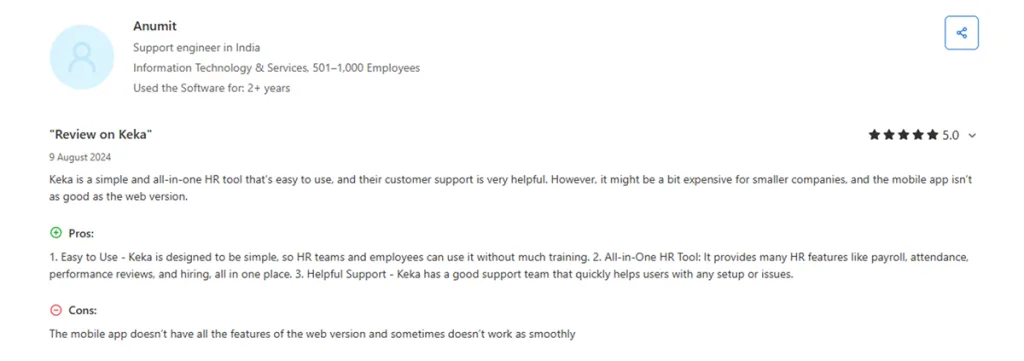
Keka’s G2 feedback highlights its ease of use, all-in-one HR capabilities, and responsive support.
Source: Capterra
Pricing: The starting price stands at $9/employee/month, with no additional setup fees.
Who’s it best for:
Keka is suitable for businesses of all sizes that want to bring HR, payroll, performance, attendance, hiring, and project operations into one system, especially service-led and multi-entity organizations that also need PSA capabilities.
Pick Keka when you want to move away from Namely without simply replacing one HRIS with another. The biggest advantage is the breadth of the platform, although that breadth means you’ll want to plan your implementation properly.
Thinking about switching HR software?
Most teams go live on Keka in weeks, not months, with no hidden fees along the way.
2. Rippling: All-in-one HR and IT platform for the modern workplace
Rippling combines HR, payroll, benefits, time tracking, and IT management in one platform. That makes it particularly useful for companies where HR is closely connected to device management, application access, identity, and onboarding.
A new employee can move through HR onboarding while access to software, devices, and other systems is handled through the same platform.

Key features:
- Core HR and employee records
- Payroll and benefits administration
- Time and attendance
- Device and application management
- Identity and access management
| Pros | Cons |
|---|---|
| Strong HR and IT integration. | The number of modules can make the platform feel complex. |
| Good fit for distributed and technology-heavy organizations | Total cost depends heavily on the products you add. |
| Modular approach lets companies add capabilities as needs change. | Some users report that navigation can take time to learn. |
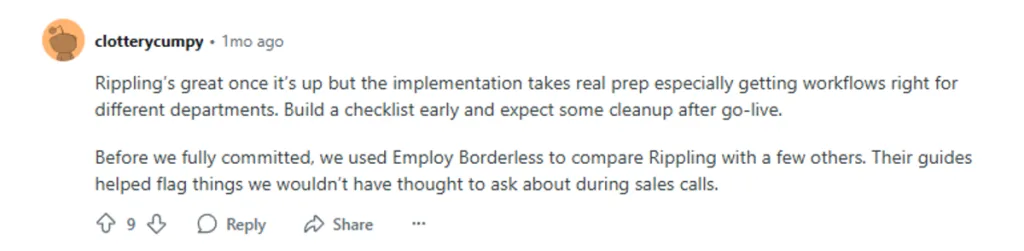
Rippling’s user feedback highlights the platform’s capabilities once implemented, while also pointing to the preparation and workflow setup required before going live.
Source: Reddit
Pricing: Starts at $8/user/month plus a base fee, with additional products priced separately.
Who’s it best for:
Rippling is best for growing companies that want HR, payroll, IT, identity, and device management connected through one platform.
Use Rippling if IT and HR need to operate together. If your biggest problem is simply replacing Namely’s HR and payroll workflows, its wider product scope may be more than you need.
3. Paylocity: Scalable HR tailored for mid-market organizations
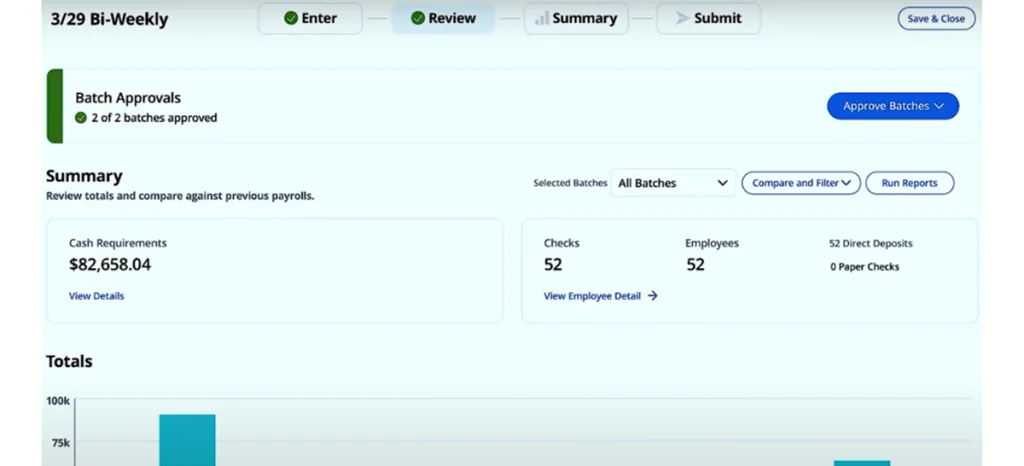
Paylocity is built around HR, payroll, workforce management, benefits, talent, and employee experience. It is particularly relevant to mid-market organizations that need more than basic payroll but don’t want to manage several separate systems.
Its product suite covers payroll, benefits, time and attendance, recruiting, performance, learning, and other workforce management functions.
Key features:
- Payroll and tax management
- Benefits administration
- Time and attendance
- Recruiting and onboarding
- Performance management
| Pros | Cons |
|---|---|
| Broad mid-market HR and payroll coverage. | The platform can take time to learn because of its breadth. |
| Strong workforce management capabilities. | Implementation requires planning and data validation. |
| Employee and manager self-service reduces routine HR requests. | Some users report longer customer service wait times. |
Paylocity users highlight its ease of use once the system is set up, while noting that implementation can take time and requires a clear understanding of how the system works.

Source:G2
Pricing: Contact vendor for pricing.
Who’s it best for:
Paylocity is best for mid-market companies that need payroll, workforce management, benefits, and employee engagement in one HR platform.
Pick Paylocity if workforce management and employee experience are as important as payroll. It is a stronger fit for organizations that have outgrown basic HR software and need a broader operating system for their workforce.
4. Paycor: HR and payroll with a people-first approach
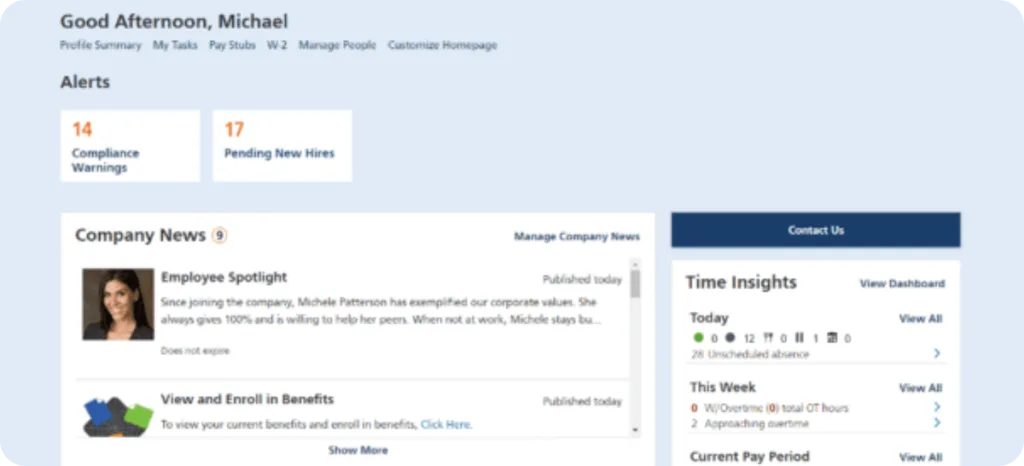
Paycor combines payroll, HR, recruiting, time, talent, benefits, and workforce management. It is particularly relevant for organizations that need stronger payroll and compliance support as they expand across locations.
Its product materials emphasize automated payroll, employee self-service, time tracking, reporting, and integrations.
Key features:
- Payroll and tax management
- Time and attendance
- Benefits administration
- Recruiting and onboarding
- Performance management
| Pros | Cons |
|---|---|
| Strong payroll and compliance orientation. | Pricing can become more difficult to predict as requirements expand. |
| Wide HR functionality beyond payroll. | Reporting and customizations may not cover every complex use case. |
| Useful for hourly and distributed workforces. | Support experience varies by issue and customer. |
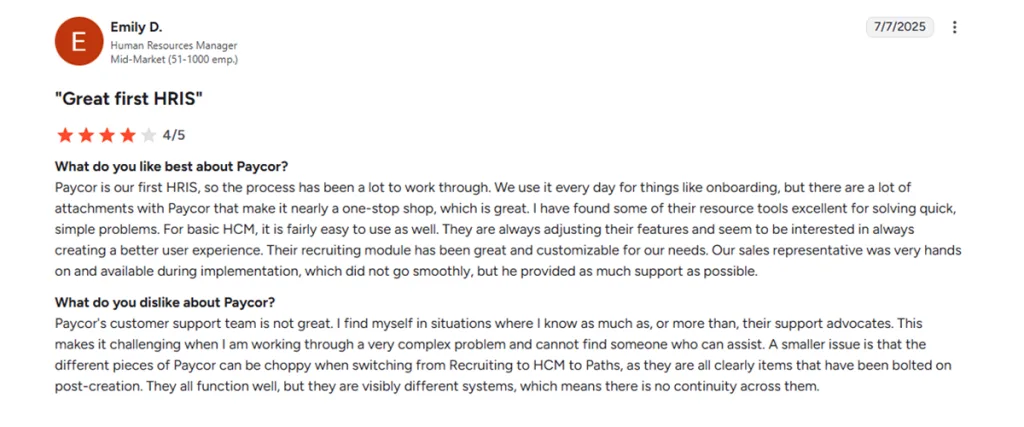
Paycor’s user feedback points to a platform that can be easy to manage once users understand the system, while implementation and getting familiar with the software can take some time.
Source: G2
Pricing: Contact vendor for pricing. Paycor currently directs prospective customers to request a consultation rather than publishing a standard starting price.
Who’s it best for:
Paycor is best for mid-sized organizations that need payroll compliance, time tracking, recruiting, and workforce management without building a collection of separate tools.
Pick Paycor when payroll compliance is a primary concern, and you want a broader HR platform around it.
5. BambooHR: UX-first core HR for growing teams
BambooHR takes an HR-first approach. Its core platform focuses on employee records, reporting, hiring and onboarding, time off, benefits tracking, workflows, and employee experience.
That makes it an appealing option if your main frustration with Namely is complexity around everyday HR administration rather than a need for a much broader payroll or IT platform.

Key features:
- Employee records and HR reporting
- Hiring and onboarding
- Time-off management
- Benefits tracking
- Workflows and approvals
| Pros | Cons |
|---|---|
| Clean, approachable HR experience. | Some advanced functionalities sit in higher plans or add-ons. |
| Strong employee self-service. | Users report limitations around customization. |
| Good reporting foundation. | It is more HR-centric than a platform that combines HR, IT, and PSA. |
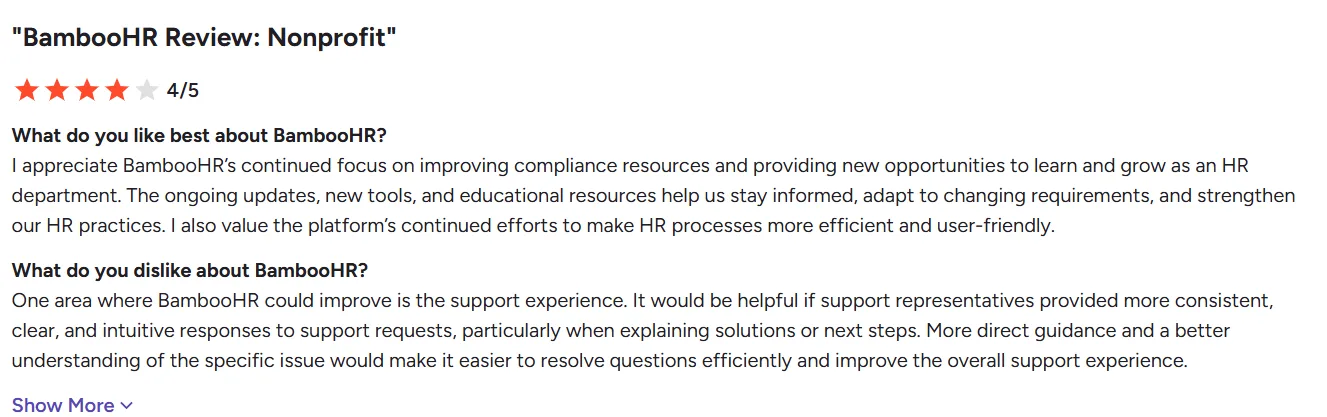
BambooHR’s user feedback highlights its focus on compliance resources, learning tools, and user-friendly HR processes, while noting that support responses could be more consistent and clearer.
Source: G2
Pricing: Starts at $10 per employee/month for Core for companies with more than 25 employees.
Who’s it best for:
BambooHR is best for HR teams that want an approachable HRIS with strong employee records, onboarding, reporting, and employee experience tools.
Use BambooHR if usability is the biggest reason you’re considering leaving Namely. If payroll complexity or project operations are central to your requirements, compare it closely with Keka, Paycor, or Paylocity.
6. Gusto: Transparent pricing for small teams
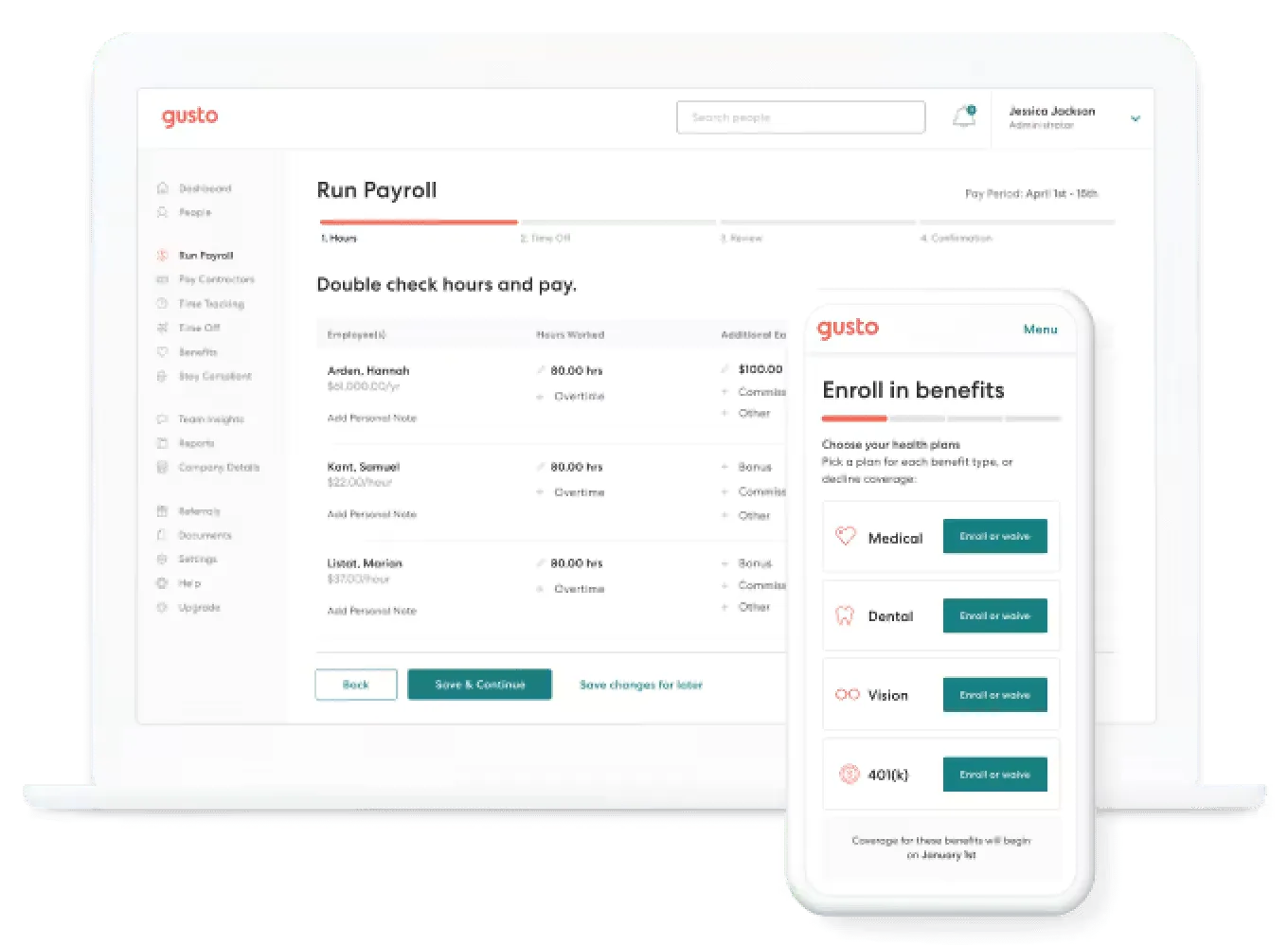
Gusto is designed around straightforward payroll, benefits, and HR administration. Its appeal is simplicity, especially for smaller businesses that don’t need a large HCM suite.
Key features:
- Payroll and tax filing
- Benefits administration
- Time tracking
- PTO
- Hiring and onboarding
| Pros | Cons |
|---|---|
| Straightforward pricing. | Advanced capabilities require higher plans or add-ons. |
| Easy payroll experience. | The platform is less suited to complex enterprise HR operations. |
| Strong fit for smaller companies. | Support and customization are recurring areas of criticism in user feedback. |
Gusto’s user feedback highlights its ease of managing payments and tax documents, while pointing to limitations in its banking features, including external account transfers and bill-pay options.

Source: G2
Pricing: Starts at $49/month + $6/person for Simple.
Who’s it best for:
Gusto is best for smaller businesses that want payroll and basic HR without the complexity of a larger HCM platform.
Choose Gusto if your HR operation is relatively simple, and payroll is the main requirement. For a 200-person company with complex workflows, multiple entities, or PSA requirements, you will probably outgrow it sooner.
7. Paycom: Single-Database Automation for Mid-Market Scale
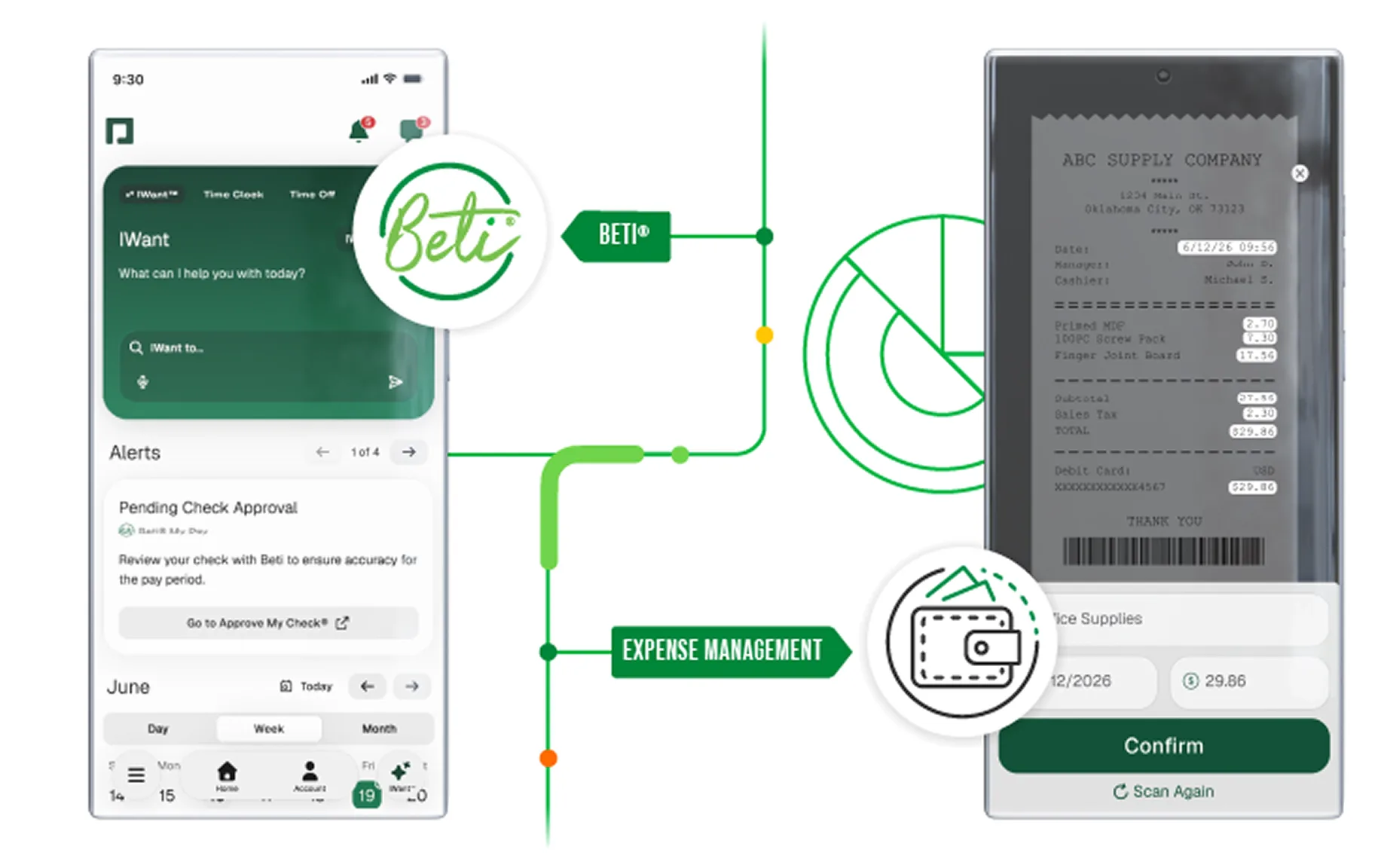
Paycom’s core differentiator is its single-database approach. Payroll, HR, time and labor, talent management, and other functions are designed to work from the same employee data.
Its payroll product also uses employee-guided processes to identify and correct payroll issues before submission.
That architecture makes Paycom particularly relevant for larger organizations dealing with complex payroll and workforce structures.
Key features:
- Payroll and tax management
- Time and labor management
- Talent acquisition
- Talent management
- Employee self-service
| Pros | Cons |
|---|---|
| Strong single database architecture. | The breadth of the system can make implementation substantial. |
| Broad HR and payroll coverage. | Customized pricing makes upfront comparisons difficult. |
| Designed to support multi-state and complex workforce structures. | The platform is likely more than smaller businesses need. |
Paycom’s user feedback highlights knowledgeable, responsive support and hands-on help with implementation, while noting that the large number of reports can make it time-consuming to find the right one.

Source: G2
Pricing: Contact vendor for pricing. Paycom states that pricing depends on workforce size and selected products and services.
Who’s it best for:
Paycom is best for larger organizations with complex payroll, time, talent, and HR requirements that want those functions running from one database.
Pick Paycom when eliminating data re-entry and consolidating a large HCM environment are major priorities. For smaller teams, the implementation and platform breadth may outweigh the benefits.
8. Justworks: The PEO alternative to owning HR yourself
Justworks combines payroll, HR tools, compliance support, benefits, and time tracking, but its biggest distinction is its PEO offering.
That means the comparison with Namely isn’t purely about software. With a PEO, you’re also evaluating how much employer administration and compliance responsibility you want the provider to handle.
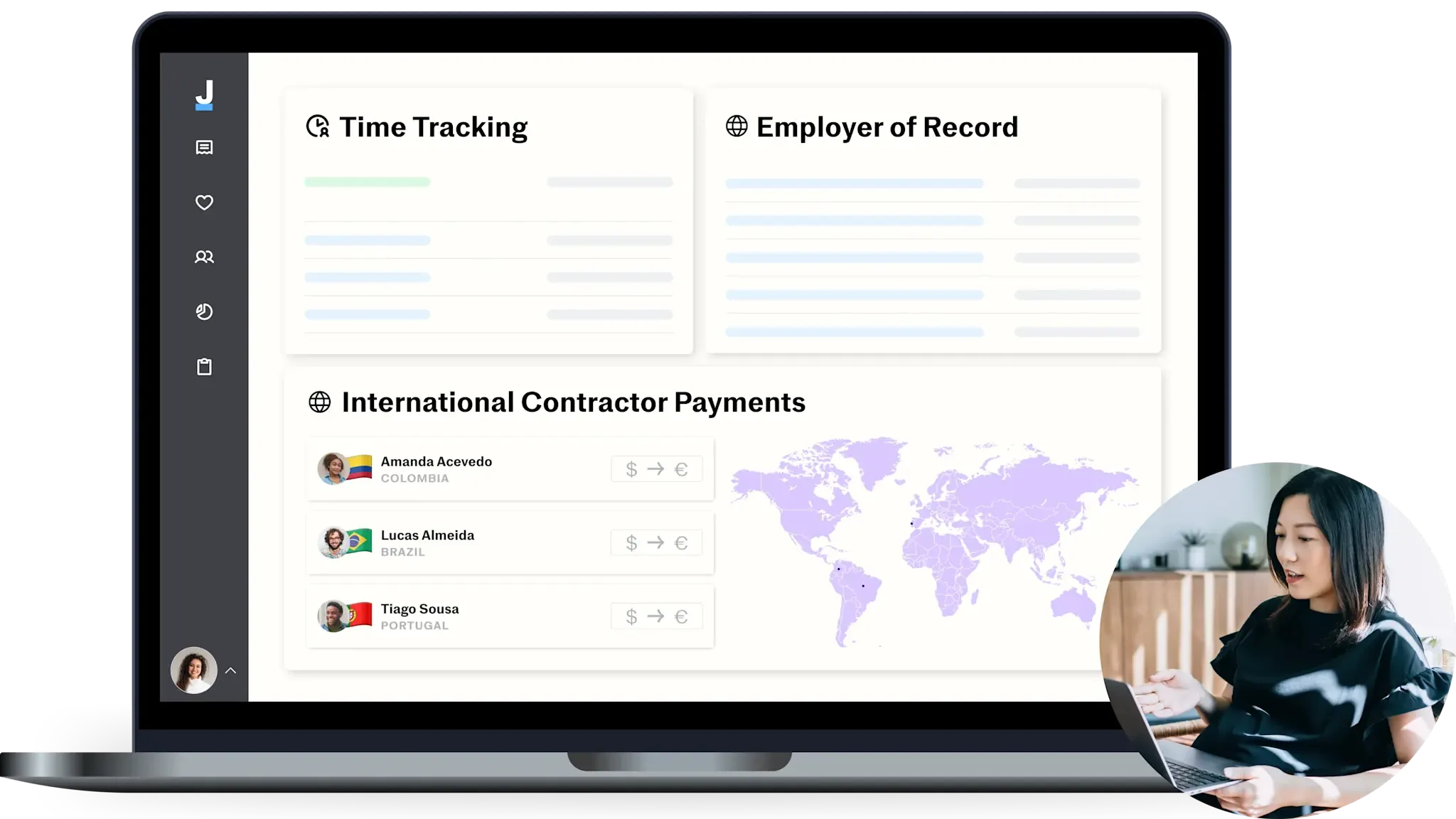
Key features:
- Payroll
- Compliance support
- HR support and consultation
- Benefits administration
- PEO services
| Pros | Cons |
|---|---|
| Straightforward PEO model. | PEO pricing can be significantly higher than software-only HR platforms. |
| Strong benefits and compliance offerings. | The co-employment model isn’t right for every organization. |
| Useful for smaller businesses without large internal HR teams. | Reporting and customization may be less flexible for teams with complex requirements. |
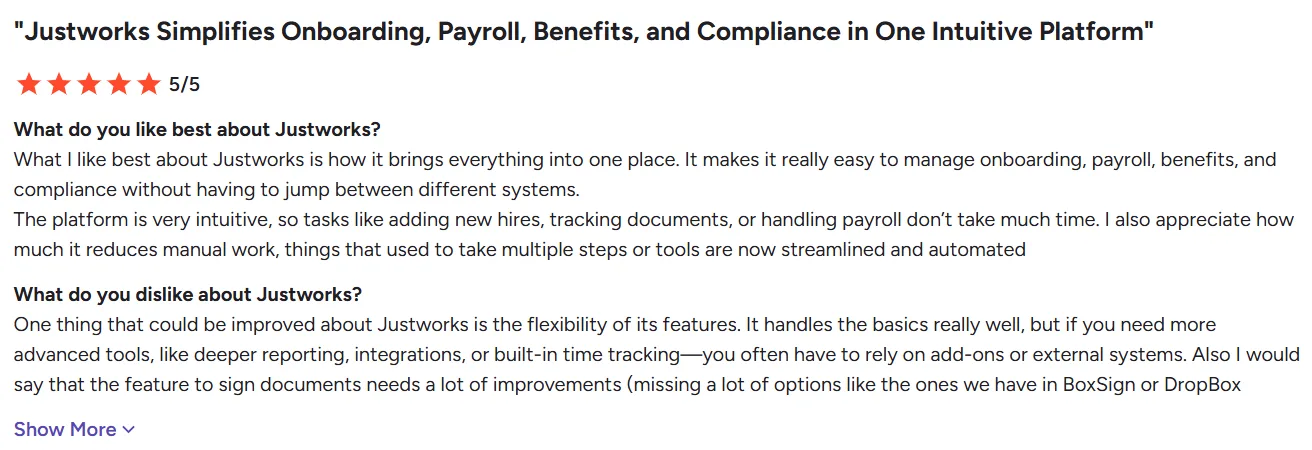
Justworks’ user feedback highlights the convenience of managing onboarding, payroll, benefits, and compliance in one place, while noting that more advanced reporting, integrations, and time-tracking may require additional tools.
Source: G2
Pricing: Payroll starts at $8/employee/month + $50/month base fee. PEO Basic is $79/employee/month, and PEO Plus is $124/employee/month.
Who’s it best for:
Justworks is best for smaller businesses that want payroll, HR support, benefits, and compliance help through a PEO rather than managing every employer responsibility internally.
Choose Justworks if reducing HR administration and gaining access to PEO benefits are more important than having maximum control over your HR technology stack.
With the eight options covered, the right choice comes down to how your company operates and what you actually need to replace.
Finding the Right Fit for Your Headcount
Headcount is a useful starting point, but it shouldn’t be the only factor. Keka can support businesses at different stages of growth. Consider your payroll complexity, number of locations, and need for PSA or IT management. Also consider how much HR work you want to keep in-house.
| Company size | Strong options | Why |
|---|---|---|
| Under 50 employees | Gusto or Justworks | Gusto works well for straightforward payroll and HR. Justworks makes more sense if you want a PEO to take on more compliance and employer administration. |
| 50-200 employees | Keka, BambooHR, or Paycor | Keka works well when you want broader HR and payroll consolidation. BambooHR suits HR-first teams that value usability. Paycor is a stronger fit when payroll and compliance are central. |
| 200-1,000 employees | Keka, Rippling, Paylocity, or Paycom | These platforms are better suited to more complex workforce operations. Keka stands out for HR plus PSA, Rippling for HR plus IT, Paylocity for workforce management, and Paycom for single-database HCM. |
| 1,000+ employees | Keka, Paycom, Paylocity, or Paycor | Larger organizations generally need stronger support for complex payroll structures, workforce management, multiple entities, and enterprise processes. Keka is a strong fit here for organizations that also want PSA and project billing unified with HR and payroll, alongside Paycom, Paylocity, and Paycor for single-database HCM, engagement, and compliance depth. |
How Do You Migrate from Namely to Another HR Platform?
Moving away from an HRIS is less about exporting a spreadsheet and more about making sure the new system starts with accurate employee, payroll, benefits, and organizational data.
A practical migration usually takes several stages.
| Phase | Typical timeline | You own | Vendor owns |
|---|---|---|---|
| Discovery and planning | Weeks 1 to 2 | Inventory employee data, historical payroll records, benefits, organizational structure, and integrations | Project plan, data mapping templates, implementation support |
| Data migration | Weeks 3 to 6 | Extract Namely data, validate employee records and YTD payroll, approve the migrated data | Data transformation, import, validation, discrepancy resolution |
| Configuration and testing | Weeks 5 to 8 | Decide workflows, pay schedules, approval rules, benefit eligibility, and participate in UAT | Configure the system, run test payrolls, establish integrations |
| Parallel run | Weeks 8 to 10 | Run both systems, reconcile results, approve the go-live decision | Support parallel processing and resolve variances |
| Go-live and stabilization | Weeks 10 to 12 | Train employees, manage change, monitor the first live payroll | Hypercare support, escalation path, post-go-live checks |
Wrapping it Up
There isn’t one Namely alternative that works for every company.
For a business that wants to consolidate HR, payroll, performance, attendance, hiring, and project operations, Keka offers a broad platform that can support different stages of growth. Its wider platform coverage makes it especially relevant when replacing Namely is also an opportunity to reduce the number of systems your HR team manages.
For companies where HR and IT need to work together, Rippling is the better fit. Its value comes from connecting employee data with application access, devices, payroll, and other operational systems.
For smaller businesses that mainly want straightforward payroll and HR, Gusto is easier to justify. And if your priority is outsourcing more employer administration through a PEO, Justworks deserves a place on the shortlist.
The right choice ultimately depends on what is actually frustrating your team today. If Namely is becoming difficult because of payroll handoffs, limited customization, reporting gaps, or growing administrative work, start by identifying which of those problems you need the new platform to solve. Then compare vendors against those requirements rather than choosing based on feature count alone.
If Keka matches your requirements, you can request a Keka demo and see how its HR, payroll, performance, and project operations fit together.
See how Keka can simplify HR and payroll for your growing workforce.


