Login
Login

What is Expense Management: A Complete Guide


PRODUCTS
 Payroll Suite
 HR Suite
 Talent Suite
 Project Services Suite
Meet the platform tailored to your business
Core system of record
One platform for the entire employee journey

BY INDUSTRY
BY COMPANY SIZE
LEARN
EXPLORE KEKA
Expense management helps companies track, approve, and control business spending. This blog explains the process, common challenges, and benefits of moving to automated systems. It highlights how digital expense tools improve accuracy, reduce delays, and create better financial visibility for teams.
Imagine this scenario: You have 50+ SDRs in your team. All travel for sales trips at least 4 times a month.
Their first steps?
Likely, they’ll book a ticket, arrange accommodations, travel to the meeting, incur expenses, and then submit a reimbursement request – hoping to get it approved within time.
You’d think that managing employee expenses would be a no-brainer by now – it’s something companies do day in and day out.
Yet surprisingly, 43% of employees report delays in expense approval, and companies lose millions annually to inefficient processes and expense errors.
Yes, as simple as it sounds- expense management is no cakewalk.
With the global expense management market projected to reach $11.9 billion by 2027, businesses rely on automated solutions to save time and improve financial control.
In this guide, let’s explore everything you need to know about expense management and understand how modern solutions can help save time, increase productivity, and provide better control over expenses.
Let’s begin by understanding its meaning.
Expense management is the process of tracking, auditing, and reimbursing employee expenses, particularly those related to business travel, meals, and other work-related expenses.
Inefficient expense management or lack of it can lead to reduced profitability, less financial control, reduced decision making and reduced employee morale.
In fact, a survey by Global Business Travel Association found that 79% of employees feel frustrated when expense approvals are delayed, which can ultimately impact their productivity.
Expense management solutions automate and organize expense submissions, reviews, and approvals, within a centralized system. They also provide greater visibility into spending, improve compliance, and boost the overall employee experience.
Did you know? 7% of the average company’s budget is spent on travel-related expenses, and 41% of companies see expense management as crucial to their operations, with many planning to invest in automated solutions.
By implementing Keka, companies can efficiently control their costs and simplify their employee experience. Let’s examine the key components of these systems.

Effective expense management solutions simplify the entire process – from submission to approval – by automating review and approval workflows, tracking expenses in real-time, and providing data-driven insights.
Here are the essential components of a modern, cloud-based expense management system:
The customization feature lets organizations tailor their expense workflows to match specific business needs and policy requirements:
An expense management system also enhances control over corporate card spending:
Efficient reimbursement is a necessity for both employees and finance teams:
Automated compliance checks help businesses minimize manual reviews and hefty lawsuits.
The best solutions seamlessly integrate with the company’s existing systems, reducing manual burden:
An ideal expense management solution acts as strategic partners by providing insights that support decision-making:
Comprehensive documentation and responsive support facilitate smooth adoption and ongoing use:
An ideal expense management system enhances efficiency, regulatory compliance, and employee satisfaction.
Next, let’s explore the common challenges companies face in expense management.

While expense management solutions offer numerous benefits, many organizations still rely on traditional methods.
So, you might wonder, “Why make the switch to an automated expense management system when I can handle it all on excel?”
Well, the answer lies in the hidden costs and inefficiencies associated with manual systems, leading to increased complexity and significant losses in the long run.
Here are some of the common challenges associated with expense management:
One of the biggest challenges is ensuring compliance with corporate policies. According to the Aberdeen Group, 20% of T&E spend is out of policy, and one in five expenses violates guidelines. Even if policies are established, lack of automation makes it difficult to catch duplicate claims or ensure expenses align with approved suppliers. In most cases, unenforced policies result in costly manual interventions to address violations. Low-level fraud, like a team lunch at expensive restaurants sanctioned by managers, complicates compliance efforts and impacts financial control.
Trend analysis and spend visibility are considered indispensable for every type of cost control. However, in traditional systems finance teams manually upload reports from ERP systems, without budget or spending checks. By automating expense management, this problem can be easily addressed by collating and aggregating expenses in real-time. This ensures proper reporting data, better transparency, and more actionable insights for better cost management.
Manual processes and unclear approval workflows delay reimbursements, frustrating employees and affecting cash flows. Disconnected systems and complex claim submission processes hamper employee satisfaction and operational efficiency.
Without automation, administrative and finance teams face the brunt of managing extensive data entry tasks. This increases the risks of errors, administrative costs, particularly impacts admin teams as they focus on admin tasks instead of strategic job responsibilities.
Manual processes complicate tax compliance. Financial teams must manually audit receipts and reconcile data manually, making the process time-consuming and error prone. This could lead to legal issues if the inaccuracies are left unaddressed.
Traditional expense management systems usually do not enforce or communicate expense policies. Employees often do not have clear guidelines for allowable expenses or reimbursement processes, leading to inconsistent claims and frequent violations. Finance teams must manually review expenses for compliance without automated checks, which increases workloads and the risk of errors. It frustrates employees and undermines the cost control efforts.
So, with all these challenges it’s quite clear that an automated expense management system is essential for companies of all sizes, from startups to large enterprises.
Next, we’ll compare traditional and automated systems to illustrate the tangible benefits of shifting to an automated system.
“It is estimated that over $1 billion is lost each year to fraudulent expense reimbursement!”
– JP Morgan
Paper-based expense management has become ingrained in business operations, and many senior managers perceive automation as an additional cost rather than a strategic investment.
Yet, automated systems provide substantial value in terms of efficiency, savings, and fraud prevention.
Let’s break down the clear differences between traditional and automated expense management:
| Feature | Traditional Expense Management | Automated Expense Management |
| Process Type | Manual and paper-dependent processes | Fully digital and automated workflows |
| Error Rate | High error rate | Lower error rate |
| Approval Speed | Lengthy as it requires multiple approvals | Faster approvals due to pre-defined roles and real-time updates |
| Visibility | Limited | Real-time visibility and insights |
| Policy Compliance | Discretionary and inconsistently applied | Integrated policy enforcement |
| Cost | High processing cost | Reduced cost due to SaaS deployment |
| Fraud Prevention | Prone to padding or error | Automated policy flags and receipt matching |
| Reporting and Analytics | Minimal reporting | Robust analytics with customizable reports |
| Ease of Use | Cumbersome | User-friendly |
| Reimbursement Speed | Slower due to manual entry and approvals | Faster due to automated workflows |
The comparison table highlights the benefits of automated expense management, from minimizing errors and fraud to enhancing visibility and cutting costs.
In the next section, let’s explore additional ways automated expense management meets the evolving needs of today’s business.
Automated expense management solutions help businesses manage their time and costs more efficiently. Many companies overlook hidden inefficiencies – like manual entry errors, fraud, and untracked expenses – assuming traditional methods are sufficient.
Automated systems offer an effective, integrated approach that helps organizations streamline processes, reduce the risks of errors, and create a central repository for expense claims.
Below are the key benefits of adopting an automated solution:
An automated solution cuts down the time spent on manual repetitive processes by automating them. With faster approval cycles – up to 50% faster in certain cases – managers and finance teams can focus on strategic tasks.
Modern solutions are user-friendly, with features like mobile accessibility and cloud integration, making it easier for employees to submit, review, and approve expenses from anywhere. This provides real-time access to track expenses, regardless of geography.
With cloud-based expense management solutions, setup costs are low, and implementation is quick. These systems are highly scalable, offer flexible pricing options, and eliminate the need for extensive training and long-term contracts. They are affordable and low-risk options for organizations of all sizes.
Automated systems provide real-time insights and a centralized view of all expenses, letting finance teams track spending patterns and recognize cost-saving areas. This data-backed visibility supports accurate budgeting and forecasting, empowering their financial decisions.
Modern expense management solutions have fraud detection and policy enforcement features, minimizing fraudulent and out-of-policy claims. Real-time alerts for duplicate submissions and policy violations help maintain better control and ensure transparency and accountability.
An automated system consolidates all-expense-related processes onto a single platform, creating organization-wide consistency and control. This also aligns expense policies with organizational goals, providing oversight and simplifying compliance management.
In short, automated expense management systems offer organizations an efficient, cost-effective way to manage expenses while ensuring compliance and real-time visibility.
Wondering which solution to choose?
Over 10,000+ organizations trust Keka’s Expense Management globally for its unique features such as automated compliance, seamless integration, and real-time insights.
Keka, a leading HRMS platform, offers a smart expense management solution seamlessly integrating with its payroll and HR suites. Designed to enhance employee experience and simplify workflows, Keka’s features are designed to meet modern business needs.
Here are the standout features its expense management module offers:
Keka automates expense submission, letting employees submit receipts through web and mobile applications. Finance teams can track all expenses in a centralized dashboard, reducing processing time and ensuring accuracy across all transactions.
Keka allows organizations to establish customizable policies with defined spending limits by role, team, or location. Automated notifications flag out-of-policy expenses, minimizing manual intervention and maintaining budget control and compliance.
Keka’s multi-level approval workflows tailor approvals based on departmental, or team needs. Expenses within limits are auto approved, while large expenses are approved through custom approval channels that align with company policies.
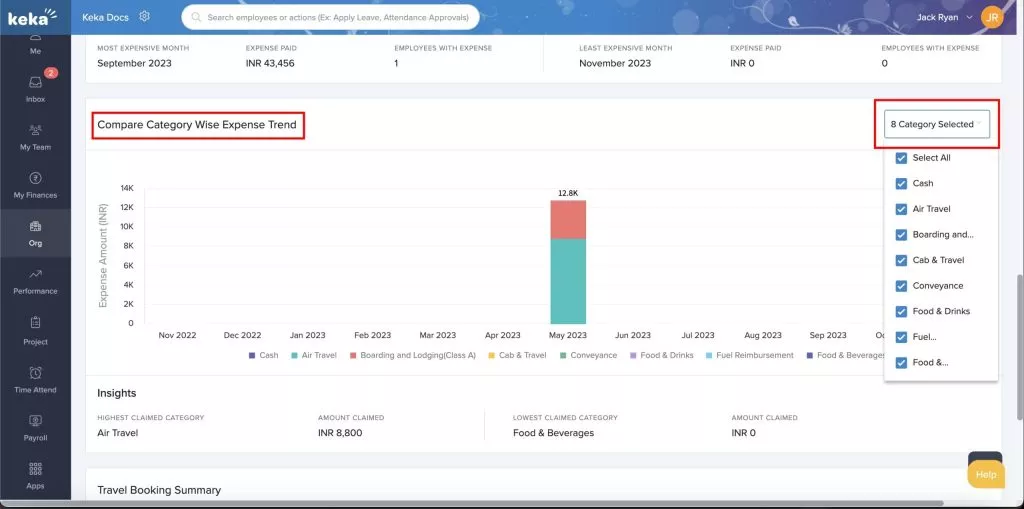
Keka expense management’s advanced analytics offers real-time insights into spending patterns by role, department, or location. This data supports expense trend analysis, highlighting cost-saving areas and enhancing strategic decisions.
Keka’s mobile app allows employees to manage expenses on the move, with features like receipt uploads, OCR for uploading receipts, mileage tracking, and status notifications. Remote employees are the major beneficiaries of this feature, as they can efficiently manage their expenses from any location.
For field employees, Keka’s mileage tracking, integrated with attendance, automatically calculates reimbursements based on travel data. This eliminates manual entry and simplifies expense reporting.
Keka offers a travel desk feature to simplify business travel arrangements, from approval to booking. This support simplifies travel management for employees by reducing complex processes.
Keka’s expense management automatically syncs with its payroll module, ensuring timely, accurate reimbursements. Cash advances are also managed within the payroll cycle, automatically adjusting unclaimed balances.
Keka’s centralized inbox consolidates pending expenses, reducing the risk of missed approvals and ensuring transparency. This also improves visibility across the reimbursement process, enhancing accountability and efficiency.
In short, Keka’s robust features make it an ideal choice for organizations keen to optimize their expense management, maintain compliance, and enhance employee experience.
Selecting the right expense management software for your business requires the perfect blend of functionality, ease of use, efficiency, and more.
Here are some of the key considerations for selecting an ideal expense management software:
By keeping these considerations in mind, you can make a well-informed decision when selecting the right expense management software for your organization.
The table below highlights Keka’s key offerings compared to other solutions on the market, helping understand how Keka can help manage your organization’s expenses efficiently.

| Key Features | Keka | Other Software |
|---|---|---|
| Mobile Receipt Scanning | ✓ | ✓ |
| Policy Configuration | ✓ | ✓ |
| Mileage Tracking | ✓ | ✓ |
| Travel Desk Service | ✓ | ✗ |
| Payroll Integration | ✓ | ✓ |
| Cash Advance | ✓ | ✓ |
| Custom Approval Workflows | ✓ | ✓ |
| Expense Reporting | ✓ | ✓ |
| Real-Time Expense Tracking | ✓ | ✓ |
| Automatic Mileage Tracking Linked to Attendance Punches | ✓ | ✗ |
Keka’s expense management stands out by meeting the needs of organizations of all sizes. With its comprehensive feature set and user-friendly design, Keka is the top choice for streamlined expense management.

Adopting an automated, smart, and scalable expense management solution like Keka can bring significant benefits to your organization.
Here’s why Keka should be your only choice:
Keka’s intuitive and user-friendly design makes expense management accessible for all users. It eliminates complex processes and automates manual tasks. Studies have revealed that user-friendly design increases adoption rates by 39%, enhancing productivity as employees can seamlessly navigate the systems and save time on high-priority tasks.
Keka integrates smoothly with payroll, accounting, and HR systems, creating a centralized platform for employee data. This, in turn, eliminates manual data entry, optimizes daily operations, enhances data accuracy, reduces costs, and improves resource utilization.
With customizable in-built policies, Keka ensures strict compliance with organizational rules and regional regulations, a must for the pharma and finance sectors. The system flags non-compliant entries automatically and adapts to regional laws, supporting a global workforce and reducing manual verification efforts.
Keka’s system optimizes expense management and budgeting, delivering long-term cost benefits to organizations. Automating tracking and reporting prevents overspending, aligns every expense with budget limits, and reduces total expenses by up to 20%. This approach is a sustainable investment that contributes to the organization’s financial health.
Keka’s advanced features and industry-focused expertise maintain transparency, reduce fraud, and support compliance with minimal manual intervention.
The key objectives of expense management include simplifying tracking, approval, and reimbursement of expenses. It also helps reduce fraud, ensure policy compliance, and improve budget control and planning.
The key types of expense management are travel-related, operational, and capital expense management.
The key features and capabilities of expense management software are receipt scanning, real-time reporting, policy compliance, mileage tracking, and multi-currency support.
Expense management helps reduce data entry errors, speeds up reimbursements, and provides clear expense analytics to support budget control and company financial health.
Using an expense management system helps save time, increases accuracy, and offers real-time insights to improve control and compliance along with preventing costly errors and saving time.
Subscribe to keep up with the latest strategic finance content.
Request a demo