


 Login


Gusto and Keka rarely compete for the same five-person startup. They meet when a company that started on Gusto has grown past 40 or 50 people and starts adding a review tool, a time tracker and a spreadsheet of approvals around it.
This comparison is written for that moment. It covers what Gusto still does better, where Keka adds depth, how the pricing models differ and what moving between them involves.
Quick answer
Gusto is the better pick for small US businesses that want published pricing and payroll they can run themselves in minutes. Keka is the better pick once you need payroll, time tracking, approvals, performance reviews and hiring on one record, which usually happens between 40 and 150 employees.
Key takeaways
- Gusto publishes its prices: Simple $49/month + $6 per person, Plus $80 + $12, Premium $180 + $22. Keka quotes by plan and offers a free trial.
- Gusto’s Simple plan covers payroll in one state; multi-state starts on Plus. Keka includes multi-state payroll in its plans.
- Gusto’s G2 sub-scores for ease of use (9.5) and setup (9.3) are among the best in the category. Its most-cited negatives are missing features and customer support.
- Keka includes structured performance reviews, OKRs and project billing, which Gusto does not offer.
Choose Gusto or Keka
| Choose Gusto if | Choose Keka if |
|---|---|
| You have under about 40 employees, mostly in one or two states | You need approvals, performance reviews and time tracking in the payroll system |
| You want a price you can read on a website | You are paying for Gusto Premium plus other HR tools |
| You want a built-in benefits broker for small-group plans | You bill clients for hours and want timesheets to drive invoices |
| You run payroll yourself and rarely need HR workflows | Managers need to own leave and time approvals from a mobile app |
Disclosure: Keka publishes this comparison. We hold both products to the same criteria, cite public sources for Gusto’s pricing and ratings, and say where Gusto is the stronger choice. No affiliate fees are involved.
What is the main difference between Gusto and Keka?
Gusto is designed so an owner with no payroll background can run it. Its strength is the first year of a company’s life: setup in a day, a clear price, benefits through its own brokerage and an interface that rarely needs training.
Keka is designed for the company that now has managers. Its core idea is that pay, time, leave, reviews, hiring and project hours belong to one employee record, with approvals flowing through managers instead of through the person who runs payroll.
So the decision is mostly about stage. If payroll is the job, Gusto is hard to beat. If running people processes across managers is the job, Keka gives you more room.
Gusto vs Keka at a glance
| Category | Gusto | Keka | Edge |
|---|---|---|---|
| Best fit | Small businesses, often under 50 employees | Growing companies, 30 to 1,500 employees | Tie |
| Setup speed | Hours to days | Weeks, with configuration help | Gusto |
| Published pricing | Yes, three tiers | No; quote-based plans with free trial | Gusto |
| Multi-state payroll | Plus and Premium plans | Included | Keka |
| Time tracking | Add-on on Simple; included higher up | Included, with overtime rules | Keka |
| Approval workflows | Basic | Multi-level approvals for leave, time, expenses and job changes | Keka |
| Performance and goals | Light | Reviews, OKRs, one-on-ones, surveys | Keka |
| Benefits | Built-in licensed brokerage | Benefits administration with your broker | Gusto |
| Project time and billing | Not offered | Built in | Keka |
| Ease of use (G2) | 9.5 / 10 | Rated 4.4 overall on G2 | Gusto |
| Support | Chat and email; priority support on Premium | Implementation team plus product support | Tie |
| G2 rating | 4.6 / 5 (10,000+ reviews) | 4.4 / 5 | Gusto |
How we evaluated Gusto and Keka
We used Gusto’s published pricing page, both vendors’ product documentation, G2 ratings and sub-scores, and the review themes G2 reports for Gusto. We scored categories from the viewpoint of a US company with 30 to 300 employees deciding whether to stay on Gusto or move to a broader platform.
Gusto wins several rows outright, and we have marked them that way.
What are Gusto and Keka, and who are they built for?
| Gusto | Keka | |
|---|---|---|
| Founded | 2011 (as ZenPayroll) | 2016 |
| Best known for | Easy, transparent small-business payroll | One employee record for HR, payroll and project time |
| Core products | Payroll, benefits brokerage, onboarding, PTO, time tracking, basic HR | HR, US payroll, time and attendance, leave, performance, hiring, expenses, project time and billing (PSA) |
| US payroll | Native; single state on Simple, multi-state on Plus and Premium | Native, with federal, state and local tax filing |
| PEO option | No | No (you stay employer of record) |
| Pricing model | Published: $49 + $6, $80 + $12, $180 + $22 per month | Quote-based plans (Foundation, Strength, Growth) |
| Free trial | No | Yes |
| G2 rating | 4.6 / 5 | 4.4 / 5 |
What is Gusto?
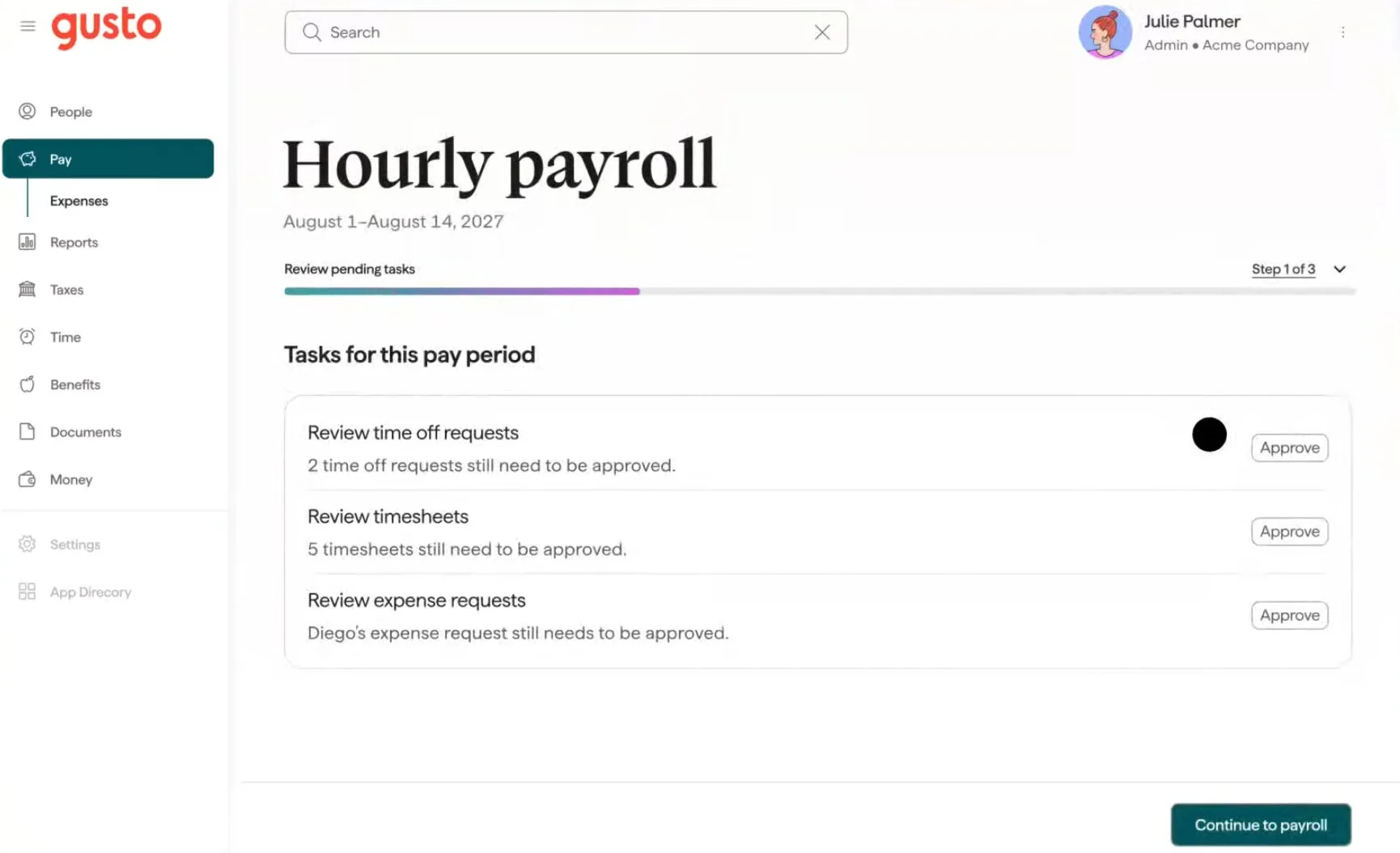
Gusto started in 2011 as ZenPayroll with one goal: make payroll something a small-business owner could do without dread. It now bundles payroll with a licensed benefits brokerage, onboarding, PTO and time tracking, and integrates with a long list of accounting and productivity tools.
Its review scores reflect that focus. G2 users rate its ease of use at 9.5 out of 10. The flip side shows up in its most common complaints: missing features and support, mostly from companies that have grown.
What is Keka?
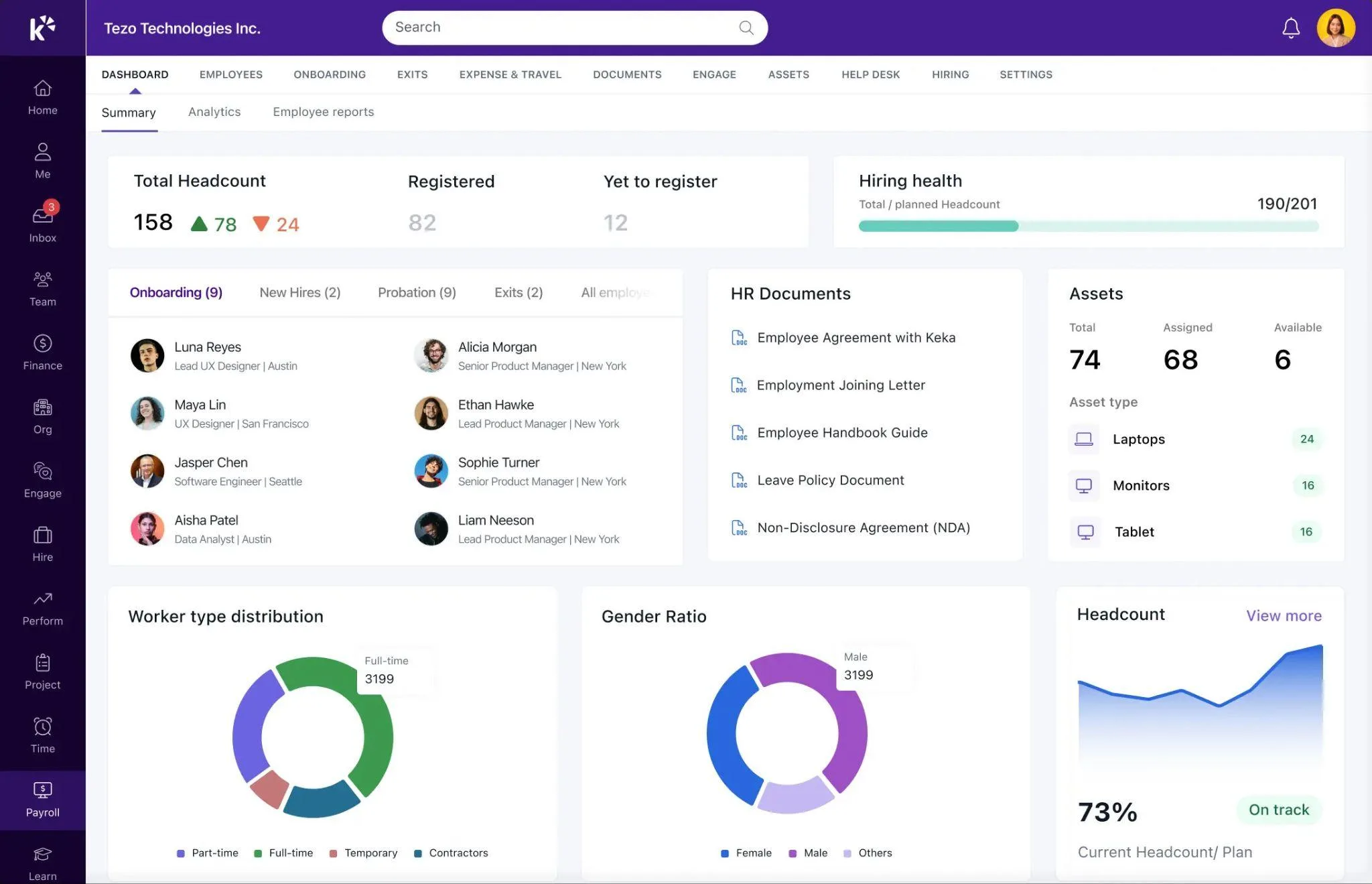
Keka is built for the stage after that. It covers US payroll and tax filing, then adds time and attendance, leave, approvals, performance reviews, OKRs, applicant tracking, expenses and project time on the same record.
For a company leaving Gusto, Keka usually replaces three or four tools at once: Gusto itself, a review tool, a time tracker and a project timesheet app.
How do Gusto and Keka compare on HR, payroll and compliance?
Running payroll
| Gusto | Keka |
|---|---|
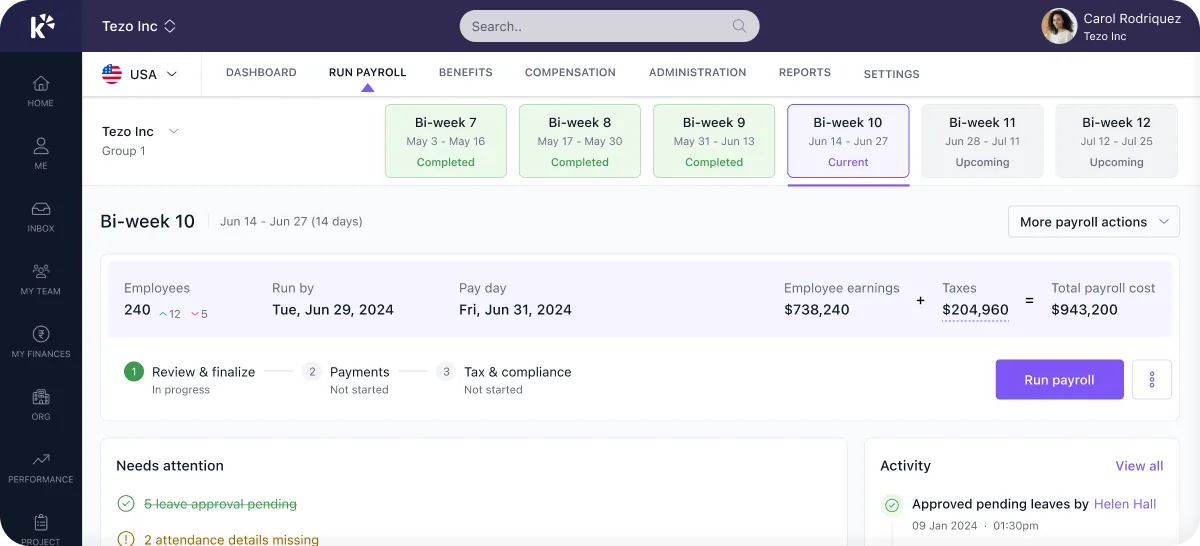
| Gusto’s pay run is fast and friendly, with auto-pilot for salaried teams, next-day deposit on higher plans and clear previews. Single-state companies on Simple get everything they need. | Keka’s pay run pulls approved time, overtime, leave and reimbursements automatically, so payroll staff review exceptions rather than enter data. Multi-state withholding and local taxes are part of standard setup. |
Time tracking and leave
| Gusto | Keka |
|---|---|
| Time tracking is an add-on on Simple and included on higher tiers. PTO policies are straightforward and suit simple rules. | Time, attendance, shifts and overtime are included, and leave policies can follow state rules such as paid sick leave accrual caps, which matters once you hire in California, New York or Washington. |
Manager workflows and approvals
| Gusto | Keka |
|---|---|
| Approvals are basic. Most changes route through the payroll admin, which works well when that person knows everyone. | Managers approve leave, timesheets, expenses, offers and job changes in a mobile app, with multi-level rules. HR sets policy once instead of fielding every request. |
Performance and hiring
| Gusto | Keka |
|---|---|
| Gusto offers light performance features and hiring help, and many customers add a dedicated review or ATS tool. | Reviews, goals, one-on-ones, engagement surveys and applicant tracking are built in, so a promotion approved in a review cycle carries into the next payroll. |
Benefits
| Gusto | Keka |
|---|---|
| Gusto’s built-in brokerage is a genuine advantage for small companies shopping for their first group plan. | Keka administers benefits deductions and enrollment, while your own broker places the plans. That suits companies that already have a broker relationship. |
How much do Gusto and Keka cost?
Gusto publishes its tiers. Keka quotes by plan. For a fair comparison, price the Gusto tier you actually need plus every other HR tool you pay for today.
| Gusto | Keka | |
|---|---|---|
| Pricing model | Base fee plus per person per month | Per employee per month, by plan |
| Published price | Simple $49 + $6; Plus $80 + $12; Premium $180 + $22 | Not published; free trial |
| Multi-state payroll | Plus or Premium | Included |
| Time tracking | Add-on on Simple ($6 per person for Time and Attendance Plus) | Included |
| Performance, OKRs, ATS | Not included; separate tools | Included in higher plans |
For a 150-person team on Gusto Premium, the per-person fee alone is $22 a month before a separate review tool or time tracker. That is the point at which a quoted all-in platform often costs about the same or less.
What are the pros and cons of Gusto and Keka?
Gusto pros and cons
| Pros | Cons |
|---|---|
| Published, simple pricing | HR depth stops at basics |
| Best-in-class ease of use | Multi-state needs a higher plan |
| Built-in benefits brokerage | Support complaints as companies grow |
| Very fast setup | No project time or billing |
Keka pros and cons
| Pros | Cons |
|---|---|
| Payroll, time, reviews and hiring on one record | Pricing is quoted |
| Manager approvals built for 100+ people | More setup than Gusto |
| Project billing for services firms | No built-in benefits brokerage |
| Free trial | Overkill for a 10-person company |
What does switching from Gusto to Keka involve?
Most companies move from Gusto to Keka in four to eight weeks. Gusto’s data model is simple, which makes the export straightforward.
| Step | What happens | Typical timing |
|---|---|---|
| 1. Export | Payroll journals, YTD by employee and tax, filings, PTO balances and employee profiles from Gusto | Week 1 |
| 2. Setup | Pay schedules, state tax accounts, PTO and approval rules configured in Keka | Weeks 2 to 4 |
| 3. YTD and parallel | YTD loaded; one parallel payroll reconciled | Weeks 4 to 6 |
| 4. Go-live | Turn off Gusto auto-pilot; first live payroll in Keka | Quarter start |
What to export from Gusto before you give notice
- Payroll journal and YTD report
- Federal and state filings to date
- State unemployment rate notices
- PTO balances by employee
- Benefits deductions and carrier details
- Employee documents and I-9s
Should you choose Gusto or Keka?
| Gusto is the better fit when | Keka is the better fit when |
|---|---|
| You are under about 40 employees, payroll is the main job, you value a published price and you want a broker built in. | You have managers who need to approve time and leave, you run review cycles, you hire steadily, or you bill clients for hours. |
Gusto is excellent at what it was built for. When your company starts running on managers, approvals and review cycles, Keka gives you one system for all of it. Many teams make the switch around their first 100 hires.
See it with your own data. Bring a recent Gusto payroll register and your state list. In a 30-minute demo we will run the same pay period in Keka so you can compare results line by line. Request a demo or compare more Gusto alternatives.
Frequently asked questions
Is Keka more expensive than Gusto?
For very small teams, usually yes. As headcount grows and you add Gusto Premium plus separate review and time tools, Keka’s plan pricing often comes out level or lower. Compare quotes that include everything you use today.
Gusto vs Keka: which is better for a 200-person company?
Keka is usually the better fit at 200 people, because it includes multi-state payroll, approvals, time tracking and performance reviews in one system.
How much does Gusto cost?
Gusto publishes Simple at $49 per month plus $6 per person, Plus at $80 plus $12 and Premium at $180 plus $22. Check Gusto’s pricing page for current rates.
Does Keka have a benefits broker like Gusto?
No. Keka administers benefits enrollment and payroll deductions, and you work with your own broker to place plans.
Can I move from Gusto to Keka mid-year?
Yes. Go live at a quarter start, load year-to-date wages and taxes into Keka and switch off Gusto auto-pilot so payroll does not run twice.
What are the most common Gusto complaints?
On G2, missing features and poor customer support are the most-cited negatives, usually from companies that have grown beyond Gusto’s core small-business use case.
Is Gusto good for multi-state payroll?
Yes, on the Plus and Premium plans. The Simple plan covers payroll in one state.


