Login
Login


If you’re stuck between Workday and ADP, I get it. They both check all the boxes: payroll, compliance, benefits, global capabilities. So why is this decision so hard?
As I dug deeper, I realized that while they offer similar features, the real-world experience of using them can be very different.
Instead of relying solely on feature lists or promotional demos, I wanted to know what it’s really like to use these platforms day-to-day.
How do they perform when you’re handling payroll under pressure or trying to manage a growing team with limited HR support?
To get a clearer picture, I spent a lot of time reading real user reviews – not just star ratings, but the actual experiences, challenges, and lessons that come with using each platform. In this blog, I’ll be sharing those insights to help you figure out which platform could work best for your business.
Workday vs. ADP at a Glance
| Feature | Workday | ADP | The Winner |
|---|---|---|---|
| Payroll Processing |
|
| Workday for better automation and transparency. |
| Ease of Use |
|
| ADP edges out for simpler day-to-day use. |
| Reporting & Analytics |
|
| Workday wins for advanced insights and flexibility. |
| Proven Industry Experience |
|
| ADP wins on legacy and breadth; Workday leads in enterprise confidence. |
| Future-Ready Technology (Future-Ready Technology Platform) |
|
| Workday is clearly more future-ready. |
| Customization & Configuration |
|
| Workday leads to flexibility and control. |
| Advanced HCM Capabilities |
|
| Workday wins with true end-to-end HCM. |
| Unified Platform Architecture |
|
| Workday clearly dominates here. |
Why You Should Believe This Review
Picking between Workday and ADP can feel overwhelming. There’s a lot of noise out there – long feature lists, bold claims, and a whole lot of HR tech jargon.
I wanted to make things easier.
So I focused on what really matters: how these platforms perform in the real world, for real teams – not just what the brochures say.
Here’s how I did it:
- Real User Feedback: I went through hundreds of reviews on G2, Reddit, and HR tech forums. This helped me understand what everyday users actually experience – from payroll accuracy to support quality and ease of use.
- No Sales Hype: I skipped the buzzwords and focused on real functionality – how the tools behave when people rely on them daily.
- Official Info, Verified: I dug through product pages, pricing breakdowns, feature lists, and support docs; so nothing here is based on guesses or assumptions.
This review is built to save you time, cut through the noise, and help you make a decision with clarity and confidence – without the stress.
Workday vs. ADP: Feature-by-Feature Breakdown
Workday and ADP are both popular choices for handling HR and payroll tasks. But what works well for one company might not be the best fit for another.
To help you figure out which is right for you, I’m breaking down the key features side by side (focusing on the things that really make a difference in daily use).
Payroll Processing
Payroll processing ensures employees are paid accurately and on time, while staying compliant with tax laws and regulations. A strong payroll system handles everything from gross-to-net calculations to tax filings and benefit deductions, all with minimal manual effort.
When payroll is smooth and reliable, it reduces administrative workload, avoids errors, and helps businesses stay focused on operations rather than correcting paycheck or compliance issues.
Workday: Workday gives employees direct access to update and view their payroll details in real time, eliminating long wait times and unnecessary emails. One enterprise user noted how impressed early adopters were with the ability to make updates—like tax elections or payment methods – and see them reflected immediately. This level of transparency and control has streamlined payroll operations and improved employee trust in the process.

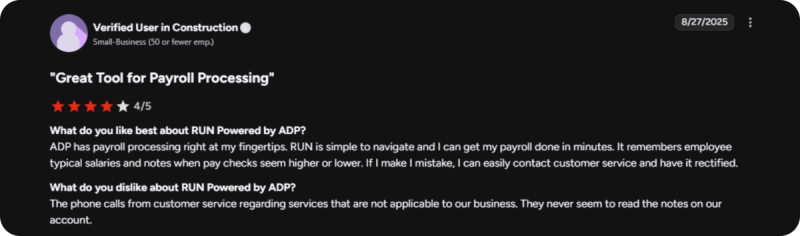
ADP: RUN Powered by ADP is an easy way to manage payroll. It’s simple to use, and you can finish payroll quickly. The system remembers what you usually pay employees and warns you if something seems wrong. If you need help, customer service is easy to reach and usually solves problems fast. But some people don’t like getting calls about extra services, especially when support doesn’t check their account first. Overall, RUN is a good and reliable payroll tool.
ADP:
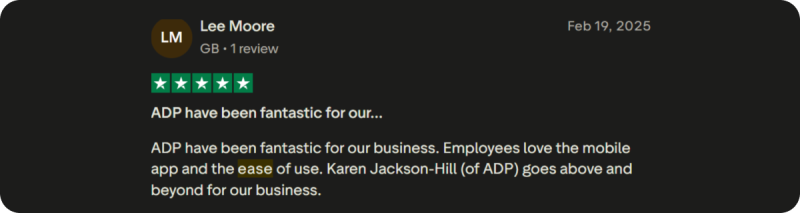
Users consistently praise ADP for its ease of use, particularly appreciating how straightforward the mobile app is for employees. The platform’s user-friendly design helps simplify everyday HR and payroll tasks, making it accessible even for those who aren’t tech-savvy.
One reviewer highlighted the exceptional support provided by ADP’s team, noting how they go above and beyond to ensure the platform works seamlessly for their business needs.
Reporting & Analytics
Effective reporting and analytics help HR teams make informed, data-driven decisions. The platform should allow users to easily create and customize reports, track key workforce metrics, and identify trends.
Whether its turnover rates, payroll costs, or headcount forecasts, having access to clear, accurate data is essential.
Workday: The reporting features in Workday stand out for their depth and flexibility. Although there’s a bit of a learning curve, users find the effort worthwhile.
One analytics lead mentioned that once they got used to the system, building and customizing reports became seamless – and powerful enough to handle even complex user requests. For teams focused on data-driven HR decisions, Workday proves to be a highly capable platform.
Ease of use refers to how simple and intuitive the platform is for HR teams and employees. A well-designed system allows users to complete everyday tasks, like updating personal info or submitting time-off requests, without confusion or needing extra support.
This improves adoption, reduces time spent on training, and minimizes errors.
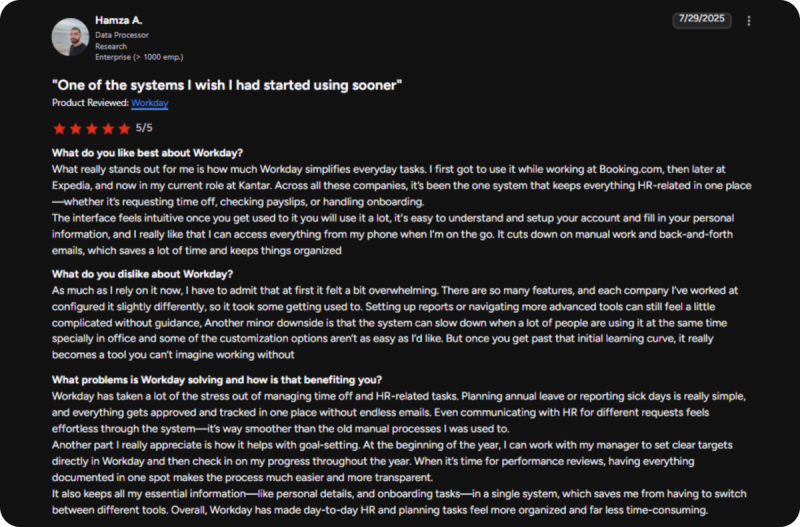
Workday: While Workday can feel overwhelming at first, users generally find the interface becomes second nature with consistent use.
A reviewer shared how tasks like requesting time off, accessing payslips, and managing onboarding became effortless after just a short adjustment period. The mobile app adds extra convenience, and once familiar, it’s a tool employees tend to rely on daily.

ADP: Some users find ADP’s platform to be glitchy and time-consuming, especially when it comes to onboarding new employees and managing payroll reporting. One reviewer expressed frustration with inconsistent customer service and difficulties in tracking employee training enrollments.
The payroll reporting features did not fully meet their needs, requiring manual adjustments to policies. These issues led them to feel that the platform added complexity rather than simplifying HR tasks.

Customization & Configuration Flexibility
Customization and flexibility are key for aligning HR systems with your company’s processes. A flexible platform allows teams to configure workflows, roles, and reporting without relying heavily on technical support.
Whether you are adjusting for growth, policy changes, or compliance needs, the system should be adaptable. The ability to tailor the platform to your organization’s structure means you get a solution that fits – not just one that functions – making operations smoother and more efficient.
Workday: Customization in Workday is possible, though it often requires technical expertise to get it just right. One enterprise user pointed out that while basic self-service and workflows are user-friendly, tailoring the platform to fit very specific business needs, like unique reporting dashboards or workflow automation, can require IT or partner support. That said, once configured, it’s a system that aligns closely with organizational processes.

ADP: ADP offers flexible customization and consolidated payroll once operational. However, setup is extremely complicated with lengthy onboarding delays and repetitive information requests. Users complain that the support lacks cross-functional expertise between time and payroll. While final integration delivers convenience, the painful implementation process and poor onboarding support overshadow its capabilities.

Advanced HCM Capabilities
Advanced HCM (Human Capital Management) features go beyond payroll and admin tasks. These include performance management, talent acquisition, succession planning, learning tools, and employee engagement.
Platforms with robust HCM tools allow HR teams to manage the full employee lifecycle and contribute more strategically to business success.
Workday: Workday stands out for its ability to unify critical talent processes, recruitment, performance, goal tracking, and succession, into one connected system. A reviewer noted how well it supports internal mobility and career development through continuous feedback and personalized development plans. For companies focused on talent growth and retention, Workday provides not just tools, but a framework for building long-term people strategies.

ADP: Users transitioning to ADP appreciate the knowledgeable and responsive support teams that help make the shift smooth and stress-free. One reviewer highlighted how ADP consistently delivers helpful reminders and guidance on important deadlines, especially around HCM-related tasks. The hands-on support has made managing processes easier and more efficient. For teams navigating complex HR operations, ADP’s clarity, reliability, and expertise in human capital management stand out as key advantages.

How Keka Differs from Workday and ADP
Workday and ADP are well-established names in HR and payroll software. Workday offers powerful enterprise-level tools but can be complex and requires significant training. ADP provides strong payroll and compliance features but sometimes lacks a fully integrated HR experience.
Keka stands out as a balanced middle-ground solution, combining simplicity with advanced capabilities. It offers a unified platform that covers everything from hiring and onboarding to payroll, performance management, and employee engagement.
This makes Keka a great fit for businesses wanting robust tools without unnecessary complexity.
Built for Growth and Ease of Use
Keka is designed to scale effortlessly with your business, whether you have 20 employees or over 1,000. Its clean, intuitive interface means less time spent on training.
This helps HR teams and employees to quickly adapt and use the system effectively.
Comprehensive All-in-One Platform
Keka integrates HR, payroll, and talent management seamlessly in a single system. This eliminates the need to manage multiple applications, reduces data errors, and improves overall efficiency by keeping all employee information in one place.
Advanced Features Included as Standard
Unlike other platforms that charge extra for premium tools, Keka offers AI-powered recruitment, customizable workflow automation, and detailed workforce analytics as part of its core package. These features help streamline processes and provide valuable insights without adding to your costs.
With transparent pricing starting at $9 per month per employee, Keka delivers a scalable, modern HR solution that grows with your business and avoids hidden fees.
Conclusion
After reviewing both Workday and ADP, I found that the best choice really depends on your business needs. Workday offers powerful features and flexibility, which works well for larger organizations looking for an all-in-one solution.
ADP, on the other hand, provides reliable payroll and an easier user experience, making it a good fit for small to mid-sized businesses.
If I had to choose a platform that balances strong functionality with simplicity, I would recommend looking into Keka.
It combines payroll, HR, and talent management in one easy-to-use system that can grow with your business.
In my experience, the right platform is the one that fits your team’s specific needs, simplifies daily tasks, and helps you manage HR and payroll smoothly; so you can focus on what matters most: growing your business.