


 Login
Login


Workday is one of the most widely recognized HRMS platforms on the market. But search trends reveal a different reality. Queries for “Workday alternatives” have been rising steadily as more organizations begin questioning whether the platform still fits their needs.
Across forums, reviews, and HR communities, the same frustrations keep surfacing. Users are increasingly ranting about a slow and clunky system. Therefore, they find it hard to justify the ROI as well.
If that experience sounds familiar, there’s good news: you don’t have to settle for it. Modern HR platforms have evolved significantly, offering faster implementations, cleaner interfaces, and far simpler day-to-day workflows.
This guide breaks down the best Workday alternatives, why organizations are switching, and how to choose the right HRMS for your team.
8 Workday Alternatives at a Glance
Here’s the short version, pricing and current G2 ratings included. Full detail on every platform is below.
| Platform | Best for | Price | G2 rating | Implementation |
|---|---|---|---|---|
| Keka | Unified HR, payroll, and PSA without enterprise complexity | Custom pricing — free trial available | 4.4/5 | Weeks |
| ADP Workforce Now | Large US enterprises needing proven compliance infrastructure | Quote only | 4.2/5 | Months |
| Rippling | Consolidating HR, IT, and Finance under one roof | From $8/employee/mo (core; modules extra) | 4.8/5 | Weeks–months |
| Ceridian Dayforce | Continuous, real-time payroll calculation at scale | Quote only | 4.2/5 | Months |
| UKG Pro | Union payroll and complex multi-shift scheduling | Quote only | 4.3/5 | Months |
| Paylocity | Employee engagement-focused mid-market teams | Quote only | 4.4/5 | Weeks |
| Paycom | Single-database architecture, employee-verified payroll | Quote only | 4.6/5 | Weeks |
| Paycor | SMBs needing flexible reporting and analytics | Quote only | 4.0/5 | Weeks |
Why Look for Workday Alternatives?
Ask any employee who uses Workday daily, and you’ll hear the same thing: simple tasks take far too many steps. Viewing a pay slip, submitting a leave request, or logging an expense claim, each involves unnecessary clicks, confusing menus, and occasional dead ends.
For HR teams, this creates a very specific kind of chaos. Inboxes fill up with queries from employees who can’t figure out how to do the most basic things. That support burden is a direct contradiction of what a modern, employee self-service HRMS is supposed to deliver. Here are the most common reasons organizations are actively looking for a Workday competitor that better fits how they actually work:
Poor experience for employees and candidates
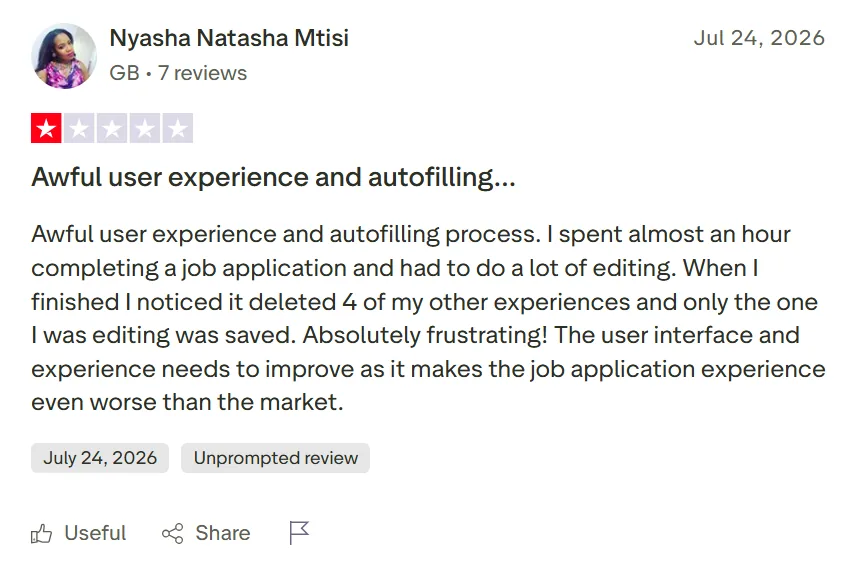
The friction doesn’t stop with employees. Candidates regularly flag Workday’s application process as one of the most tedious they’ve encountered, with duplicate data entry, forced account creation, and forms that seem designed to make people quit halfway through.
A Trustpilot reviewer ran into exactly that. She said the application process cost her almost an hour, and that when she finished editing one section, the system silently deleted four of her other listed work experiences and kept only the one she’d just edited. She called it “absolutely frustrating” and said the interface needs to improve because it makes applying “even worse than the market.”
Implementation complexity that doesn’t scale down
Workday was built for large enterprises with dedicated implementation teams and specialist consultants. For mid-organizations, that creates a real mismatch: long deployment timelines, expensive change management, and months before the system reaches a stable and usable state.
On G2, one reviewer put it plainly: implementations are typically difficult projects that leave work still flowing over into production after go-live, and staffing a Workday team is its own challenge, since good talent to support the system is hard to find, internally or externally.

Security and communication concerns
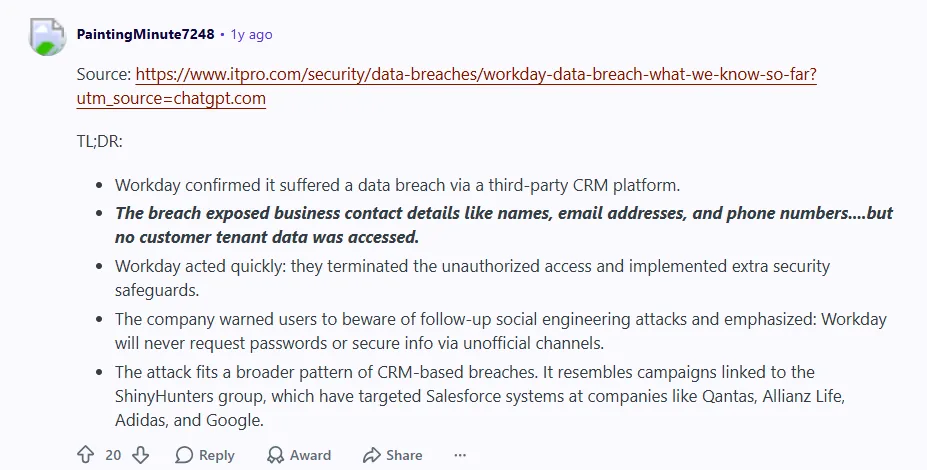
Last year, Workday confirmed that threat actors had accessed its third-party CRM platform, exposing contact details such as names, email addresses, and phone numbers tied to customer support and sales interactions. Workday said “there is no indication of access to customer tenants or the data within them,” and separately warned customers that it would never call to request a password or other secure details, since the exposed contact data could be used in follow-up social engineering attempts. The incident fit a broader pattern of CRM-linked breaches that hit several large enterprises around the same time. For organizations already frustrated with Workday’s complexity and support responsiveness, it added another layer of doubt, and when trust erodes, the case for switching becomes harder to ignore.
When Workday Is Still the Right HR Platform
Before diving into alternatives, it’s worth being honest: Workday is a genuinely capable platform for a specific kind of organization.
You may not need to switch if:
- Your company has 10,000+ employees with a fully staffed HRIS team.
- You’ve already made significant investments in Workday integrations and custom configurations.
- Your organization runs complex enterprise financial workflows tightly connected to Workday’s ERP layer.
- You have dedicated implementation and change management resources in place, and the system is already running stably.
If those factors apply, switching may create more disruption than value. But for teams that find Workday overly complex, slow to implement, or difficult to use day-to-day, several modern platforms offer a meaningfully simpler path forward.
Here’s exactly how we compared them, and then a closer look at what each one does best.
How I Evaluated Each Alternative
I scored every platform on the same six weighted criteria, using G2 and Capterra reviewer feedback and each vendor’s own published documentation rather than sales-deck claims alone.
| Criterion | What I checked |
|---|---|
| Multi-state US payroll depth | Coverage across all 50 states including local tax jurisdictions, reciprocity handling, and year-end filing automation |
| Payroll engine & accuracy controls | Off-cycle runs, retroactive adjustments, garnishments, audit trails, and approval workflows |
| Breadth vs. point-tool sprawl | How many separate vendors a buyer can retire by adopting the platform — HRIS, payroll, time, benefits, recruiting |
| Implementation time & migration support | Median go-live timeline, data migration ownership, and parallel payroll run support |
| Pricing transparency & TCO | Published pricing availability, PEPM vs. bundled models, and hidden costs like required add-on modules |
| Support responsiveness | Named account rep vs. ticket queue, published SLAs, and reviewer sentiment on support quality |
Disclosure: Keka is our product, and it ranks first in this comparison. I’ve applied identical criteria to every vendor here, documented limitations for all of them including Keka, and flagged every unverified price as an estimate rather than a fact.
8 Best Alternatives to Workday
Workday was built for a specific kind of organization: large enterprises with dedicated HRIS teams, deep implementation budgets, and specialist partners to manage the rollout. For those organizations, it can work well. But most growing and mid-market companies don’t operate that way, and even large enterprises are increasingly weighing Dayforce and UKG Pro as closer-fit alternatives at the same scale. Here’s a closer look at all eight.
1. Keka — G2 4.4/5
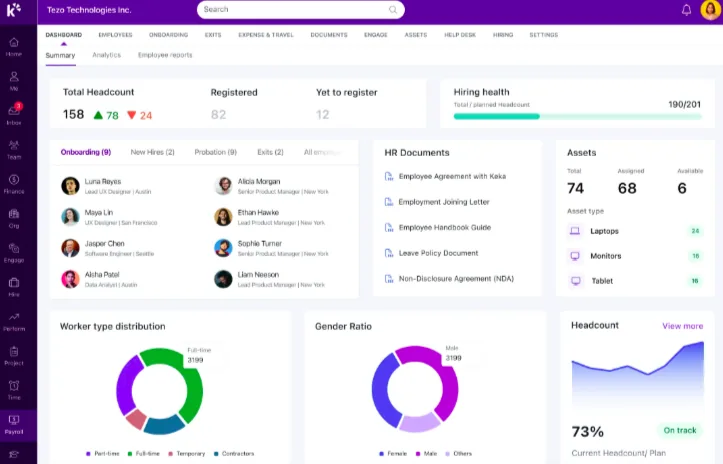
Keka consistently ranks among the top HRMS platforms. Built for growing teams that need enterprise-grade HR without enterprise-level complexity, it strikes a balance that most platforms in this space struggle to find: powerful enough to handle real organizational depth, yet intuitive enough that employees actually enjoy using it.
Unlike Workday, where routine tasks can feel like navigating a maze, Keka brings payroll, attendance, performance, recruitment, and employee self-service into one cohesive, clean experience.
Key features of Keka
- Payroll automation: One-click payroll processing with automated document generation, statutory compliance, and customizable salary structures.
- Employee self-service: Individual profile management, leave tracking, SSO access, and mobile and web access so employees manage their own data without HR intervention.
- Performance management: 360-degree feedback, OKRs, goal tracking, appraisal workflows, and peer reviews covering the whole performance cycle.
- HR workflow automation: Covers hiring, onboarding, internal movements, and approval chains, with integration across CRM and other third-party tools.
- Time and attendance: Geo-fenced and biometric attendance, shift management, and real-time sync with payroll.
- Learning and development: built-in L&D repository with course creation and completion tracking.
Pros and cons of Keka
| Pros | Cons |
|---|---|
| Clean, intuitive UI with fast performance | The platform is built with greath depth and smaller teams may not utilise each and every feature. Smaller teams can go for foundation or strength plans rather than the growth plan. |
| Comprehensive unified platform | If you are looking for advanced workflow customization; plan ahead so they can be executed in time by solutions experts |
| Responsive customer support | |
| Excellent HR metrics dashboard and visual analytics |
Ideal for: Growing businesses and mid-market companies (50–2,000+ employees) across tech, manufacturing, services, and professional industries that want a modern, unified HRMS without needing a dedicated implementation team to get there.
Pricing
Keka’s US pricing is custom, based on headcount and which modules you need (HR, payroll, PSA). Unlike most tools on this list, you don’t have to talk to sales just to try it. In fact, Keka offers a free trial at www.keka.com/us/pricing, so you can get a feel for the platform before any pricing conversation starts.
Thinking about switching HR software?
Most teams go live on Keka in weeks, not months, with no hidden fees along the way.
2. ADP Workforce Now — G2 4.2/5
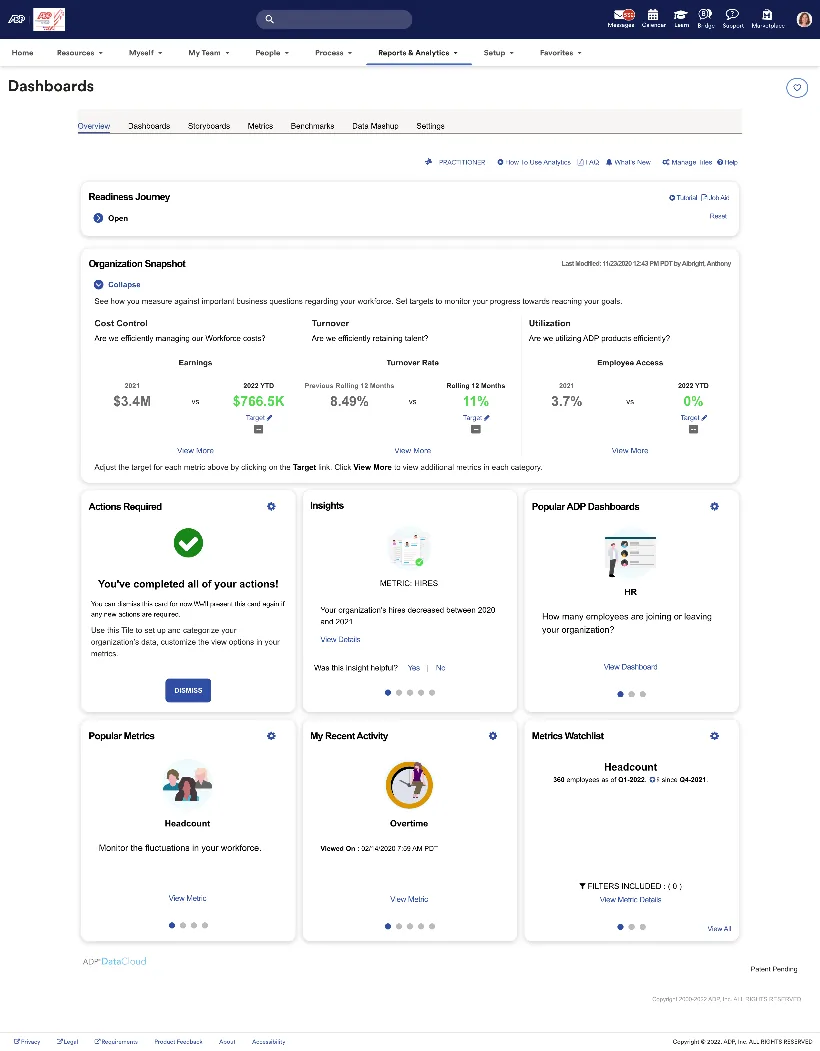
ADP Workforce Now is one of the most established names in HR and payroll, and for large US-based organizations with complex compliance requirements, that reputation is well-earned. It offers a full HCM suite covering payroll, benefits, time tracking, talent management, and workforce analytics, all built on decades of compliance expertise.
That said, “established” can also mean “not built for speed or simplicity.” Teams looking for fast onboarding and intuitive day-to-day use may find ADP more demanding than modern alternatives.
Key features of ADP Workforce Now
- Multi-state payroll management: complex payroll calculations, tax compliance, and regulatory reporting with automated error detection.
- Benefits administration: streamlined open enrolment, ACA and COBRA compliance, carrier integrations, and eligibility tracking.
- Talent Lifecycle Management: recruitment, onboarding, performance reviews, compensation planning, and succession planning.
- Compliance engine: automatically tracks federal, state, and local regulatory changes, maintains audit trails, and generates required compliance reports.
Pros and cons of ADP Workforce Now
| Pros | Cons |
|---|---|
| Industry-leading compliance management | Complex initial setup and long implementation timelines |
| Highly scalable | Steep learning curve |
| Advanced analytics benchmarked against industry data | Premium pricing can exceed budget for smaller organizations |
| Full-featured mobile apps | Inconsistent customer support |
Best for: Growing businesses and mid-market companies (50–2,000+ employees) across tech, manufacturing, services, and professional industries that want a modern, unified HRMS without needing a dedicated implementation team to get there.
Not the best fit for: Teams that live primarily in a mobile app for day-to-day HR tasks, since ADP’s mobile experience currently lags its web platform, or organizations needing very heavy workflow customization at large scale, which can take more setup time.
Pricing
ADP Workforce Now is quote-only across its Essential, Enhanced, and Premium tiers.
3. Rippling — G2 4.8/5
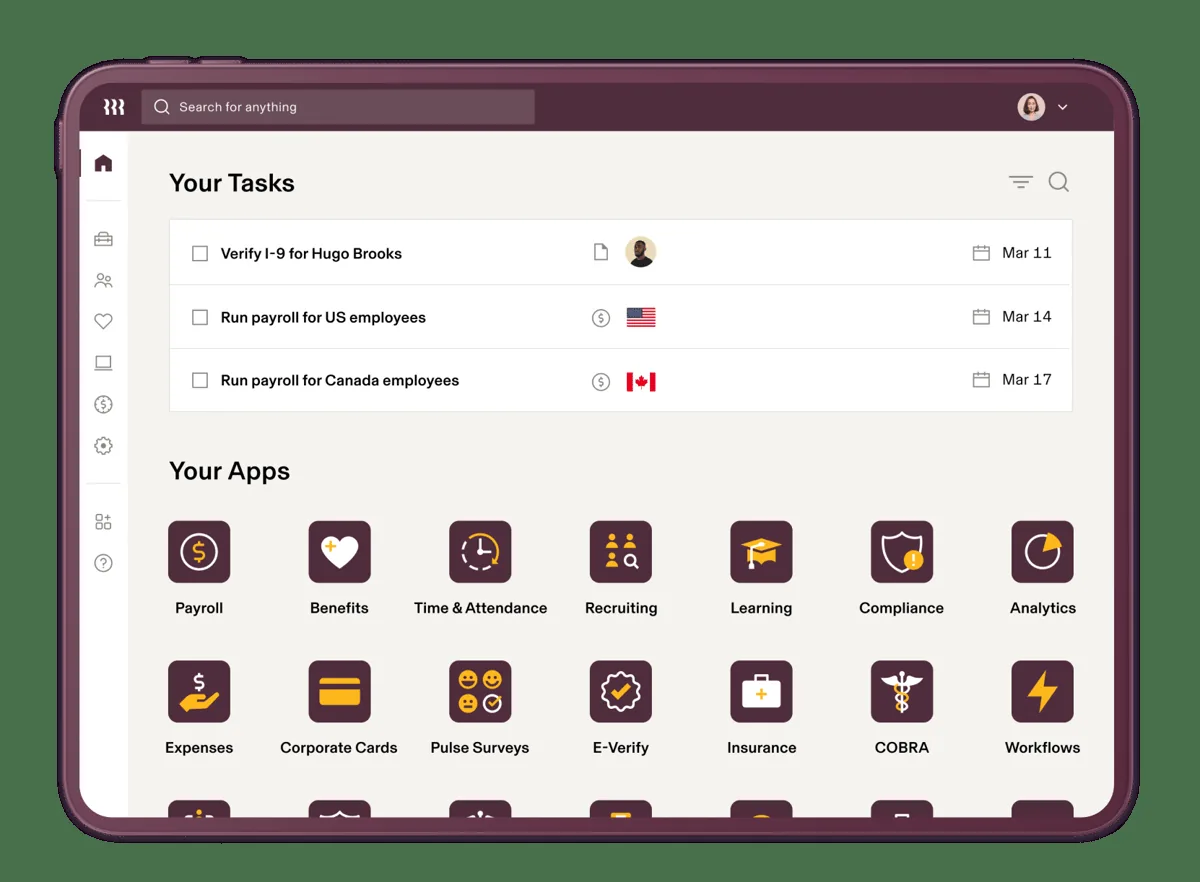
Rippling isn’t a traditional HRMS platform, as it’s the only one in this list that brings HR, IT, and Finance management under a single roof, making it a particularly strong fit for companies managing distributed or remote teams across multiple geographies.
Key features of Rippling
- Unified HR, IT, and Finance: automates workflows across HR, IT device management, identity management, and spend management in one platform.
- Global payroll and compliance: supports international payroll and global employment across multiple countries.
- Automated onboarding and offboarding: triggers all downstream tasks like IT provisioning, payroll setup, and access management in a single automated workflow.
- 650+ app integrations: connects with Google Workspace, Slack, and hundreds of other tools, enabling cross-system automation at scale.
Pros and cons of Rippling
| Pros | Cons |
|---|---|
| Eliminates tool fragmentation across HR, IT, and finance | Pricing is not publicly listed beyond the core platform |
| Best-in-class automated onboarding and offboarding | Setup complexity varies depending on existing tech stack |
| 650+ integrations for deep cross-system automation | Advanced features require purchasing additional modules |
| Scales for small teams to global organizations | More expensive than a standalone HRMS |
Best for: Tech-forward SMBs, SaaS companies, and remote-first teams that want to consolidate HR, IT, and Finance operations under one platform and are willing to invest in a more sophisticated setup to get there.
Not the best fit for: Budget-conscious teams that only need a straightforward HRMS, since Rippling’s HR + IT + Finance breadth adds cost and setup complexity a single-purpose payroll/HR tool wouldn’t require.
Pricing:
Rippling is one of the few tools here that publishes a number: its core HR platform starts at $8 per employee per month.
4. Ceridian Dayforce — G2 4.2/5
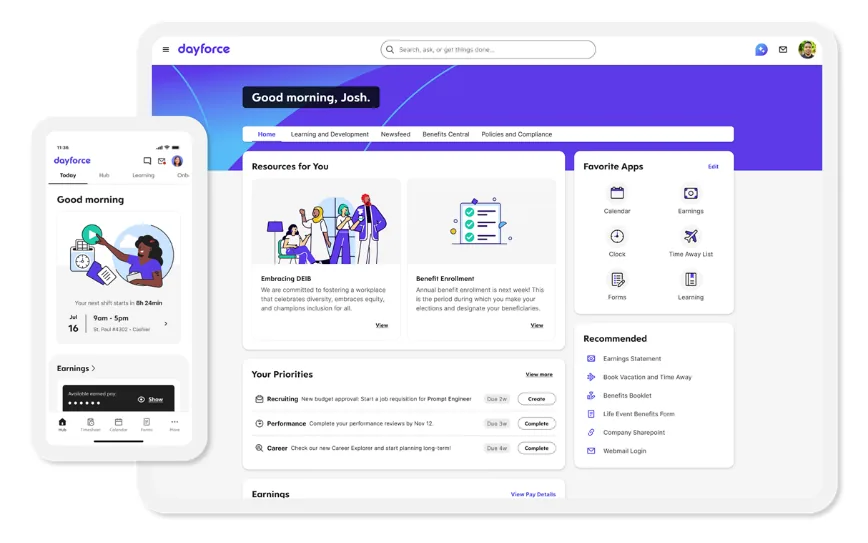
Dayforce (rebranded from Ceridian in 2024) is a global HCM platform built around a continuous calculation engine that updates payroll in real time as timesheets and pay data change, instead of running everything in nightly batches. It was taken private by Thoma Bravo in a roughly $12.3 billion deal that closed in February 2026, ending its run as a public company. Dayforce competes directly with Workday for large, complex enterprise deals, particularly where scheduling and multi-country payroll matter.
Key features of Ceridian Dayforce
- Continuous payroll calculation: updates gross-to-net pay in real time as HR and timesheet data changes, instead of waiting on a batch run.
- Dayforce Wallet: on-demand pay, letting employees access earned wages before the official pay date.
- Workforce management: demand forecasting, scheduling, and labor-cost optimization built natively into the same platform.
- Global payroll: native payroll coverage across 200+ countries and territories.
- People analytics: predictive insights and reporting across the employee lifecycle.
Pros and cons of Ceridian Dayforce
| Pros | Cons |
|---|---|
| Real-time payroll calculation catches errors before they reach a paycheck | Implementation timelines and enterprise pricing are comparable to Workday’s own |
| Genuine single application for HR, payroll, benefits, and workforce management | Customer support responsiveness is inconsistent, per reviewers |
| Strong mobile app for schedules, clock-in, and pay visibility | Reporting is powerful but has a steep learning curve |
Best for: Large enterprises (500+ employees, often well beyond that) with complex, multi-country payroll or heavy scheduling needs, common in retail, hospitality, healthcare, and manufacturing.
Not the best fit for: Mid-market or smaller companies, since Dayforce’s implementation timelines and enterprise pricing are comparable to Workday’s own, without a clear cost or speed advantage at that scale.
Pricing
Dayforce is quote-only.
5. UKG Pro — G2 4.3/5
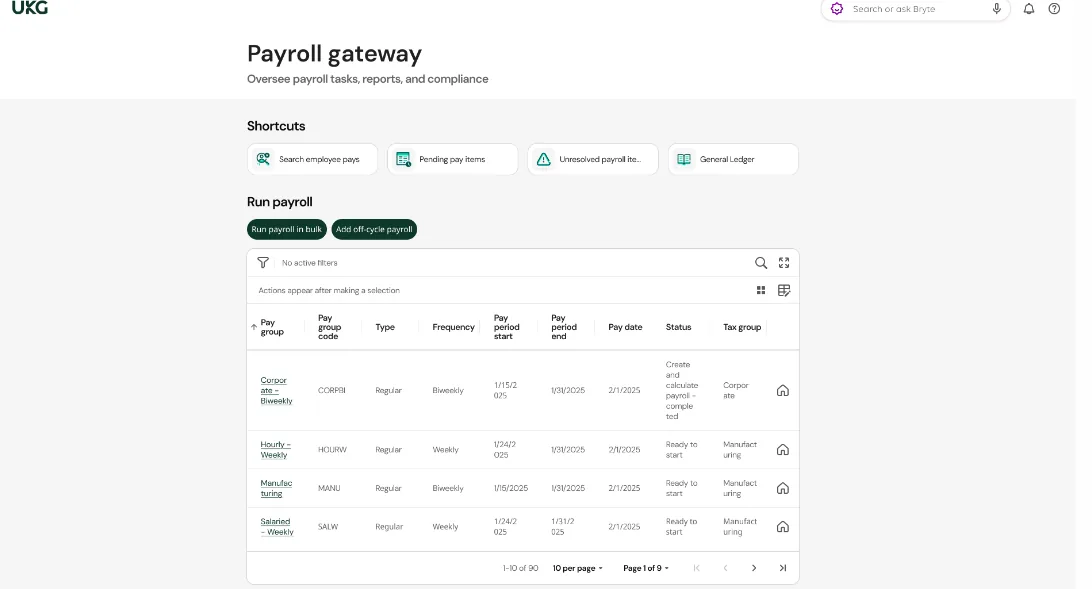
UKG Pro is the enterprise HCM flagship from UKG (Ultimate Kronos Group), formed by the 2020 merger of Ultimate Software and Kronos. It inherits Kronos’s decades of workforce management heritage, which shows up most clearly in union payroll handling and complex multi-shift scheduling, areas where UKG Pro goes deeper than Workday for frontline-heavy industries.
Key features of UKG Pro
- Multi-state US payroll with deep union payroll capabilities and complex pay rules.
- Workforce management inherited from Kronos: scheduling, time tracking, and labor analytics.
- Bryte AI: AI-driven workflow recommendations and insight surfacing across the platform.
- People analytics with sentiment analysis layered on top of standard HR reporting.
- Benefits administration with decision support and carrier connections.
Pros and cons of UKG Pro
| Pros | Cons |
|---|---|
| Unmatched workforce management depth for complex scheduling and union environments | Implementation complexity comparable to Workday’s own |
| Clean, easy-to-navigate interface once configured | Reviewers report performance issues like slow page loads |
| Reliable payroll processing and tax compliance | Pricing is opaque and fully quote-based |
Best for: Enterprise organizations (1,000+ employees) with union labor agreements, multi-location scheduling, or a frontline-heavy workforce.
Not the best fit for: Organizations under 1,000 employees, since UKG steers smaller buyers toward its other product (UKG Ready) instead, and reviewers report implementation complexity and pricing opacity similar to Workday itself.
Pricing
Custom Pricing
6. Paylocity — G2 4.4/5
Paylocity is a cloud-native HCM platform that goes beyond standard payroll and HR and is one of the few platforms that treats employee engagement as a product feature. Peer recognition, pulse surveys, and a social collaboration feed are built in, not bolted on. For teams where culture and connection matter as much as compliance, that’s a meaningful differentiator.
Key features of Paylocity
- Employee engagement suite: peer recognition, pulse surveys, and a community newsfeed set it apart from traditional payroll-focused platforms.
- Modular pricing: add features as needed with per-employee-per-month pricing and no additional implementation fees.
- Global payroll support: an edge over US-only alternatives like Paycom.
- ~400 app integrations: broad third-party connectivity for companies with diverse tech stacks.
Pros and cons of Paylocity
| Pros | Cons |
|---|---|
| No additional implementation fees | Data sync can be inconsistent across modules |
| Strong employee engagement and collaboration tools | Reporting is less customizable than competitors |
| Modular pricing for cost control | Navigation between sections can feel tedious |
| Broad integrations | Post-go-live support responsiveness varies by account |
Best for: Mid-market companies in the US that want to balance payroll reliability with employee experience, prefer flexible integration options, and want to avoid heavy upfront implementation costs.
Not the best fit for: Teams that need highly customizable reporting or perfectly consistent data sync across modules, since reviewers flag inconsistent cross-module sync and reporting that’s less flexible than some competitors.
Pricing
Paylocity is priced per employee per month on a quote basis; analysts estimate $22 to $32, with no separate implementation fee according to the company. Organizations that want a fully self-contained, single-database system instead should look at Paycom next.
Paycom — G2 4.6/5
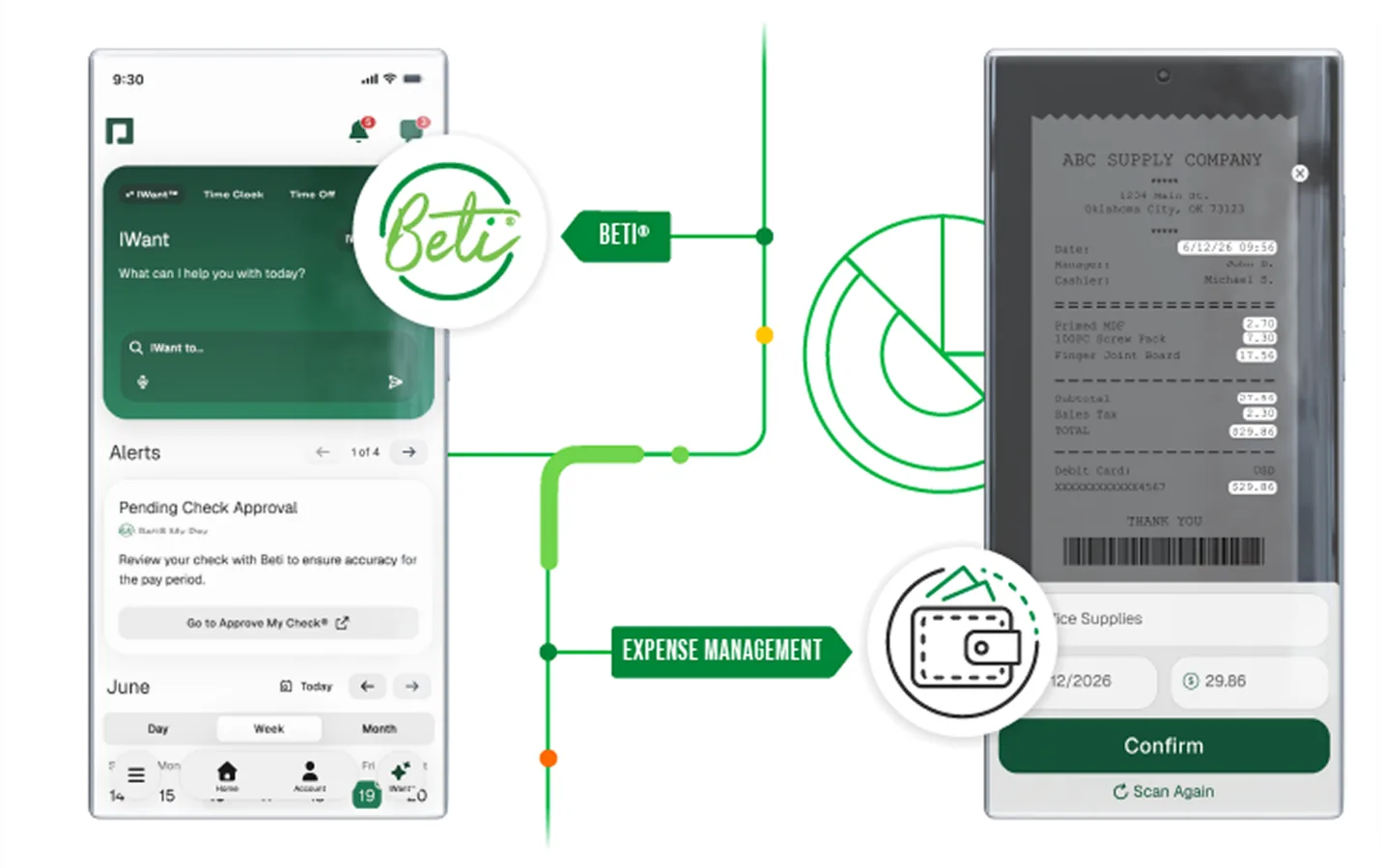
Paycom’s core differentiator is its single-database architecture. It has one unified system where every piece of HR and payroll data lives, with no sync issues between modules. Its standout feature, Beti, takes self-service a step further by letting employees verify and correct their own payroll data before it processes.
Key features of Paycom
- Single-database architecture: all HR and payroll data in one database, eliminating data inconsistencies across modules.
- Employee self-service (Beti): employees review and correct their payroll before it processes, reducing errors at the source.
- Time and attendance: geolocation and biometric options with strong user satisfaction scores.
- Benefits administration: automated enrolment with employee-facing pay-impact previews and automatic carrier data transfers.
Pros and cons of Paycom
| Pros | Cons |
|---|---|
| Single database ensures real-time accuracy across all modules | Closed ecosystem with limited third-party integration support |
| Strong self-service that reduces HR admin burden | Reporting is less flexible for complex needs |
| Highly responsive customer support | No global payroll support |
| Good value for small businesses and non-profits | Heavy reliance on the support team for advanced administration |
Best for: US-based SMBs and mid-market companies that want a clean, self-contained HCM system and don’t need global capabilities or extensive third-party integrations.
Not the best fit for: Companies with employees outside the US or that rely on a broad ecosystem of third-party integrations, since Paycom has no global payroll support and a comparatively closed integration model.
Pricing
Paycom is quote-only.
Paycor — G2 4.0/5
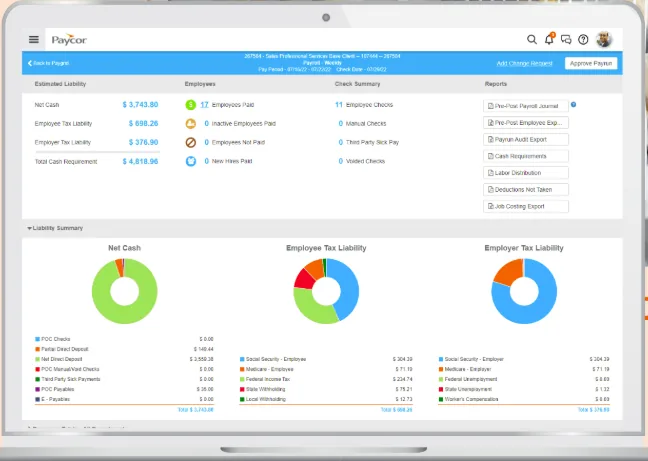
Paycor is a solid HCM platform that’s earned a loyal following among SMBs, particularly lean HR teams who need strong reporting capabilities without the complexity of an enterprise-grade system. Its user-friendly interface lowers the adoption barrier, and its analytics flexibility makes it easy to surface the data that matters to HR leaders.
Key features of Paycor
- Customizable reporting and analytics: flexible, intuitive reports with robust export capabilities for teams that run on data.
- Talent management and LMS: integrated recruiting, onboarding, and a learning management system for employee development.
- Payroll and tax filing: automated payroll processing, tax filing, and multi-state compliance.
- Benefits administration: full benefits enrolment, ACA tracking, and carrier integrations.
Pros and cons of Paycor
| Pros | Cons |
|---|---|
| Advanced reporting and analytics | Pricing is not transparent |
| Approachable UI, even for first-time HR tech users | Implementation can be challenging with complex configurations |
| Strong customer support for SMBs | Less suitable for large enterprises |
| Wide third-party integration options | Scheduling and workforce management modules are less mature |
Best for: SMBs to mid-market companies in healthcare, retail, and hospitality where reporting flexibility, compliance, and ease of use matter more than enterprise-level depth.
Not the best fit for: Large enterprises or companies with complex scheduling and workforce-management needs, since reviewers note Paycor is less suited to enterprise scale and its scheduling modules are less mature
Pricing
Paycor is quote-only.
How to Choose the Right Alternative to Workday
Switching from Workday isn’t just a software decision, it’s a change that touches every employee in your organization.
The right platform isn’t the most feature-rich one. It’s the one that fits your size, complexity, budget, and growth trajectory without disrupting existing workflows or demanding more than your team can absorb.
Start with headcount, since it rules out half the list immediately:
| Headcount | Pick | Why |
|---|---|---|
| 50–200 employees | Paycor, or Rippling | Implementation speed and cost appropriate for this stage; enterprise platforms create disproportionate overhead here. |
| 200–1,000 employees | Keka, Paylocity, or Paycom | Full HCM capabilities at mid-market pricing; a consolidated platform reduces integration burden as the HR team scales. |
| 1,000–5,000 employees | ADP Workforce Now, Ceridian Dayforce, or Keka | Need proven scale and compliance depth while keeping implementation timelines reasonable. |
| 5,000+ employees | Keka, Ceridian Dayforce or UKG Pro | Enterprise implementation resources are available and complexity justifies the longer timeline — this is where Workday itself remains a fair comparison. |
Then use these criteria to pressure-test whichever names made your shortlist:
Company size and growth trajectory
Evaluate platforms based on where your organization is going, not just where it is today. A platform that works well for a 50-person team but struggles after you add another 100 employees is both expensive and disruptive to replace mid-growth.
Prioritize solutions that are built to scale with you, not ones you’ll outgrow before you’ve fully settled in.
Geography and compliance coverage
If your workforce spans multiple countries, states, or regulatory environments, compliance coverage should be the hard filter. Before shortlisting any platform, verify whether it handles your specific statutory requirements natively, or whether staying compliant will require custom configuration and ongoing external support.
Workflow complexity
Map your most complex HR workflows before you even sit through a single demo. Platforms that look clean and simple on the surface can become limiting once real-world complexity, like approval chains, multi-entity payroll, or custom leave policies, kicks in.
Know your minimum threshold for configurability before you let a polished UI make the decision for you.
Time to value
Implementation timelines vary dramatically depending on platform complexity, data migration requirements, and the level of external support needed. If speed is the most critical factor, weigh it as heavily as any feature on this list, not as an afterthought.
Integration and tech stack compatibility
Before evaluating any platform, audit your existing tech ecosystem. If your business runs on a dense stack of tools, you need an HR platform with proven, native integrations for the ones you already rely on. Middleware-based integrations add cost, maintenance overhead, and data lag, and those costs compound over time.
Employee experience and adoption
A system that employees and managers find confusing will generate support tickets, workarounds, and quiet frustration, all of which erode the ROI of the total investment. Evaluate the employee-facing experience just as rigorously as the admin-facing one. The best HRMS is the one people actually use.
Use this table to match your top priority to the right shortlist:
| If your top priority is… | Look closely at… | Watch out for… |
|---|---|---|
| Scalability across growth stages | Keka, ADP, Rippling | Dayforce, UKG Pro — often overkill and overpriced below 500 employees |
| Payroll accuracy & depth at scale | Keka, ADP, Paycom, Dayforce | Paycor — lighter payroll depth once you’re past mid-market |
| Complex scheduling & union payroll | UKG Pro, Ceridian Dayforce | Paylocity, Paycor — not built for this level of scheduling depth |
| Statutory & multi-region compliance | Keka, ADP, Rippling, UKG Pro | Paycom — US-only; Paycor — more limited globally |
| Ease of use & fast adoption | Keka, Paylocity | ADP, Dayforce, UKG Pro — steep learning curve |
| Speed of implementation | Keka, Paycor, Paylocity | ADP, Dayforce, UKG Pro — can take months to over a year with implementation partners |
| Deep integrations & open ecosystem | Rippling, Paylocity | Paycom — closed ecosystem, limited integrations |
| Employee engagement & experience | Paylocity, Keka, Paycom | Paycor — engagement tools less mature |
| Reporting & analytics flexibility | ADP, Paycor, UKG Pro | Paycom — reporting often requires workarounds |
| Value for money at mid-market scale | Keka, Paylocity, Paycor | ADP, Dayforce, UKG Pro — high TCO, built for enterprise scale |
| IT + HR + Finance consolidation | Rippling | All others — none match Rippling’s IT layer |
The clearest signal you’ve found the right platform is when your shortlist naturally narrows based on your top three criteria, and one platform consistently appears across all three.
How to Migrate Off Workday
Once you’ve picked a direction, here’s roughly what the switch itself looks like in practice, regardless of which alternative you land on.
| Phase | Timeline | You own | Vendor owns |
|---|---|---|---|
| Discovery & planning | Weeks 1–2 | Complete employee census, export historical payroll data, document current pay rules and tax jurisdictions | Project plan, data mapping templates, integration requirements documentation |
| Configuration & data migration | Weeks 3–6 | Validate migrated data, confirm pay rule accuracy, test employee self-service access | System configuration, data import and transformation, integration setup with benefits carriers and banks |
| Parallel payroll runs | Weeks 7–8 (minimum 2 pay periods) | Compare parallel run results to your current system, document and resolve discrepancies, final user acceptance | Parallel run execution, discrepancy investigation, configuration adjustments |
| Go-live & hypercare | Weeks 9–12 | Employee communication, retire legacy system access, establish ongoing admin processes | First live payroll support, elevated support response, issue resolution escalation |
Common failure points
- Workday’s historical data exports may require specific report configurations or API access that aren’t standard. Confirm data availability before committing to a timeline.
- Workday’s custom calculated fields and business rules may not map directly to a new platform’s structure. Budget for rule-translation effort.
- Benefits carrier integrations in Workday may need to be rebuilt, since carrier EDI connections are platform-specific and require re-establishment.
Wrapping It Up
Workday is a formidable platform, nobody’s disputing that. But for organizations without a dedicated HRIS team, a six-figure implementation budget, or months to spend on configuration, the gap between what Workday promises and what it practically delivers can be hard to ignore.
The good news is that the alternatives have caught up, and in several areas, surpassed it.
Whether your priority is payroll accuracy, compliance depth, employee experience, integration flexibility, or simply getting live without a consulting partner, there’s a platform on this list built for exactly that. The key is to lead with your criteria, not a feature checklist. Know your workforce size, compliance footprint, and growth trajectory, and let those answers do the shortlisting for you.
In 2026, the HR technology market rewards organizations that choose platforms employees actually want to use. A well-adopted mid-market HRMS will always outperform an underutilized enterprise suite in ROI, in team morale, and in the quality of data driving your people decisions.
Ready to see how Keka compares to Workday for your team? Try Keka free and we’ll map your payroll, compliance, and PSA needs against what you’re running today.
See how Keka can simplify HR and payroll for your growing workforce.


