


 Login
Login


The best Justworks alternatives in 2026 are Keka (unified HR + payroll + PSA platform), Gusto (SMB-friendly payroll with transparent pricing), Rippling (modular HR-IT-Finance suite), TriNet (enterprise PEO), Paychex (established multi-state payroll), ADP Run (scalable payroll infrastructure), Paycor (mid-market HCM), and OnPay (budget-conscious simple payroll). Each platform was evaluated on hands-on product usage, pricing transparency, review sentiment on G2 and Reddit, and support quality.
Justworks can start to feel limiting as your company grows and your HR needs become more complex. Rising PEO costs, gaps in integrations and customization, or the need for more advanced HR and reporting capabilities can all be reasons to start evaluating other options.
If you’re a growing small or mid-sized company considering a Justworks alternative, this guide is for you. I’d encourage you to begin with the quick comparison table that has an overview of pricing, ratings, and deployment model for all eight. From there, you can go through each option in detail to find the one that fits your team.
Let’s take a look.
Quick Comparison: 8 Justworks Alternatives at a Glance
| Platform | Best For | Pricing (PEPM) | Free Trial | G2 Rating |
|---|---|---|---|---|
| Keka | Businesses of all sizes | Custom pricing | Yes | 4.4/5 |
| Gusto | Small teams under ~150 employees | Starts from $49/mo + $6/employee | Yes | 4.6/5 |
| Rippling | Growth-stage teams needing HR + IT in one system | Custom, modular (from ~$8 PEPM) | Yes | 4.8/5 |
| TriNet | Companies wanting a full-service PEO | Custom pricing (PEO model) | No | 4.2/5 |
| Paychex | SMBs wanting service-heavy payroll support | Custom pricing | No | 4.1/5 |
| ADP Run | Businesses under 50 employees | Custom quote, tiered packages | Yes | 4.7/5 |
| Paycor | Mid-market, 100–1,000 employees | Custom pricing | No (demo only) | 4.0/5 |
| OnPay | Small businesses under ~50 employees | $49/mo + $6/employee | Yes | 4.8/5 |
Disclosure: Keka is our product. We rank ourselves #1 only where our unified platform genuinely fits the buyer’s consolidation needs. We list real cons for Keka and cite reviewer-reported limitations for all tools, never asserting defects as fact.
How I Evaluated These Tools
When I assess HR and payroll platforms, I look at how the software behaves in the real world. Here’s what actually went into this evaluation:
- First-hand product usage: onboarding, payroll runs, employee setup, PTO, benefits, reporting, and support workflows
- Reddit and community discussions: especially complaints and switch stories from founders, HR leaders, and small-business operators
- Review sites: G2, Trustpilot, Capterra, and similar platforms for recurring patterns of praise and frustration
- Support quality: response times, escalation paths, and whether the platform feels human when something goes wrong
- Pricing clarity: whether the vendor is upfront, modular, opaque, or prone to add-on creep
- Compliance depth: tax filings, multi-state handling, contractor support, benefits administration, and PEO coverage
- Scalability: whether the platform still feels solid at 25 employees, 100, and beyond
- Integrations and admin experience: how easily it fits into a modern stack without creating manual work
1) Keka: Best Justworks alternative for businesses of all size that want to consolidate without PEO lock-in
Keka is a unified HR, payroll, and professional services automation platform built to support businesses of all sizes as their HR needs grow. It brings payroll, hiring, performance, time and attendance, and built-in ATS capabilities onto one data model, helping HR teams manage more of their workforce operations from a single platform.
Keka has recently rebuilt its core around Keka AI. It can answer payroll and attendance questions directly, flag payroll anomalies and attrition risks, and help HR teams handle routine tasks. For HR leaders managing a growing workforce, this can reduce manual checks and make it easier to act on workforce data. It also supports the needs of more complex organizations. It’s SOC 2, ISO 27001, and GDPR compliant, while its payroll stays current with federal, state, and local requirements. Multi-entity teams can manage payroll and compliance across their operations without having to track every tax change themselves.
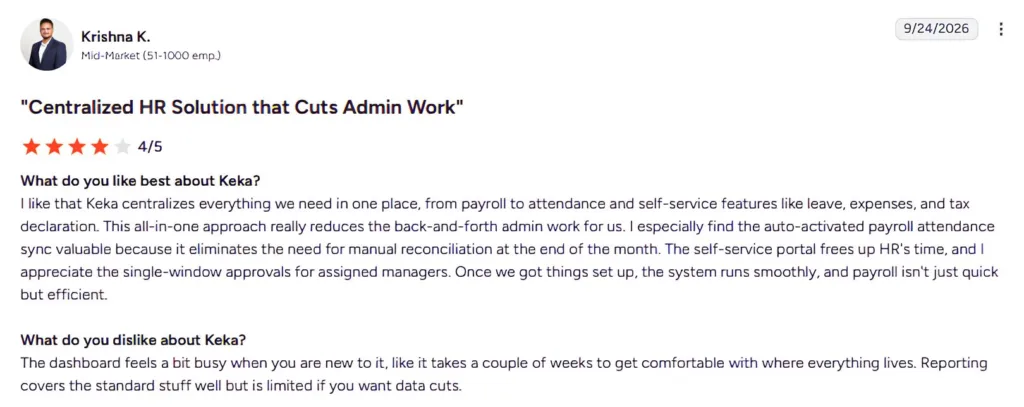
Keka users particularly value the way it simplifies routine HR administration. Automated payroll and attendance syncing, employee self-service, and streamlined manager approvals help reduce back-and-forth and make recurring HR processes easier to manage.
Source: G2
What Are the Key Features of Keka?
- Payroll and country compliance running natively on one policy model
- Keka AI answers questions across payroll, attendance, hiring, and performance, and flags anomalies before they become problems
- PSA suite for project-based teams to track utilization and protect billable margins
- Mobile self-service for leave, payslips, and attendance requests
- Performance module with goal-setting and review workflows that don’t require HR to chase every submission
- 100+ integrations, including Salesforce, Xero, and Stripe
| Pros | Cons |
|---|---|
| Broad HR and PSA coverage: Keka brings HR, payroll, talent, employee experience, project management, resource management, timesheets, and billing into one platform. | Best suited to organizations looking to consolidate HR processes: Keka can work as a single point solution, but organizations that adopt the broader ecosystem can benefit more from the connected workflows and data across the platform. |
| Comprehensive US payroll: Keka supports payroll, benefits, deductions, direct deposit, ACH, W2s, 1099s, and automated tax filings across all 50 states. | The PSA capabilities may require some process alignment: Companies introducing project and resource management alongside HR may need to map their existing project workflows into the platform. |
| Designed to scale: Keka supports companies of different sizes and combines HR, payroll, and PSA capabilities within one platform. | Automation works best with well defined processes: Organizations may need to clearly define their existing approval structures and workflows before configuring them for automation. |
How Much Does Keka Cost?
The Foundation, Strength, and Growth tiers are priced on request based on headcount and modules, with a free trial and no separate implementation fee.
Best For: Keka fits HR and finance leaders at US businesses that want to consolidate payroll, HR, hiring, and PSA in one platform, from companies leaving a PEO to larger organizations managing more complex workforce needs.
If that level of consolidation is more than a smaller team needs, Gusto solves a narrower problem well.
Thinking about switching HR software?
Most teams go live on Keka in weeks, not months, with no hidden fees along the way.
2) Gusto: Best for small teams that want clean UX and transparent pricing from day one
Gusto is payroll-first software built for lean teams that want the basics done well without a complex rollout. It’s best known for AutoPilot, which runs recurring payroll automatically once configured, and for publishing its pricing outright rather than routing buyers through a sales call.
Gusto fits small businesses best, generally under 150 employees, though its Plus and Premium tiers stretch further. In 2026 Gusto acquired Guideline, a retirement plan provider, in a deal reported at roughly $600 million, folding low-cost, payroll-synced 401(k) plans directly into the platform. For an HR or finance lead at a small company, that means one less vendor to manage when adding a retirement benefit, since the 401(k) now runs off the same payroll data instead of a separate reconciliation.
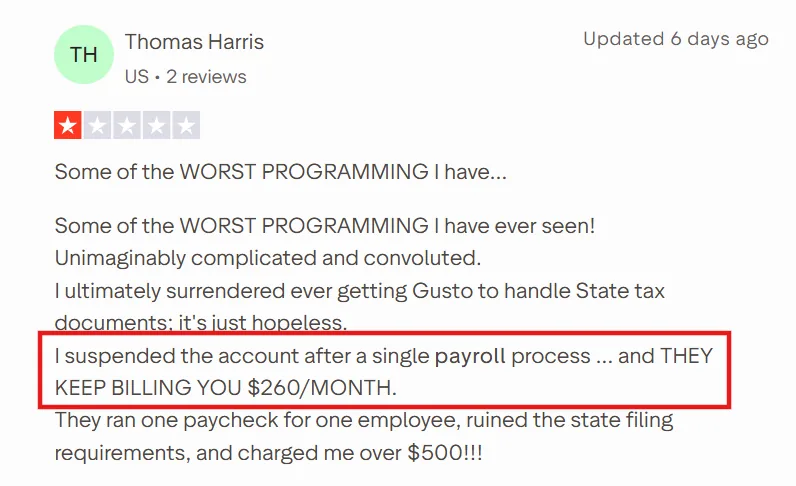
While Gusto is generally considered top tier, reviews highlight the potential challenges that can arise around payroll and tax handling. One user described the setup as overly complicated and said a payroll run led to state filing issues and unexpected charges.
Source: Trustpilot
What Are the Key Features of Gusto?
- AutoPilot runs recurring payroll automatically once set up, no manual re-entry each cycle
- Guideline-powered 401(k) plans run off the same payroll data, so contributions sync automatically
- Full-service payroll in all 50 states with unlimited payroll runs at no extra per-cycle cost
- Built-in benefits administration, including health, dental, vision, FSA, HSA, and workers comp
- Published, month-to-month pricing with no setup fees or long-term contracts
| Pros | Cons |
|---|---|
| AutoPilot removes the need to manually re-run payroll every cycle once configured | Reporting and analytics thin out past roughly 200 employees, per the vendor’s own positioning |
| Published pricing means a finance lead can budget without a sales call | Not built for full PEO-style compliance depth or co-employment |
| New Guideline-backed 401(k) integration keeps retirement contributions synced to payroll automatically | Multiple Trustpilot reviews describe billing and tax-filing errors that took time to resolve |
| Strong self-service adoption, since employees can access pay stubs and benefits without HR involvement |
Pricing
Simple: $49/month + $6 per employee per month.
Plus: $80/month + $12 per employee per month.
Premium: $180/month + $22 per employee per month. No setup fees or long-term contracts.
Best For: Gusto fits HR leads at companies under roughly 150 employees who want Justworks-level simplicity minus the co-employment model, and who don’t yet need Keka’s or Rippling’s broader HCM depth.
Once a company’s HR and IT needs start overlapping, Rippling is usually the next stop.
3) Rippling: Best for scaling companies that want HR, IT, and automation in one operating layer
Rippling positions itself as a workforce operating system rather than a payroll tool, running HR, IT, and finance off one shared employee record. Its signature move is triggering payroll setup, benefits enrollment, laptop provisioning, and app access from a single onboarding workflow.
This is something none of the other tools on this list do natively. Rippling fits best for growth-stage companies, roughly 100 to 1,000 employees, that have outgrown separate HR and IT systems. This year Rippling added an AI Spend Console and Data Cloud, giving finance and HR leaders a single view of AI tool spend and workforce data without exporting to a spreadsheet.
For a finance lead already managing a growing software budget, that’s a way to tie AI costs directly to headcount and department without a separate BI project.
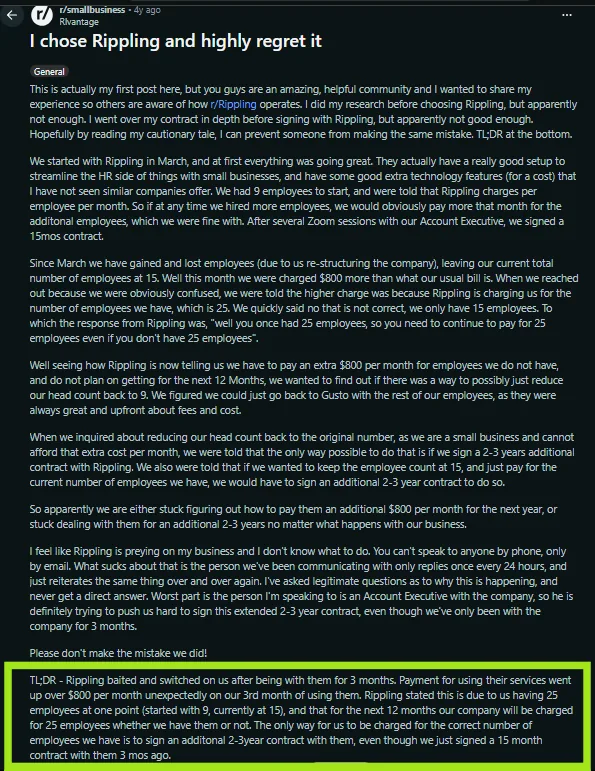
Rippling’s modular pricing is a recurring source of buyer regret, and this Reddit thread lays out a concrete example.
Source: Reddit
What Are the Key Features of Rippling?
- Onboarding triggers payroll, benefits, device provisioning, and app access from one workflow
- AI Spend Console ties AI tool costs to specific employees and departments
- 650+ native integrations, the broadest ecosystem on this list
- Global payroll and EOR support across many countries
- Granular, role-based permissions enforced automatically across every connected app
| Pros | Cons |
|---|---|
| Single onboarding workflow provisions payroll, benefits, and IT access together, cutting a multi-system onboarding process to one | No free trial, demo only, which limits self-serve evaluation before committing |
| 650+ integrations mean most existing tools connect without custom work | Modular pricing means costs escalate as more modules turn on, and multiple users report price increases after the first year or two |
| Role-based permissions are enforced automatically across every app, reducing manual access reviews | Implementation requires more upfront planning than a plug-and-play tool |
| Scales cleanly as HR and IT complexity grow together |
How Much Does Rippling Cost?
Custom, modular pricing starting around $8 per employee per month for the base platform, with each additional module (payroll, IT, benefits) billed separately on top. However, Forbes reports that some products require a monthly base fee starting at $35 per month.
Best For: Rippling fits companies past 100 employees that need HR and IT to share one system, and that have someone dedicated to managing which modules are actually turned on, since that’s where the cost control happens.
For companies that want the PEO model Justworks offers, just with deeper benefits infrastructure, TriNet is the next comparison point. See our Rippling vs Justworks detailed comparison for a closer look at the two.
4) TriNet: Best for companies that want a full-service PEO with deep benefits infrastructure
TriNet is a full-service PEO, meaning it becomes co-employer of a company’s workforce the same way Justworks does. But it also offers a more traditional, hands-on HR partner model behind it. It’s best known for giving small businesses access to large-group benefits plans, backed by more than 30 years in the PEO industry.
TriNet fits companies from roughly 5 to 1,000 employees that want an outsourced HR function, not just software. In April 2026 TriNet completed its acquisition of Cocoon, a leave-management platform, adding AI-enabled leave workflows and compliance-first tracking directly into the TriNet platform. For an HR director juggling FMLA, state paid leave, and company policy across multiple states, that folds one more compliance-heavy process into the same system instead of a bolted-on point solution.
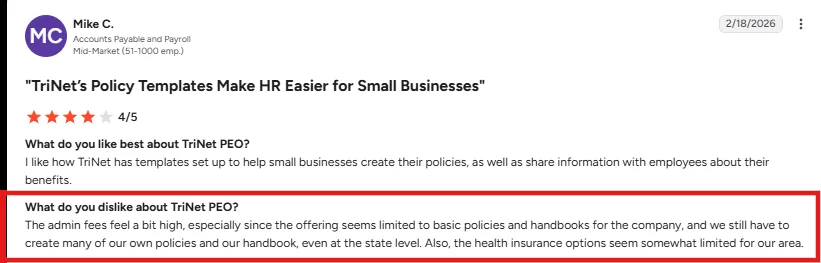
TriNet’s PEO customers most often flag a high fee layered on top of limited policy and benefits options. One reviewer appreciated the ready-made policy templates, but felt the offering lacked flexibility for more comprehensive HR needs and had limited health insurance options in their area.
Source: G2
What Are the Key Features of TriNet?
- Access to nationwide, large-group benefits plans through TriNet’s PEO scale
- Cocoon-powered leave management with AI-enabled workflows, added April 2026
- Dedicated HR consultant and relationship manager per account
- Built-in time and attendance with PTO tracking and approval workflows
- U.S. compliance support across FLSA, ACA, and EEOC requirements
| Pros | Cons |
|---|---|
| Bundles large-group benefits pricing that a standalone small business couldn’t negotiate on its own | Custom policy edits often require going through an account rep rather than self-service settings |
| Dedicated HR consultant handles multi-state compliance questions directly, instead of a support ticket queue | Multiple small business owners report add-on fees, like a “platform innovation fee,” appearing after signing |
| New Cocoon integration folds leave management and compliance tracking into the same platform | Less self-serve and less modern-feeling than Gusto, Rippling, or Keka |
| Deep bench of PEO-specific expertise for companies that want outsourced HR, not just software |
How Much Does TriNet Cost?
Custom pricing based on headcount and benefits selections, quoted directly by TriNet’s sales team.
Best For: TriNet fits companies that want a genuine outsourced HR partner and large-group benefits access, and that are comfortable trading some self-service flexibility and fee transparency for that level of hands-on support.
Paychex sits in a similar space to TriNet, but leans more on payroll muscle than a full PEO relationship. See our Justworks vs TriNet comparison for the direct matchup.
5) Paychex: Best for SMBs that want payroll plus service-heavy support in a traditional package
Paychex pairs Paychex Flex, its payroll and HR platform, with a service-heavy support model built around a dedicated payroll specialist rather than a ticket queue. It’s known for staying power, more than 50 years in payroll, and for offering its own PEO option, Paychex HR PEO, alongside standard payroll for companies that want to offload compliance entirely. Paychex fits small to mid-sized businesses across the board, since its packages scale from self-employed owners up to 250-plus-employee companies.
In April 2025 Paychex completed a $4.1 billion acquisition of Paycor, combining Paychex’s compliance and advisory depth with Paycor’s HCM technology. For a finance leader evaluating either vendor, that means the two companies now share resources and roadmap, even though they still operate as separate products today.
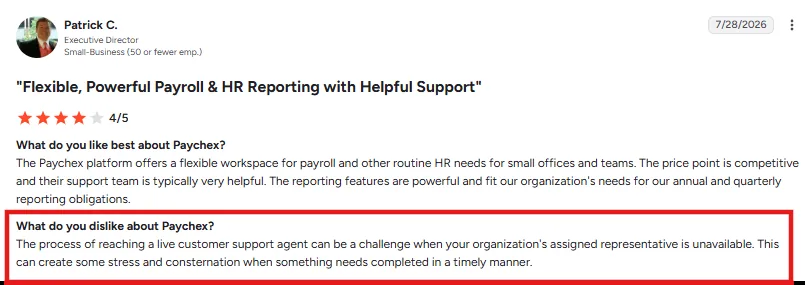
While Paychex’s customers appreciate its flexible payroll and reporting tools, support can be a pain point. One small-business reviewer said getting a live support agent was difficult when their assigned representative was unavailable, creating delays when issues needed to be resolved quickly.
Source: G2
What Are the Key Features of Paychex?
- Dedicated payroll specialist model instead of a shared support queue
- Paychex HR PEO option for businesses that want to fully offload HR and compliance
- Built-in retirement services (401(k), financial wellness) tied directly to payroll
- AI-supported recruiting (Recruiting CoPilot) and workforce analytics
- Time and attendance synced to payroll to reduce manual corrections
| Pros | Cons |
|---|---|
| Dedicated payroll specialist gives a direct line for payroll-day emergencies, instead of a ticket queue | Assigned representatives are frequently unavailable, forcing calls through a general support line |
| PEO option lets a company fully offload HR and compliance without switching platforms later | Add-on sprawl across retirement, insurance, and background checks can make the total bill harder to track |
| Now shares technology and advisory resources with Paycor following the 2025 acquisition | Not built for companies with a meaningfully global workforce |
| Broad service tiers scale from self-employed owners through large businesses |
How Much Does Paychex Cost?
Custom quotes based on payroll features, service tier, and company size. Contact vendor for pricing.
Best For: Paychex fits businesses that want a named payroll contact and the option to fully outsource HR through its PEO, and that are willing to trade some self-service polish for that human backup.
ADP Run covers similar ground for small businesses that want payroll scale and brand reliability over a dedicated rep.
6) ADP Run: Best for businesses under 50 employees that want proven payroll scale with name recognition behind it
RUN Powered by ADP is ADP’s small-business payroll and HR platform, built specifically for companies under 50 employees rather than ADP’s larger enterprise products. It’s backed by one of the largest payroll processor datasets in the industry, which shows up in ADP’s ranking as #1 on G2’s 2026 Best Software for Small Business list, two years running. RUN fits businesses from 1 to 49 employees that want payroll accuracy and compliance depth without building an in-house payroll function. This year ADP added ADP Assist, an AI feature built into RUN that flags payroll errors before they happen and answers payroll questions directly inside the platform. For a small business owner running payroll themselves, that’s a way to catch a misclassified employee or a missed deduction before it turns into a tax-filing problem.
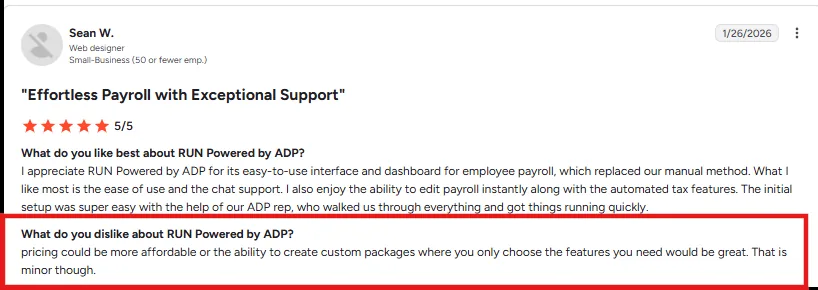
RUN’s pricing structure draws the most consistent complaints from small business owners, and this G2 review is representative.
Source: G2
What Are the Key Features of ADP Run?
- ADP Assist flags payroll errors before submission and answers payroll questions directly
- RUN & DONE automates recurring payroll runs
- Seamless Clover POS integration for retail and restaurant payroll
- W-2 and 1099 generation and e-filing handled automatically
- Mobile app lets owners run payroll from anywhere
| Pros | Cons |
|---|---|
| ADP Assist catches payroll errors before submission instead of after a filing mistake | Multiple small business owners report add-on charges for tasks that feel like they should be automated |
| Backed by ADP’s compliance infrastructure across all 50 states, updated automatically for tax law changes | Implementation fees have been reported around 10 to 20% of annual software costs |
| Clover POS integration processes payroll from the same place a retail or restaurant business accepts payments | Pricing requires a sales conversation rather than a published rate card |
| 24/7 real-person support, per ADP’s own customer survey data |
How Much Does ADP Run Cost?
Custom quotes across four packages (Essential, Enhanced, Complete, HR Pro), plus a reported implementation fee. Contact vendor for pricing.
Best For: RUN fits small business owners, generally under 50 employees, who want ADP’s compliance track record and are willing to negotiate pricing directly rather than start from a published number.
Paycor covers a similar payroll-plus-HR need, but leans mid-market rather than small business.
7) Paycor: Best for mid-market teams that want manager-facing analytics on top of payroll and HR
Paycor is a mid-market HCM platform covering payroll, HR, talent acquisition, and workforce management in one system, aimed at companies that have outgrown small-business tools but aren’t enterprise-scale yet. It’s best known for COR Leadership Insights, which turns routine workforce data into recommendations for managers rather than raw reports. Paycor fits mid-market companies best, generally 100 to 1,000 employees.
In April 2025 Paychex completed its $4.1 billion acquisition of Paycor, and Paycor now operates as, in its own words, “a Paychex company,” combining Paycor’s HCM technology with Paychex’s compliance and advisory depth. For an HR director evaluating Paycor today, that ownership change matters because support and product roadmaps are actively being integrated, and multiple recent user reports describe service disruptions during that transition.
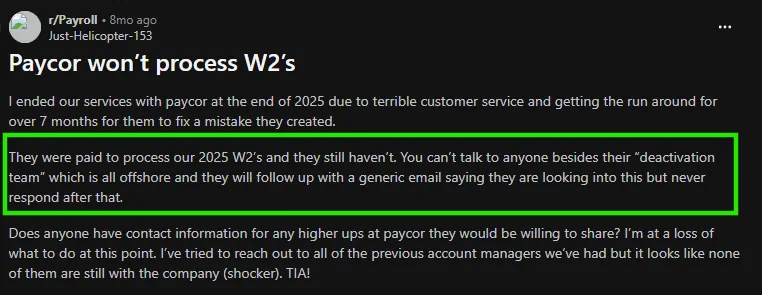
Paycor’s customer support has drawn sharper complaints, and this recent Reddit post is an example.
Source: Reddit
What Are the Key Features of Paycor?
- COR Leadership Insights turns workforce data into manager-facing recommendations
- Unified applicant tracking, onboarding, payroll, and benefits administration
- Mobile app lets employees punch in, view pay, and request time off
- WISE, an AI workforce assistant launched in 2026, surfaces HR tasks inside email and chat tools
- Compensation planning and pulse survey tools for talent management
| Pros | Cons |
|---|---|
| COR Leadership Insights gives managers workforce recommendations instead of raw exportable data | Multiple recent reviews describe slower support and W-2 processing delays tied to the Paychex integration |
| WISE surfaces HR and payroll tasks directly in email and chat, cutting time spent logging into a separate system | Reporting module is less flexible than competitors’, per repeated G2 feedback |
| Broad integration library covering benefits, background checks, and accounting tools | Mobile app reliability issues, including missed punches and sync delays, show up across several reviews |
| Now backed by Paychex’s compliance and advisory resources following the 2025 acquisition |
How Much Does Paycor Cost?
Custom pricing based on company size and modules selected. Contact vendor for pricing.
Best For: Paycor fits mid-market companies that want COR’s manager-facing analytics and can tolerate some near-term service friction while the Paychex integration settles.
For a business that just needs simple, transparent payroll without any of that consolidation, OnPay is the more direct swap.
8) OnPay: Best for small businesses that want the most transparent, no-frills payroll on this list
OnPay is straightforward payroll and HR software built for small businesses that want to run payroll in a few clicks without a steep learning curve. It’s known for publishing its full price list outright, rather than routing buyers to a sales call, and for bundling HR and benefits tools that competitors often charge extra for. OnPay fits small businesses best, generally under 50 employees, including specialized industries like farms, churches, and restaurants that need industry-specific payroll rules. OnPay hasn’t announced a major acquisition or AI feature this year, and its roadmap stays focused on core payroll accuracy and industry-specific compliance rather than adding a broader HCM suite. For a small business owner comparing OnPay to Justworks, the trade-off is straightforward: OnPay costs less per employee, but there’s no bundled benefits negotiation or co-employment model behind it.
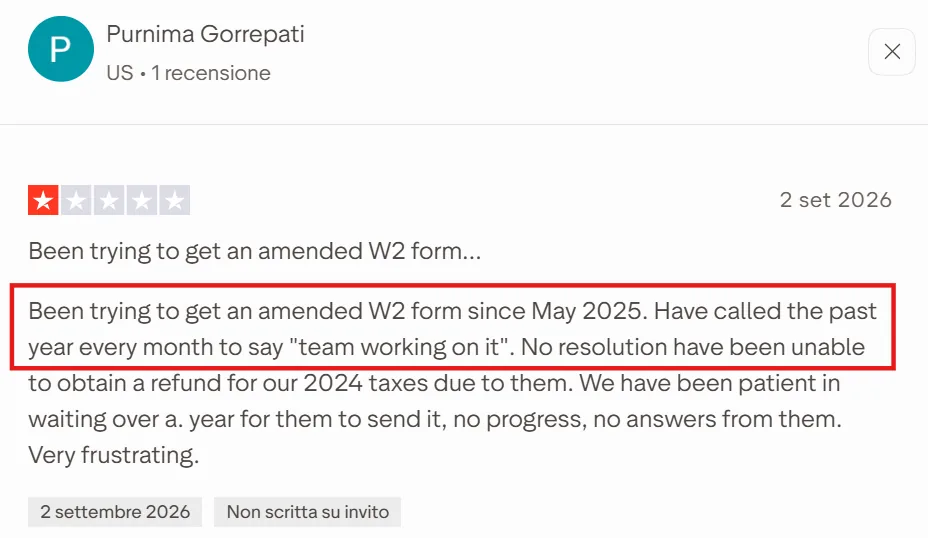
OnPay’s tax-filing accuracy is the most common complaint from small business users, and this trustpilot review lays out a specific, costly example.
Source: trustpilot
What Are the Key Features of OnPay?
- Full-service payroll with automated federal and state tax calculations and filings
- Built-in HR tools, including PTO tracking, org charts, and employee self-service, at no extra base cost
- QuickBooks and Xero integrations for bookkeeping sync
- Integrated benefits, 401(k), and pay-as-you-go workers’ comp
- Free account migration and onboarding support when switching from another provider
| Pros | Cons |
|---|---|
| Published pricing, $49 base plus $6 per employee, means a buyer can calculate exact monthly cost before signing up | Multiple users report missed or late tax filings that led to penalties |
| HR tools like PTO tracking and org charts are included, not a separate paid tier | No PEO option or co-employment model for companies that want benefits bundled in |
| Free migration support removes the usual friction of switching payroll providers mid-year | Limited to core payroll and HR, without Rippling’s or Keka’s broader HCM depth |
| Simple enough for a first-time payroll admin to run without dedicated training |
How Much Does OnPay Cost?
$49 per month base fee plus $6 per employee per month. Optional add-ons range from $10 to $65 per month, with HR and Time Tracking also charging $2 and $4 per employee, respectively.
Best For: OnPay fits small businesses, generally under 50 employees, that want the lowest-friction, most transparent payroll option on this list and don’t need a PEO’s bundled benefits or co-employment protection.
Matching a tool to your headcount and deployment preference is really what this whole decision comes down to.
How to choose the right Justworks alternative
The right pick depends on two things. The first is how many people you’re paying and second is how much of the HR and compliance work you want to handle yourself.
| Headcount | Pick | Why |
|---|---|---|
| 1–50 employees | Gusto or OnPay | Simple payroll with transparent pricing; you likely don’t need full HCM yet. |
| 50 –500 employees | Keka or Rippling | You’re ready to consolidate tools; both offer breadth without PEO lock-in. |
| 500–5,000+ employees | Keka, Paycor, or Paychex | Full HCM needs emerge; Keka scales from mid-market into enterprise without enterprise-tier pricing or a platform switch, and without co-employment. Paycor and Paychex also work at this range. |
How to Migrate Off Justworks
Once you’ve picked a direction, the actual switch is a phased project, not a single cutover date. See our US compliance resources for more on what a state-by-state transition involves.
| Phase | Timeline | You own | Vendor owns |
|---|---|---|---|
| Pre-migration planning | 4–6 weeks before cutover | Employee census validation, benefits decisions, state tax registration gaps | Data import templates, compliance gap analysis, implementation kickoff |
| Data migration | 2–4 weeks | Justworks data export (payroll history, employee records, YTD taxes), data cleanup | Import validation, mapping to new system, historical data loading |
| Parallel run | 1–2 pay periods | Verification of parallel calculations, employee communication | Discrepancy resolution, final configuration adjustments |
| Go-live and cutover | Target: first payroll of new quarter | Final employee self-service rollout, benefits enrollment confirmation | Production payroll run support, tax filing transition, Justworks deauthorization |
Conclusion
Choosing a Justworks alternative starts with understanding why you’re leaving. If your team has outgrown Justworks on cost, functionality, integrations, or HR complexity, use that pain point to narrow your options.
Smaller teams may benefit from the simplicity of Gusto or OnPay. Growing companies consolidating HR systems can look at Keka or Rippling. Businesses that still want outsourced HR and compliance can consider TriNet or Paychex.
Your growth stage matters too. A 20-person startup has very different requirements from a 200-person company building a dedicated HR function. Focus on the capabilities you’ll need over the next few years, the amount of HR work you want to own, and the total cost of the setup. That should leave you with a much shorter, more relevant shortlist.
If you’re ready to move beyond a PEO and bring payroll, HR, compliance, and talent together in one system, Keka is a scalable alternative built to support businesses of all sizes.
See how Keka can simplify HR and payroll for your growing workforce.


