Login
Login


If you’re weighing Gusto vs. Zenefits, you already know both can check the usual boxes. What you really want to know is which platform will actually make life easier when things get busy, and which one leaves you to fend for yourself?
While writing this article, this is what I asked myself:
Can I get things done quickly without extra stress?
Will it grow with my team?
And if I hit a snag, will someone actually help me?
To get honest answers, I went past surface-level ratings and dug into real user feedback. I wanted to hear from businesses who’ve actually used these tools – the wins, the frustrations, and the surprises.
In this blog, I’m sharing what stood out to me most.
If you are deciding between Gusto and Zenefits, these insights might help you avoid headaches – and find a platform you can count on.
Gusto vs. Zenefits at a Glance
This table gives you a clear overview of Gusto and Zenefits. It points out their strengths, weaknesses, and which one stands out in different areas, helping you decide faster.
| Feature | Gusto | Zenefits | The Winner |
|---|---|---|---|
| Multi-State Payroll Processing |
|
| Gusto, for more reliable multi-state tax management. |
| Customer Support Quality & Responsiveness |
|
| Slight edge to Gusto, but Zenefits competitive with premium support. |
| User Experience |
|
| Gusto leads in ease of use, but Zenefits is improving steadily. |
| Document Management |
|
| Gusto, for simplicity, though Zenefits offers solid HR doc features. |
| Time & Attendance |
|
| Varies, Gusto for simplicity; Zenefits for richer scheduling. |
| Comprehensive HR Features & Platform Robustness |
|
| Varies, Gusto for integration, Zenefits for HR depth. |
| Enterprise Scalability & Feature Depth |
|
| Gusto is better for mid-sized growth; Zenefits is best for SMBs. |
Why Should You Believe This Review?
Picking the right software can be a headache—so many features, so much jargon, but not much clarity on what it’s like to actually use.
I wanted to cut through all the fluff and focus on what really counts: how Gusto and Zenefits work for people who rely on them every day.
Here’s how I did it:
- Real User Experiences: I checked out forums, social media, and verified reviews on G2 to hear from folks who know these tools inside and out.
- Straight From the Source: I looked at official pricing, features, and docs to make sure I’m giving you the real scoop beyond the marketing hype.
- Hundreds of Candid Reviews: I went through a ton of honest feedback – the good, the bad, and everything in between; because it’s important to see all sides.
This review is here to help you make a smarter choice – without wasting time on confusing sales speak or buzzwords. Let’s get to what actually matters.
Gusto vs. Zenefits: Feature by Feature Breakdown
Gusto and Zenefits both offer tools to make HR and payroll easier, but they each have strengths that suit different businesses.
Rather than listing a bunch of technical details, this comparison highlights the key features that matter most in everyday use.
Payroll Processing
Payroll processing is the backbone of employee compensation. It automates salary calculations, tax deductions, and benefit contributions, ensuring accuracy and punctuality. A reliable system supports various pay schedules and complies with labor laws, reducing manual work and errors.
Efficient payroll processing minimizes risks, saves time, and keeps employees satisfied by ensuring they are paid correctly and on time, which is essential for maintaining trust and smooth business operations.
Gusto: Users often say that Gusto delivers smooth and reliable payroll processing, even during big transitions. One CPA noted that switching from manual payroll to Gusto was finished well before a crucial IRS deadline, thanks to clear task tracking and no last-minute problems. This reliability and focus on meeting deadlines help build user trust, especially when staying compliant is critical.

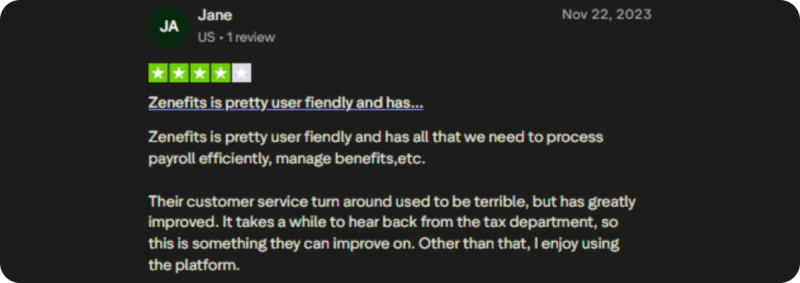
Zenefits: Zenefits offers a user-friendly platform that helps businesses run payroll efficiently and manage employee benefits in one place. Many users find the payroll tools easy to navigate and effective for day-to-day tasks.
While the overall experience is smooth, some note that response times from the tax team can be slow. Still, recent improvements in customer support have made payroll processing with Zenefits more reliable for many small to mid-sized companies.
Tax Compliance
Tax compliance ensures that all payroll-related taxes are calculated, withheld, and filed correctly according to federal, state, and local regulations. Payroll systems that stay up to date with changing tax laws help businesses avoid costly penalties and audits.
Automated tax calculations and electronic filing simplify complex tax requirements, especially for companies operating in multiple jurisdictions.
Gusto: Gusto helps take the stress out of tax compliance by automating filings and staying up to date with changing regulations. Users appreciate that it handles federal, state, and local taxes without needing extra input.
This reduces the chance of errors and missed deadlines. While support can be slow at times, most users find the platform reliable and accurate, making it easier to stay compliant without having to manage everything manually.
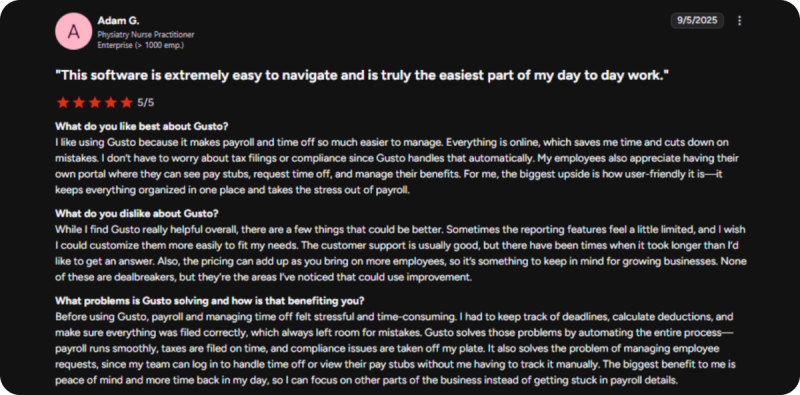
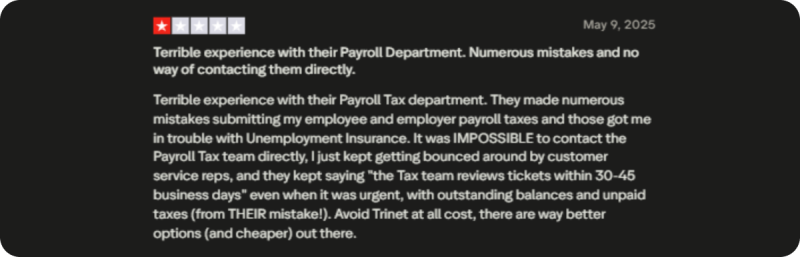
Zenefits: Some users report ongoing issues with Zenefits’ payroll and tax feature, especially when problems arise. Mistakes in tax submissions have led to complications with agencies like Unemployment Insurance, and resolving them can be frustrating.
There’s often no direct line to the tax team, and response times can be slow – even for urgent matters.
Customer Support Quality and Responsiveness
High-quality customer support is critical for resolving payroll and HR issues promptly. Responsive support teams offer timely assistance through various channels such as phone, chat, or email.
Clear communication and expert guidance help minimize downtime and keep business processes running smoothly.
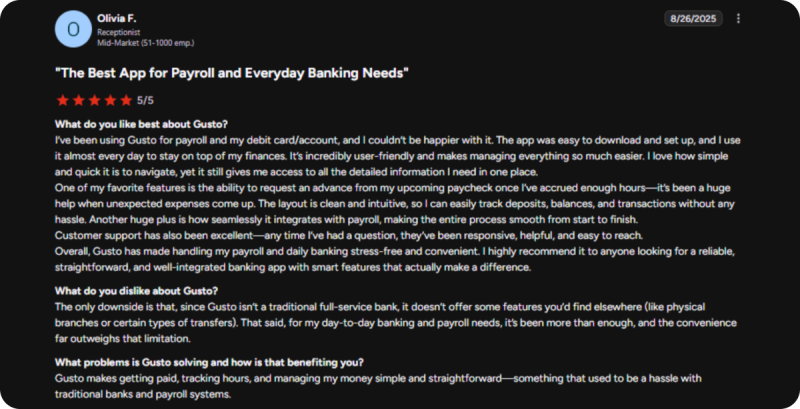
Gusto: Gusto’s customer support is generally well-regarded by users for being responsive and easy to reach. Many appreciate how quickly questions are answered and how helpful the team is during setup or day-to-day use.
That said, it’s worth noting that some users have experienced occasional delays or limited support on more complex issues. Overall, Gusto provides a solid support experience that adds to the platform’s reliability and ease of use.
Zenefits: Zenefits provides responsive and friendly customer support, making it easy for users to get help when needed. Many users find the team helpful, especially during onboarding and payroll-related issues.
That said, some processes, like reversing terminations, still require a phone call, which can feel a bit old-fashioned for an otherwise digital platform.
User Experience
User experience (UX) focuses on how easy and intuitive the software is for users. A clean, simple interface helps employees and administrators quickly find features and complete tasks without confusion. Good UX reduces the need for extensive training and lowers the chances of errors. When software is user-friendly, it encourages consistent use and increases productivity.
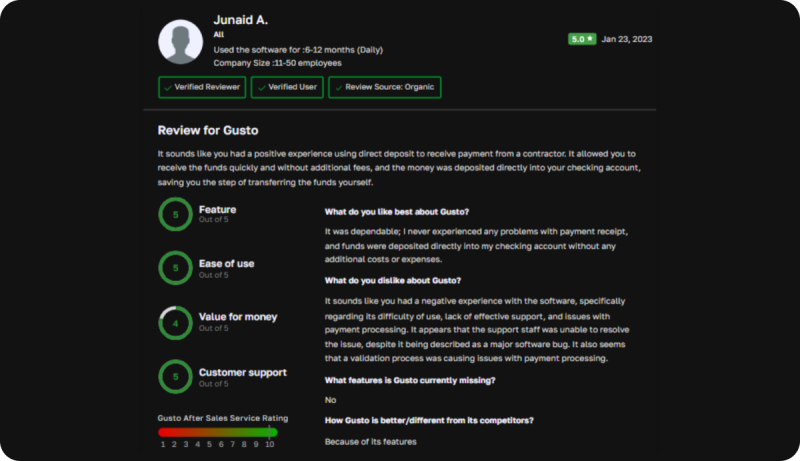
Gusto: Gusto offers a smooth and dependable user experience, especially when it comes to payment processing and direct deposits.
Users appreciate its simple, no-fuss setup and clear interface. While most interactions are seamless, some have noted occasional bugs or delays that could benefit from more responsive support and quicker fixes.
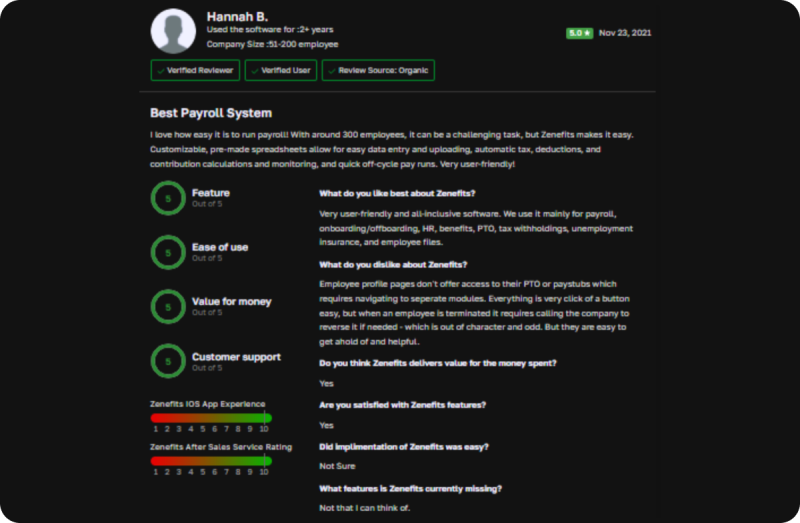
Zenefits: Zenefits provides an efficient and user-friendly experience, particularly for payroll processing and onboarding. Users appreciate the streamlined workflows and easy navigation, making tasks like handling documents and managing employee data quicker.
However, some have mentioned that certain features, like accessing PTO or pay stubs, require extra steps.
Document Management
Document management refers to how well the system handles storing, organizing, and retrieving important files securely. This includes employee records, tax forms, contracts, and compliance documents.
Efficient document management allows easy access and sharing while ensuring sensitive data is protected. A good system supports digital storage with proper version control and audit trails.
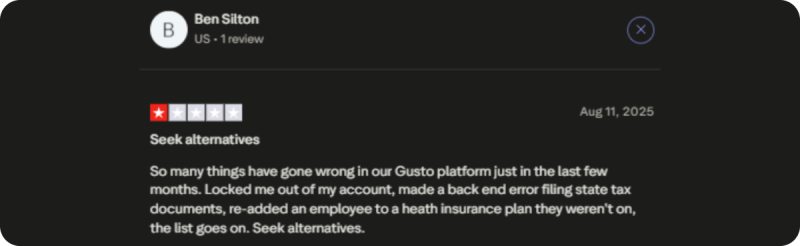
Gusto: Gusto’s document management has been frustrating for some users, with issues like incorrect employee additions to benefits and problems filing state tax documents. These errors have caused confusion and extra work. Users suggest seeking alternatives, as the document handling and account management process could be more reliable and efficient.
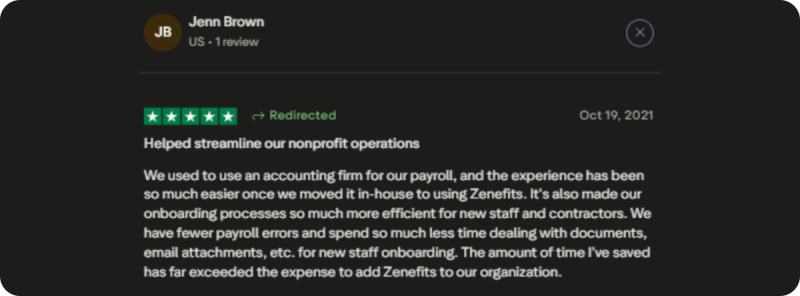
Zenefits: Zenefits makes document management easy by keeping employee records organized and accessible. Users can quickly upload, store, and find important documents like contracts and tax forms. The platform is simple to use, reducing the need for paper records and helping businesses stay organized and compliant.
Time & Attendance
Time and attendance tools track when employees start and end their work, breaks, and time off. Modern systems often offer mobile and biometric clock-in options, making it convenient and accurate. Integration with payroll ensures employees are paid based on actual hours worked.
Accurate time tracking helps businesses comply with labor laws, manage overtime, and reduce time theft or errors, resulting in fair compensation and better workforce management.
Gusto: Gusto’s time and attendance features are highly valued by users, especially for their reliability in managing payroll alongside employee hours. The platform automatically syncs employee hours with payroll calculations, reducing manual errors and ensuring accurate, timely paychecks. Users praise its reliability and ease of use which make it a trusted tool for managing time and attendance, ensuring timely and accurate payroll processing.

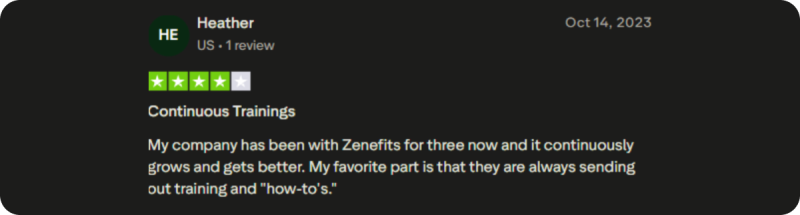
Zenefits: Zenefits offers time and attendance tracking, but some users have reported issues with its functionality.
The scheduling and attendance features are more feature-rich than some alternatives, but they can be prone to bugs. Additionally, users have experienced integration problems with payroll, making it difficult to ensure accurate pay.
Comprehensive HR Features & Platform Robustness
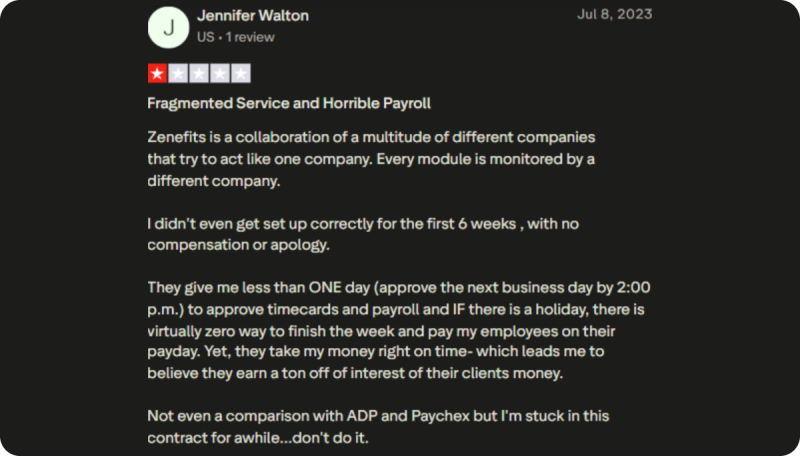
Comprehensive HR platforms offer a wide range of tools beyond payroll, including recruitment, onboarding, benefits administration, and performance tracking. A robust platform ensures all these features work seamlessly together, providing a secure and stable environment.
This integration streamlines HR tasks, reduces manual data entry, and improves reporting.
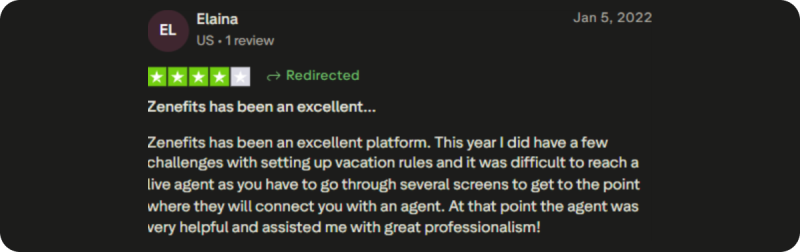
Gusto: The HR software from Gusto is user-friendly and centrally organized. Users value how easy it is to obtain pay stubs, tax returns, and benefit details. Time is saved and everything is easily found because of the platform’s simplicity. Gusto is a reliable option for efficiently handling HR duties because of its prompt customer service.
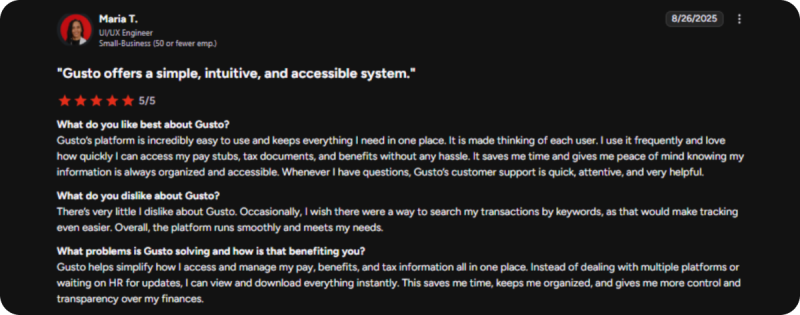
Zenefits: Zenefits is also a platform with solid HR features. Users appreciate the platform’s capabilities, but there are some challenges, like difficulty reaching a live agent when needing assistance.
Despite these issues, once connected, the support team is helpful and professional. Zenefits offers valuable HR functions, such as vacation rule management, but may benefit from improving its user interface to make accessing support and managing tasks more efficient.
Keka: A Better Alternative to Zenefits and Gusto
When choosing an HR and payroll platform, businesses often find themselves caught between two extremes.
Gusto offers a wide array of features but can become complex and costly for smaller teams, while Zenefits is user-friendly but lacks certain advanced capabilities.
Keka provides a balanced middle-ground solution, combining the simplicity of Zenefits with the depth of functionality found in more robust platforms like Gusto.
A Scalable Solution for Growing Businesses
Keka is built to grow with your business, making it the ideal choice for companies with teams ranging from 20 to 1,000 employees. Unlike traditional HR platforms, Keka offers an intuitive user interface that does not require specialized training.
This makes it easy to implement and navigate, even for teams without a dedicated HR department. As your business expands, Keka scales with you, offering more advanced features as needed without overwhelming users with unnecessary complexity.
Integrated Features for Streamlined Operations
Keka’s comprehensive features cover the entire HR spectrum, from payroll and time tracking to performance management and employee engagement. It integrates seamlessly, offering tools such as AI-powered hiring workflows, real-time analytics, and customizable performance reviews.
These features work together to automate tasks, reduce manual effort, and improve efficiency across the board. Keka ensures a smooth user experience by centralizing all HR functions in one platform, streamlining processes and saving time for HR teams.
Clear and Predictable Pricing
Keka offers clear, straightforward pricing starting at $9 per month per employee, with no hidden fees or surprise charges. This transparent pricing model ensures businesses can easily manage their budgets as they scale.
Keka provides businesses with an affordable, flexible solution that balances cost with the depth of functionality required to support long-term growth.
Conclusion
Choosing the right HR and payroll platform doesn’t have to be complicated. Gusto and Zenefits both offer solid solutions – Gusto with its feature-rich system and Zenefits with its user-friendly interface.
But as your business evolves, you need a platform that balances ease with scalability.
That’s where Keka shines. I feel like Keka perfectly combines simplicity with advanced functionality.
It covers everything from payroll and time tracking to performance management, and it scales as your business grows.
If you are after a solution that streamlines HR tasks while offering the right level of depth, Keka is an excellent choice. Its seamless integration and clear pricing make it a strong, flexible option for businesses of any size, helping you stay efficient as you expand.