Login


Across the hall, your newest hire is emailing HR for the third time this week asking how to submit a timesheet. Meanwhile, your HR team is drowning in requests that employees should be able to handle in 30 seconds.
You’re not alone: 57% of HR professionals report working beyond normal capacity due to understanding, often buried in routine admin tasks that employees could easily manage through the right employee self-service portal software. No wonder the market for employee self-service solutions is experiencing rapid growth as organizations prioritize digital HR transformation.
The companies getting this right have transformed their operations. Because the best employee self-service platform doesn’t just digitize the process but eliminates friction entirely.
With countless options flooding the market, the challenge isn’t finding software but finding the right one that aligns with your team’s workflow and culture.
This guide reviews the 10 best employee self-service portals for 2026, covering transparent pricing, real implementation insights, and the critical details that only surface after months of use.
Because your HR team’s expertise is too valuable to waste on tasks employees can handle themselves.
Let’s dive in.
Research Methodology: How I Chose the Best Solutions
To make this list truly useful, I evaluated each platform on the following parameters:
- Usability and interface: How intuitive and employee-friendly is the platform for daily use?
- Core ESS features: Does it support personal data updates, leave, attendance, performance feedback, and payroll access in a self-service manner?
- Integration and workflow automation: How seamlessly does it connect with existing HR tools and automate processes from onboarding to exit?
- Compliance management: Can it handle India-specific statutory requirements like automated tax deductions and labor law adherence?
- Analytics and reporting: Does it provide actionable insights for strategic HR decision-making?
- Scalability and customization: Can it grow with the organization and adapt to unique HR processes?
- Mobile access: How effective are its mobile apps in supporting remote and mobile-first employees?
- Customer feedback: Real user reviews from G2, Capterra, and TrustPilot were analyzed to highlight strengths and potential gaps.
With these benchmarks in place, let’s explore the 10 best employee self-service portal software options available in 2026.
Top 10 Employee Self-Service Software in 2026
Here are the top 10 employee self-service platforms to watch out for in 2026:
1. Keka
Keka is one of the most widely used employee self-service portal software in India, designed to give employees autonomy over routine HR tasks while reducing manual intervention for HR teams. Instead of handling repeated admin queries, HR can focus on strategy, compliance, and culture-building.


Key Features of Keka:
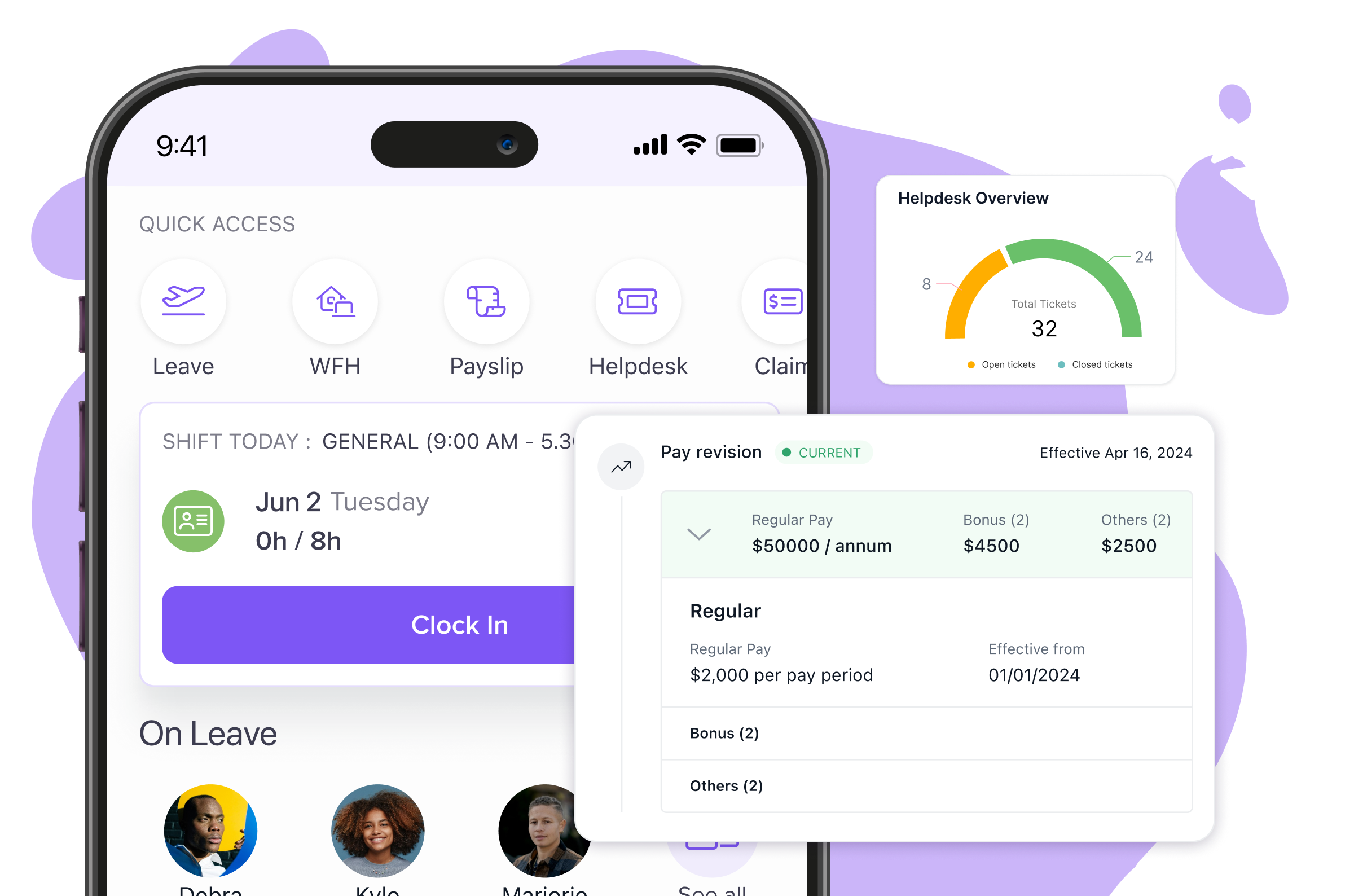
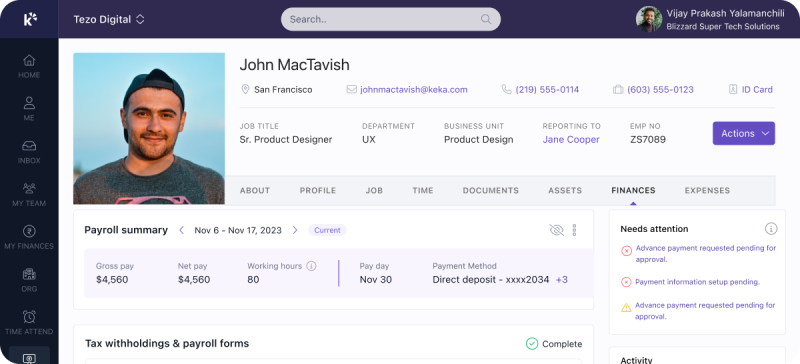
- Personal Profile Management: Employees can update contact details, emergency numbers, and upload personal documents without HR approval.
- Document Repository: Secure upload/download of handbooks, policies, and compliance-ready forms.
- Leave Management: Apply for WFH, partial-day, or official duty leaves with visibility into team calendars.
- Real-Time Attendance Tracking: Options include web check-in, mobile GPS, biometric integration, and selfie attendance with anti-spoofing.
- Attendance Regularization: Employees can raise requests for discrepancies directly in the portal.
- Payroll Self-Service: Access pay slips, salary breakdowns, tax forms, and past records instantly.
- Expense and Reimbursement Management: Submit claims, track status, and receive automated notifications for approvals/rejections.
- Internal Helpdesk: Built-in ticketing for HR queries, grievances, or tech issues with real-time tracking.
- Social Wall: Announcements, birthdays, work anniversaries, and peer recognition features to boost engagement.
- Access and Security: Single sign-on for seamless login across devices and cross-platform access via web and mobile application.
Pros and Cons of Keka:
| Pros | Cons |
|---|---|
| Single sign-on and cross-device functionality | Mobile app features are less robust than the web version |
| Comprehensive mobile accessibility with GPS-enabled features | Limited customization options for dashboards |
| Real-time attendance tracking with multiple punch options | |
| Real-time attendance tracking with multiple punch options |
Ideal Solution for:
Small to large enterprises across IT services, manufacturing, BFSI, consulting, and professional services, especially those managing distributed or remote teams who need reliable employee self-service solutions.
Pricing:
Plans start at ₹9,999/month for up to 100 employees, with ₹90 per additional employee.
Expert’s Opinion on Keka:
Keka delivers the most intuitive employee self-service experience we’ve tested, with seamless mobile access and real-time updates that genuinely reduce HR workload. The automated workflows and customizable dashboards strike an ideal balance between power and simplicity. While enterprises might want more compliance features, it’s perfect for growing businesses that need ESS that actually works.
2. GreytHR
GreytHR is a cloud-based Employee Self-Service portal that simplifies HR operations through automation and transparency. It empowers employees to manage their own HR tasks while reducing the administrative load on HR teams.
Key Features of greytHR:
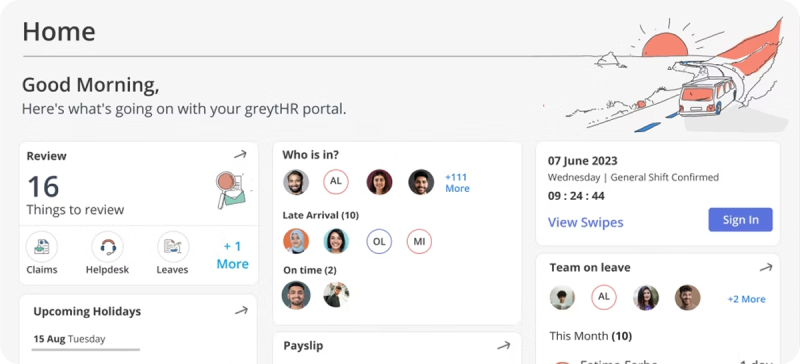
- Digital Document Management: Access pay slips, Form 16, tax records, and policies with secure downloads anytime.
- Workflow-Based Request System: Leave, attendance, expenses, and IT declarations with real-time approval tracking.
- Team Collaboration Hub: Company announcements, employee directory, and peer engagement features.
- Mobile-First Attendance Tracking: Mark attendance via biometric devices, web punch, or mobile app.
Pros and Cons of greytHR:
| Pros | Cons |
|---|---|
| User-friendly interface with minimal learning curve | System performance issues during month-end processing |
| Cost-effective pricing with solid value for money | Backend automation can be slow |
| Strong payroll integration with compliance support | Occasional glitches needing page refresh |
| Mobile app for HR tasks on the go | Mobile app less intuitive than desktop |
Ideal Solution for:
SMEs in IT, healthcare, manufacturing, and services looking for statutory compliance and efficient automation.
Pricing:
Essential Plan starts at ₹3,495/month for 50 employees. Additional users can be added at ₹35/month.
Expert’s Opinion on greytHR:
greytHR offers solid mobile-first ESS functionality with strong Indian compliance automation. The interface handles basic attendance and leave management well, though workflow customization is limited. Support response times can be slow when you need quick assistance.
3. Zoho People
Zoho People is a cloud-based Employee Self-Service platform known for its customization options and seamless integration with the Zoho ecosystem.
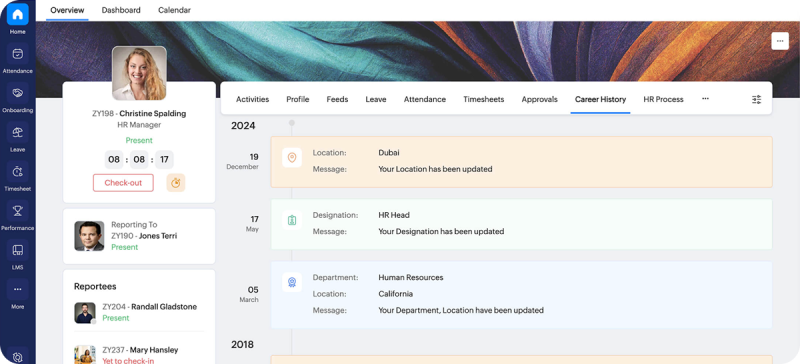
Key Features of Zoho People:
- Leave Management: Advanced leave workflows, team calendars, and automated balance tracking.
- Skills and Competency Tracking: Manage skills, map competencies, and track development with LinkedIn integration.
- Performance Management: Goal-setting, appraisals, 360° feedback, and continuous planning tools.
- Customizable Portal: Themes, menus, and privacy settings for birthdays, anniversaries, and more.
Pros and Cons of Zoho People:
| Pros | Cons |
|---|---|
| Seamless integration within the Zoho suite | Complex setup requiring IT support for small teams |
| Highly customizable workflows and dashboards | Customer support response times are slow |
| Covers the entire employee lifecycle | Outdated interface design |
| Mobile app with facial recognition attendance | Integration challenges with third-party tools |
Ideal Solutions for:
SMBs in tech, retail, media, and services needing scalable ESS solutions with strong customization.
Pricing:
Essential plan starts at ₹48/user/month.
Expert’s Opinion on Zoho People:
Zoho People provides reliable ESS basics at an attractive price, especially valuable within the Zoho ecosystem. The platform handles core functions adequately but lacks advanced reporting capabilities. Payroll integration can add unwanted complexity to otherwise straightforward processes.
4. SumHR
SumHR is a cloud-based Employee Self-Service solution tailored for SMBs, focusing on payroll and attendance automation.
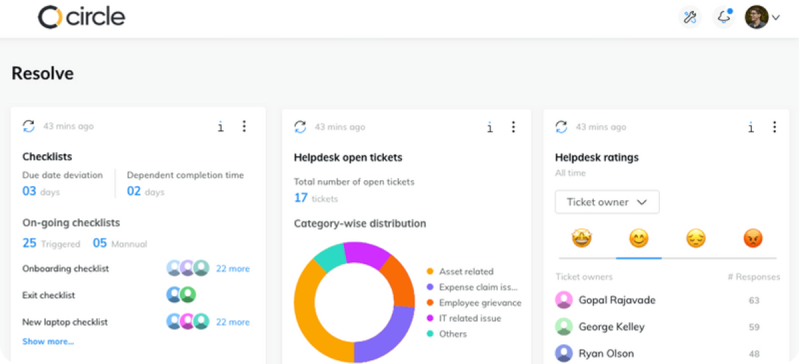
Key Features of SumHR:
- Biometric Integration: Real-time attendance with biometric sync across devices.
- Payroll Self-Service: Instant payslip access, tax processing, and bank integrations.
- Employee Lifecycle Management: Onboarding, profile updates, asset tracking, and exit automation.
- Social Recognition: Automated celebrations for birthdays, anniversaries, and company events.
Pros and Cons of SumHR:
| Pros | Cons |
|---|---|
| Affordable pay-as-you-go pricing model | Occasional system lags and loading issues |
| Strong payroll with compliance support | UI feels clunky and outdated |
| Comprehensive attendance & leave automation | Payroll integration setup can be complex |
| Responsive customer support for SMBs | Limited advanced reporting options |
Ideal Solutions for:
SMBs in IT, hospitality, healthcare, and services needing a low-cost, compliance-ready solution.
Pricing:
Startup plan starts at ₹49/user/month.
Expert’s Opinion on SumHR:
Sum HR covers essential ESS needs with a clean, straightforward interface that works well for startups. The simplicity is both its strength and limitation – perfect for basic requirements but lacking integration options. Growing businesses will likely outgrow its capabilities quickly.
5. Pocket HRMS
Pocket HRMS is a cloud-based Employee Self-Service solution with AI features and strong customization for larger organizations.
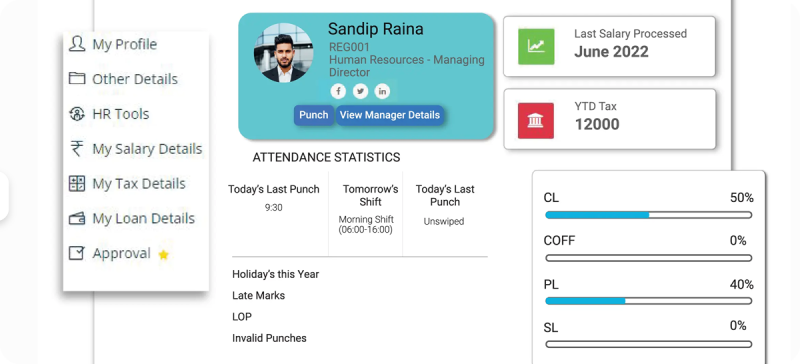
Key Features of Pocket HRMS:
- AI Chatbot: Virtual assistant for instant HR query resolution.
- Geo-Tagging and Tracking: Location verification, geo-fenced attendance, and field route mapping.
- Advanced Document Management: Bulk uploads, policy acknowledgment, and secure storage.
- Comprehensive Approval Workflows: Multi-level approvals for leaves, expenses, travel, and timesheets.
Pros and Cons of Pocket HRMS:
| Pros | Cons |
|---|---|
| Highly customizable fields and workflows | Minimum 50-employee requirement |
| AI-powered features for better employee experience | Complex setup requiring technical expertise |
| Strong GPS and biometric integrations | Limited integration with smaller third-party systems |
| Scalable for large and growing organizations | Higher cost compared to basic ESS platforms |
Ideal Solution for:
Medium to large companies in IT, healthcare, manufacturing, and services with complex approval needs.
Pricing:
Standard plan starts at ₹60/user/month. ESS is available as an add-on.
Expert’s Opinion on Pocket HRMS:
Pocket HRMS brings AI automation to payroll self-service with generally accurate results and smooth biometric integration. The mobile app is customizable but prone to occasional performance issues. Works best for mid-sized organizations prioritizing automation over user experience consistency.
6. HR One
HR One is a cloud-based Employee Self-Service platform with a mobile-first design and automation across all HR functions.
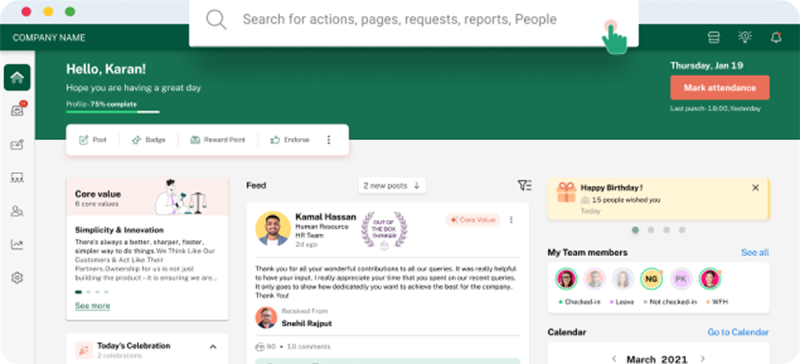
Key Features of HR One:
- Inbox for HR: Centralized dashboard for all HR tasks in one place.
- Multi-Service Request Portal: 20+ request types covering documents, grievances, and service needs.
- Smart Document Generation: Automated creation of HR letters, certificates, and documents with digital signatures.
- Feedback and Engagement: Company announcements, badges, and interactive team updates.
Pros and Cons of HR One:
| Pros | Cons |
|---|---|
| Unique inbox eliminates module switching | Feature-heavy, requires training for adoption |
| Fully automated payroll with touchless processing | More suitable for enterprises than smaller firms |
| 100+ pre-built HR templates for faster operations | Complex implementation for advanced modules |
| Mobile app with complete ESS functionality | High pricing for SMEs |
Ideal Solution for:
Mid-to-large enterprises in manufacturing, IT, BFSI, and healthcare needing advanced workflows with mobile accessibility.
Pricing:
Basic plan starts at ₹4,950/month for 50 employees; ₹99 per additional user.
Expert’s Opinion on HR One:
HR One targets enterprise needs with sophisticated AI chatbots and comprehensive analytics dashboards. The multilingual support serves diverse workforces well but requires significant budget and training investment.
7. PeopleStrong
PeopleStrong is an HCM platform with AI-powered ESS features, focusing on data-driven decisions and personalized employee experiences.
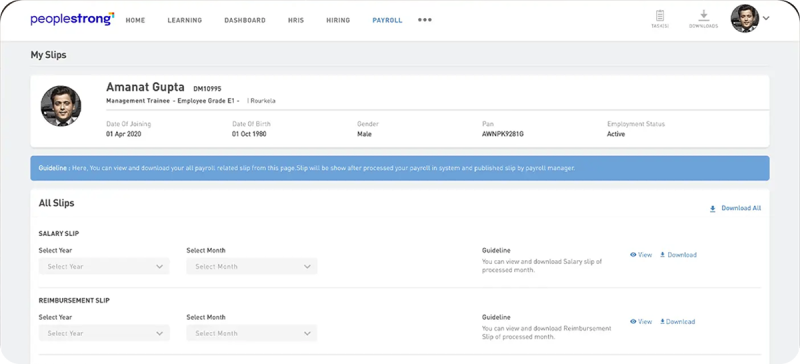
Key Features of PeopleStrong:
- AI Personalization: Career and wellness recommendations powered by ML.
- Analytics Dashboard: Real-time performance and goal alignment with organizational KPIs.
- Integrated Collaboration Tools: Built-in communication, project tools, and recognition platform.
- Mobile-Optimized Experience: Geofencing, GPS, and one-tap mobile access.
Pros and Cons of PeopleStrong:
| Pros | Cons |
|---|---|
| Covers the entire talent lifecycle | Pricing is more enterprise-focused |
| Strong data security with two-factor authentication | Limited transparency on costs |
| Mobile-first design for seamless use | Over-engineered for basic ESS use cases |
| AI/ML automation for HR efficiency | Longer implementation timelines |
Ideal Solution for:
Large enterprises in BFSI, retail, IT, and healthcare needing advanced analytics and full-scale talent management.
Pricing:
Custom quotes based on company size and needs.
Expert’s Opinion on PeopleStrong:
PeopleStrong combines ESS with extensive talent management features, appealing to large APAC enterprises. The AI insights provide valuable employee data, though interface rigidity can frustrate users. Customization processes tend to be slow and require ongoing support.
8. SAP SuccessFactors
SAP SuccessFactors is a cloud-based ESS solution designed for global enterprises, integrating deeply with SAP systems.
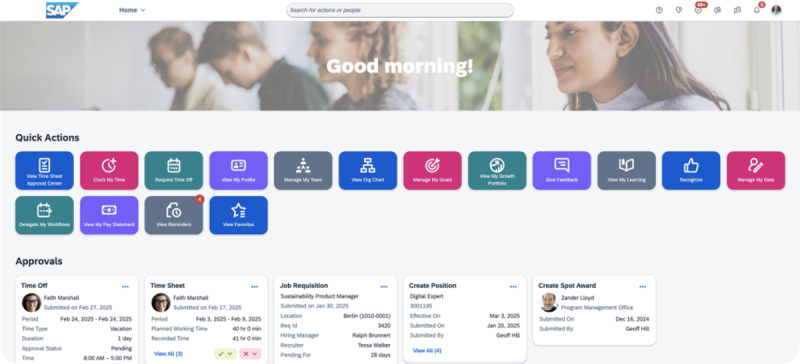
Key Features of SAP SuccessFactors:
- Global Enterprise Integration: Sync with SAP ERP, finance, and enterprise tools.
- Workflow Automation: Advanced approvals, travel, expense, and shift planning.
- Employee Portal: Centralized access to benefits, learning, and performance tools.
- Enterprise-Grade Security: Role-based access, two-factor authentication, and global compliance.
Pros and Cons of SAP SuccessFactors:
| Pros | Cons |
|---|---|
| Proven enterprise scalability and reliability | High licensing and implementation costs |
| Tight SAP ecosystem integration | Setup requires SAP expertise |
| Global workforce management support | Needs dedicated IT support |
| Modern HTML-based interface | Limited flexibility without technical help |
Ideal Solution for:
Multinational corporations across BFSI, pharma, manufacturing, and global services.
Pricing:
Starts at ₹1,550/user/month.
Expert’s Opinion on SAP SuccessFactors:
SAP SuccessFactors delivers enterprise-grade ESS with deep analytics for multinational operations. The platform handles complex compliance well but comes with steep learning curves and high costs. Mobile performance issues and interface complexity limit user adoption.
9. Oracle Fusion HCM Cloud
Oracle Fusion HCM Cloud is a global workforce management solution combining ESS with AI-driven personalization.
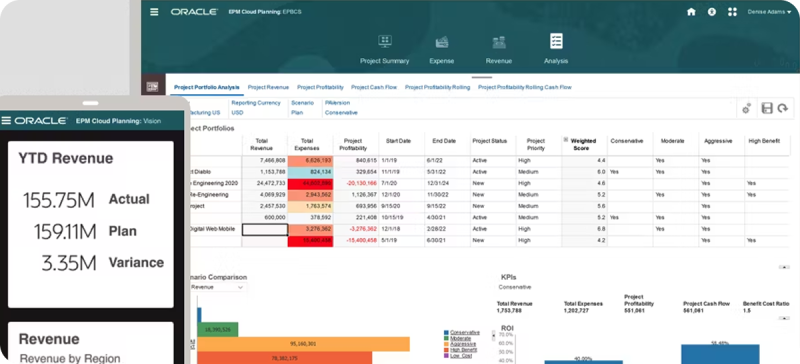
Key Features of Oracle Fusion HCM Cloud:
- AI Personalization: Machine learning algorithms providing personalized recommendations on career, wellness, and learning.
- Calendar Integration: Sync with Outlook and Google for HR tasks.
- Benefits Management: Flexible enrollment, retirement planning, and wellness programs.
- Global Compliance and Localization: Payroll and HR compliance across multiple countries.
Pros and Cons of Oracle Fusion HCM Cloud:
| Pros | Cons |
|---|---|
| Strong AI and automation features | Expensive licensing and setup |
| Comprehensive global compliance tools | Overly complex for SMEs |
| Deep Oracle ecosystem integrations | Steep learning curve for non-technical users |
| Mobile-friendly with native apps | Deployment requires Oracle expertise |
Ideal Solution for:
Large, multinational firms in finance, healthcare, and manufacturing seeking global compliance and AI-driven ESS.
Pricing:
Custom quotes based on organizational needs.
Expert’s Opinion on Oracle Fusion HCM Cloud:
Oracle Fusion HCM provides comprehensive self-service with extensive customization for large enterprises. The cloud infrastructure scales well, though the confusing UI and slow support responses impact user experience. Implementation requires substantial technical resources and time investment.
10. Zimyo
Zimyo is an AI-backed ESS platform designed to automate HR operations and empower employees with self-service capabilities.
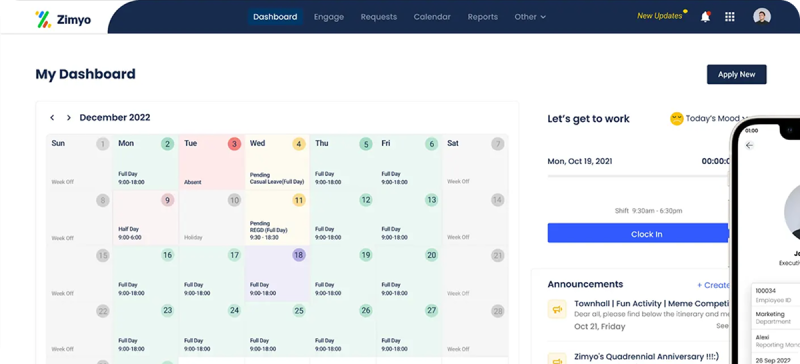
Key Features of Zimyo:
- AI Analytics: Real-time insights on performance, attendance, and workforce trends.
- Expense Management: Automated workflows and error-free reimbursements.
- Smart Tax Declarations: Online portal for IT proofs, deductions, and submissions.
- Attendance Tracking: Biometric sync, GPS punching, and online attendance tools.
Pros and Cons of Zimyo:
| Pros | Cons |
|---|---|
| Strong automation reduces manual HR work | Higher pricing with minimum 50-employee requirement |
| Excellent customer support with dedicated managers | Performance dips during peak use |
| Full-featured mobile app | Manual migration needed at setup |
| AI features for smarter workforce decisions | Learning curve for advanced features |
Ideal Solution for:
Mid-to-large enterprises in IT, hospitality, and professional services requiring AI insights and payroll automation.
Pricing:
Basic plan starts at ₹80/user/month.
Expert’s Opinion on Zimyo:
Zimyo offers affordable all-in-one ESS with good basics for the Indian market. The bilingual interface and responsive support create positive user experiences, though system reliability can be inconsistent. Feature depth may not satisfy organizations with sophisticated HR requirements.
With this clarity, let’s have a closer look at all the key competitors in the next section.
Top ESS Portal Providers in 2026: A Comparison
Choosing the right Employee Self-Service (ESS) portal can feel overwhelming with so many options on the market.
To make things easier, here’s a snapshot of how the leading platforms compare in 2026:
| Platform | Key Features | Best For | Starting Price |
|---|---|---|---|
| Keka |
| Small to large enterprises | ₹9,999/month (up to 100 employees) |
| greytHR |
| Small and medium enterprises | ₹3,495/month (50 employees) |
| Zoho People |
| Small to medium businesses | ₹48/user/month |
| Sum HR |
| Small to medium enterprises | ₹49/user/month |
| Pocket HRMS |
| Medium to large organizations | ₹60/user/month |
| HR One |
| Medium to large enterprises | ₹4,950/month (50 employees) |
| PeopleStrong |
| Large enterprises | Custom quotes |
| SAP SuccessFactors |
| Large enterprises | ₹1,550/user/month |
| Oracle Fusion HCM Cloud |
| Large enterprises and global corporations | Custom quotes |
| Zimyo |
| Medium to large enterprises | ₹80/user/month |
Next, let’s break down the top ESS portal recommendations based on real-world scenarios and use cases.
Best Picks for Your Organization: ESS Portal Use Cases and Recommendations
There’s no one-size-fits-all ESS platform. The right choice depends on your size, industry, and workflows. Here’s how the top solutions fit into real-world scenarios:
Fast Growing Startups and Scale-ups
When you’re hiring fast, you need scalable pricing and remote-friendly tools:
- Keka: Affordable base plan with scalable add-ons.
- SumHR: Simple pay-per-user model with strong payroll automation.
- greytHR: Budget-friendly per-employee pricing after the first 50 users.
Manufacturing and Field Operations:
Accuracy in attendance and compliance tracking is critical:
- Keka: GPS tracking and biometric punch with anti-spoofing technology.
- Pocket HRMS: Advanced geo-tagging and AI chatbot for field workers.
- Zimyo: Multi-mode attendance with real-time insights.
Professional Services and Consulting:
You need polished workflows, client-ready documentation, and easy expense management:
- Keka: Strong expense management with built-in helpdesk functionality.
- HR One: 20+ service request types and mobile-first design.
- Zoho People: Excellent for businesses already in Zoho ecosystem with extensive customization.
Healthcare and Compliance-Heavy Industries:
Regulations demand secure, compliant systems with approvals:
- SAP SuccessFactors: Global compliance with enterprise-grade security.
- Pocket HRMS: Multi-level approval workflows.
- greytHR: Focused statutory compliance at a lower cost.
Remote-First and Hybrid Organizations:
Mobility and ease of use are non-negotiable:
- Keka: Full featured mobile app and social wall for engagement.
- HR One: Built for mobile-first HR experiences.
- People Strong: Consumer-grade mobile UX with AI personalization.
Enterprise and Multinational Corporations:
Need robust compliance, analytics, and global integrations:
- Oracle Fusion HCM: AI-driven, compliance-ready at scale.
- SAP SuccessFactors: Seamless with SAP ecosystem.
- PeopleStrong: Advanced analytics for workforce insights.
Budget-Conscious Organizations:
Core features without overspending:
- greytHR: Lowest cost at ₹35/employee/month with solid core features
- Zoho People: ₹48/user/month with extensive Zoho integration benefits
- SumHR: ₹49/user/month with strong payroll automation
| Organization Profile | Primary Recommendation | Key Considerations |
|---|---|---|
| Cost-conscious SMEs | Keka/greytHR | Affordable entry pricing with essential features |
| Growth-stage startups | Keka/SumHR | Flexible, scalable pricing that grows with teams |
| Manufacturing/Field | Keka/Pocket HRMS | GPS, biometric & geo-tagging for accurate tracking |
| Mobile-First Organizations | HR One/Keka | Designed for mobile-first workflows |
| Compliance-Heavy Industries | SAP SuccessFactors/greytHR | Meets statutory & global compliance needs |
| Enterprise/Global | Keka/Oracle Fusion HCM Cloud | Enterprise-grade, scalable global solutions |
How to Choose the Right Employee Self-Service Platform in 2026?
Selecting an ideal ESS platform isn’t just about ticking feature boxes, but it’s also about finding a solution that fits your company’s size, growth plans, and employee expectations. The wrong choice can lead to low adoption, wasted spend, and HR still bogged down with admin work.
Match the Platform to Your Growth Stage
A tool that works for 50 employees may buckle when you hit 500. Think about both your current scale and future headcount:
- Startups: Prioritize simplicity and affordability.
- SMEs: Look for scalable features that don’t overwhelm.
- Mid-market: Customization and advanced workflows become key.
- Enterprise: Go for global-ready platforms with compliance depth.
Pro Tip:
If you expect 50% growth in two years, choose a platform that can handle that scale without a costly migration.
Focus on Core Features
Your chosen software must provide essential self-service capabilities that truly empower employees and reduce HR workload.
At minimum, your ESS should let employees:
- Update personal details
- Apply for leave and track balances
- Mark and regularize attendance
- Access payslips and tax forms
- Store and download HR documents
Beyond the basics, advanced features like expense claims, performance feedback, and analytics are great, but only if your team actually use them.
Pro Tip:
Avoid platforms that require HR intervention for basic employee updates or lack mobile accessibility for core features. If employees can’t complete routine tasks independently, you haven’t truly achieved self-service.
Check Integration Fit
Your ESS should work smoothly with payroll, ERP, recruitment, and communication tools like Slack or Teams. Watch out for the following red flags:
- Vendors who are vague about integration capabilities.
- Solutions requiring extensive custom development for basic connections.
- Platforms with poor API documentation or limited developer support.
- Systems that don’t support real-time data synchronization.
Technical Tip:
Always ask vendors for API documentation before you commit. A platform with limited API capabilities or lengthy integration processes can significantly delay implementation and increase costs.
Focus on Compliance
Ensure your chosen solution automates statutory compliance requirements, reducing legal risk and administrative overhead.
Indian Compliance Requirements:
- Labor law adherence
- Tax regulations
- Statutory forms like Form 16
- Audit trails
Global Considerations:
- Multi-country payroll processing
- Local labor law variations
- Currency and tax rate management
- Regional data protection regulations (GDPR, etc.)
Compliance Alert:
Non-compliance can result in penalties ranging from ₹10,000 to ₹1 lakh per violation. Choose platforms with built-in compliance automation rather than manual processes that rely on HR memory and diligence.
Prioritize Employee Experience
Employee adoption depends heavily on intuitive interfaces and mobile accessibility, especially for remote or hybrid working models.
A good ESS should:
- Work seamlessly on mobile
- Load fast, even during peak usage
- Offer intuitive navigation without training
- Support multi-language access and secure logins
Action Tip:
Test the mobile app during demos. If common tasks like leave requests take too long, employees won’t use it.
Balance Customization with Ease
Workflow flexibility matters, but heavy customization often leads to complexity. Aim for platforms that offer:
- Configurable approvals
- Automated policy enforcement
- Custom dashboards and alerts
Customization Balance:
Platforms that require extensive customization for basic functionality often become maintenance nightmares. Look for solutions that offer configuration options rather than custom coding requirements.
Check Vendor Reliability
A good platform is useless without dependable support. Ask about:
- SLA-backed response times
- Multi-channel support (chat, phone, knowledge base)
- Training resources and onboarding help
- Regular feature updates and roadmap visibility
Action Tip:
Check actual customer reviews on G2, Capterra, and TrustPilot. Vendor promises about support quality don’t always match reality. Look for patterns in customer feedback about response times and issue resolution.
Budget and Pricing Models
Consider the total cost of ownership beyond that goes beyond the basic licensing fee. The real costs include:
- Setup and migration
- Integration development
- Training and change management
- Ongoing support and upgrades
Hidden Costs Warning:
Enterprise-grade setups can cost 2–3x the first-year license fee. Plan for total cost of ownership, not just subscription.
By carefully weighing these factors against your organizational context, you’ll be positioned to select an ESS platform that enhances HR efficiency, elevates employee satisfaction, and aligns with your strategic goals through 2026 and beyond.
Ready to Unlock Your Path to ESS Success in 2026?
As 2026 unfolds, the Employee Self-Service revolution isn’t on the horizon—it’s already here.
The best platform isn’t the one with the longest feature list or the lowest price tag. It’s the one your employees actually use, the one that grows with your business, and the one that frees HR from being a bottleneck to becoming a true strategic partner.
Think about it: when an employee can request leave in three clicks instead of ten, it transforms the entire work experience. The real cost of ESS isn’t the subscription fee; it’s the hidden expense of poor adoptions, endless workarounds, and HR teams stuck in administrative quicksand.
In 2026, any platform that doesn’t integrate seamlessly with your existing tools or work flawlessly mobile isn’t a solution, but tomorrow’s debt.
Thousands of Indian organizations are already saving 35% of their HR time while boosting employee satisfaction. Isn’t it time you joined them?