Login
Login


Anyone who has handled invoices knows how messy billing can get. A single typo can delay payments, lost records can confuse clients, and what looks like a simple spreadsheet often turns into hours of back-and-forth emails.
Roughly 45% of businesses struggle with billing mistakes and payment delays, losing an average of 9% of their annual revenue. Instead of focusing on growth, they end up stuck resolving disputes and patching avoidable mistakes.
What sets growing businesses apart is how efficiently they manage billing to keep cash flowing without friction.
And in this guide, we will show you how.
We’ll explore the best billing software for 2026, along with their features, pricing, pros and cons, and unbiased opinion to help you choose the best tool for your business.
Research Methodology: How I Evaluated Billing Software
When reviewing billing platforms, I considered the realities finance teams face every day: chasing late payments, fixing invoice errors, and keeping cash flow predictable. The goal was to identify software that not only handles the basics but also adds real value in day-to-day operations.
- Security and compliance: Since billing involves sensitive financial data, I prioritized tools with encryption, fraud detection, role-based access, and compliance with standards like PCI DSS and GDPR.
- Invoice management and automation: Effective tools handle recurring billing, offer customizable templates, send reminders automatically, and include safeguards that catch errors before invoices go out.
- Payment processing and client experience: I prioritized platforms that support multiple payment methods, handle different currencies, connect to secure gateways, and allow partial payments or deposits when needed.
- Cash flow visibility: Strong billing software provides real-time insight into pending, overdue, and collected payments. Features like dashboards, aging reports, and forecasting help managers stay ahead of revenue risks.
- Customization and flexibility: I reviewed whether platforms allow custom fields, branded invoices, tax settings, and localized billing rules without heavy manual adjustments.
- Reporting and audit readiness: I favored tools that provide detailed transaction histories, audit trails, and export options to support both internal reviews and external audits.
- Scalability and integrations: I reviewed whether each platform supports multi-entity billing, approval workflows, and integrations with accounting solutions such as QuickBooks, Xero, or ERP systems.
- User feedback: Finally, I weighed real-world reviews from G2, Capterra, and Trustpilot to confirm whether the platforms remain reliable beyond demo environments.
Best Picks for Billing Software
Here are our best picks for billing software in 2026.
1. Keka
Keka is widely recognized as an HR and payroll platform, but it also offers strong billing capabilities tailored for service-oriented companies.
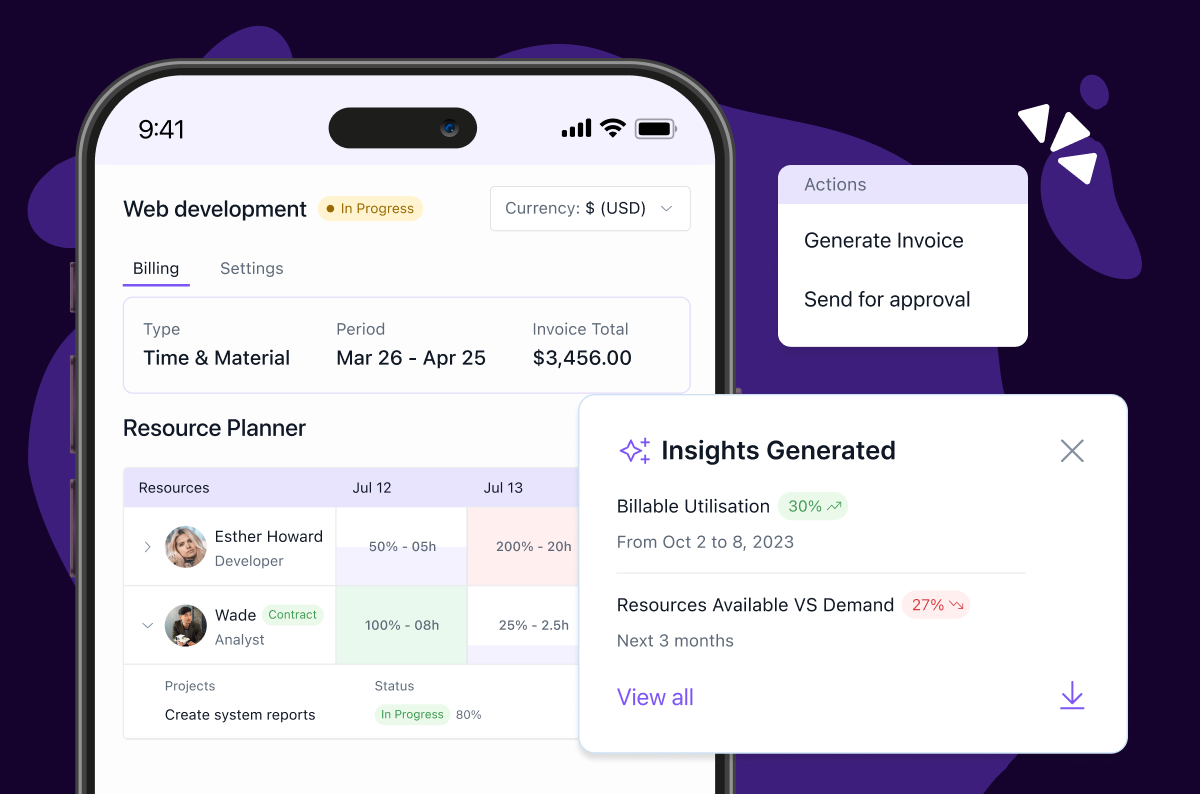
For businesses that bill clients based on employee hours, Keka simplifies the process by converting approved timesheets directly into invoices. Its invoicing system supports GST compliance, recurring billing, and payment tracking, making it one of the best invoicing software for small businesses that need HR and billing in a single solution.


Key features of Keka:
- Data Security: Keka consistently monitors threats using a web application firewall and network-level firewalling and deploys in-transit encryption to safeguard your data.
- Invoice Automation: Create professional invoices with customizable templates and schedule recurring bills.
- Timesheet Billing: Convert approved employee timesheets into client-ready invoices with one click.
- Tax Compliance: Apply GST and regional tax rules automatically to invoices.
- Payment Tracking: Monitor pending, overdue, and cleared invoices from a unified dashboard.
- Revenue Reporting: Access reports on outstanding invoices, payment patterns, and revenue flow.
- Multi-Currency Support: Generate invoices for international clients with automatic conversion.
- Mobile Invoicing: Create and track invoices directly from the Keka mobile app.
| Pros | Cons |
|---|---|
| Timesheet-linked billing reduces manual work for service firms | Limited flexibility for businesses with complex billing models |
| Automates overtime, shift management, and payroll to reduce manual errors. | Not as feature-rich as dedicated invoicing software |
| Recurring billing and reminders improve payment collection | |
| Mobile access makes invoicing easy for managers on the go |
Ideal Solution for:
Service-based businesses with 100–1,000 employees that want payroll, timesheets, and billing connected in one system.
Pricing:
- Foundation: $9/employee/month
- Strength: $16/employee/month
- Growth: $22/employee/month
Expert’s Opinion on Keka:
Keka makes life easier for service companies that bill clients based on employee hours. Managers don’t have to manually move data from timesheets to invoices, and GST is applied automatically without extra work. It’s straightforward, reliable, and saves time. The trade-off is that it doesn’t offer the advanced flexibility of dedicated billing platforms, so it suits businesses that value simplicity and integration over deep customization.
2. GimBooks
GimBooks is a lightweight billing and accounting solution built for small businesses in India. It helps entrepreneurs generate GST-compliant invoices, track expenses, and manage ledgers without needing advanced accounting knowledge.

Key Features of GimBooks:
- GST Invoicing: Create and share GST-compliant invoices with auto-filled tax fields.
- Expense Tracking: Record business expenses and link them with ledgers for clarity.
- Reports and Analytics: Generate profit and loss statements, balance sheets, and cash flow reports.
- Multi-Language Support: Create invoices in regional languages for local clients.
| Pros | Cons |
|---|---|
| Easy to use for small business owners with no accounting background | Limited scalability for large enterprises |
| Mobile-first platform makes invoicing accessible on the go | Lacks advanced automation found in global invoicing tools |
| Strong GST compliance and e-way bill support for Indian businesses | Customer support can be slow during peak hours |
| Expense tracking and reports improve financial visibility | Integration options are limited compared to competitors |
Ideal Solution for:
Small business owners, freelancers, and traders in India who want GST-compliant invoicing and basic financial tracking.
Pricing:
- Free Plan: Limited invoicing features
- Premium Plan: Starting at ₹799/year (approx. $10/year)
- Enterprise Plans: Custom pricing available on request
Expert’s Opinion:
GimBooks stands out for its simplicity and strong GST support, which makes it a good fit for Indian SMEs and freelancers. Business owners can manage invoices and expenses without needing an accountant, and the mobile app is practical for day-to-day use. It’s not built for large or complex businesses, but for small teams that want quick, compliant invoicing GimBooks is a cost-effective option.
3. Zoho Invoice
Zoho Invoice is a popular choice for small and medium businesses that want free yet professional invoicing. It offers automation for recurring billing, global currency support, and integrations with the Zoho ecosystem. For entrepreneurs looking for the best invoicing software for small businesses, Zoho Invoice stands out as a feature-rich tool without subscription costs.

Key Features of Zoho Invoice:
- Automated Billing: Schedule recurring invoices and automate reminders for unpaid bills.
- Global Payments: Accept payments in multiple currencies and integrate with gateways like Stripe and PayPal.
- Expense Management: Record expenses and convert them into billable items.
- Time Tracking: Track project hours and turn them directly into client invoices.
| Pros | Cons |
|---|---|
| Free invoicing software with no subscription fees | Limited advanced features compared to premium billing tools |
| Supports multi-currency payments for global clients | Works best inside the Zoho ecosystem with limited third-party integrations |
| Recurring billing and reminders reduce manual follow-ups | Customization options are somewhat restricted |
| Expense tracking and time-based billing in one platform | Customer support can feel slower during free plan use |
Ideal Solution for:
Freelancers and small businesses seeking free, professional invoicing with automation.
Pricing:
Free for all businesses (no hidden charges).
Expert’s Opinion:
Zoho Invoice is one of the most cost-effective invoicing tools available. It removes the barrier of subscription costs, which makes it appealing for freelancers and startups. While larger companies may need more advanced customization, its clean design and integration with Zoho apps make it an excellent entry point into professional invoicing.
4. Refrens
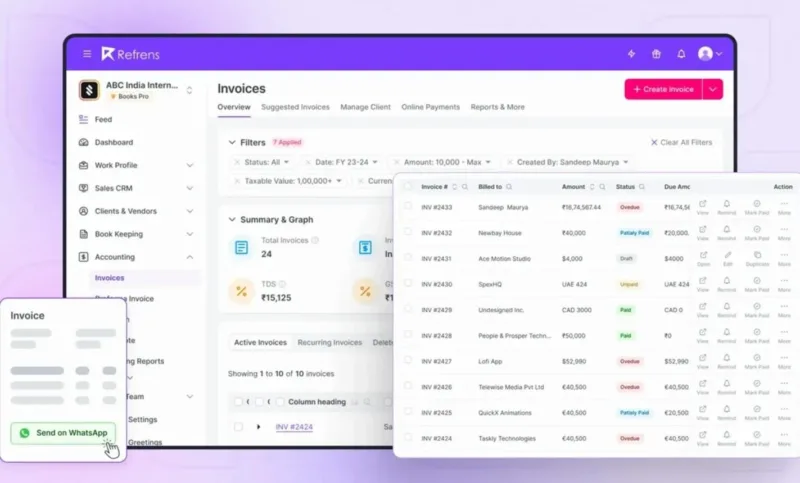
Refrens is a cloud-based billing and accounting platform built for startups, agencies, consultants, service businesses, and growing SMEs. It simplifies billing with GST-compliant invoicing, recurring invoices, e-Invoicing, inventory management, and accounting in one platform. Businesses can also collect payments faster through integrated payment options, automate bookkeeping, and manage multiple businesses from a single dashboard, making it one of the best billing software solutions for Indian businesses.


Key Features of Refrens:
- GST Billing & e-Invoicing: Generate GST-compliant invoices, e-Invoices, and e-Way Bills with automatic tax calculations.
- Recurring Invoicing: Automate recurring invoices and payment reminders to reduce manual follow-ups.
- Accounting & Bookkeeping: Automatically record transactions, manage ledgers, and generate financial reports.
- Inventory Management: Track stock across multiple locations, manage products, and monitor profitability in real time.
| Pros | Cons |
|---|---|
| Billing, accounting, inventory, and CRM in one platform | Some advanced features are available only in higher plans |
| Supports GST, e-Invoicing, and e-Way Bills | Primarily designed for Indian businesses |
| Integrated payment collection with UPI, QR codes, and payment links | |
| Free plan with affordable paid plans for growing businesses |
Ideal Solution for:
Startups, agencies, consultants, service businesses, and SMEs looking for an all-in-one billing, accounting, inventory, and GST-compliant invoicing solution.
Pricing:
- Free Plan: Available
- Accounts Lite: ₹4,900/year
- Accounts GST: ₹12,000/year
- Accounts: ₹14,000/year
Expert’s Opinion:
Refrens is a strong choice for businesses that need more than basic billing software. It combines invoicing, accounting, inventory management, CRM, and GST compliance in a single cloud platform, reducing the need for multiple tools. Its user-friendly interface, automation capabilities, and cost-effective pricing make it an excellent option for startups and SMEs looking to streamline financial operations while staying compliant.
5. MargBooks
MargBooks is one of the best billing software options for small businesses in India that also need inventory management. It combines GST-ready invoicing with stock tracking, accounting, and reporting, making it a strong fit for retailers, wholesalers, and distributors.

Key Features of MargBooks:
- GST-Ready Invoicing: Generate invoices compliant with Indian GST rules and e-invoicing.
- Inventory Management: Track stock levels, batches, and expiry dates with real-time updates.
- Accounting Tools: Manage ledgers, cash flow, and financial statements alongside billing.
- Customizable Reports: Create detailed sales, purchase, and tax reports for decision-making.
| Pros | Cons |
|---|---|
| GST-compliant invoicing designed for Indian businesses | Interface feels outdated compared to modern SaaS tools |
| Inventory and billing are integrated in one system | Requires training for first-time users |
| Detailed reporting helps with tax filing and audits | Mobile app features are limited |
| Affordable pricing with lifetime license options | Customer support can be slow during peak periods |
Ideal Solution for:
Retailers, wholesalers, and distributors in India who need billing and inventory management together.
Pricing:
- Basic Plan: Starting at ₹7,200/year
- Advanced Plans: Custom pricing available based on modules
Expert’s Opinion :
MargBooks is a dependable billing solution for Indian SMEs that deal with inventory. The GST-ready invoicing and deep stock control features make day-to-day operations easier for retailers and distributors. While it may not look as modern as global SaaS tools, its practical combination of billing and inventory tracking makes it a valuable choice for small and medium businesses focused on compliance and efficiency.
6. MyBillBook
Harvest blends time tracking with invoicing, making it a favorite for service-based businesses that bill clients by the hour.

Key Features of MyBillBook:
- GST Billing: Create and print professional GST-compliant invoices in seconds.
- Inventory Tracking: Monitor stock levels, purchases, and sales with real-time updates.
- Mobile Access: Manage billing, expenses, and reports directly from Android or iOS devices.
- Reports and Analytics: Generate profit and loss statements, sales summaries, and tax reports.
| Pros | Cons |
|---|---|
| GST-ready invoicing tailored for Indian businesses | Limited integrations with third-party apps |
| Mobile-first design makes billing accessible anywhere | Advanced reporting options are restricted to higher plans |
| Affordable pricing for small businesses | Lacks automation for complex billing cycles |
| Built-in stock and sales tracking improves visibility | Customer support response can vary |
Ideal Solution for:
Small shop owners, service providers, and traders in India who need a mobile-friendly billing and invoicing app.
Pricing:
- Free Trial: 14 days
- Premium Plan: Starting at ₹1,499/year
- Higher Plans: Custom pricing for advanced features
Expert’s Opinion on Harvest:
MyBillBook makes digital billing simple for Indian small businesses. It works especially well for shops and traders who need GST-ready invoices and quick stock tracking. The mobile app is practical for owners who manage their business on the go. While it’s not built for complex enterprise needs, it offers strong value for SMEs looking to digitize billing affordably.
7. Saral Billing
Saral Billing is one of the best billing software for small businesses in India that want GST-compliant invoicing without complexity. It helps shop owners, distributors, and service providers create invoices, manage stock, and generate tax-ready reports.

Key Features of Saral Billing:
- GST-Compliant Invoices: Create invoices with auto-calculated GST and e-invoicing support.
- Inventory Control: Track stock levels, purchases, and sales with batch and expiry management.
- Reports and Tax Filing: Generate sales registers, GSTR reports, and financial summaries.
- Custom Invoice Design: Add logos, branding, and formats suited to business needs.
| Pros | Cons |
|---|---|
| Auto-applies GST rates to reduce manual tax entry | Dated interface compared to modern SaaS tools |
| Generates tax-ready reports that match Indian compliance formats | Limited features on the mobile app |
| Links the stock movement directly with invoices | Lacks automation for recurring billing |
| Custom invoice design improves client-facing documents | Few integration options with third-party accounting tools |
Ideal Solution for:
Small retailers, distributors, and service providers in India who need simple GST-ready billing.
Pricing:
Starting at ₹7,000/year (custom modules available).
Expert’s Opinion :
Saral Billing works best for businesses that want GST accuracy and inventory control in one system. Shop owners and distributors save time during tax filing because the reports match compliance formats directly. While the interface feels dated, the depth in GST and stock-linked billing makes it a practical fit for SMEs focused on compliance.
8. Tipalti
Tipalti is one of the best invoicing software platforms for businesses that handle global vendor payments. It automates invoice capture, approvals, and cross-border payments in 120+ currencies. With compliance and fraud detection built in, Tipalti is widely used by finance teams that need secure and scalable accounts payable and billing management.

Key Features of Tipalti:
- Invoice Automation: Capture, match, and approve invoices automatically.
- Global Payments: Pay vendors in 120+ currencies with built-in compliance checks.
- Tax Compliance: Collect W-8/W-9 forms and manage global tax rules.
- Fraud Detection: AI-driven monitoring to prevent duplicate or fraudulent payments.
| Pros | Cons |
|---|---|
| Handles global payments in multiple currencies | Pricing is high for smaller businesses |
| Strong automation reduces manual invoice processing | Implementation requires time and training |
| Built-in tax and compliance management | More suitable for mid-size and large enterprises |
| Fraud detection adds security to vendor payments | Customer support can be slow for smaller clients |
Ideal Solution for:
Mid-sized and large businesses managing cross-border vendor payments and accounts payable at scale.
Pricing:
Starting at $149/month plus transaction fees.
Expert’s Opinion :
Tipalti stands out for companies that pay vendors globally. It combines invoice automation with compliance and fraud checks, which makes it much more than a standard billing tool. While it can be expensive for smaller firms, larger businesses benefit from the time savings and reduced risks it delivers.
9. Stripe Billing
Stripe Billing is one of the best invoicing software platforms for subscription-based and digital-first businesses. It helps companies manage recurring billing, automate payment retries, and collect revenue in 135+ currencies. With its developer-friendly APIs and strong ecosystem, Stripe Billing is widely used by startups and SaaS companies that need scalable billing automation.

Key Features of Stripe Billing:
- Recurring Billing: Automate subscriptions, renewals, and payment cycles.
- Smart Payment Recovery: Use dunning and retry logic to reduce failed payments.
- Global Currency Support: Accept payments in 135+ currencies with tax handling.
- Integrations and APIs: Connect with CRM, ERP, and finance systems using robust APIs.
| Pros | Cons |
|---|---|
| Strong automation for subscriptions and recurring billing | Requires developer support for advanced customization |
| Smart retry logic improves revenue collection | Transaction fees can add up for high-volume billing |
| Wide global payment coverage with compliance built in | Limited offline billing features |
| Its API-first approach makes integrations flexible | May feel complex for very small businesses |
Ideal Solution for:
SaaS companies, marketplaces, and global startups that need recurring billing automation.
Pricing:
0.5% per recurring transaction, plus standard Stripe processing fees.
Expert’s Opinion :
Stripe Billing gives SaaS businesses reliable control over subscriptions and recurring revenue. Features like smart retries and multi-currency billing reduce revenue leakage, and its API-first design offers flexibility. The trade-off is that smaller businesses may find it technical, but for growth-focused companies, it’s one of the most complete billing platforms available.
10. Recurly
Recurly is one of the best billing software options for managing subscriptions at scale. It focuses on revenue recovery, churn reduction, and analytics, making it popular among mid-sized SaaS businesses. With its prebuilt integrations and no-code setup for most billing workflows, Recurly reduces reliance on IT teams while still offering advanced controls.

Key Features of Recurly:
- Subscription Management: Automate renewals, upgrades, downgrades, and cancellations.
- Revenue Recovery: Use dunning tools and payment retries to recover failed charges.
- Analytics and Reporting: Track MRR, churn, and customer lifetime value.
- Integrations: Prebuilt connections with CRMs, ERPs, and accounting software.
| Pros | Cons |
|---|---|
| Specialized in subscription billing and recurring revenue | Pricing can be steep for startups |
| Dunning and retry tools improve revenue recovery | Not suitable for businesses outside subscriptions |
| Strong analytics for MRR, churn, and growth insights | Some advanced features are locked in higher plans |
| Easy integrations with finance and CRM platforms | Limited customization compared to developer-first tools |
Ideal Solution for:
SaaS and digital service companies looking to optimize subscription revenue.
Pricing:
Starting at $199/month plus transaction fees.
Expert’s Opinion :
Recurly helps subscription businesses grow revenue and cut churn. Its analytics give finance teams clarity on MRR and customer behavior, while automation handles renewals and failed payments. It’s less flexible than developer-first platforms like Stripe, but for companies that want a plug-and-play subscription billing solution, Recurly is a strong choice.
11. Finexo Books
Finexo Books is a cloud-based billing software designed for Indian small and medium businesses looking for a simple way to manage GST invoicing, recurring billing, and payment collections. It helps businesses create professional invoices, track receivables, automate recurring bills, and monitor customer payments from a single dashboard. Along with billing, it also includes accounting, GST compliance, inventory management, and financial reporting for businesses that prefer an all-in-one solution.
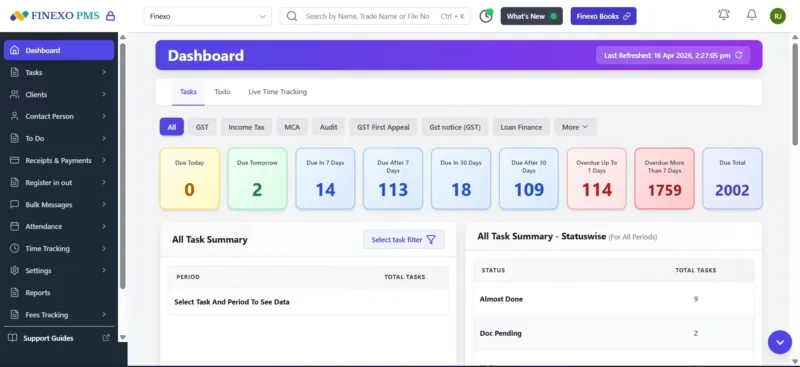
Key Features of Finexo:
- GST-compliant invoice creation with automatic tax calculation
- Customizable invoice templates and branding
- Recurring billing and automated invoice generation
- Payment tracking with outstanding receivables dashboard
- Customer and supplier management
- Inventory management linked with billing
- Bank reconciliation
- Expense management
- GST return filing support
- Financial reports and business insights
| Pros | Cons |
|---|---|
| Simple interface with minimal setup required | Fewer third-party integrations than larger global platforms |
| Affordable flat annual pricing with all features included | Advanced enterprise workflows are still evolving |
| Combines billing, accounting, GST, and inventory in one application | Newer product compared to long-established accounting software |
| Cloud-based access with multi-user collaboration | No dedicated desktop application |
Ideal Solution for:
Small and growing businesses, accountants, and CA firms that want GST-compliant billing software with integrated accounting, without paying separately for multiple modules.
Pricing:
- Silver: ₹4,999/year
- Gold: ₹7,999/year
- Diamond: ₹9,999/year
- 7-day free trial available
- All plans include the complete feature set.
Expert’s Opinion :
Finexo Books is a practical choice for businesses that want billing to remain simple while still having accounting available when needed. Its biggest strengths are GST-ready invoicing, recurring billing, payment tracking, and straightforward pricing, making it well suited for Indian SMBs. While it may not yet match the ecosystem or integration depth of some larger global platforms, it delivers strong value for businesses looking for an easy-to-use billing solution that also covers accounting and compliance without additional modules.
12. Fortis
Fortis is a UAE-focused POS system and business management solution that helps businesses manage payments, sales, orders, inventory, customers, and reporting from one platform. Its SmartPOS solution combines payment acceptance with POS and business management tools, making it suitable for retail stores, restaurants, cafés, service businesses, and other growing businesses.
For businesses that need billing and payment management alongside their day-to-day operations, Fortis allows users to accept card and cash payments, process orders, print simplified tax invoices, track sales, and manage inventory from the same system.

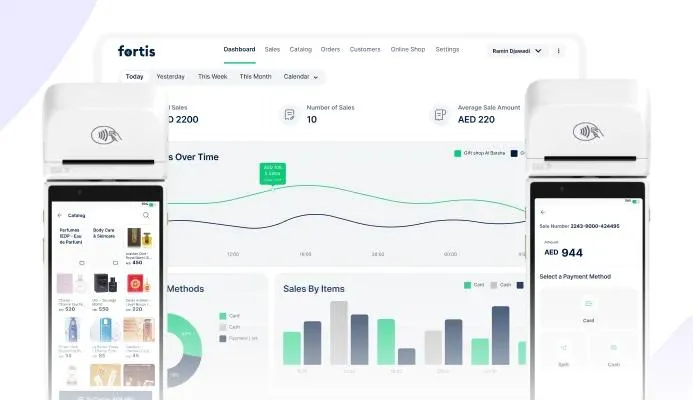
Key Features of Fortis:
- POS & Payments: Accept card and cash payments, process orders, and manage transactions through Fortis SmartPOS.
- Tax Invoices: Print simplified tax invoices directly from the POS terminal.
- Inventory Management: Track stock levels in real time and automatically update inventory after each sale.
- Product Catalogue: Manage products, categories, variants, pricing, and discounts from one platform.
- Sales Tracking & Reporting: Monitor sales by channel, date, location, or employee and access business reports through the dashboard.
- Customer Management: Capture customer information and view purchase history to better understand customer activity.
- Payment Links: Create and send payment links to accept payments remotely.
| Pros | Cons |
|---|---|
| Works on existing card machines, reducing the need for separate POS hardware | Advanced reporting may not meet the needs of businesses requiring highly detailed analytics |
| Combines orders, payments, inventory, customer data, and reporting in one system | Businesses operating multiple brands from a single location may need a more specialized multi-entity POS solution |
| Built-in inventory automatically updates stock after sales | |
| Built-in loyalty features support points, stamps, digital cards, and customer insights | |
| Real-time dashboard provides visibility into sales and business performance |
Ideal Solution for:
UAE retailers, restaurants, cafés, service businesses, and growing businesses that need POS, payments, billing, inventory, and sales management in one connected platform.
Pricing:
- Fortis Lite: Free
- SmartPOS: AED 1,290/year/device
- Additional devices: AED 390/year each
Fortis states that listed prices are exclusive of 5% VAT, and the hardware itself is not included in the SmartPOS subscription price.
Best Billing Tools Comparison Chart
Choosing the right billing software can be challenging because each platform supports different types of businesses.
Here’s a side-by-side look at the best billing software in 2026:
| Billing Tool | Features | Best For | Pricing |
|---|---|---|---|
| Keka |
| Service-based businesses that want invoicing tied to HR and payroll | Starts from $9/employee/month |
| GimBooks |
| Small businesses and freelancers in India who need GST-ready billing | Starts at ₹799/year |
| Zoho Invoice |
| Freelancers and small businesses seeking free invoicing software | Free for all businesses |
| Refrens |
| Small businesses, IT & service companies, agencies, and growing businesses | Free plan available; Paid plans start at ₹4,900/year |
| MargBooks |
| Retailers, wholesalers, and distributors in India | Starts at ₹7,200/year |
| mybillbook |
| Shops, traders, and small businesses that are moving from paper to digital billing | Starts at ₹1,499/year |
| Saral |
| Indian SMEs needing GST billing with stock tracking | Starts at ₹7,000/year |
| Tipalti |
| Mid to large businesses managing cross-border vendor payments | Starts at $149/month + fees |
| Stripe |
| SaaS and startups with global recurring billing needs | 0.5% per recurring transaction + Stripe fees |
| Recurly |
| SaaS and digital services optimizing subscription revenue | Starts at $199/month |
| Chargebee |
| Scaling SaaS and e-commerce businesses needing audit-ready billing | Free plan up to $250k revenue, paid from $599/month |
| Fortis |
| UAE retailers and growing businesses | From AED 1,290/year/device |
Which Tool is Best for You?
The right billing software depends on your business size, industry, and how you manage clients or payments. Here’s a breakdown to help you choose:
1. Small Businesses
For small businesses that need simple GST invoicing and expense tracking without complex features:
- MyBillBook: Best for shop owners and traders moving from manual billing to digital. Affordable and mobile-friendly.
- GimBooks: Works well for freelancers and SMEs in India needing GST-ready invoicing and basic reports.
- Saral Billing: Practical for small retailers and distributors with stock-linked billing and GST compliance.
2. Growing SMEs
For companies scaling operations, needing tighter control over payments, and integrating billing with other workflows:
- Keka: Stands out for SMEs that bill clients based on employee hours. Timesheet-linked invoicing, GST compliance, and payroll sync make it a complete system.
- MargBooks: Strong choice for wholesalers and distributors managing inventory and billing in one platform.
- Fortis: A strong option for UAE retailers and growing businesses that want to connect POS, payments, billing, inventory, and sales management in one platform.
3. Enterprises
For large organizations with complex billing, global compliance, and multi-entity needs:
- Tipalti: Automates invoice capture, vendor payments, and compliance checks for enterprises managing cross-border payouts.
- Chargebee: Built for SaaS and e-commerce enterprises scaling subscription revenue with audit-ready reporting.
4. Remote and Hybrid Teams
For businesses managing clients or operations across locations:
- Keka: Cloud-based with mobile invoicing and payment tracking, useful for distributed service companies.
- Zoho Invoice: Free, mobile-friendly solution for remote freelancers and SMEs that need lightweight invoicing.
5. Subscription Businesses
For SaaS and digital-first companies relying on recurring revenue:
- Stripe Billing: Flexible API-first billing tool for global startups.
- Recurly: Prebuilt subscription workflows and analytics to optimize churn and MRR.
- Chargebee: A Comprehensive platform with compliance and revenue recognition, best for scale-ups.
6. Freelancers and Solopreneurs
For individuals who need quick invoicing without heavy accounting:
- Zoho Invoice: Free invoicing with multi-currency support, ideal for freelancers.
GimBooks: Low-cost mobile invoicing app designed for freelancers and solo traders in India.
Best Picks for Billing Software: Comparison Table
| Category | Software | Why It Stands Out |
|---|---|---|
| Best for Small Businesses | MyBillBook | Simple GST billing and mobile invoicing for shop owners and traders moving from paper billing. |
| GimBooks | Easy GST-ready invoicing with expense tracking, designed for freelancers and small businesses in India. | |
| Saral Billing | Stock-linked billing with GST reports, practical for small retailers and distributors. | |
| Refrens | GST-compliant invoicing, accounting, inventory, and payment collection in one cloud platform, ideal for small businesses and service companies. | |
| Best for Growing SMEs | Keka | Connects timesheets, payroll, and billing in one platform, ideal for service firms scaling beyond spreadsheets. |
| MargBooks | Strong fit for wholesalers and distributors needing inventory and billing combined. | |
| Refrens | Combines invoicing, accounting, inventory, CRM, and GST compliance in one platform, helping growing businesses streamline operations. | |
| Best for Large Enterprises | Tipalti | Automates invoice processing and cross-border payments with compliance built in. |
| Chargebee | Subscription billing with audit-ready revenue recognition for enterprises. | |
| Best for Remote or Hybrid Teams | Keka | Cloud-based billing with mobile invoicing and payroll sync, well-suited for distributed service companies. |
| Zoho Invoice | Free invoicing with mobile access, a flexible option for remote freelancers and SMEs. | |
| Best for Subscription Businesses | Stripe Billing | API-first billing with recurring payments and global currency support, great for SaaS startups. |
| Recurly | Prebuilt subscription workflows and analytics to optimize churn and recurring revenue. | |
| Chargebee | Complete subscription billing platform with tax and compliance support, ideal for scale-ups. | |
| Best for Freelancers and Solopreneurs | Zoho Invoice | Free invoicing with expense tracking and multi-currency support. |
| GimBooks | Affordable mobile billing for freelancers and solo traders in India. | |
| Refrens | Free invoicing with client management, online payments, GST billing, and expense tracking for freelancers, consultants, and agencies. | |
| Best for Retail & Payments | Fortis | Connects POS and payments with billing, inventory, sales tracking, and reporting for day-to-day business management. |
How to Choose the Right Billing Software for Your Business
Selecting the best billing software starts with understanding your business needs. The right platform should save time, improve cash flow, and fit naturally into your existing workflows. Here are the key factors to consider:
- Business Size and Industry: Freelancers and small service providers often benefit from simple tools that focus on invoicing and expense tracking, such as Zoho Invoice or MyBillBook. SMEs may look for billing connected to payroll or inventory, while enterprises usually require compliance, scalability, and advanced reporting.
- Essential Features: Make a list of what matters most. For example, service companies may need timesheet-based billing, SaaS firms require subscription management, and retailers depend on GST invoicing and stock control.
- Ease of Use: Consider your team’s comfort with financial tools. A clean, intuitive interface reduces the learning curve and adoption barriers, especially for small teams without accounting expertise.
- Integrations: Look for platforms that connect easily with your accounting software, payment gateways, CRM, or payroll system. Smooth integration helps avoid duplicate data entry and errors.
- Cost and Value: Go beyond the subscription price. Factor in transaction fees, user-based pricing, and potential add-on costs as your business grows. Choose software that fits your budget without sacrificing reliability.
- Customer Support: Billing directly impacts revenue, so responsive customer support is critical. Check whether the vendor provides live chat, email support, or training resources.
- Customization: The ability to brand invoices, adjust tax rules, and adapt workflows makes billing software more effective and professional.
Conclusion
Billing directly affects how money flows through a business. Missed invoices, late payments, and compliance errors can quickly slow operations and damage client relationships. The right software turns invoicing into a reliable process to help companies collect payments on time, stay tax-compliant, and focus energy on customers rather than chasing accounts.
For SMEs and service-led organizations, Keka brings billing into the same system as payroll and timesheets. This link means managers can generate accurate, GST-ready invoices from employee work records without duplicate entry.