


 Login
Login


The eight best alternatives for Dayforce in 2026 are Keka, Workday HCM, UKG Pro, ADP Workforce Now, Paylocity, Paycom, Paycor, and isolved. Each offers the tools growing companies need to scale. They are also easier to implement and manage than Dayforce.
Dayforce is a strong platform if you have the resources to run it. That level of capability, however, can come with added complexity. For growing mid-sized companies, lengthy implementation, complex reporting, and specialist-dependent tasks can outweigh the benefits.
One Redditor on r/humanresources said their team spent months cleaning up after a Dayforce rollout because it wasn’t as intuitive and required an expert to rollout.
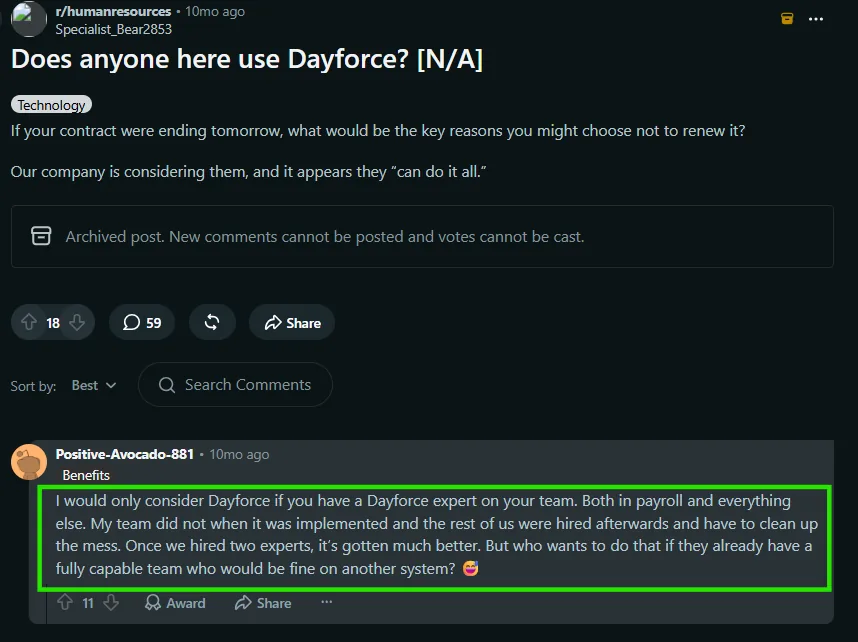
Source: Reddit
That experience is worth keeping in mind when comparing Dayforce with other HCMs. Below, we look at eight alternatives, what they offer, who they suit, and where they may be a better fit for growing companies. If you want the short version, the table below gives you a quick comparison.
Quick Verdict: Best Dayforce Alternatives
| Feature | Keka | Workday HCM | UKG Pro | ADP Workforce Now | Paylocity | Paycom | Paycor | isolved |
|---|---|---|---|---|---|---|---|---|
| Best For | Orgs looking for HR, payroll & PSA in one platform that can handle complexity and scale | Large enterprises needing HR and finance integration | Complex, large-scale shift scheduling | Payroll reliability & benefits network breadth | Culture-focused mid-market orgs | Employee-driven payroll & self-service | Healthcare, manufacturing & restaurant businesses | Companies wanting local partner-led service |
| Ideal Company Size | All sizes | Mid to large enterprise | large enterprise | Mid-market to enterprise | Small market | Mid to large | Small market | Varies by partner |
| US Payroll Compliance | All 50 states, automated filing (941, 940, W-2, 1099) | Strong, global multi-country compliance | Deep, built for complex multi-location orgs | Strong, backed by ADP’s scale and compensation benchmarking data | Strong | Strong, US and global payroll | Strong, with industry-specific compliance tools | Strong, delivered via partner network |
| Automation & AI | Comprehensive AI woven across core workflows | Advanced AI agents across recruiting, talent, workforce planning | Advanced UKG Bryte™ AI insights across HR/payroll | Moderate ADP Assist flags anomalies & trends | Moderate generative AI assistant for predictive analytics | Advanced Beti® (self-audit payroll) + IWant™ AI search | Moderate standard automation across modules | Moderate “The Guardian” AI agent for payroll |
| Employee Self-Service | Yes. Self servive available on mobile app and web on modules like leave, expenses, time tracking, performance and more | Yes | Yes | Yes | Yes | Yes, employees review & approve their own paycheck | Yes | Yes |
| Pricing Model | Tiered, published plans (Foundation/Strength/Growth) | Custom enterprise pricing | Custom, contact vendor | Tiered (Select/Plus/Premium), contact vendor | Tiered by headcount & modules | Tiered by size & modules | Tiered (Basic/Complete), contact vendor | Varies by implementation partner |
| Mobile App Support | Complete support on intuitive mobile app | Good | Good, but reviewers cite a learning curve | Full-featured | Highly rated (4.7/5 App Store), especially for non-desk employees | Good | 4.7/5 App Store rating, some features missing vs. web | Standard, via People Cloud login |
| Free Trial | Yes | No | No | No | No | No | No | No |
| Deployment | Cloud | Cloud | Cloud | Cloud | Cloud | Cloud | Cloud | Cloud |
| G2 Rating (2026) | 4.4/5 | 4.1/5 | 4.3/5 | 4.2/5 | 4.4/5 | 4.6/5 | 4.0/5 | 4.3/5 |
Why teams look for Dayforce alternatives?
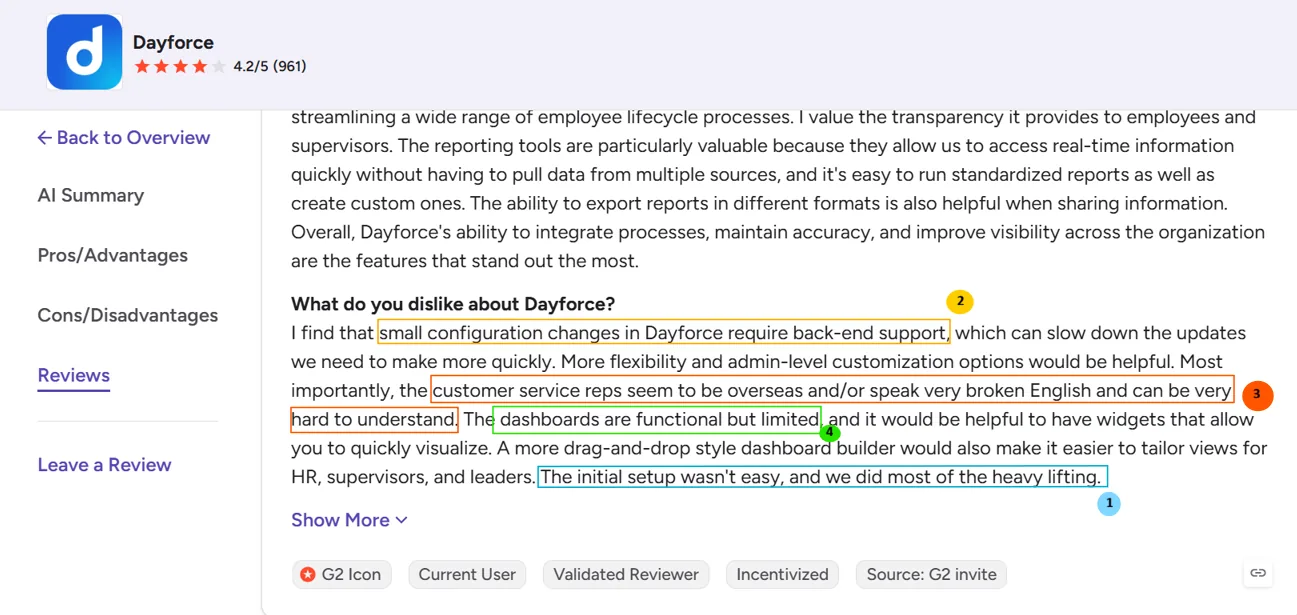
Dayforce offers the depth that larger organizations need. But that depth can also make the platform harder to manage. Reviews point to four recurring concerns beginning with lengthy implementation, limited self-service for configuration changes, difficult reporting, dashboard customization, and inconsistent customer support. Here’s a G2 review that sums it up.
1. Implementation can take significant time
Dayforce implementations can involve considerable configuration, testing, data migration, and internal coordination. For a growing company with a lean HR or HRIS team, the time and resources required to get the platform running can become a concern.
2. Some changes require specialist support
Day-to-day administration can become difficult when HR teams cannot make certain changes themselves. One G2 reviewer noted that even small configuration changes required back-end support. This can slow down otherwise simple updates and make teams more dependent on technical expertise.
3. Reporting and dashboards can be difficult to customize
Dayforce provides extensive reporting capabilities, but some users find it difficult to create the exact views they need. The same G2 reviewer specifically called for more flexible, drag-and-drop dashboards for HR teams, supervisors, and leaders. For growing businesses, this can add unnecessary work when teams need quick access to workforce data.
4. Support can become a pain point
Customer support is another recurring concern in Dayforce reviews. Users have reported slow responses and difficulty getting issues resolved, particularly when they need help with configuration or platform-related problems. For teams relying on their HCM for payroll and compliance, delays can have a direct operational impact.
Key Evaluation Factors We Used to Compare Dayforce Alternatives
We compared these eight platforms across the capabilities and considerations that matter most when choosing an HCM for a growing organization. The parameters are listed below:
- Company size and fit: The size and type of organization each platform is best suited for.
- Payroll and compliance: US payroll, tax filing, multi-state or global compliance, and industry-specific requirements.
- Workforce management: Time tracking, scheduling, and labor management capabilities.
- Automation and AI: AI capabilities, payroll automation, insights, and workflow automation.
- Employee self-service: Mobile access, leave, expenses, payroll information, and other employee-facing features.
- Pricing: Pricing models, available plans, and whether vendors publish their pricing.
- Mobile app: Mobile availability, functionality, and how closely the mobile experience matches the web platform.
- Implementation and deployment: Implementation requirements, setup complexity, and deployment model.
- Free trial: Whether buyers can test the platform before committing.
- User satisfaction: G2 ratings and recurring themes from customer reviews.
Top 8 Alternatives to Dayforce
Keka — Best for Companies of All Sizes That Want HR, Payroll, and PSA in One Platform
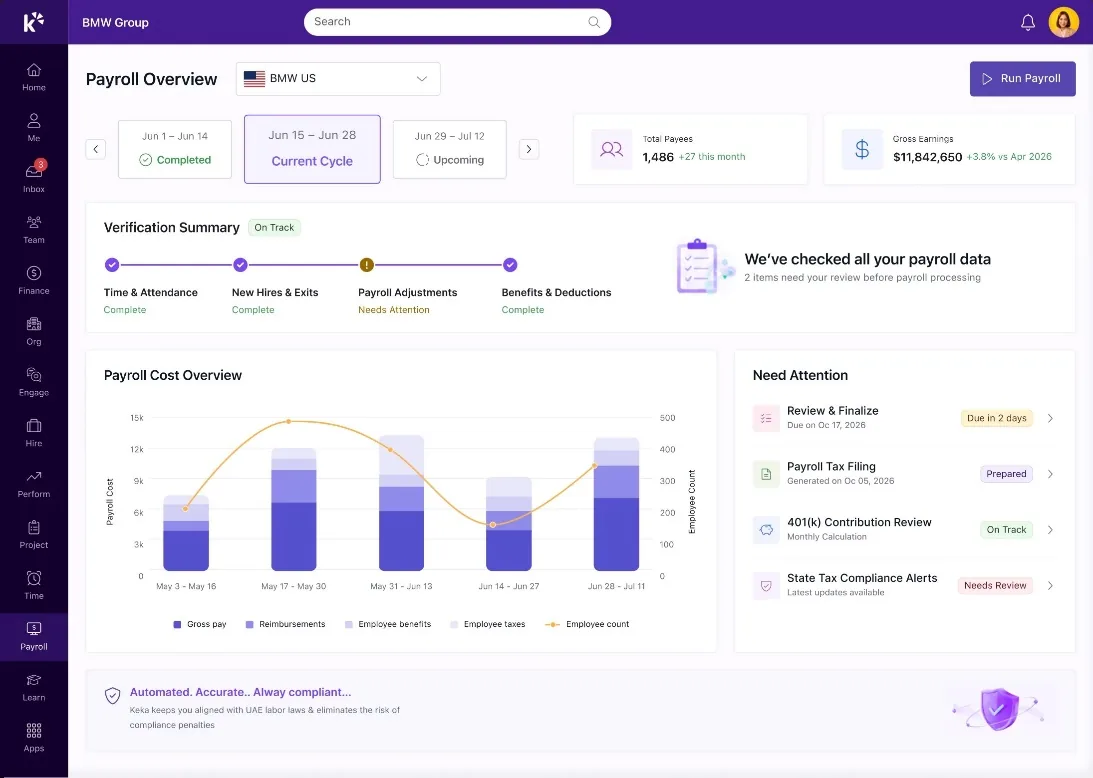
Keka is an all-in-one HR, payroll, and PSA software that helps businesses manage their people and projects in one place. Used by 12,500+ organizations across 120+ countries, Keka supports companies of all sizes. The platform covers HR, payroll, hiring, performance, time and attendance, employee experience, project management, resource management, timesheets, billing, and analytics, with a strong focus on making HR technology simple and easy to use.
It’s also one of the few alternatives here that offers a free trial, which most enterprise HCMs, including Dayforce, don’t.
On the payroll side, it handles compliance across all 50 states, along with federal and state tax filing, direct deposit, and flexible pay schedules.
Keka also layers AI and 100+ pre-built integrations across the core platform rather than treating them as a bolt-on and positions itself as a lower total cost of ownership than enterprise HCMs like Workday while providing similar platform depth and supporting complexity.
Key Features
- Employee self-service through a mobile app, leave requests, expense claims, and time tracking.
- A PSA module for project-based teams, connecting time tracking, billing, invoicing, and resourcing directly to payroll.
- Payroll compliance across all 50 states, with tax filing built into the platform.
- Employee self-service through a mobile app, leave requests, expense claims, and time tracking.
- Engagement tools like pulse surveys and peer recognition, feeding straight into HR dashboards.
- Performance management with OKRs, continuous feedback, and review cycles included.
| Pros | Cons |
|---|---|
| Intuitive user experience: Keka is designed to make HR and workforce processes easy to navigate for HR teams, managers, and employees. | Moving from multiple systems requires some transition: Organizations replacing several existing HR or operational tools may need to plan data migration and workflow changes as part of implementation. |
| Broad HR and PSA coverage: Keka brings HR, payroll, talent, employee experience, project management, resource management, timesheets, and billing into one platform. | Automation works best with well defined processes: Organizations may need to clearly define their existing approval structures and workflows before configuring them for automation. |
| Global workforce capabilities: Keka is used by organizations across 120+ countries, supporting companies with geographically distributed teams. | Global functionality can introduce more configuration: Companies operating across multiple countries may need to configure workflows around their different workforce and compliance requirements. |
| Comprehensive US payroll: Keka supports payroll, benefits, deductions, direct deposit, ACH, W2s, 1099s, and automated tax filings across all 50 states. |
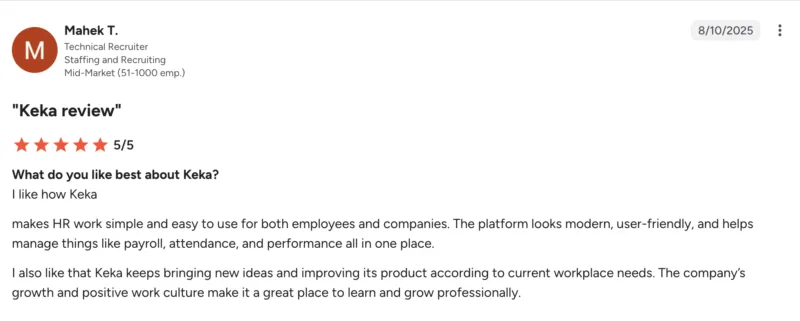
Customer reviews add some useful context to these pros and cons. One Keka reviewer praised its ease of use and all-in-one HR capabilities, while noting that limited third-party integrations and a smoother mobile experience would make the platform stronger.
Pricing Plan: Plans are customized based on company size, selected modules, and implementation requirements.
Thinking about switching HR software?
Most teams go live on Keka in weeks, not months, with no hidden fees along the way.
Workday HCM — Best for Companies That Want HR and Finance Running on One System
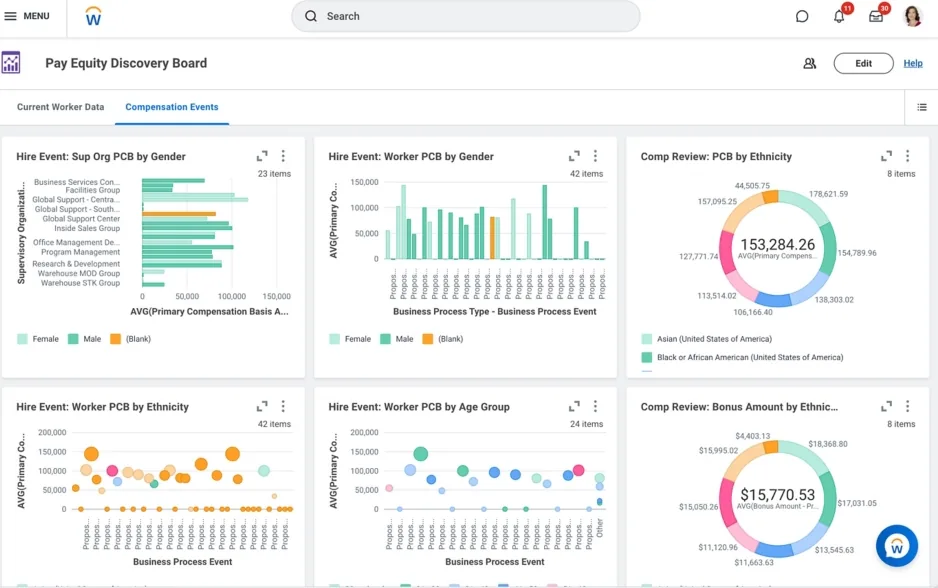
Workday is built for large enterprises with global operations, and for years that was the only company it served. In November 2025, Workday launched Workday GO, aimed at companies with 500 to 3,500 employees, promising go-live in as little as 60 days and fixed pricing. Workday says over 75% of its customers now have fewer than 3,500 employees, so this isn’t a small side project for them anymore.
Instead of treating payroll and workforce data as separate from the company’s financial picture, Workday runs both on the same data model. If your finance team and HR team need to see the same numbers, that’s the main reason to look at Workday over most other names on this list.
Key Features
- Full hire-to-retire HR: recruiting, onboarding, payroll, benefits, time, performance, and learning
- HR and financial data on one system, with workforce, financial, and operational data in a single hub
- Built-in AI across recruiting, talent mobility, and everyday HR tasks
- Skills-based talent tools that track what people can do, not just their job title
- Workday GO: a faster, fixed-price setup for midsize companies.
| Pros | Cons |
|---|---|
| Native HR-finance data integration, rare among competitors | Reviewers consistently describe the interface as complex, with too many clicks for simple tasks like booking leave |
| Strong compliance coverage for global, multi-country organizations | Implementation usually needs outside consultants |
| Only platform natively integrating HR, payroll, and financial management in a single data model | There’s a real learning curve. Several reviewers say new users need proper training before they’re comfortable in it |
| Standout AI-driven workforce planning and succession analytics | Some users report the platform feels slow or unresponsive at times |
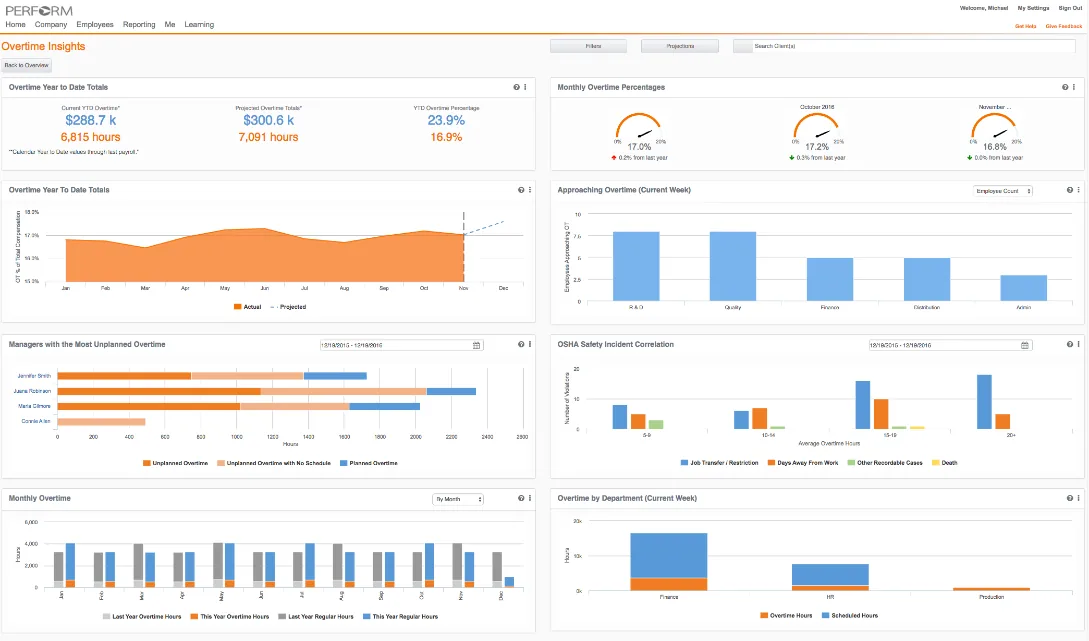
A closer look at user feedback reveals some of the trade-offs that come with Workday’s depth. One enterprise reviewer appreciated its ongoing improvements and flexibility, but described the implementation as particularly challenging when internal processes and requirements weren’t clearly documented.
Source: G2
Pricing Plan: Contact vendor for pricing.
UKG Pro — Best for Large Organizations With Complex Shift Scheduling
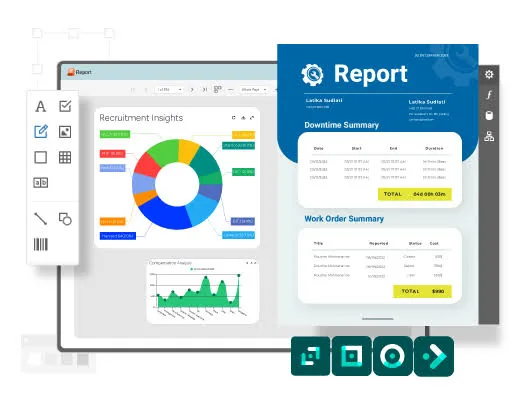
UKG Pro is built for large organizations, and UKG says so directly on their own site. It’s meant to handle global workforces spread across multiple locations, shifts, job classifications, and compliance rules all at once. If your business runs on shift work, think healthcare, manufacturing, retail, or hospitality, this is one of the few platforms on this list built around that specific kind of complexity from the ground up.
It doesn’t offer anything Dayforce doesn’t. No free trial, no published pricing, no faster setup. What it does have is a long history in workforce management, going back to its Kronos roots, which is part of why scheduling and time tracking feel more built-out here than on most other platforms in this list.
Key Features
- Enterprise payroll built for complex, multi-location organizations
- Advanced scheduling and labor management, carried over from UKG’s Kronos background
- Talent management: performance, succession planning, and learning
- Support for salaried, hourly, hybrid, and gig workers in one system
- AI-driven insights across HR, payroll, and workforce data
- Built to handle complex organizational structures without custom development
Pros and Cons
| Pros | Cons |
|---|---|
| Deeper scheduling and labor management than most competitors | The interface takes getting used to. Reviewers say it takes multiple clicks to do simple things |
| Handles salaried, hourly, and gig workers in one system | Implementation can be challenging requiring external subject matter experts |
| Strong track record with large, shift-based organizations | Some users report slow support response times and bugs |
| AI built into the core platform, not an add-on | Inconsistent time-off approvals, sometimes letting unapproved requests reach payroll |
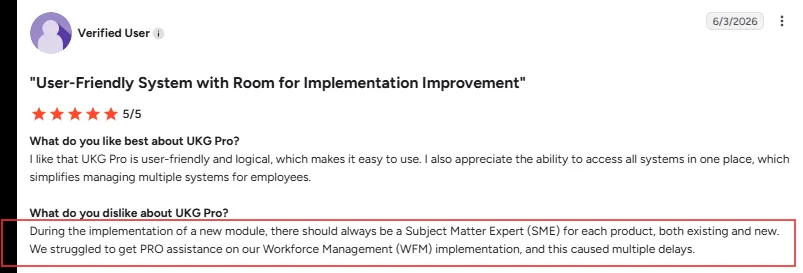
Here’s real user feedback on what it’s like to work with UKG Pro. One reviewer praised its intuitive interface and centralized access but pointed to implementation delays when the right subject-matter expertise wasn’t available for new modules.
Source: G2
Pricing Plan: Contact vendor for pricing
ADP Workforce Now — Best for Payroll Reliability and Benefits Network
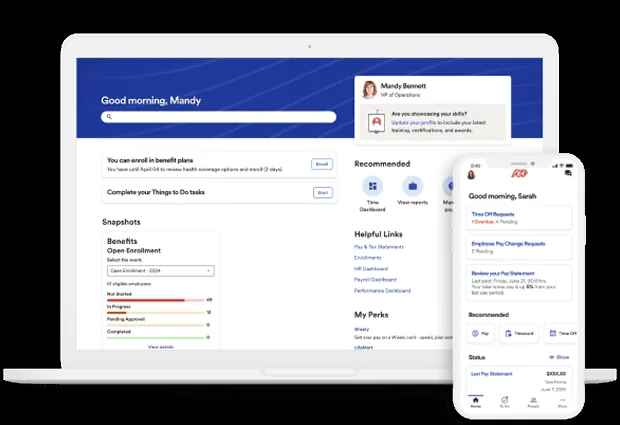
ADP Workforce Now is ADP’s all-in-one HR and payroll platform, and it’s been around long enough that most mid-sized US companies have at least considered it at some point. It’s built as a package system: you pick a base tier, then add benefits administration or time and attendance on top as your needs grow.
ADP runs payroll and benefits for a massive number of US employers, which means deep compliance coverage and a huge base of benchmarking data most competitors can’t match.
Key Features
- Real-time payroll processing with built-in error detection before you submit
- AI-driven insights (ADP Assist) that flag things like turnover trends and payroll anomalies
- Benefits administration with flexible plan setup and mobile enrolment
- Time and attendance as an add-on module
- Compensation benchmarking against ADP’s own employer data pool
- Standard compliance reporting for things like COBRA, EEO, and FLSA
- Global payroll support for companies with workers outside the US
Pros and Cons
| Pros | Cons |
|---|---|
| Full-featured mobile apps | Customer support is the most common complaint. |
| Deep compliance coverage, backed by ADP’s scale and experience | Reports and workflows are often described as rigid. |
| Large employer network enables strong compensation benchmarking | Custom reporting is a pain point, often need support’s help |
| Wide range of add-on modules if you need more than core payroll | Pricing isn’t published and is hard to pin down before signing |
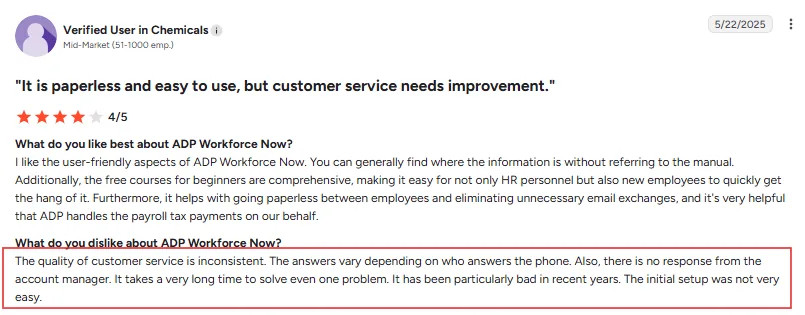
The user reviews also highlight where ADP Workforce Now can fall short beyond its core functionality. One mid-market reviewer found the platform easy to navigate and appreciated its paperless workflows, but described customer support as inconsistent and slow when resolving issues.
Source: G2
Pricing Plan: Contact vendor for pricing
Paylocity — Best for Companies That Want Payroll and Culture in One Place
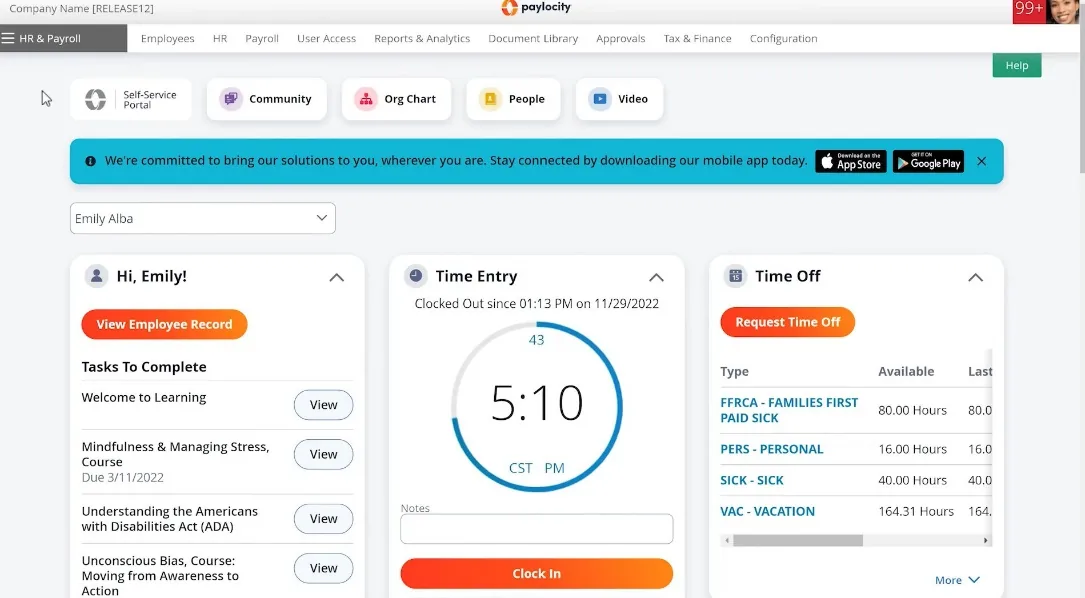
Paylocity is a cloud-based HCM platform that brings payroll, HR, benefits, and workforce management together in one system. It’s realistically a fit for companies somewhere between 50 and 500 employees, though smaller tech-forward teams and some larger companies use it too.
What makes Paylocity stand out from most on this list is Community, a built-in social feature where employees can chat, recognize each other, and stay connected, alongside the usual payroll and HR tools. Most competitors treat engagement as a bolt-on. Paylocity treats it as part of the core product.
Key Features
- Payroll automation with tax filing, garnishment handling, and compliance support
- Employee self-service portal for pay stubs, time off, benefits, and personal info
- Community, a social hub for recognition, updates, and employee connection
- AI assistant for finding documents, policy answers, and HR guidance quickly
- Time and labor tracking, including scheduling
- Recruiting and onboarding tools built into the same system
- Reporting and workforce analytics dashboards
Pros and Cons
| Pros | Cons |
|---|---|
| Reliable payroll and time tracking | Support quality is inconsistent, some get fast help, others wait for days |
| Highly rated mobile app, especially for non-desk employees | Account managers change often, so you may not keep the same point of contact |
| Flexible reporting with templates and custom options | Building the exact report you need can still take some trial and error |
| Unifies payroll, HR, and engagement, reducing duplicate work | Full setup takes real time, especially with most modules in use |
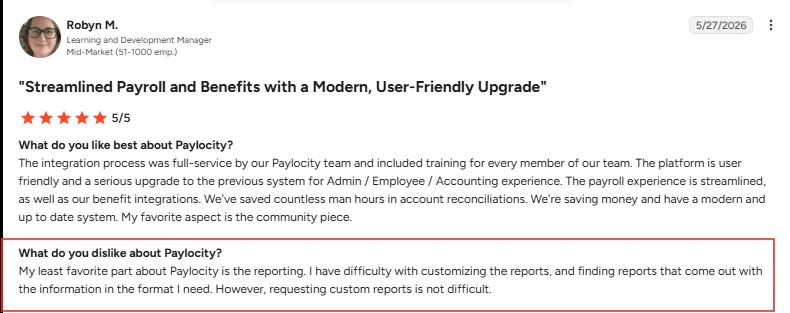
Paylocity’s customer feedback also highlights some of the trade-offs behind its reporting experience. One mid-market reviewer praised the smooth implementation, integrations, and user-friendly interface, but found it difficult to customize reports or get information in the exact format needed.
Source: G2
Pricing Plan: Contact vendor for pricing
Paycom — Best for Getting Employees to Do Their Own Payroll
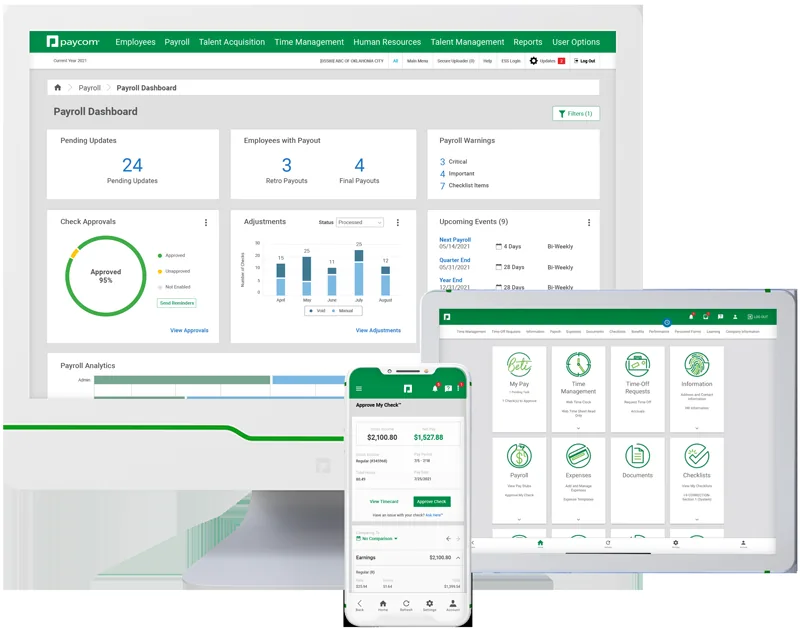
Paycom’s biggest standout feature is Beti. Instead of HR chasing down payroll errors after the fact, employees review their own paycheck before it’s submitted, catching mistakes themselves. Paycom built this because employees already handle their own timecards, PTO, and expenses.
Everything runs on one single database, not separate modules bolted together. That matters because it’s a real difference from platforms like Dayforce, where the value comes from continuous calculation across a huge, complex system. Paycom’s pitch is closer to “put the work on the person it actually belongs to,” which shows up in how much less manual review HR ends up doing.
Key Features
- Beti: employees review and approve their own paycheck before it’s submitted
- IWant: an AI search tool that answers HR and payroll questions instantly, instead of digging through menus
- Single database covering payroll, time, HR, and talent, so data doesn’t need re-entry between systems
- Automatic payroll tax calculation, withholding, and filing at the local, state, and federal level
- Garnishment administration handled inside the platform
- Flexible pay options, including direct deposit, pay cards, and daily pay
Pros and Cons
| Pros | Cons |
|---|---|
| Employee self-service reduces HR’s payroll error chasing | Support quality depends on which specialist you get, and reviewers report frequent rep turnover |
| Single database cuts down on duplicate data entry | New features can take time to learn when they’re first introduced |
| Handles payroll, HR, and time tracking in one system | Compliance module restricted to US, Mexico, Canada, UK and Ireland only. |
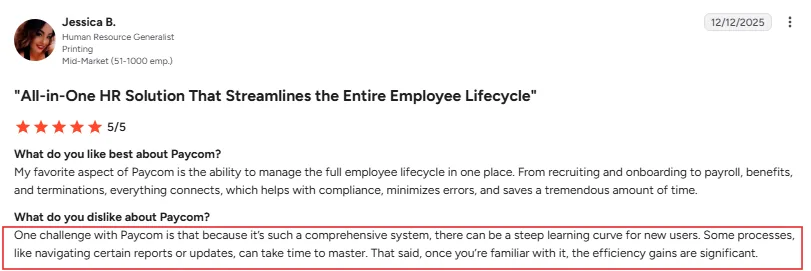
Paycom’s user feedback points to a similar trade-off between its breadth of features and ease of use. One reviewer liked having the full employee lifecycle managed in one place, but noted that the platform can take time for new users to learn, particularly when navigating reports and updates.
Source: G2
Pricing Plan: Contact vendor for pricing
Paycor — Best for Healthcare, Manufacturing, and Restaurant Businesses
Paycor is built around industries, not just company size. They specialize in healthcare, manufacturing, and restaurants, and they serve organizations from 1 to 1,000 employees. So if you’re a bigger operation, this one may not scale with you the way Dayforce does.
What makes Paycor different is how deep the industry fit goes. For restaurants, it connects to point-of-sale and scheduling systems. For manufacturing, it plugs into ERP and time-tracking tools. For healthcare, it handles scheduling, credentialing, and electronic health record integrations. That’s not generic HR software with an industry label slapped on. It’s built around how those specific businesses operate.
Paycor was acquired by Paychex in April 2025. However, Paycor customers remain on the Paycor platform, with Paychex saying existing products and service relationships will continue.
Key Features
- Payroll, HR, time tracking, and talent management in one platform
- Industry-specific integrations for healthcare, manufacturing, and restaurants
- Managed Payroll, where Paycor’s own team runs payroll end to end for you
- Earned wage access, so employees can get paid before payday
- 140+ APIs and a marketplace with hundreds of pre-built connectors
- Compliance tools for tax filing and multi-state payroll
- Used by more than 30,000 businesses and 2.3 million users across all 50 states
| Pros | Cons |
|---|---|
| Deep industry-specific integrations for healthcare, manufacturing, and restaurants | Customer support is the most consistent complaint – slow responses, high rep turnover |
| Managed Payroll is a genuine option if you want to hand payroll off entirely | Reporting is a weak spot; no custom field combinations, scoring lower than competitors on G2 |
| Automatic data flow between modules, so information entered once doesn’t need re-entering | The mobile app is missing features that the web version has |
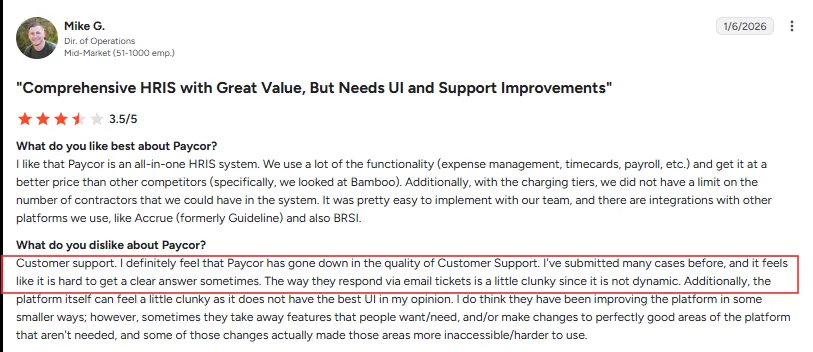
Customer feedback also highlights some frustrations alongside Paycor’s broad functionality. One mid-market reviewer praised its all-in-one capabilities and easy implementation, but said customer support had become less responsive and that some UI and product changes made certain tasks harder to navigate.
Source: G2
Pricing Plan: Contact vendor for pricing
isolved — Best for Companies That Want a Local Partner Handling Their HCM
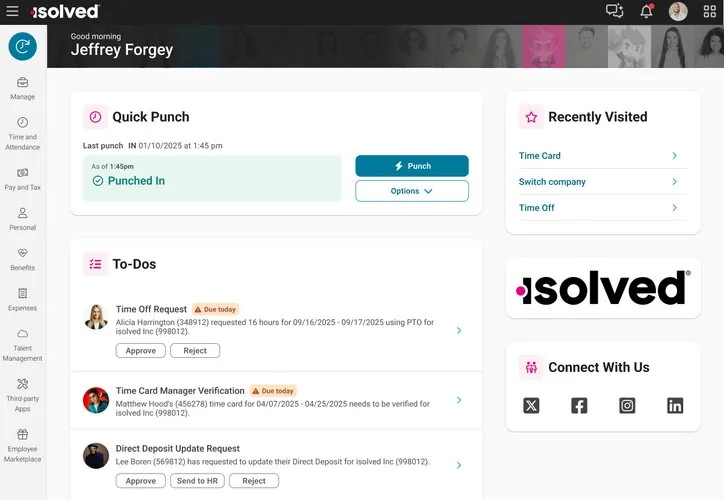
isolved works differently than most names on this list. Instead of selling directly, most of the time you get isolved through a local partner, like a payroll provider, benefits broker, or HR consultant, who implements and supports the platform for you. isolved’s own site is built around this network, with separate paths for Preferred Partners, Network Partners, and Referral Partners.
The platform itself, called isolved People Cloud, brings HR, payroll, and benefits together in one place, with AI and support services layered in. isolved says it’s used by more than 200,000 employers, delivered either directly or through that partner network. That’s the real differentiator. You’re not only buying software, you’re getting a local relationship on top of it, which is a genuinely different setup from Dayforce’s more direct enterprise sales model.
Key Features
- HR, payroll, and benefits in one connected platform
- Applicant tracking, assessments, and automated onboarding
- Time and attendance tracking, with scheduling and labor cost controls
- Industry-specific tools for sectors like manufacturing, healthcare, and field-based work
- “The Guardian,” isolved’s AI agent built specifically for payroll
- Delivered directly or through a network of local implementation partners
| Pros | Cons |
|---|---|
| You get a local partner network with dedicated account support, not a generic ticket queue | Customer support response times are long and answers are inconsistent |
| HR, payroll, and benefits genuinely sit in one system instead of separate tools | Several reviewers mention payroll or billing errors |
| Industry-specific setups exist for fields like manufacturing and healthcare | Implementation is described as lengthy by some users, with a tough initial setup |
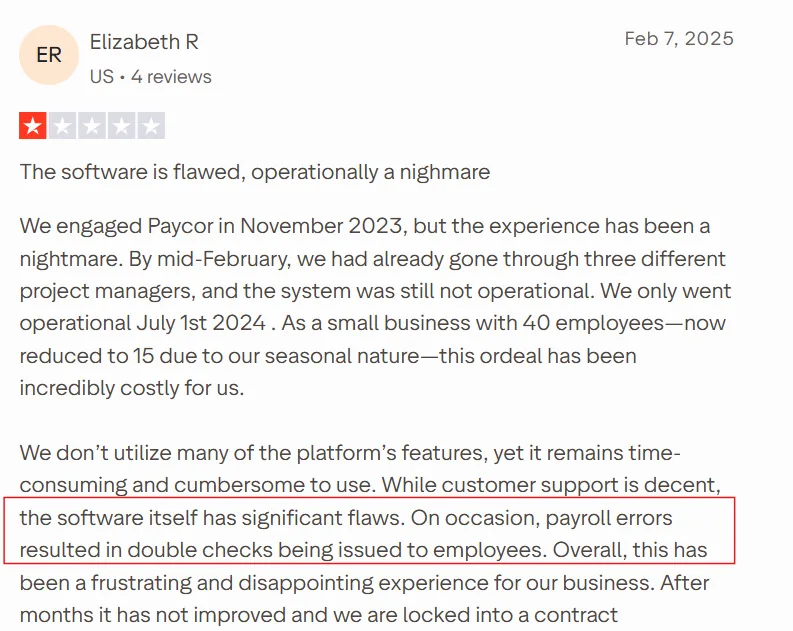
Some Paycor reviews point to concerns around implementation and day-to-day reliability. One small-business reviewer described a lengthy implementation process and said the platform remained cumbersome to use, with occasional payroll errors adding to the frustration.
Source: trustpilot
Pricing Plan: Contact vendor for pricing
How to choose the right Dayforce alternative
The right software depends on your headcount and how complex your workforce operations are. Use the table below to narrow down the options based on your company size and priorities.
| Headcount | Pick | Why |
|---|---|---|
| 0-20 employees | Gusto ot Paycor | Full platform capability without enterprise implementation complexity or cost; Keka if PSA matters, Paycor if industry-specific compliance is priority |
| 20-1500 employees | Keka, Paylocity, or Paycom | All offer market-appropriate implementations; consider Keka for consolidation, Paylocity for engagement focus, Paycom for self-service obsession |
| 1,500–3,000 employees | Keka UKG Pro or ADP Workforce HCM | Keka is proven at this scale with appropriate support resources; consider UKG for scheduling complexity, ADP Workforce HCM for benefits network |
| 3,000+ employees | Keka, Workday HCM or stay with Dayforce | Choose Keka if platform depth, UX, and ease of adoption is a priority; Workday if finance integration is priority, Dayforce if continuous calculation is valued |
Migrating off Dayforce
If you’ve decided to move away from Dayforce, the transition needs to be planned carefully. You’ll need to clean and map your existing data, rebuild workflows, and run payroll in parallel before switching over. Here’s what the migration typically involves and who handles each part.
| Phase | Timeline | You own | Vendor owns |
|---|---|---|---|
| Data audit and mapping | Weeks 1-3 | Identifying all data sources, cleaning historical records, mapping Dayforce fields to new platform | Providing field mapping templates, data validation rules, import specifications |
| Parallel configuration | Weeks 4-8 | Defining business rules, approval workflows, reporting requirements, testing configurations | Platform setup, configuration implementation, integration connections |
| Data migration and validation | Weeks 9-11 | Validating migrated data accuracy, employee PII verification, historical payroll reconciliation | Running migration scripts, providing validation reports, fixing migration errors |
| Parallel payroll runs | Weeks 12-14 | Running payroll in both systems, reconciling differences, sign-off on accuracy | Support during parallel runs, variance investigation, cutover preparation |
| Go-live and stabilization | Weeks 15-16 | Final cutover decision, employee communication, first production run approval | Go-live support, issue escalation, hypercare period monitoring |
See how Keka can simplify HR and payroll for your growing workforce.


